
In the vast digital landscape of entertainment, word games hold a timeless appeal, offering a unique blend of intellectual challenge and casual fun. Among the myriad options available, “Microsoft Ultimate Word Games” emerges as a notable contender, specifically designed to tax the minds of players while providing hours of engaging gameplay. Available freely for Windows, this collection bundles three classic word game formats – Crosswords, Jumble, and Wordament – into a single, cohesive package, promising educational benefits for younger players and a robust mental workout for adults. This in-depth review will delve into the intricacies of each game, explore the overarching Adventure Mode, assess its value proposition for families, and consider its position within the broader ecosystem of digital word puzzles, all while addressing common user experiences.
At its core, “Microsoft Ultimate Word Games” is more than just a pastime; it’s a digital gymnasium for the brain. Developed by Rare Ltd, a studio known for its diverse portfolio, the application aims to cater to a wide audience, from casual players seeking a few minutes of distraction to dedicated puzzle enthusiasts hungry for a consistent challenge. Its free availability significantly lowers the barrier to entry, making cognitive exercise accessible to virtually anyone with a compatible Windows device.
Unpacking the Trio: Crosswords, Jumble, and Wordament
The genius of “Microsoft Ultimate Word Games” lies in its curated selection of three distinct, yet equally engaging, word game formats. Each game offers a different type of mental challenge, ensuring variety and catering to diverse preferences for puzzle-solving. This tripartite structure provides a comprehensive word game experience that few standalone applications can match.
Crosswords: The Classic Challenge
Crosswords represent the quintessential word puzzle, a cultural phenomenon that has graced newspaper pages and digital screens for over a century. In “Microsoft Ultimate Word Games,” the Crosswords component faithfully recreates this time-honored game of logic and vocabulary. Players are presented with a grid, typically white and black squares, and a series of cryptic clues, divided into “across” and “down” categories. The objective is to deduce the correct words based on these clues and fill them into the corresponding squares.
The appeal of crosswords is multi-faceted. Firstly, it’s a test of vocabulary, requiring players to recall words that fit specific definitions or synonyms. Secondly, it’s a profound exercise in logical deduction and lateral thinking. Clues often employ wordplay, double meanings, or obscure references, demanding that players think outside the box to interpret their true intent. The satisfaction derived from deciphering a particularly tricky clue or seeing the grid slowly fill out is immense. For many, crosswords are a daily ritual, a mental warm-up, or a relaxing way to unwind. “Microsoft Ultimate Word Games” provides this experience in a convenient digital format, allowing players to tackle puzzles at their own pace, free from the constraints of pen and paper, and often with helpful features like error checking or hint systems (though the extent of these in the free version may vary). The inclusion of crosswords immediately positions the package as a serious contender for puzzle aficionados.
Jumble: Rearranging Letters for Victory
Jumble offers a different kind of word challenge, focusing on letter manipulation and quick recognition. Instead of clues, players are presented with a set of virtual tiles, each bearing a letter, which are scrambled versions of a word or phrase. The primary goal is to unscramble these letters to spell out correct words on a board. This format often involves multiple jumbled words, with specific letters from each solution then used to form a final, longer puzzle solution.
This game type is an excellent test of pattern recognition and anagram-solving skills. Players must rapidly scan the jumbled letters, mentally rearrange them, and identify potential word formations. It’s a game that benefits from a keen eye and a flexible mind, encouraging players to experiment with different letter combinations. The interface in “Microsoft Ultimate Word Games” typically allows for easy dragging and dropping of tiles, or perhaps clicking to swap positions, making the process intuitive. Jumble is often seen as a lighter, more fast-paced alternative to crosswords, perfect for those who enjoy the thrill of discovery rather than abstract deduction. Its inclusion ensures that the package appeals to those who prefer a more direct, hands-on approach to word puzzle-solving. It’s particularly good for improving spelling and recognizing common word structures, making it subtly educational.
Wordament: A Race Against the Clock
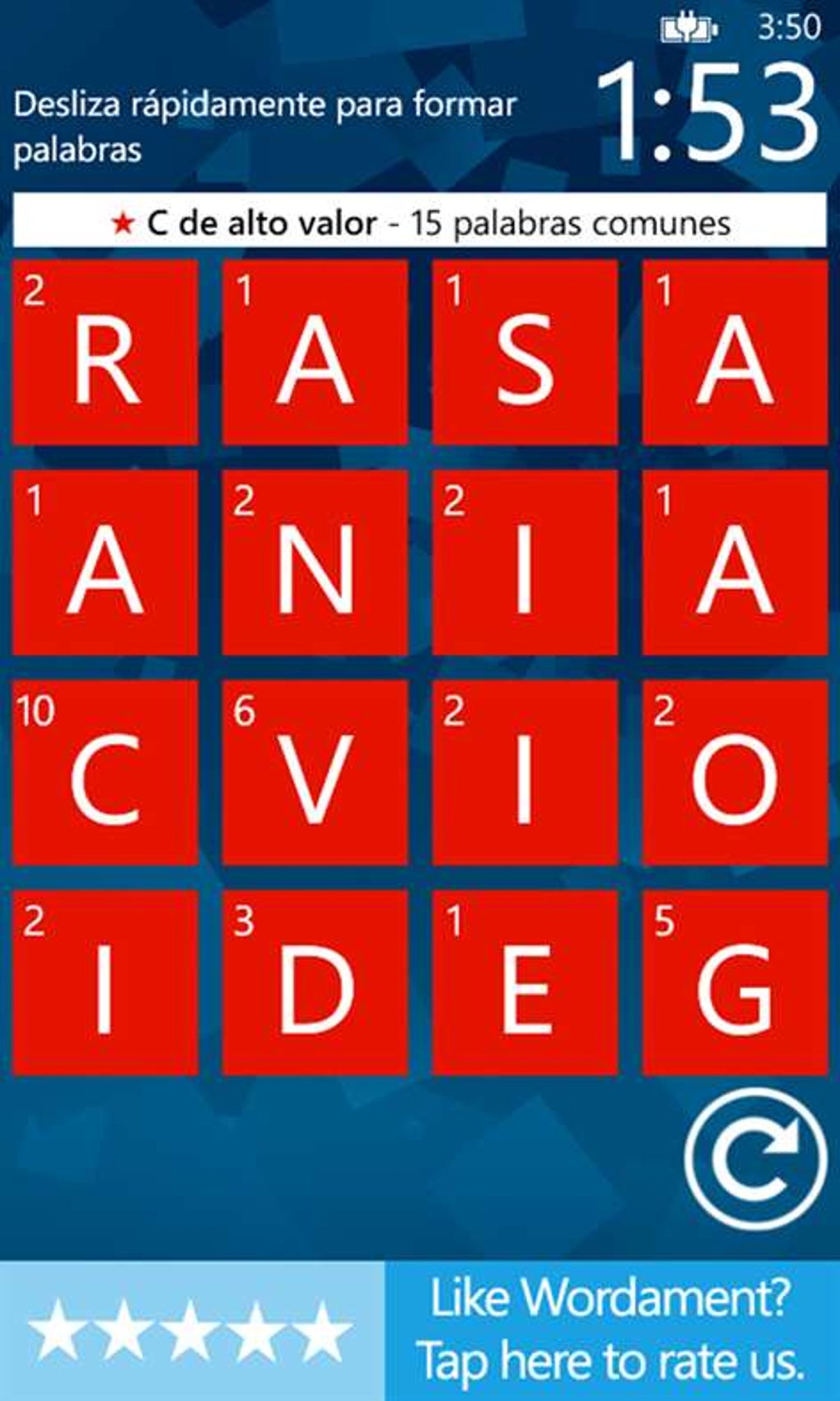
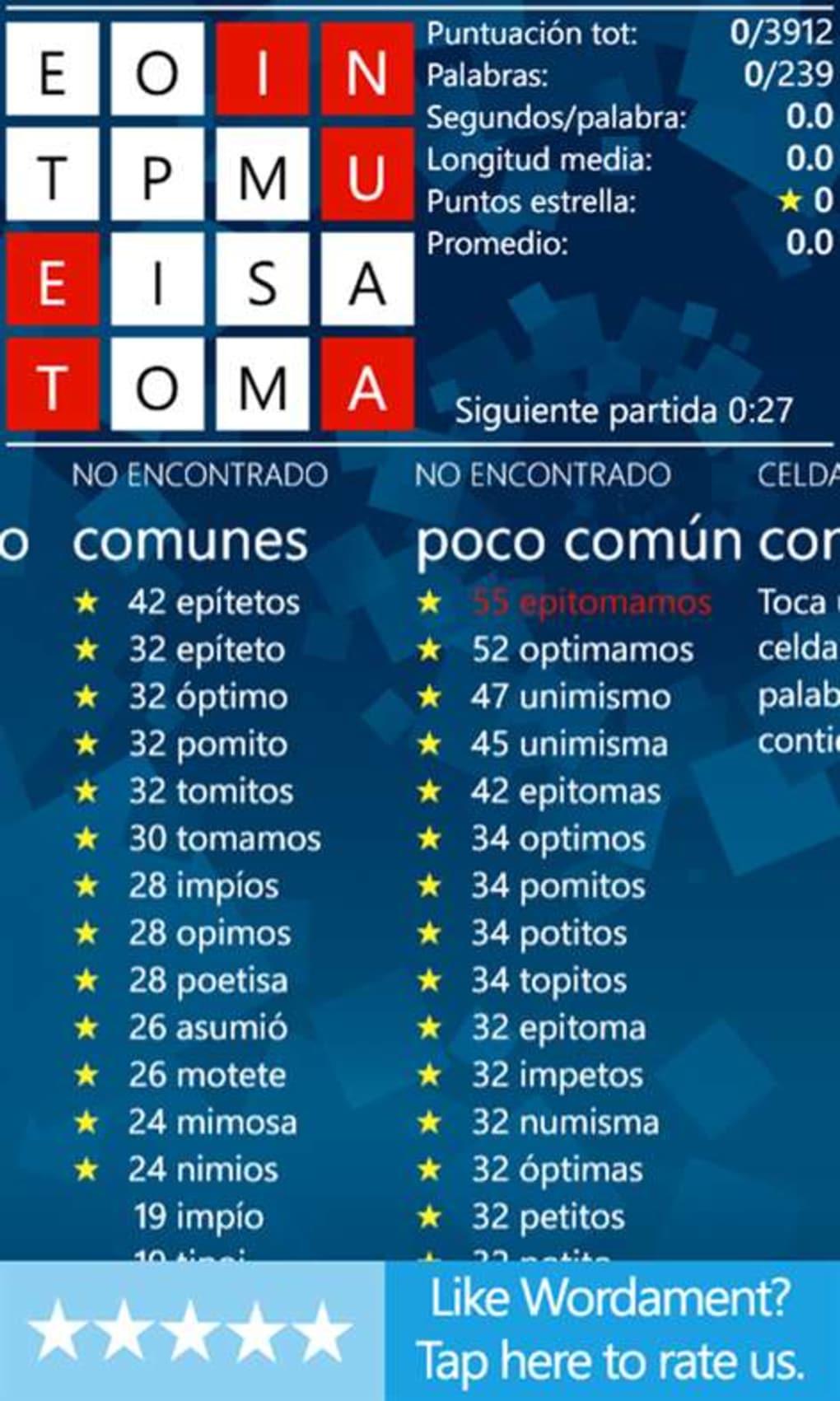
Wordament introduces an element of speed and competitive intensity to the word game compilation. This game confronts the player with a four-by-four grid of letters, resembling a modern take on classic Boggle. The central objective is to form as many words as possible from adjacent letters within this grid, and crucially, in as short a time as possible. Words can be formed by connecting letters horizontally, vertically, or diagonally, but each letter tile can typically only be used once per word.
Wordament is a high-octane word search. It demands rapid visual scanning, quick vocabulary recall, and strategic thinking under pressure. Players must not only identify potential words but also efficiently trace them on the grid to register their score. The timed nature of the game adds an exhilarating layer of challenge, encouraging players to constantly improve their speed and expand their word-finding abilities. It often features leaderboards, allowing players to compare their scores with others globally, fostering a sense of competition and encouraging repeat play. “Microsoft Ultimate Word Games” leverages this inherent competitiveness, making Wordament a standout feature for those who thrive under pressure and enjoy testing their lexical agility against the clock. This game excels at enhancing word recognition speed and strategic pathfinding through a dense letter matrix.
Beyond the Basics: Adventure Mode and Family Appeal
While the individual games offer substantial entertainment, “Microsoft Ultimate Word Games” elevates the experience through its innovative Adventure Mode and its deliberate design as a family-friendly title. These elements transform a mere collection of games into a more structured and rewarding journey.
The Thrill of Adventure Mode
The Adventure Mode in “Microsoft Ultimate Word Games” serves as an overarching narrative or progression system that ties the three distinct games together. Instead of simply picking a game and playing it repeatedly, players are tasked with progressing through a series of set challenges. These challenges are intelligently structured, often requiring players to demonstrate proficiency across all three game types. For instance, an Adventure Mode level might demand solving a certain number of crosswords, achieving a specific score in Wordament, or unscrambling a given set of jumbles within a time limit.
This mode adds a significant layer of engagement and replayability. It provides a clear sense of progression, motivating players to hone their skills in each individual game. The challenges are designed to gradually increase in difficulty, ensuring that players are continuously tested and encouraged to improve. For those who might find open-ended gameplay daunting, Adventure Mode offers a guided path, turning the act of playing into a quest with tangible milestones. It injects purpose into each puzzle, making every solved crossword or found word contribute to a larger goal. The thrill of overcoming a particularly tough challenge in Adventure Mode provides a deeper sense of accomplishment than merely completing a standalone puzzle.
Educational Entertainment for All Ages
Perhaps one of the most compelling aspects of “Microsoft Ultimate Word Games” is its dual appeal to both adults and children. The reference content explicitly highlights this, stating that “For adults, it is a test of mind power; for kids, educational fun.” This philosophy underpins the entire design of the package, making it an ideal choice for family entertainment.
For adults, the games offer a rigorous workout for the brain. Crosswords demand logical reasoning and a vast vocabulary. Jumble improves pattern recognition and quick word association. Wordament hones speed, spatial reasoning, and an expansive lexicon. Regular engagement with such puzzles has been linked to various cognitive benefits, including improved memory, enhanced problem-solving skills, and even potentially delaying cognitive decline. It’s an accessible way for adults to keep their minds sharp and engaged, providing a stimulating alternative to passive entertainment.
For children, the educational value is immense and often disguised within the fun. Playing these games can significantly boost vocabulary development, as they encounter and learn new words. Spelling skills are naturally reinforced through Jumble and Wordament. Crosswords introduce children to logical deduction and critical thinking from an early age, helping them understand how context and clues lead to solutions. The interactive nature of digital games can make learning feel less like a chore and more like an enjoyable discovery process. Furthermore, playing these games as a family can foster cooperative learning and healthy competition, creating shared experiences that are both entertaining and enriching. Parents can guide their children through clues, explain word meanings, and celebrate successes together, turning screen time into quality family time.
Performance, Accessibility, and User Experience
Understanding how “Microsoft Ultimate Word Games” performs in the hands of its users is crucial. While the concept and gameplay are strong, the practical aspects of its deployment, system compatibility, and user feedback paint a more complete picture of its standing in the market.
System Requirements and Availability
“Microsoft Ultimate Word Games” is specifically designed for the Windows platform, indicating its primary target audience. The provided information notes its availability for Windows 8, and given its general nature, it’s highly likely to be compatible with Windows 10 and potentially Windows 11 as well, though the latter might depend on updates. The game version mentioned is 1.0, with the latest update dating back to March 7, 2019. This suggests that while the game has been stable for some time, active development or frequent content updates might not be its current focus.
As a free-to-play application, its accessibility is one of its greatest strengths. Users can download and install it without any upfront cost, removing financial barriers to entry. This model often relies on in-app purchases or advertisements to generate revenue. The developer, Rare Ltd, is a well-established name in the gaming industry, lending a degree of credibility and polish to the title, even if it’s a casual offering. The download statistics, such as 13.6K downloads and 77 last month’s downloads (as of the reference data), suggest a consistent, albeit not viral, level of interest. This indicates a steady base of players who appreciate its free and engaging content. The availability across multiple languages (e.g., Spanish, German, Japanese, Korean, etc., as shown in the “Also available in other platforms” section that lists language options) further enhances its global reach, allowing a diverse player base to enjoy the game in their native tongue.
Navigating Common User Feedback
User reviews are often a candid reflection of an application’s real-world performance and user satisfaction. The provided snippets offer valuable insights into common experiences with “Microsoft Ultimate Word Games.”
One significant issue highlighted by a user, Elaine Robinson, in May 2021, concerns loading problems: “There seems to be a problem with the Word Games. I used to to play it every day, but about three weeks ago it stopped loading, just showed the start screen with ‘mugw’ endlessly moving around.” This feedback points to a critical technical issue where the game fails to initialize or load properly. Such problems can be incredibly frustrating for regular players, leading to uninstallation and reinstallation attempts, often to no avail. Loading issues can stem from various sources, including software conflicts, corrupted installation files, system updates that break compatibility, or server-side problems if the game requires an online connection for content. For a game that hasn’t seen a recent update (since March 2019), such compatibility issues with newer Windows versions or system configurations are a plausible concern. Addressing these stability issues is paramount for maintaining a positive user experience.
Another user, lily1217, in June 2020, pointed out a different, albeit common, complaint for free-to-play games: “I like playing these games but there are too many ads and commercials.” This feedback is almost standard for free applications that rely on advertising for monetization. While ads are a necessary evil for developers to sustain free offerings, an excessive or intrusive ad frequency can severely detract from the user experience. Interruptions during gameplay, long ad breaks, or poorly placed advertisements can frustrate players and make an otherwise enjoyable game feel cumbersome. Developers often walk a fine line between generating revenue and maintaining player engagement. For “Microsoft Ultimate Word Games,” the perceived abundance of ads might be a point of friction for some users, indicating that the game’s monetization strategy, while understandable, might impact player enjoyment. This highlights the ongoing challenge for free game developers to balance revenue generation with a clean, uninterrupted play experience.
These user comments, while specific, provide a general understanding of the challenges that free-to-play games, especially those not actively updated, can face. Technical glitches and ad fatigue are critical areas where user satisfaction can significantly drop, regardless of how engaging the core gameplay is.
The Enduring Charm of Digital Word Puzzles
The popularity of word games, both in their traditional and digital forms, has remained steadfast through generations. “Microsoft Ultimate Word Games” taps into this enduring appeal, offering a modern rendition of classic puzzles that continue to captivate minds.
Why Word Games Remain Popular
The reasons behind the sustained popularity of word games are deeply rooted in human psychology and cognitive needs. Firstly, they offer a tangible sense of accomplishment. The act of solving a puzzle, whether it’s finding a hidden word or cracking a cryptic clue, provides a satisfying dopamine hit. This immediate gratification encourages continued play and builds self-confidence.
Secondly, word games are fantastic cognitive exercises. They stimulate various parts of the brain, improving vocabulary, enhancing memory recall, refining logical reasoning, and sharpening problem-solving skills. In an age where mental agility is highly valued, these games provide an accessible and enjoyable way to keep the brain active and healthy. They can even serve as a gentle form of mental relaxation, allowing the mind to focus on a single, engaging task, diverting attention from daily stressors.
Thirdly, word games are inherently accessible. The rules are often simple to grasp, and they don’t require specialized knowledge beyond basic literacy. This broad accessibility means they can be enjoyed by people of all ages, educational backgrounds, and skill levels. The format also allows for varying levels of difficulty, ensuring that both novices and seasoned wordsmiths can find a challenge appropriate for them.
Finally, there’s a social aspect to word games. While “Microsoft Ultimate Word Games” might be primarily a single-player experience, the competitive elements of Wordament and the shared cultural understanding of crosswords foster a sense of community. Discussions about challenging puzzles or comparing scores are common, adding another layer to their appeal. This combination of intellectual stimulation, personal achievement, accessibility, and a subtle social dimension ensures that word games will likely never go out of style.
Exploring Alternatives and Similar Titles
The digital marketplace is brimming with word games, offering players a vast array of choices beyond “Microsoft Ultimate Word Games.” These alternatives often specialize in one particular type of word puzzle or introduce unique twists. Understanding these alternatives helps contextualize where Microsoft’s offering stands.
For instance, “Wordament for Windows 10” is a standalone version of one of the games within the Microsoft collection, emphasizing its competitive, multiplayer aspect. Its focus is solely on the fast-paced grid puzzle, often appealing to players who want that specific experience without the other two game types.
Then there are titles like “Wordscapes - Word Cookies” and “Word Connect Game 2020,” which often combine elements of word search and crossword puzzles, challenging players to form words from a given set of letters, typically presented in a circular or scattered format. These games are popular for their relaxing interfaces and incremental challenge, appealing to a broad casual audience.
“Brain Workshop” and “gBrainy” represent a broader category of brain-training games, where word puzzles are just one component alongside memory, logic, and arithmetic challenges. These aim for a holistic cognitive workout.
Classic computer word games like “Bookworm” (a trial version is available) offer a more arcade-like word-building experience, where players connect letters to form words and clear a board, often against a ticking clock or accumulating tiles. “Text Twist 2” similarly focuses on unscrambling letters to find all possible words from a given set.
Other alternatives include “Wordfeud for Windows 10,” which is essentially a digital Scrabble clone, allowing players to compete against friends or strangers in a turn-based, strategic word-building game on a board. “Simple Word Search” provides a direct, no-frills experience for those who enjoy the classic word search puzzle.
Comparing “Microsoft Ultimate Word Games” to these alternatives, its primary strength lies in its versatility. By offering three distinct classic formats (Crosswords, Jumble, Wordament) and an Adventure Mode, it provides a well-rounded experience within a single, free package. While a dedicated player of one specific game might find more depth in a specialized app (like a dedicated crossword app or a standalone Wordament), Microsoft’s offering serves as an excellent all-in-one solution for those who enjoy variety and wish to engage different facets of their linguistic and logical abilities. The choice often comes down to personal preference: a broad, free collection versus a highly specialized, potentially paid, or more heavily monetized individual game. For a comprehensive, free, and family-friendly word game experience, “Microsoft Ultimate Word Games” remains a strong contender, despite the user feedback regarding ads and occasional technical hiccups.
In conclusion, “Microsoft Ultimate Word Games” offers a compelling package for word puzzle enthusiasts. Its collection of Crosswords, Jumble, and Wordament, complemented by an engaging Adventure Mode, provides a rich and varied experience. While challenges related to advertisements and occasional technical issues have been noted by users, its free availability and proven cognitive benefits for all ages make it a valuable addition to any Windows user’s application library. It successfully delivers brain-bending fun, making it a go-to choice for those seeking to sharpen their minds and enjoy the timeless pleasure of wordplay. Users can find this and many other engaging titles on PhanMemFree, exploring a world of digital entertainment and productivity tools.
File Information
- License: “Free”
- Version: “1.0”
- Latest update: “March 7, 2019”
- Platform: “Windows”
- OS: “Windows 8”
- Downloads: “13.7K”


