
Microsoft Visual Studio for Windows stands as an unparalleled integrated development environment (IDE) that has become a cornerstone for developers worldwide. It’s far more than just a code editor; it’s a robust, feature-rich platform designed to empower individuals and teams to create virtually any type of software imaginable. From intricate web applications and sophisticated cloud solutions to compelling mobile experiences and immersive video games, Visual Studio provides the necessary tools and functionalities to transform abstract ideas into tangible, high-quality products.
The platform’s core strength lies in its remarkable versatility and broad support for an extensive array of programming languages. Whether you’re a seasoned professional adept in C#, a data scientist working with Python, a web developer crafting dynamic interfaces with JavaScript, or a system programmer optimizing performance with C++, Visual Studio offers a native, optimized experience. This linguistic flexibility makes it an ideal choice for developers across all skill levels and project types, fostering an inclusive environment where diverse programming paradigms can coexist and thrive.
Beyond its multi-language support, Visual Studio is celebrated for its integrated development lifecycle capabilities. It’s built to streamline every phase of software creation, from initial conceptualization and coding to debugging, testing, deployment, and ongoing maintenance. Features like its advanced debugging tools act as an indispensable magnifying glass, allowing developers to meticulously inspect code execution, pinpoint errors with surgical precision, and understand complex system behaviors. Similarly, IntelliSense, an intelligent code completion and suggestion system, operates as a smart assistant, significantly accelerating development by providing context-aware suggestions and reducing syntax errors.
Collaboration is another domain where Visual Studio truly shines. Recognizing the increasingly distributed nature of modern development teams, it incorporates features like Live Share, enabling real-time cooperative coding sessions regardless of geographical location. This transforms pair programming and code reviews into seamless, interactive experiences. Furthermore, its deep integration with version control systems, particularly Git, and support for continuous integration/continuous deployment (CI/CD) pipelines, firmly plants Visual Studio within the DevOps landscape, ensuring efficient, automated, and collaborative software delivery.
In essence, Microsoft Visual Studio is not just a tool; it’s a comprehensive ecosystem that continually evolves to meet the demands of contemporary software development. It aggregates a vast collection of interconnected utilities, frameworks, and services, all housed within a unified, intuitive interface. This holistic approach ensures that developers have everything they need at their fingertips, enabling them to focus on innovation and problem-solving rather than grappling with disparate tools. Its commitment to productivity, collaboration, and versatility solidifies its position as the ultimate development hub for building the next generation of applications.
Unpacking the Power: Core Features and Integrations
Microsoft Visual Studio differentiates itself through an extensive suite of core features and a rich tapestry of integrations that extend its capabilities far beyond a basic code editor. It’s designed to be a complete solution, providing developers with everything they need from inception to deployment.
Precision Debugging and Diagnostics
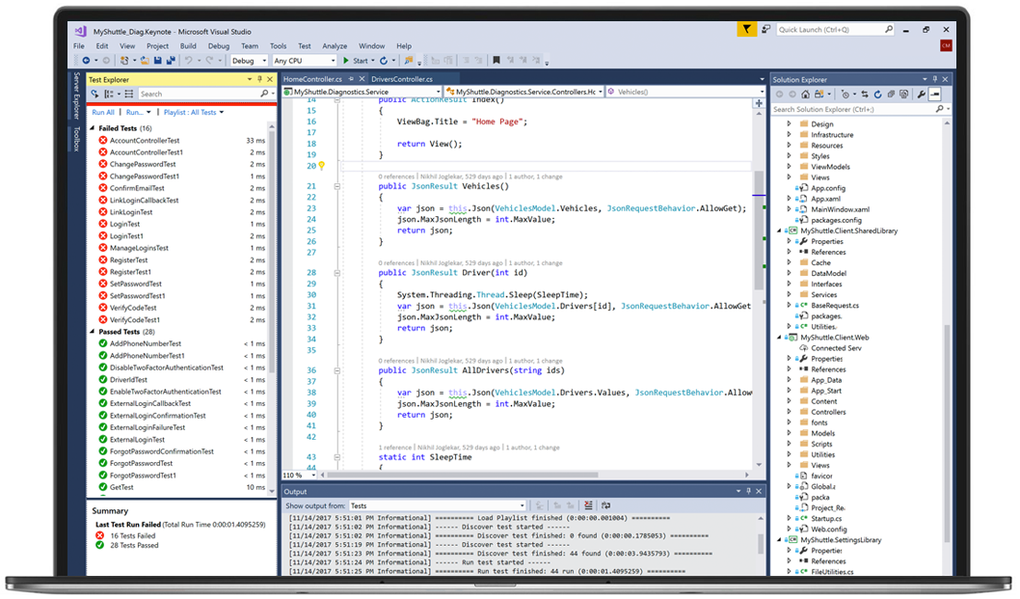
One of Visual Studio’s most acclaimed strengths lies in its sophisticated debugging tools. This isn’t just about stopping code; it’s about understanding its behavior at a granular level. Developers can set breakpoints to pause execution at specific lines, then step through code line-by-line, step over function calls, or step into them to examine internal logic. The Watch window allows real-time monitoring of variable values, while the Call Stack provides a clear trace of function calls leading to the current execution point. The Immediate window enables developers to execute code snippets or evaluate expressions on the fly, offering dynamic insight.
Beyond basic debugging, Visual Studio offers advanced diagnostic tools for performance and resource analysis. This includes memory profiling to identify leaks or inefficient memory usage, CPU usage analysis to pinpoint performance bottlenecks, and event tracing to understand system interactions. These tools are indispensable for optimizing applications, ensuring they run efficiently and reliably, akin to having an X-ray vision into the heart of your application.
IntelliSense and Productivity Enhancements
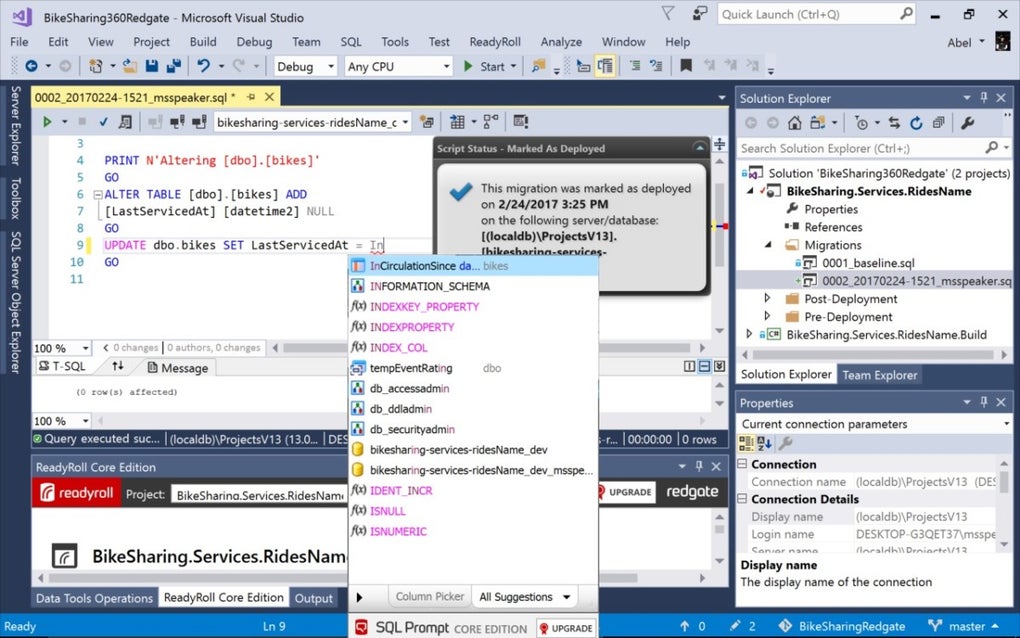
IntelliSense is a groundbreaking feature that fundamentally reshapes the coding experience. It acts as an intelligent autocomplete and suggestion system, providing context-aware code completion as you type, suggesting valid members, variables, and keywords. It offers parameter information for methods, guiding developers through complex API calls, and quick info tooltips that display documentation for symbols. This significantly reduces typos, speeds up coding, and minimizes the need to remember exact syntax or API details.
Complementing IntelliSense are a host of other productivity features. Code snippets allow developers to insert predefined blocks of code with a few keystrokes, accelerating boilerplate creation. Refactoring tools simplify complex code changes, such as renaming variables, extracting methods, or reordering parameters, while maintaining code integrity. Code analysis features identify potential errors, stylistic inconsistencies, or security vulnerabilities before runtime. Navigation tools like Go To Definition, Peek Definition, and Find All References enable developers to quickly understand and traverse their codebase, making large projects more manageable.
Real-Time Collaboration with Live Share
In an increasingly global and remote work environment, collaboration is paramount. Visual Studio’s Live Share feature is a game-changer, enabling real-time, bidirectional code collaboration. Developers can share their entire workspace or specific files with teammates, who can then view, edit, and debug code simultaneously. This isn’t just screen sharing; it’s a shared development session where each participant retains their own editor settings, keybindings, and even debugging capabilities. This is particularly beneficial for pair programming, remote team coordination, and instant code reviews, fostering a highly interactive and productive collective development process.
Robust Version Control and DevOps Integration
Visual Studio provides seamless integration with Git, the industry-standard distributed version control system. Developers can manage their repositories directly within the IDE, performing common Git operations such as cloning, committing, pushing, pulling, branching, and merging with an intuitive graphical interface. This tight integration simplifies tracking changes, reverting to previous versions, and coordinating work within teams.
Furthermore, Visual Studio plays a crucial role in DevOps workflows. It integrates effortlessly with platforms like Azure DevOps (formerly Visual Studio Team Services) and other CI/CD tools, allowing developers to set up continuous integration (automatically building and testing code upon commit) and continuous deployment (automatically deploying validated code). This automation accelerates the delivery pipeline, ensuring faster releases and higher quality software.
Expansive Ecosystem and Marketplace Extensions
Visual Studio is designed to be highly extensible. While its built-in tools are formidable, the Visual Studio Marketplace provides an ecosystem of thousands of extensions that can customize and augment the IDE’s functionality. Want support for a niche programming language, integration with a specific cloud service, specialized linters, or unique themes? Chances are, there’s an extension for it. This extensibility allows developers to tailor their environment precisely to their project requirements and personal preferences, ensuring that Visual Studio remains adaptable to evolving technological landscapes.
Deep Cloud Integration with Azure
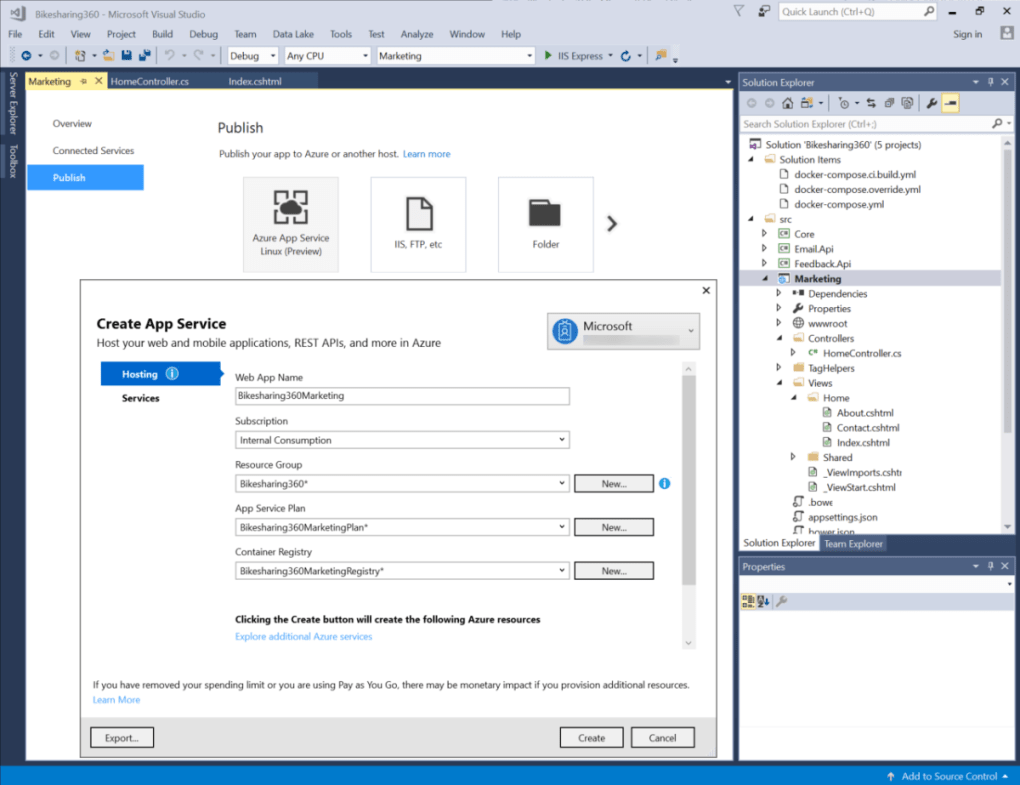
Microsoft’s cloud platform, Azure, enjoys exceptionally robust integration with Visual Studio. With just a few clicks, developers can deploy applications directly to Azure App Services, virtual machines, or serverless functions. They can monitor application performance using Azure Application Insights, scale resources up or down as needed, and manage various Azure services—including databases, storage, and networking—all from within the IDE. This tight coupling significantly simplifies cloud-native development, reducing the overhead of managing infrastructure and allowing developers to focus on application logic.
Streamlined Containerization with Docker
For modern architectures, particularly microservices, containerization with Docker has become essential. Visual Studio offers first-class support for Docker, simplifying the creation, debugging, and deployment of containerized applications. Developers can containerize their projects, debug code running inside a Docker container, and deploy these containers to various environments, including Azure Kubernetes Service (AKS). This ensures consistent development environments, simplifies deployment, and facilitates scalable, resilient application architectures.
Cross-Platform Mobile Development with Xamarin
The Xamarin framework, deeply integrated into Visual Studio, empowers developers to build native mobile applications for both iOS and Android from a single C# codebase. This allows for significant code reuse across platforms, accelerating development and reducing maintenance overhead, while still delivering high-performance, native user experiences. Visual Studio provides the necessary tools for designing UIs, debugging mobile apps, and managing platform-specific features, making cross-platform mobile development efficient and accessible.
Powerful Tools for Game Development
For developers immersed in the gaming world, Visual Studio offers fantastic tools and integrations for popular game engines like Unity and Unreal Engine. Specific debuggers, project templates, and profiling tools are tailored to the unique demands of game development. This integration streamlines the process of writing, debugging, and optimizing game logic, helping developers build immersive 2D and 3D experiences with greater efficiency.
Data-Driven Application Development
Visual Studio provides comprehensive support for building data-driven applications through seamless integrations with various databases, including SQL Server and others via extensions. Developers can design database schemas, write and execute SQL queries, manage database connections, and even perform data migrations directly from within the IDE. This consolidated environment simplifies the development of applications that rely heavily on data storage and retrieval, ensuring a smooth workflow between application code and database interactions.
AI-Driven Code Assistance with IntelliCode
Leveraging the power of artificial intelligence, Visual Studio includes IntelliCode, a feature that takes code suggestions to the next level. Unlike traditional IntelliSense, IntelliCode learns from thousands of high-quality, open-source projects on GitHub to provide personalized, context-aware code suggestions that are statistically more likely to be correct and aligned with best practices. This AI-driven assistance helps developers write cleaner, more idiomatic code faster, and learn from a vast repository of collective programming wisdom.
For those new to the complexities of software development, Visual Studio is supported by a wealth of instructional resources. Numerous videos, tutorials, and books are specifically designed to guide novice users through its interface and functionalities, ensuring that even beginners can effectively leverage its powerful capabilities to create and edit applications.
System Compatibility and Performance Considerations
While Microsoft Visual Studio is an incredibly powerful and versatile IDE, understanding its system compatibility and recommended hardware specifications is key to maximizing its performance and ensuring a smooth development experience.
Operating System Requirements
Visual Studio is primarily designed for the Windows ecosystem. The software officially supports Windows 10 or later, ensuring compatibility with modern operating system features and security updates. While older versions of Windows might technically install Visual Studio, running it on the latest supported OS is highly recommended. Newer Windows versions often come with performance improvements, enhanced security, and better integration with .NET and other Microsoft technologies that Visual Studio heavily relies upon. Developers should also ensure their Windows installation is up-to-date with the latest service packs and security patches to maintain optimal stability and compatibility.
Hardware Recommendations for Optimal Performance
Although Visual Studio can run on relatively modest hardware, getting the most out of its extensive features, especially with larger projects or multiple extensions, necessitates a reasonably modern and robust machine.
- RAM (Random Access Memory): While a minimum of 4 GB of RAM might allow Visual Studio to launch, it’s far from ideal for serious development. 16 GB of RAM is strongly recommended as a baseline for smoother performance, especially when dealing with large solutions, multiple projects, complex debugging sessions, or running additional tools. For enterprise-level development, game development, or projects involving virtual machines and containers, 32 GB of RAM or more is highly advisable to prevent slowdowns and enhance multitasking capabilities.
- Storage: Solid State Drive (SSD): This is perhaps one of the most critical components for performance. An SSD is unequivocally recommended for installing Visual Studio and storing your project files. The significant increase in read/write speeds compared to traditional hard disk drives (HDDs) drastically reduces load times for the IDE, project compilation times, and debugging startup times. A minimum of 50 GB of free space is typically required for the initial installation, but planning for much more (e.g., 200 GB+) is wise to accommodate project files, build artifacts, and future updates.
- Processor (CPU): A quad-core processor is generally considered the minimum for a responsive experience. Many Visual Studio processes, such as compilation, code analysis, IntelliSense operations, and debugging, can leverage multiple cores. For even better performance, especially with heavy workloads like building large C++ projects or running multiple concurrent tasks, a modern multi-core processor (e.g., Intel i7/i9 or AMD Ryzen 7/9) will ensure that all background processes run efficiently without causing the IDE to lag or become unresponsive.
- Graphics Card: While not as critical as RAM or an SSD, a dedicated graphics card with at least 1 GB of VRAM can improve the responsiveness of the UI, especially for complex graphical elements or when working with game development tools. However, for most general-purpose development, an integrated GPU is usually sufficient.
- Display: A high-resolution display (e.g., 1080p or 4K) is beneficial for managing multiple code windows, tool panes, and debugging interfaces, improving overall developer productivity.
Framework and Broader Compatibility
Visual Studio’s strength also lies in its broad support for various development frameworks and platforms:
- .NET Framework and .NET Core (now .NET 5+): Visual Studio comprehensively supports both the legacy .NET Framework and the modern, cross-platform .NET Core (which has evolved into just .NET 5, 6, 7, etc.). This dual support allows developers to work on existing, older applications built on .NET Framework while simultaneously developing new, high-performance, cross-platform applications with the latest .NET versions.
- Web Technologies: For web developers, Visual Studio is highly versatile. It seamlessly integrates with popular front-end frameworks and libraries such as Node.js, Angular, and React. This means developers can utilize Visual Studio as their primary IDE for building robust web applications, benefiting from its powerful editing, debugging, and project management capabilities across the entire web stack.
- Multi-Platform Targeting: One of the most compelling aspects of Visual Studio is its ability to target multiple operating systems from a single codebase. Through frameworks like Xamarin (for mobile) and .NET (for desktop and server), developers can build applications that run natively on Windows, Linux, iOS, and Android. This significantly reduces development time and effort, as a single team can produce applications for a wide range of devices and environments without having to learn entirely different toolsets or programming languages for each platform.
In summary, while Visual Studio is flexible, investing in hardware that meets or exceeds the recommended specifications will unlock its full potential, leading to a much more productive, efficient, and frustration-free development experience.
Seamless Integration within the Microsoft 365 Ecosystem
Microsoft Visual Studio is not just a standalone development tool; it’s an integral component of the broader Microsoft ecosystem, particularly for users already entrenched in Microsoft 365. Its thoughtful integration with various Microsoft 365 applications and services enhances collaboration, streamlines project management, and simplifies licensing, making it an even more compelling choice for individuals and organizations.
Enhanced Workflow with Microsoft Teams and SharePoint
For teams utilizing Microsoft 365 for daily operations, Visual Studio fits perfectly into existing workflows. It integrates effortlessly with collaboration tools like Microsoft Teams and document management platforms like SharePoint, fostering a more connected development environment.
- Microsoft Teams Integration: Developers can leverage Teams for real-time communication directly related to their code. For instance, discussions about code changes, feature implementations, or debugging issues can happen within dedicated Teams channels. Teams can also be used to share code snippets, attach screenshots of UI elements under development, or even initiate audio/video calls for pair programming or code reviews. Some extensions even allow notifications about pull requests or CI/CD build statuses to be pushed directly into Teams, ensuring that all team members are kept in the loop without ever needing to leave the IDE completely. This minimizes context switching and keeps project discussions centralized and accessible.
- SharePoint for Project Resources: SharePoint integration allows teams to manage project documentation, design specifications, requirements, and other non-code assets alongside their development efforts. Developers can link to or store project plans, UI mockups, architectural diagrams, and user stories in SharePoint, making it easy for the development team and other stakeholders to access crucial information. This ensures that all project-related resources are consistently managed and readily available, providing a single source of truth for the entire project lifecycle.
Flexible Licensing and Subscription Benefits
Visual Studio’s availability as part of Microsoft’s subscription plans adds significant value, especially for businesses and professionals.
- Visual Studio Professional and Enterprise Subscriptions: These tiered subscriptions often come bundled with a range of benefits beyond just the IDE itself. Developers frequently gain access to Azure credits, allowing them to experiment with cloud deployments, test cloud services, and build prototypes without incurring immediate additional costs. These subscriptions also often include access to development software, training resources, and technical support, providing a comprehensive package for professional developers.
- MSDN Benefits (now part of Visual Studio Subscriptions): Historically, Visual Studio subscriptions were tied to MSDN (Microsoft Developer Network) benefits, which provided access to almost all Microsoft software for development and testing purposes. This means developers can get licenses for Windows operating systems, SQL Server, SharePoint, and other Microsoft products to set up their development and testing environments, significantly reducing software acquisition costs.
Free Access for Education Professionals and Students
Microsoft demonstrates a strong commitment to fostering future talent through its Education program. Under this initiative, students and educators often receive free access to Visual Studio, including its Professional and Enterprise editions, along with Azure credits and other developer tools. This is an invaluable resource for academic institutions, allowing students to learn and practice with industry-standard tools without financial barriers. It also helps in cultivating a skilled workforce familiar with Microsoft technologies, which benefits the wider tech industry. Interested individuals in an educational setting are encouraged to check the Microsoft Education website for eligibility and specific offerings.
Contextualizing Microsoft 365 Plans (Brief Overview)
While Visual Studio is a distinct product, its integration with Microsoft 365 underscores the overarching strategy of providing a unified productivity and development platform. Briefly, the various Microsoft 365 plans cater to different user needs:
- Microsoft 365 Personal: Geared towards individuals, offering premium Office apps (Word, Excel, PowerPoint, Outlook), 1 TB of OneDrive storage, and usage across multiple devices.
- Microsoft 365 Family: Designed for households, supporting up to six users, each with their own 1 TB of OneDrive storage and access to premium apps.
- Microsoft 365 Business: Tailored for small to medium-sized businesses, providing enhanced collaboration tools (Teams, SharePoint), advanced security features, and device management.
- Microsoft 365 Enterprise: Aimed at large organizations, encompassing comprehensive security, analytics, and compliance tools alongside scalable collaboration solutions.
This ecosystem approach ensures that Visual Studio users, especially within organizations already leveraging Microsoft 365, benefit from a harmonious blend of development tools and productivity services, resulting in a more efficient, collaborative, and cost-effective software development lifecycle.
In conclusion, Microsoft Visual Studio stands as a testament to Microsoft’s enduring commitment to the developer community. Its powerful debugging tools, AI-driven coding assistance, expansive ecosystem of extensions, and deep integration with cloud services like Azure and collaboration platforms like Microsoft 365, solidify its position as a leading IDE. Whether you’re building a simple web app or a complex enterprise solution, Visual Studio provides the comprehensive, flexible, and intelligent environment necessary to bring your most ambitious ideas to life. The continuous evolution of its features, coupled with strong community support and a clear path for collaboration, ensures that Visual Studio remains an indispensable tool for modern software development.
File Information
- License: “Trial version”
- Latest update: “December 5, 2024”
- Platform: “Windows”
- OS: “Windows 8”
- Language: “English”
- Downloads: “404.1K”
- Size: “1.65 MB”


