
MidiStation is a free, open-source application designed primarily for testing the capabilities of the DirectMidi library. While its primary function is geared towards developers and testers, its user-friendly interface and functionality make it a valuable tool for musicians, educators, and anyone interested in exploring the world of MIDI. This comprehensive review will delve into the features, functionality, and overall user experience of MidiStation, examining its strengths and weaknesses to provide a clear understanding of its capabilities.
MidiStation’s Core Functionality: A MIDI Testing Ground
At its heart, MidiStation serves as a versatile MIDI testing tool. It offers robust control over MIDI input and output ports, allowing users to seamlessly interact with a wide range of MIDI devices, from standard MIDI keyboards and synthesizers to software-based MIDI instruments and applications. This capability is particularly valuable for developers working with the DirectMidi library, enabling thorough testing and debugging of MIDI-related functionalities within their projects. The program’s open-source nature further enhances its appeal to developers, allowing for community contributions, modifications, and expansion of its feature set.
The ability to activate all system MIDI ports, including the MIDI mapper and software synthesizers, provides an unparalleled level of flexibility. This allows users to route MIDI data between various devices and applications efficiently, facilitating complex musical setups and workflows. The ease with which users can connect and disconnect MIDI devices makes the configuration process straightforward, even for those less familiar with MIDI technology. This simple yet powerful functionality sets MidiStation apart from more complex and often less user-friendly MIDI applications.
User Experience and Interface: Intuitive Design for Ease of Use
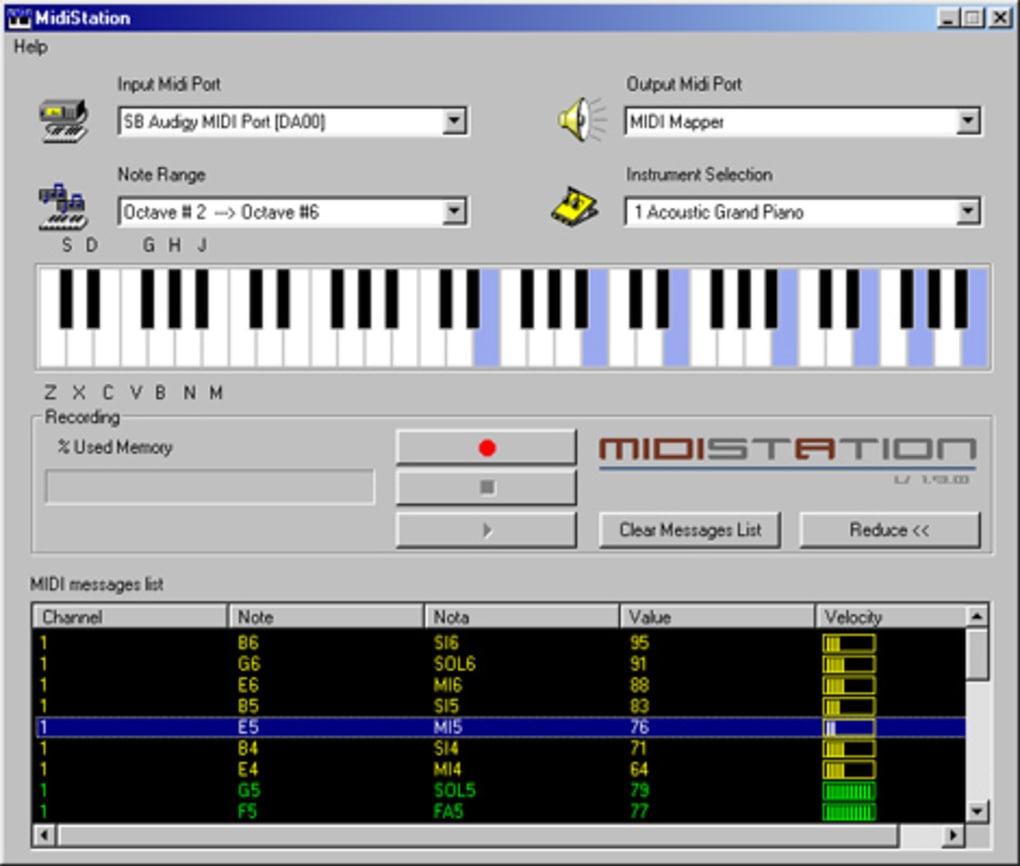
One of MidiStation’s notable strengths lies in its intuitive and user-friendly interface. The program is designed for ease of use, making it accessible to both novice and experienced users alike. The simple yet effective layout avoids unnecessary complexity, allowing users to quickly grasp the program’s functionality without needing extensive technical knowledge. This simplicity is particularly crucial for educators who might use MidiStation as a teaching tool, ensuring that students can readily utilize its features without getting bogged down in technical details.
The program’s intuitive playback using a computer mouse eliminates the need for specialized hardware. This accessibility is especially beneficial for individuals who may not have access to a MIDI keyboard or other specialized controllers. The ability to play music using the computer keyboard provides an additional layer of accessibility, broadening the range of users who can benefit from MidiStation’s functionality. This feature transforms the application into a basic virtual keyboard, allowing for quick experimentation and musical exploration.
Applications: Beyond Testing – Musical Exploration and Education
While originally designed as a testing tool, MidiStation’s user-friendly nature and versatile MIDI capabilities extend its applicability beyond its initial scope. Musicians, particularly those who are beginners or those who require a simple MIDI interface for teaching or educational purposes, can readily benefit from MidiStation’s ease of use and functionality. Its capability to act as a MIDI keyboard monitor allows for real-time visual feedback on MIDI data, which is invaluable for understanding and troubleshooting MIDI communication.
For educators, MidiStation provides a valuable tool for demonstrating core MIDI concepts. Its simple interface helps to avoid confusion, allowing students to focus on understanding MIDI principles rather than navigating a complex software environment. The ability to interact with various MIDI devices also facilitates hands-on learning experiences, bridging the gap between theoretical concepts and practical application. The open-source nature also allows educators to modify and extend the software to tailor it to specific learning objectives.
Technical Specifications and System Requirements: A Lightweight Solution
MidiStation is a lightweight application with modest system requirements, ensuring compatibility with a broad range of Windows systems. Its small file size contributes to quick installation and minimal impact on system resources, making it ideal for use on systems with limited processing power or memory. The program’s support for multiple languages further extends its accessibility, catering to a wider user base across various geographical regions.
The program’s relatively low system requirements are a significant advantage. This makes MidiStation accessible to a wider range of users, including those with older or less powerful computers. The minimal system footprint also reduces the risk of system instability or performance degradation, ensuring a smooth and reliable user experience, even during intensive MIDI processing.
Community and Support: Open-Source Collaboration and User Feedback
The open-source nature of MidiStation fosters a collaborative environment, encouraging community contributions and support. This collaborative approach ensures continuous improvement and expansion of the software’s functionality. The open-source community can provide valuable feedback, identify bugs, and contribute new features, ensuring the software remains relevant and adaptable to the evolving needs of its users.
The open-source aspect contributes to a strong community of users and developers. This creates a platform for knowledge sharing, troubleshooting, and collaborative improvement of the software. This collaborative environment contributes to a vibrant and supportive community, offering valuable assistance and resources to users who may encounter technical difficulties or require assistance with specific features.
Conclusion: MidiStation – A Versatile and Accessible MIDI Tool
MidiStation, while designed as a testing tool for the DirectMidi library, has evolved into a versatile and accessible MIDI application with broad appeal. Its intuitive interface, lightweight design, and powerful MIDI capabilities make it a valuable asset for musicians, educators, and developers alike. The program’s open-source nature further enhances its value, fostering a collaborative community that ensures continuous development and support. MidiStation’s ease of use and broad compatibility make it a compelling choice for anyone seeking a simple yet effective MIDI solution. Its strength lies in its ability to seamlessly bridge the gap between complex MIDI technology and intuitive user experience, making the power of MIDI accessible to a wider audience.
File Information
- License: “Free”
- Version: “1.9.2-rc”
- Latest update: “September 12, 2013”
- Platform: “Windows”
- OS: “Windows 2003”
- Language: “English”
- Downloads: “13.1K”
- Size: “227.11 KB”


