
MikuMikuDance (MMD) is a free, open-source 3D animation software developed by the Vocaloid Promotion Video Project (VPVP). Primarily known for its ease of use and accessibility, MMD has become a popular choice for both beginners and experienced animators, offering a powerful platform for creating and animating 3D models. This comprehensive guide will explore MMD’s capabilities, features, uses, and place within the broader landscape of 3D animation software.
Understanding MikuMikuDance (MMD): Features and Functionality
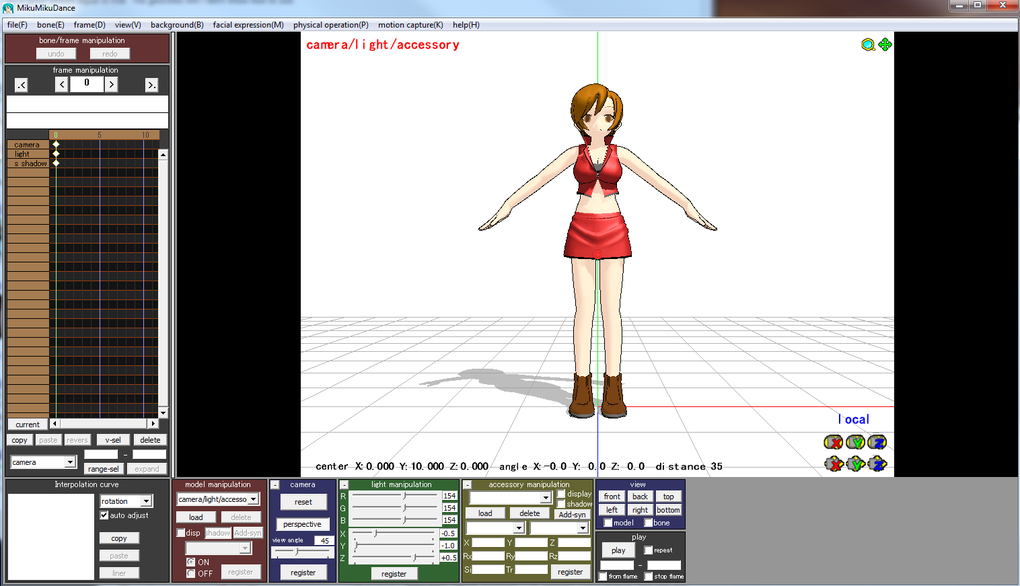
MikuMikuDance is far more than just a simple animation program; it’s a complete 3D modeling and animation suite designed for intuitive creation. Its core strength lies in its user-friendly interface, making it accessible to individuals with varying levels of technical expertise. While it lacks the extensive feature set of professional-grade software like Autodesk Maya or Blender, MMD’s streamlined approach allows users to focus on the creative process without getting bogged down in complex settings.
Key features of MMD include:
-
3D Model Import and Export: MMD supports the import and export of various 3D model formats, allowing users to work with pre-made models or create their own using external software. This flexibility ensures seamless integration with other 3D modeling pipelines.
-
Intuitive Animation Tools: The software boasts an intuitive animation system, making it relatively easy to create even complex animations. Keyframe animation is the primary method, offering a straightforward way to control model movements and poses over time.
-
Motion Data Editing: MMD allows for detailed manipulation of motion data, providing granular control over character movements. This allows for fine-tuning of animations to achieve specific effects and stylistic choices.
-
Camera Control and Effects: Users have extensive control over camera angles, movements, and effects, enabling the creation of dynamic and engaging scenes. This includes features like panning, zooming, and the addition of various visual effects.
-
Physics Engine: A built-in physics engine allows for the realistic simulation of physical interactions between objects in the 3D space. This adds another layer of realism and complexity to the animations.
-
Extensive Community Support: MMD boasts a large and active online community, providing ample resources, tutorials, and support for users. This community-driven aspect is invaluable for troubleshooting issues, sharing resources, and learning new techniques.
-
Plugin Support: While not as extensive as some other software, MMD offers limited plugin support, allowing for the extension of its functionality through external add-ons. This provides opportunities for customization and the addition of specialized features.
MikuMikuDance (MMD): Applications and Use Cases
The versatility of MMD extends to a wide range of applications, making it a valuable tool for various creative endeavors. Its user-friendly nature and powerful features have made it popular across diverse fields.
-
Anime-Style Animation: MMD excels in creating anime-style animations, largely due to the availability of numerous pre-made models and motion data designed for this specific aesthetic. The software’s intuitive animation tools make it well-suited for creating dynamic and expressive character animations.
-
Music Video Production: Many music video creators utilize MMD to bring their musical visions to life, animating characters and objects to synchronize with the music and lyrics. The software’s ability to combine animation, camera effects, and visual effects makes it ideal for crafting compelling music videos.
-
Fan Animations and Fanfiction: The large community of MMD users contributes to a vast repository of fan-made content, including animations and interpretations of popular anime, manga, and video games. This aspect fosters creativity and allows for the exploration of existing storylines and characters in innovative ways.
-
Educational Purposes: MMD can serve as a valuable educational tool for teaching 3D modeling and animation principles. Its user-friendly interface and streamlined workflows make it a less daunting starting point compared to more complex professional software packages.
-
Hobbyist Projects and Personal Creations: MMD provides a platform for individuals to pursue their creative passions, whether it’s experimenting with different animation techniques, creating short films, or simply exploring the possibilities of 3D animation.
The MMD Community and its Influence
The success of MikuMikuDance is heavily intertwined with its thriving community. This active network of users contributes significantly to the software’s longevity and widespread adoption.
-
Model and Motion Data Sharing: The community readily shares models, motion data, and other resources, contributing to a vast library of materials available to all users. This collaborative spirit significantly lowers the barrier to entry for newcomers, providing them with readily available assets to work with.
-
Tutorials and Support: A wealth of online tutorials, guides, and support forums cater to users of all skill levels. This continuous flow of knowledge sharing helps newcomers learn the ropes, and experienced users can refine their skills and discover new techniques.
-
Collaboration and Inspiration: The community fosters collaboration, allowing users to share their work, receive feedback, and inspire one another. This collaborative atmosphere encourages creativity and pushes users to explore the software’s capabilities to their fullest extent.
-
Expansion of Software Capabilities: While not officially supported by the developers, the community’s contributions often indirectly expand the software’s capabilities through the creation and sharing of custom tools and scripts.
Comparing MikuMikuDance (MMD) to Other 3D Animation Software
While MMD offers a valuable and accessible entry point into 3D animation, it’s crucial to understand its limitations when compared to professional-grade software.
-
Professional Software (Maya, Blender, 3ds Max): These industry-standard packages offer significantly more advanced features, including more complex modeling tools, realistic rendering capabilities, robust physics engines, and extensive plugin support. However, they come with a steeper learning curve and often require considerable investment.
-
Simplified Animation Software (CrazyTalk Animator, Reallusion iClone): These applications offer a more user-friendly approach compared to professional software, but usually lack the flexibility and control offered by MMD in terms of animation.
MMD occupies a unique niche, bridging the gap between accessible hobbyist software and the complexity of professional tools. Its strengths lie in its ease of use, strong community support, and focus on anime-style animation, making it an excellent choice for users interested in these specific areas.
System Requirements and Availability
MikuMikuDance is readily available for download and is compatible with a range of Windows operating systems. Its relatively modest system requirements allow it to run on a variety of hardware configurations. Always check the official website or trusted download sources for the most up-to-date information regarding system requirements and compatible operating systems.
Conclusion: MikuMikuDance – A Powerful Tool for Creative Expression
MikuMikuDance (MMD) stands as a testament to the power of accessible software and the strength of community support. Its straightforward interface and powerful animation tools, combined with a rich online community, make it an excellent choice for anyone interested in exploring the world of 3D animation, especially those drawn to anime-style aesthetics. While not a replacement for professional software, MMD provides a valuable platform for learning, creating, and sharing animated content, fostering creativity and collaboration among its users. Its continued popularity highlights its enduring appeal and value within the ever-evolving landscape of digital animation.
File Information
- License: “Free”
- Version: “9.32”
- Latest update: “May 16, 2024”
- Platform: “Windows”
- OS: “Windows Vista”
- Downloads: “187”
- Size: “6.86 MB”


