
MindManager is a powerful software application designed for Windows users seeking a comprehensive solution for organizing ideas, managing projects, and streamlining workflows. Its intuitive graphical interface transforms complex tasks into visually manageable maps, fostering clarity and efficiency in planning and execution. Unlike simpler note-taking applications or linear to-do lists, MindManager leverages the power of mind mapping to represent information in a hierarchical and interconnected manner, reflecting the organic nature of thought processes and project development. This approach enhances understanding, facilitates brainstorming, and improves overall project management capabilities.
Intuitive Interface and Ease of Use
MindManager distinguishes itself through its user-friendly interface, which makes it accessible to both novice and experienced users. The software boasts a clean and visually appealing design, immediately putting users at ease. A comprehensive interactive quick-start guide walks users through the essential features and functions, ensuring a smooth onboarding experience. This ease of use is further enhanced by the drag-and-drop functionality that allows for effortless manipulation of elements within the mind map. Users can easily add, remove, rearrange, and connect various components with minimal effort, allowing for dynamic adjustments to the project plan as needed.
The software’s intuitive nature is further emphasized by its readily available help options and extensive online resources. Whether users encounter a specific issue or wish to explore advanced features, MindManager provides ample support to guide them through the process. This readily accessible assistance reduces the learning curve and empowers users to quickly harness the full potential of the software.

Comprehensive Features for Enhanced Productivity
Beyond its user-friendly interface, MindManager offers a rich array of features designed to boost productivity and enhance project management capabilities. Its core functionality centers on creating and managing mind maps, which visually represent ideas, tasks, and their interrelationships. These maps aren’t limited to simple outlines; they can incorporate diverse elements, including:
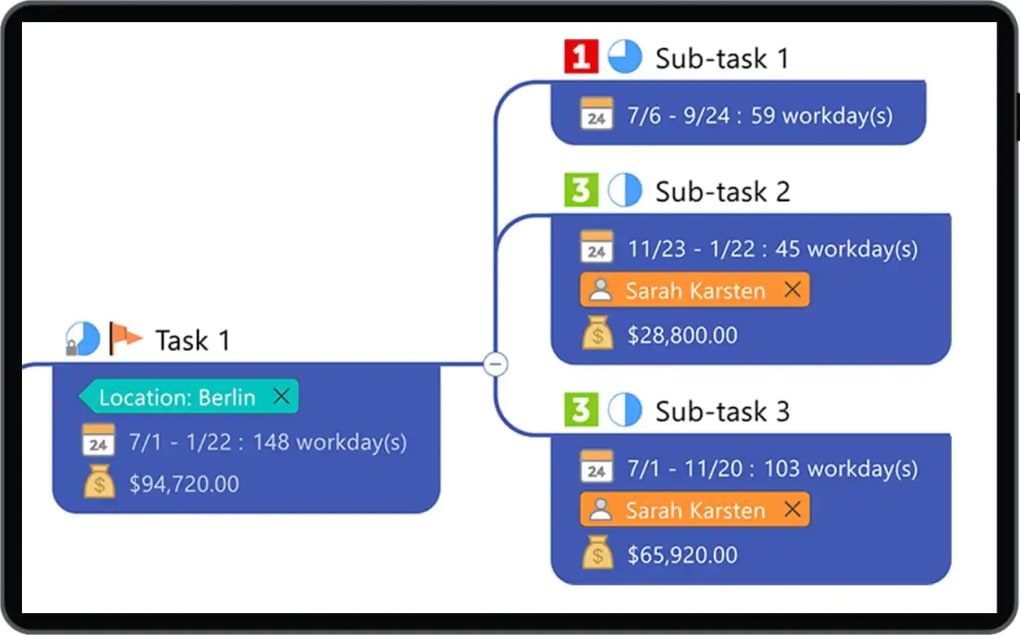
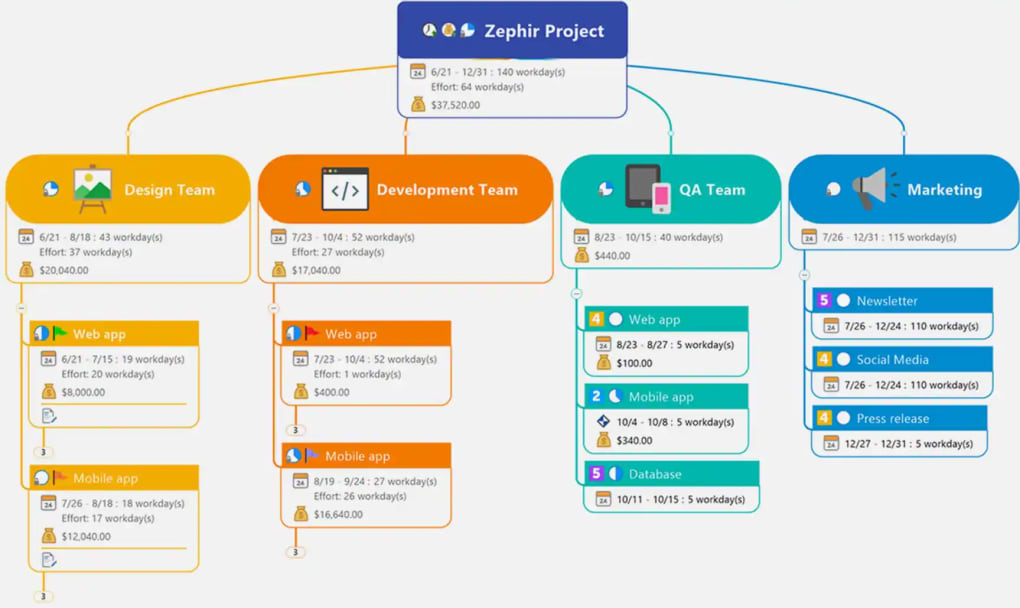
- Multiple Topics and Sub-Topics: MindManager allows for the creation of hierarchical structures, enabling the breakdown of complex projects into smaller, more manageable components. This hierarchical organization makes it easy to track progress, identify dependencies, and manage individual tasks effectively.
-
Relationships and Connections: The software facilitates the visualization of relationships between different parts of a project. Users can establish links and connections between topics, showcasing dependencies, timelines, and the overall flow of work. This visual representation eliminates ambiguity and enhances team collaboration by clarifying the interconnectedness of various project components.
-
Rich Media Integration: MindManager supports the incorporation of various media types, such as images, icons, notes, hyperlinks, and attachments. This functionality enables users to enrich their mind maps with supplementary information, making them more dynamic and informative. This feature is particularly useful for adding context, visual cues, or external resources related to specific project elements.
-
Advanced Editing and Export Options: Once a mind map is complete, users can treat it much like a standard document, editing and spell-checking the text, and exporting the final product into various formats, including PDF, Microsoft Word, and more. This ensures that the finalized project can be seamlessly shared and integrated into existing workflows.
Beyond these core features, MindManager includes several additional tools that elevate its functionality, such as:
-
Built-in Timer: A built-in timer aids in task management and time tracking, allowing users to monitor their progress and allocate time effectively. This is particularly helpful for managing deadlines and ensuring tasks are completed within allocated timeframes.
-
Brainstorming Mode: MindManager provides a dedicated brainstorming mode designed to stimulate creative thinking and idea generation. This mode encourages rapid idea capture and organization, streamlining the initial stages of project development.
- Internet Capabilities: The software seamlessly integrates with the internet, allowing users to easily search for information and incorporate web-based resources directly into their mind maps. This feature eliminates the need for constant switching between applications, improving workflow efficiency.
Streamlining Complex Projects
The real strength of MindManager lies in its ability to simplify the management of even the most intricate projects. By visually representing the complexities of a project, it eliminates confusion and reduces the risk of overlooking critical details. The intuitive drag-and-drop interface empowers users to continuously refine their maps, experimenting with different organizational structures until they find the optimal representation for their project.
This dynamic approach to project visualization is particularly beneficial for teams working on collaborative projects. By using MindManager, teams can maintain a shared, centralized view of the project, ensuring everyone is aligned on goals, timelines, and responsibilities. The software’s collaborative features promote effective communication and minimize the potential for miscommunication or task duplication.
Comparison to Alternatives
While MindManager offers a powerful and comprehensive solution, several alternative mind mapping and project management tools exist in the market. Some popular alternatives include FreeMind, iMindMap, and Wondershare MindMaster. However, MindManager’s strength lies in its comprehensive feature set, user-friendly interface, and robust support, making it a top contender for users seeking a complete and efficient project management solution. While some alternatives might offer free versions or more specialized features, MindManager’s balance of ease of use, advanced functionality, and reliable support makes it a compelling choice for individuals and teams requiring a dependable and powerful tool for their project management needs.
User Reviews and Community Feedback
User reviews consistently highlight MindManager’s intuitive interface and ease of use as key strengths. Many users appreciate the software’s ability to visually represent complex projects, facilitating better understanding and improved task management. Feedback also indicates that the software’s advanced features, such as its rich media integration and export options, add significant value to the user experience.
However, some users have noted that the software’s collaborative features could be improved. Although MindManager allows for document sharing, the process requires registration, which may present a minor inconvenience for some users. Furthermore, some users have suggested improvements to the MindJet Player, highlighting the need for greater compatibility and ease of use when embedding charts into web pages or third-party web services. Despite these minor criticisms, the overall user feedback reflects a highly positive reception of MindManager as a valuable tool for managing projects and organizing ideas.
Conclusion
MindManager is a valuable tool for individuals and teams seeking to enhance their project management and idea organization capabilities. Its intuitive interface, comprehensive feature set, and robust support make it a highly effective solution for streamlining workflows and improving productivity. While some minor improvements could be made, its overall efficacy and wide range of functionalities position MindManager as a leading contender in the project management software market, offering a compelling solution for users of all skill levels. The ability to easily visualize complex projects, coupled with the ease of use and advanced features, makes MindManager a powerful asset for anyone striving for increased efficiency and effectiveness in their endeavors.
File Information
- License: “Trial version”
- Latest update: “March 4, 2025”
- Platform: “Windows”
- OS: “Windows 10”
- Language: “German”
- Downloads: “253.5K”
- Size: “3.20 MB”


