
Mini Mouse Macro is a free, user-friendly utility designed for Windows operating systems. Its primary function is the real-time recording and playback of mouse movements, clicks, and keyboard inputs. Unlike many macro recorders that require manual input of coordinates and actions, Mini Mouse Macro simplifies the process by capturing your actions directly as they occur. This intuitive approach makes it an ideal choice for both novice and experienced users seeking to automate repetitive tasks on their computers. This article delves into the functionalities, advantages, and limitations of Mini Mouse Macro, exploring its role in enhancing productivity and streamlining workflows.
Real-Time Recording and Playback: The Core Functionality
The core strength of Mini Mouse Macro lies in its real-time recording capability. This feature eliminates the need for manually defining each mouse click, keyboard stroke, and coordinate. Instead, users initiate a recording session with a simple click of a button, and the software meticulously logs all subsequent mouse movements and keyboard inputs. This real-time tracking produces a highly accurate macro script, eliminating the potential for errors associated with manual input. The recorded macro includes not only the action itself (e.g., a mouse click or key press) but also the precise timing and coordinates involved, ensuring faithful reproduction during playback.
The playback feature offers a degree of control over the execution of recorded macros. A loop mode allows continuous repetition of the recorded actions, particularly useful for highly repetitive tasks. During playback, users can visually track the mouse cursor’s movement, observing the animation of the recorded actions. This visual feedback provides an assurance that the macro is playing back as intended and allows for immediate identification of any discrepancies. Importantly, any manual intervention during playback interrupts the process, ensuring the integrity of automated actions. This feature safeguards against unintended modifications to the automated workflow.
User-Friendly Interface and Ease of Use
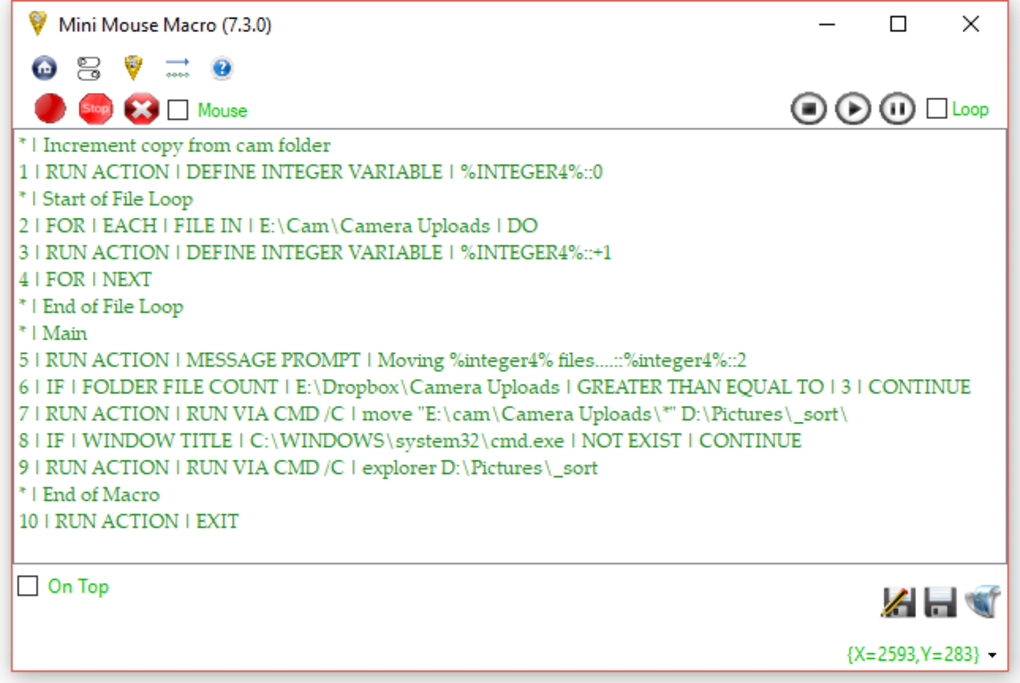
Mini Mouse Macro boasts a remarkably intuitive and user-friendly interface. Its simplicity is a significant advantage, particularly for users unfamiliar with macro recording software. The main interface presents all essential functionalities in a clear and straightforward manner, eliminating any unnecessary complexity. The recording and playback controls are prominently displayed, making them easily accessible and intuitive to operate. The real-time display of recorded actions, complete with timestamps and coordinates, enhances transparency and allows users to review the macro’s contents before playback. This straightforward design removes any steep learning curve often associated with similar software, making it accessible to a broad spectrum of users. Furthermore, its portable nature allows users to run it directly from a USB drive, eliminating the need for installation. This flexibility is invaluable for users who need access to their macros across multiple computers or prefer to maintain a clean installation on their main systems. The unobtrusive system tray icon minimizes its footprint when not in use.
Automation of Repetitive Desktop Tasks
The primary application of Mini Mouse Macro lies in automating repetitive desktop activities. Tasks that involve a sequence of mouse movements, clicks, and keyboard inputs—such as data entry, form filling, or gaming macros—can be significantly streamlined through the use of this software. By recording these repetitive actions once, users can easily replay them as many times as needed, freeing up their time and reducing the chance of human error. This automation is particularly beneficial in scenarios involving complex and repetitive procedures, where manual execution can be time-consuming and prone to mistakes. The software efficiently handles the repetitive execution of these tasks, significantly improving overall productivity. Examples include automating image editing processes, repeating specific sequences in games, and even generating repetitive text or code. The ability to loop the macro also enhances this automation, enabling continuous operation for extended periods.
Comparison with Alternative Macro Recorders
Mini Mouse Macro distinguishes itself from competitors with its unique emphasis on real-time recording. Many alternative macro recorders require users to manually specify each step in the macro sequence, often involving the cumbersome input of precise coordinates and action details. This manual approach is prone to errors and requires a significant time investment, particularly for complex tasks. In contrast, Mini Mouse Macro’s real-time recording directly captures the user’s actions, ensuring accuracy and minimizing the effort required to create a macro. This advantage significantly simplifies the process of automating tasks and renders it accessible to users of all skill levels. While other software might offer more advanced features or scripting capabilities, Mini Mouse Macro excels in its ease of use and streamlined approach to creating efficient and accurate macros for everyday tasks.
Limitations and Considerations
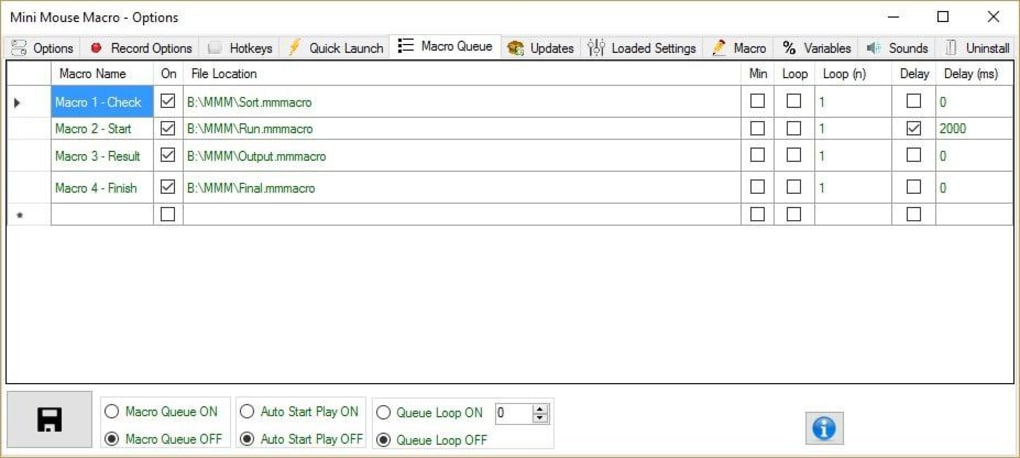
While Mini Mouse Macro offers a compelling combination of ease of use and real-time recording, it’s essential to acknowledge certain limitations. Some advanced features are restricted to the Pro version of the software, requiring a paid upgrade. This may limit functionality for users seeking more sophisticated capabilities such as conditional statements, variable handling, or integration with other applications. While the free version is sufficient for a wide range of tasks, those requiring more complex macro scripting might need to explore alternative solutions. Additionally, the reliance on real-time recording may not be suitable for all scenarios. Tasks involving unpredictable elements or user interaction during the recording might produce macros that are not entirely reliable or require adjustments after recording.
Conclusion: A Valuable Tool for Streamlining Workflows
Mini Mouse Macro offers a valuable and straightforward solution for automating repetitive desktop activities. Its real-time recording capability, combined with its user-friendly interface, makes it an ideal choice for individuals seeking a simple and effective way to enhance their productivity. While certain limitations exist, particularly concerning advanced features reserved for the Pro version, the free version remains a robust tool for a wide range of applications. The ability to effortlessly record and replay sequences of mouse movements and keyboard inputs offers significant time savings and reduces the potential for human error in repetitive tasks. For users prioritizing ease of use and efficient macro creation, Mini Mouse Macro stands as a highly recommended solution. Its portable nature and simple interface make it accessible to a broad range of users, regardless of technical expertise. For basic to moderate macro needs, Mini Mouse Macro provides a simple yet powerful way to streamline workflows and boost productivity.
File Information
- License: “Free”
- Latest update: “June 17, 2025”
- Platform: “Windows”
- OS: “Windows 7”
- Language: “English”
- Downloads: “4K”
- Size: “4.97 MB”


