
MiniTool Partition Wizard is a disk management tool available in both free and paid versions, offering a wide array of features for managing hard drive partitions. While its free version provides a robust suite of tools for home users, the paid version unlocks additional functionalities aimed at more advanced users and professionals. This review delves into the program’s features, strengths, weaknesses, and overall usability, helping you decide if MiniTool Partition Wizard is the right choice for your disk partitioning needs.
Core Features and Functionality
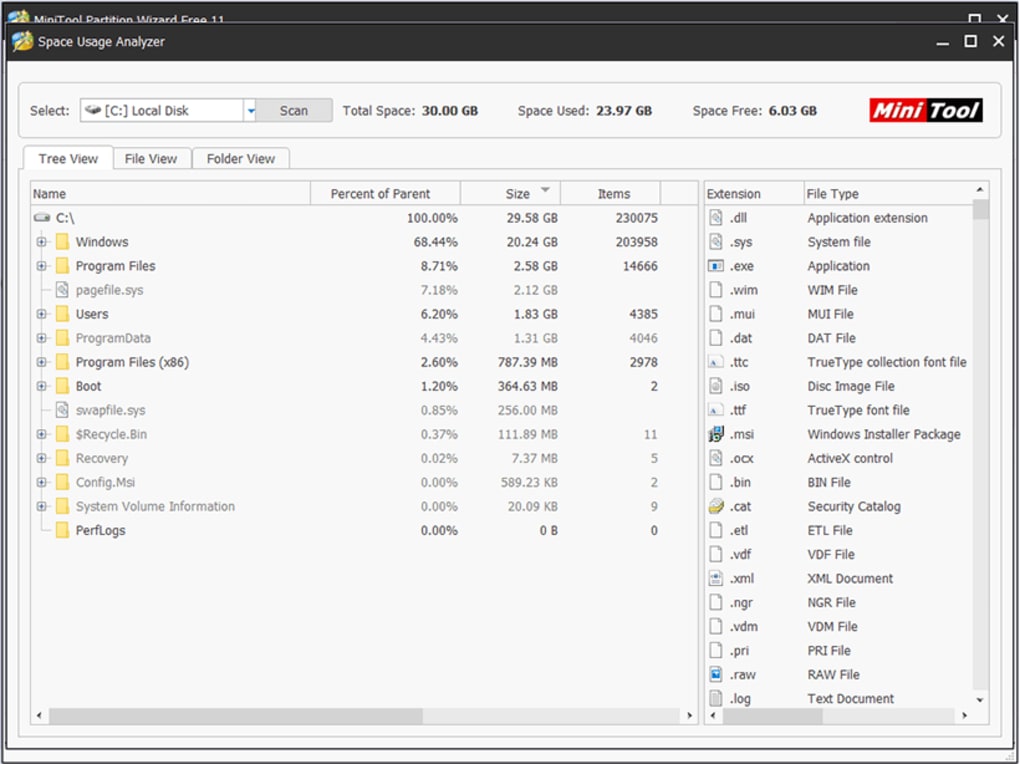
MiniTool Partition Wizard presents a user interface (GUI) designed for ease of navigation. The left panel displays a list of available functions, while the top panel houses the action buttons. The right panel provides a real-time view of the ongoing operation, offering clear visual feedback throughout the process. The program’s core functionality encompasses a wide spectrum of partition management tasks, including:
-
Partition Creation: Easily create new partitions on your hard drive, specifying size, file system (NTFS, FAT32, etc.), and drive letter. This is crucial for organizing your data, dedicating specific areas for operating systems, applications, or data storage.
-
Partition Deletion: Safely remove partitions from your hard drive, freeing up space for other partitions or preparing the drive for repartitioning. MiniTool Partition Wizard allows for secure deletion, overwriting the partition’s data to prevent recovery. This is vital for data security when decommissioning drives or recycling storage media.
-
Partition Resizing: Expand or shrink existing partitions without data loss, optimizing disk space utilization. This is particularly useful when one partition is running low on space, allowing you to redistribute space from less-utilized partitions. The program handles the process intelligently, minimizing disruption to your system.
-
Partition Formatting: Format partitions to a specific file system, preparing them for use. This step is necessary when creating new partitions or repurposing existing ones, ensuring compatibility with your operating system and applications.
-
Partition Copying: Create an exact copy of a partition to another location on the same or a different drive, serving as a crucial backup and migration tool. This feature is invaluable for data protection and system recovery, allowing for easy duplication of essential partitions.
-
Partition Moving: Relocate partitions within a drive without data loss, reorganizing the drive layout for better performance or data organization. This capability is crucial for optimizing drive performance and ensuring data accessibility.
-
Partition Merging: Combine multiple partitions into a single larger partition, improving data management and simplifying drive structure. This eliminates fragmentation and can enhance drive performance.
-
Partition Splitting: Divide a large partition into smaller ones, improving organization and allowing for dedicated storage areas. This is particularly useful for managing various types of data.
The paid version of MiniTool Partition Wizard expands upon these features with additional capabilities like:
-
Changing Cluster Sizes: Optimize cluster size for specific file types, enhancing storage efficiency.
-
Partition Alignment: Align partitions to optimize the drive’s performance by aligning them with the physical sectors of the hard drive.
-
Converting between MBR and GPT: Switch between the Master Boot Record (MBR) and GUID Partition Table (GPT) partitioning schemes for advanced disk management.
Strengths and Weaknesses
MiniTool Partition Wizard boasts several strengths:
-
Comprehensive Feature Set: The free version itself offers a surprisingly extensive range of features exceeding those found in some paid competitors. This comprehensive feature set makes it a versatile tool for various disk management tasks.
-
User-Friendly Interface: The GUI is intuitive and easy to navigate, making it accessible to both novice and experienced users. The visual representation of the disk partitions enhances ease of use.
-
Automatic Order of Changes: MiniTool Partition Wizard intelligently orders the changes you make, minimizing errors and simplifying the process. This automation enhances reliability and reduces the risk of user error.
-
Data Recovery Capabilities: The program’s ability to recover deleted partitions is a significant advantage, providing a safety net against accidental data loss.
However, certain weaknesses are also apparent:
-
Lack of Dynamic Disk Support: The most significant limitation is the lack of support for dynamic disks, a significant drawback for users utilizing this type of disk configuration. This exclusion limits its applicability to specific setups.
-
Potential for Data Loss (for Beginners): The extensive functionality, while powerful, also carries a risk for inexperienced users. One wrong move could potentially result in significant data loss if proper precautions aren’t taken. Thorough understanding and caution are paramount when using the program.
-
Limited Safeguards for Novices: The program could benefit from improved safeguards to prevent accidental data destruction for novice users. More guidance and warnings before undertaking potentially risky operations would enhance user safety.
Comparison to Alternatives
MiniTool Partition Wizard competes with other partition managers like EaseUS Partition Master and Paragon Partition Manager. While the paid versions of these competitors offer comparable features, MiniTool Partition Wizard’s free version often provides a broader range of capabilities than many free alternatives. The key differentiator lies in the balance between the free and paid versions’ feature sets. Other free options might lack the comprehensive nature of MiniTool’s free version, while paid alternatives might not justify the cost increase over MiniTool’s feature-rich free offering.
User Reviews and Feedback
User reviews are generally positive, highlighting the program’s ease of use and comprehensive feature set. However, negative feedback often points towards the potential for accidental data loss and the absence of dynamic disk support. These user comments underscore the importance of careful usage and awareness of the program’s limitations. The free version’s capabilities often outweigh any shortcomings for many users, particularly those with simpler partitioning needs.
Conclusion
MiniTool Partition Wizard is a powerful and versatile partition management tool. Its comprehensive feature set, coupled with an intuitive interface, makes it an excellent choice for many users. The free version, despite its limitations, provides a remarkable level of functionality for home users and casual users. However, the lack of dynamic disk support and the potential for data loss if misused must be considered. The program is highly recommended for users comfortable with disk management tools but crucial caution is urged for less experienced users. Always back up your data before undertaking any partition management tasks. The combination of its comprehensive free version and optional paid version makes MiniTool Partition Wizard a valuable addition to any user’s toolkit who need to manage their hard drive partitions.
File Information
- License: “Free”
- Latest update: “December 26, 2024”
- Platform: “Windows”
- OS: “Windows 10”
- Language: “English”
- Downloads: “244.6K”
- Size: “3.25 MB”


