
Minitube is a desktop application designed to provide a streamlined YouTube experience on Windows and other operating systems. While aiming for a simplified, TV-like interface, its functionality is significantly reduced compared to the full YouTube website or mobile apps. This review examines its strengths and weaknesses, based on user experiences and available information.
Functionality and User Interface
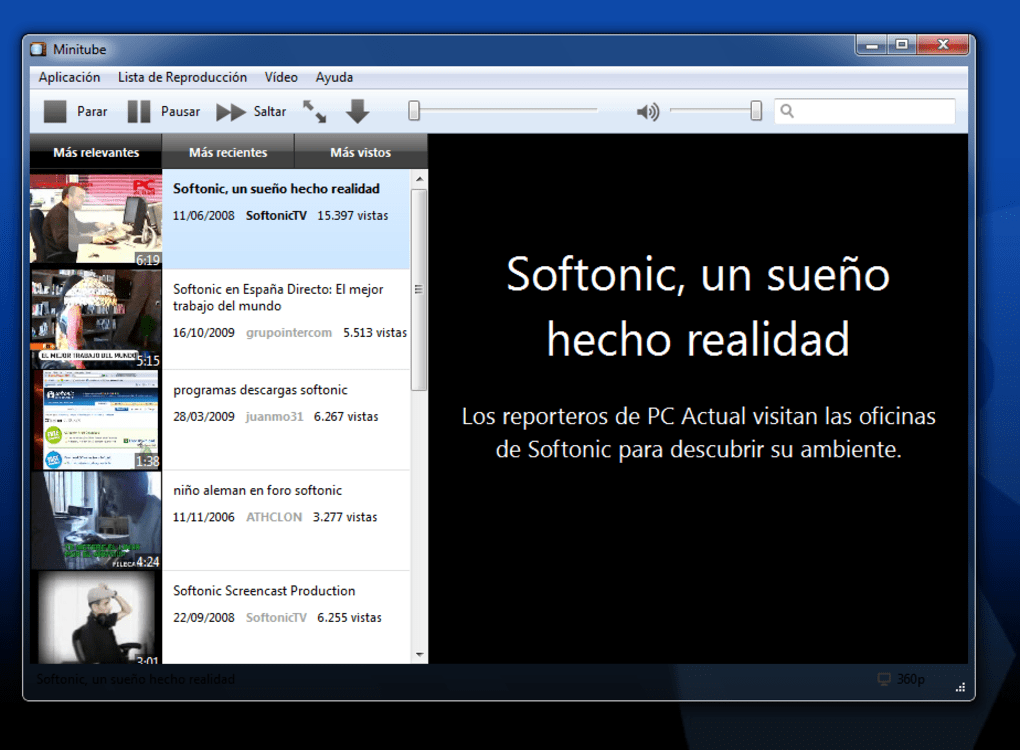
Minitube’s core function is to provide a desktop client for accessing and watching YouTube videos. Upon installation, users are presented with a simple interface dominated by a large search bar. Typing search terms brings up instant suggestions, mimicking the autocomplete feature on the YouTube website. Once a video is selected, playback proceeds as expected, allowing for full-screen viewing and support for high-definition (HD) content. This straightforward approach streamlines the process of finding and playing videos, making it arguably easier for some users than navigating the more complex YouTube website.
However, this simplicity comes at a cost. One of the most significant drawbacks is the lack of crucial YouTube features. Minitube does not provide access to video comments, a fundamental aspect of the YouTube community experience. Furthermore, it lacks the ability to download videos, a feature highly valued by many users. These omissions fundamentally alter the user experience, making it far less interactive and less feature-rich than accessing YouTube directly through a web browser. The removal of these features directly impacts the core functionality that many users expect from a YouTube platform.
The aim to provide a “TV-like” experience feels somewhat misplaced. The core difference between watching videos on a TV and on YouTube is the interactive element: comments, sharing options, related video suggestions within the platform itself. Minitube eliminates these interactive features, leaving only the video playback. This decision arguably detracts from the overall utility and appeal of YouTube as a dynamic, community-driven platform, turning it into a less engaging, more passive viewing experience.
Performance and Stability
Reports suggest that Minitube suffers from performance issues, including frequent freezing and lagging during video playback. This instability significantly undermines the user experience and makes for a frustrating viewing experience. Such issues indicate potential limitations in the application’s optimization or resource management, highlighting a critical area needing improvement. These glitches are not merely minor inconveniences; they detract significantly from the supposed ease and simplicity of the application, negating any benefits from its streamlined interface.
The lack of consistent performance directly clashes with the goal of providing a smooth and straightforward YouTube viewing experience. While the interface may be minimalistic, a stable performance is essential. If the software frequently freezes or lags, its primary function is jeopardized, leaving users frustrated and likely searching for alternative solutions.
Features and Missing Functionality
While Minitube boasts predictive searching and suggestions for further viewing, these features are somewhat overshadowed by the missing core functionalities. The predictive search is helpful, but hardly groundbreaking, and the “further viewing” suggestions might not be particularly unique or significantly different from the recommendations provided within YouTube itself.
The absence of comment sections diminishes the social aspect of YouTube. For many users, comments are a significant part of their YouTube experience. The inability to interact with other viewers, participate in discussions, or even see others’ reactions to the content undermines the overall value proposition of the application.
Furthermore, the lack of download capabilities is a significant limitation. Many users download YouTube videos for various reasons: offline viewing, archiving, or sharing. The inability to perform this basic functionality is a critical weakness for Minitube and a major drawback compared to alternative methods of accessing YouTube videos.
The overall effect of these missing features creates a significantly impoverished YouTube experience, rendering Minitube unsuitable for users who depend on these functionalities. Its simplification has gone too far, sacrificing core elements of the YouTube platform that many users actively engage with and benefit from.
Alternatives and Comparison
Numerous alternatives to Minitube exist, both official and unofficial, offering a broader range of features and functionality. The official YouTube website and mobile apps provide the full suite of YouTube features, including comments, downloads (although often restricted), and integration with other Google services. Other third-party desktop applications may offer enhanced features, such as download capabilities or background playback.
When comparing Minitube to these alternatives, its limitations become even more apparent. While its simplicity might appeal to certain users, the sacrifices in terms of functionality heavily outweigh the benefits for most. Its reduced feature set and instability make it a less appealing choice compared to the established alternatives, leading many users to opt for more feature-rich and reliable options.
Conclusion
Minitube presents itself as a simplified YouTube desktop client, aiming for a TV-like viewing experience. However, the drastic reduction in functionality, particularly the absence of comments and download capabilities, significantly limits its utility. Furthermore, the reported performance issues make it an unstable and unreliable option. While the streamlined interface might appeal to certain users who only require basic video playback, the compromises made in terms of features and stability render Minitube a less attractive choice compared to the fully featured YouTube website and other available alternatives. For most users seeking a complete YouTube experience, Minitube’s limitations are too significant to warrant its consideration.
File Information
- License: “Free”
- Latest update: “June 9, 2015”
- Platform: “Windows”
- OS: “Windows 8”
- Language: “English”
- Downloads: “26.4K”
- Size: “14.12 MB”


