
MIT App Inventor is a revolutionary, free, visual programming application that empowers anyone, regardless of prior programming experience—even children—to build fully functional software for smartphones and tablets. This intuitive platform utilizes a block-based approach, dramatically reducing the complexity and time investment typically associated with traditional software development environments. Its cloud-based nature further simplifies the process, allowing users to create applications directly within their web browser, eliminating the need for complex local installations. For those new to programming, MIT App Inventor provides a uniquely accessible and engaging entry point into the world of software creation.
Building Apps with Ease: A Visual Approach
The beauty of MIT App Inventor lies in its simplicity. As a web-based application, all you need to begin is a web browser and an internet connection. While you’ll also require a smartphone or tablet for live testing and debugging your creations, the core development process unfolds entirely within your browser. The application itself comprises two primary environments: the Designer and the Blocks Editor.
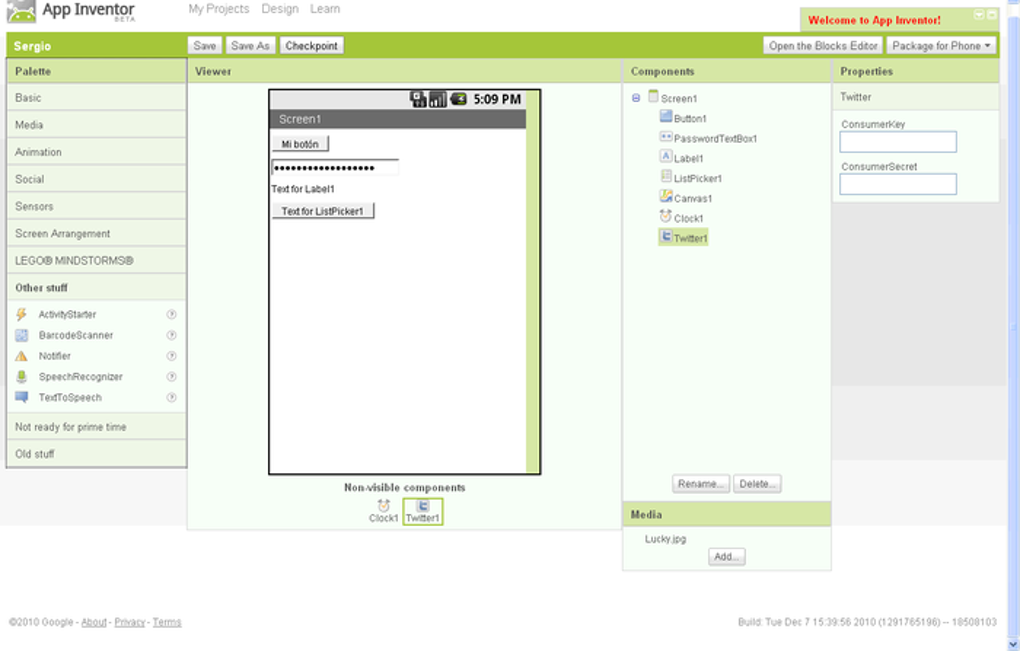
The Designer is where you craft the user interface (UI) of your app. Here, you visually arrange both on-screen and off-screen components, essentially designing the look and feel of your application. Think of it as a drag-and-drop interface for creating the visual elements users will interact with—buttons, text fields, images, and more. This allows even users with no design experience to create visually appealing apps. The intuitive nature of this visual design process is one of the key reasons for MIT App Inventor’s widespread popularity among beginners.
The Blocks Editor, on the other hand, is where the app’s functionality comes to life. This environment employs a block-based programming language, resembling a digital construction set. Instead of writing lines of complex code, users connect pre-built blocks—representing different commands and actions—to define how their app responds to user interactions and other events. This puzzle-like approach makes coding significantly more accessible and less intimidating, particularly for those unfamiliar with traditional text-based programming languages. The blocks visually represent the logic and flow of the application, making it easier to understand and debug the code.
The power of this visual approach is undeniable. It allows users to focus on the logic and functionality of their application, without getting bogged down in the intricacies of syntax and code structure. This visual approach is not a simplification; it is a powerful tool for understanding the fundamental concepts of programming, leading to a deeper comprehension of how software works.
App Possibilities: Beyond Simple Games
While many beginners start with simple games—and MIT App Inventor is perfectly suited for game development—its capabilities extend far beyond casual entertainment. The platform is remarkably versatile, enabling the creation of a wide range of applications:
-
Educational Apps: The platform’s ease of use makes it ideal for creating educational apps tailored to various subjects and learning styles. Imagine creating interactive quizzes, vocabulary builders, or even simulations, all without needing advanced programming knowledge. The potential for educators to create custom learning tools is vast, allowing for personalized and engaging learning experiences.
-
Informative Apps: MIT App Inventor can be used to develop applications that provide information on a variety of topics. News aggregators, reference guides, or even simple calculators can all be developed with ease. The ability to quickly prototype and test different ideas makes this platform suitable for rapid development of informational apps.
-
Business Applications: Although seemingly targeted at beginners, the platform’s capabilities also support the creation of simple business applications. Imagine creating an app for inventory management, appointment scheduling, or simple data collection. The ease of development and deployment make it a cost-effective solution for small businesses with limited IT resources.
-
Web Apps: While the original focus was on mobile applications, MIT App Inventor for Web Apps allows developers to create and deploy web-based applications, broadening its appeal and usefulness to a larger audience. This extension of the platform’s capabilities expands its utility beyond mobile devices.
The ability to incorporate features like text-to-speech further expands the potential of MIT App Inventor. Imagine an educational app that reads questions aloud, making it accessible to a wider range of users, including those with visual impairments. This level of accessibility is often difficult to achieve in traditional development environments, but it’s readily available within MIT App Inventor.
Your Journey into Programming Begins Here
MIT App Inventor serves as an excellent gateway to the world of programming. Its user-friendly interface and block-based programming language eliminate the steep learning curve often associated with traditional coding. Instead of grappling with complex syntax and debugging cryptic error messages, users can focus on the core concepts of app design and functionality, fostering a more intuitive understanding of how software operates. This approach removes the intimidation factor often associated with programming, allowing individuals to explore their creativity and build functional apps with ease.
Abundant Resources and Community Support
To further enhance the learning experience, MIT App Inventor provides a wealth of tutorials, guides, and community support. These resources cater to users of all skill levels, providing ample opportunities to learn, explore, and troubleshoot any challenges encountered along the way. The extensive documentation, online forums, and example projects allow beginners to quickly grasp the fundamentals and progress towards creating more complex applications. The collaborative nature of the community further strengthens the learning process, with users able to share their knowledge and experiences, fostering a supportive and inclusive environment.
Advantages and Disadvantages: A Balanced Perspective
While MIT App Inventor offers a highly accessible and rewarding approach to app development, it’s essential to acknowledge both its strengths and weaknesses:
Pros:
- Ease of Use: The visual and block-based programming environment significantly simplifies the development process, making it accessible to beginners and children.
- Cloud-Based Service: The cloud-based nature eliminates the need for complex local installations, simplifying the setup and making it accessible from any device with an internet connection.
- Visual and Blocks Programming: The intuitive block-based programming paradigm eliminates the need for extensive coding knowledge, making the learning curve significantly less steep.
- Abundant Tutorials: A comprehensive suite of tutorials and support resources caters to users of all skill levels, ensuring a smooth learning experience.
- Cross-Platform Compatibility: Apps created using MIT App Inventor can generally be deployed to various platforms (Android, and increasingly web browsers).
Cons:
- Overwhelming Number of Tools: The extensive array of tools and features can be overwhelming for absolute beginners, potentially requiring some time to navigate effectively.
- Limited Advanced Features: While capable of creating a wide range of apps, MIT App Inventor might lack some advanced features found in professional-grade development environments. This is less of a limitation for beginners, but it is worth considering for those with more ambitious projects.
- Dependence on Internet Connection: Because it’s cloud-based, a stable internet connection is crucial for the entire development process.
Conclusion: Empowering the Next Generation of Developers
MIT App Inventor represents a significant leap forward in making software development accessible to a broader audience. Its intuitive design and block-based programming language break down the barriers to entry, empowering individuals of all ages and skill levels to create functional and engaging applications. Whether you’re a student exploring the world of programming, an educator seeking to create interactive learning tools, or a business owner looking for a simple solution for creating basic applications, MIT App Inventor offers a powerful and user-friendly pathway to app development success. Its focus on visual programming and extensive support resources makes it an ideal starting point for anyone aspiring to build their own apps.
File Information
- License: “Free”
- Version: “2”
- Latest update: “July 4, 2025”
- Platform: “Web Apps”
- OS: “Internet Explorer”
- Language: “English”
- Downloads: “4.6K”


