
The Mixed Reality Portal for Windows offers a compelling entry point into the world of mixed reality, seamlessly blending digital content with your physical environment. This application, developed by Microsoft, provides a user-friendly platform for experiencing and interacting with mixed reality applications and games on your Windows PC, regardless of whether you own a dedicated VR headset. This exploration will delve into the features, functionalities, and potential applications of this increasingly powerful tool.
Accessing and Utilizing the Mixed Reality Portal
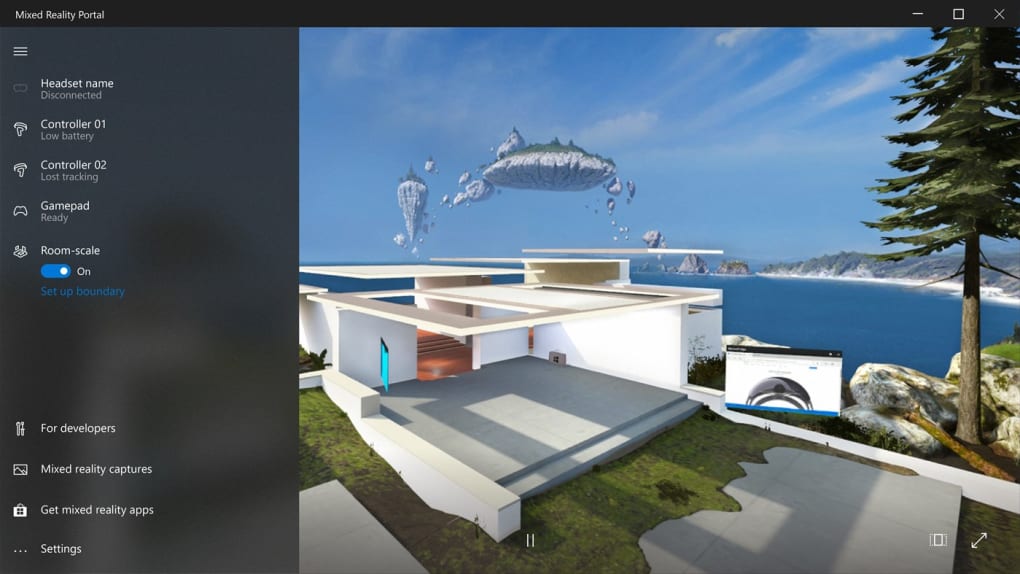
The Mixed Reality Portal serves as the central hub for all your mixed reality experiences on Windows. The installation process is straightforward, involving a simple download and installation from the Microsoft Store or the official website. Upon launch, users are greeted with an intuitive interface, designed for ease of use even for those new to mixed reality technology. The portal guides users through setting up their environment, calibrating sensors (if using external tracking devices), and selecting the appropriate display mode based on their hardware configuration.
One of the key strengths of the Mixed Reality Portal lies in its adaptability. It works across a wide range of devices, including Windows 10 and 11 PCs, Windows Mixed Reality headsets, and other compatible devices. This flexibility extends to the types of experiences it supports, ranging from immersive gaming and interactive entertainment to productivity applications and collaborative tools. The portal seamlessly integrates with existing Windows applications and functionalities, creating a fluid and integrated user experience.
Furthermore, the Mixed Reality Portal’s configuration options allow for a high degree of customization. Users can adjust settings such as the virtual environment’s scale, spatial mapping resolution (affecting how accurately the software represents your physical space), and clip plane distance (determining the distance at which virtual objects blend seamlessly with the real world). These options are critical for optimizing performance and ensuring a comfortable and engaging mixed reality experience. For example, users with limited space can adjust the virtual environment’s scale to create a more spacious virtual workspace, while users in well-lit rooms might want to modify settings related to spatial mapping and clip planes to improve clarity and realism.
Exploring the Immersive Capabilities
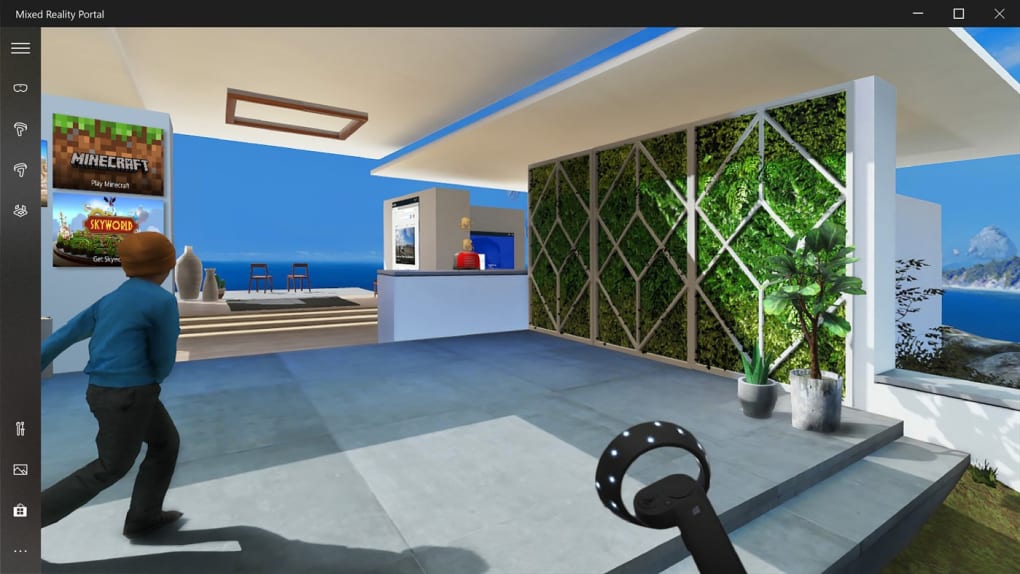
The Mixed Reality Portal offers a variety of methods for interacting with mixed reality content. Users can navigate the virtual environment using a mouse and keyboard, a gamepad, or dedicated motion controllers, depending on the application and their personal preferences. Head tracking, supported by most compatible headsets, adds another layer of immersion, allowing users to look around the virtual space and interact with objects naturally. The combination of accurate spatial mapping and responsive head tracking creates a convincingly realistic sense of presence.
The application’s capability to blend real and virtual worlds is particularly impressive. Users can view virtual objects superimposed onto their physical surroundings through passthrough functionality, which employs the camera on the headset to project a live video feed. This feature allows for a seamless integration of digital content into the real world, facilitating tasks such as virtual prototyping, interactive design reviews, or even overlaying information onto real-world objects for educational or industrial applications.
The platform also supports the creation and sharing of virtual environments. Users can design their own virtual spaces, complete with objects and interactive elements, and share them with others online. This collaborative aspect opens up exciting possibilities for remote teamwork, shared gaming experiences, and even virtual education and training. The ability to build and share custom environments adds an element of personalization and creativity that significantly enhances the versatility of the Mixed Reality Portal.
Mixed Reality Applications: Beyond Gaming
While gaming is a prominent use case for mixed reality technology, the Mixed Reality Portal’s applications extend far beyond entertainment. In professional settings, this technology empowers collaborative work through virtual meetings and shared workspaces, allowing teams to interact and brainstorm more effectively, regardless of geographical location. Architects and designers can utilize the portal to visualize 3D models in a realistic setting, enabling more efficient design reviews and facilitating a deeper understanding of scale and spatial relationships. Similarly, educators can create engaging and interactive learning experiences, bringing textbooks to life through interactive 3D models and virtual field trips.
In the medical field, mixed reality provides surgical planning and simulation tools, enabling surgeons to practice complex procedures in a risk-free virtual environment. The ability to overlay holographic images onto a patient’s anatomy during surgery can improve precision and reduce surgical times. Furthermore, mixed reality can be used for patient education, demonstrating procedures and post-operative care in a clear and easily digestible format. The use cases are continually expanding, demonstrating the technology’s potential to revolutionize professional workflows across numerous industries.
Hardware and Software Compatibility
The Mixed Reality Portal’s compatibility with a broad range of hardware is a significant advantage. While it works optimally with Windows Mixed Reality headsets, it also supports a variety of other VR and AR devices through third-party software integrations. This allows a broader user base to access mixed reality experiences, without requiring expensive, specialized equipment. The platform also maintains compatibility with various input devices, ranging from standard mouse and keyboard to specialized motion controllers and hand-tracking systems. This flexibility ensures a more inclusive and accessible mixed reality experience for all users.
Software compatibility is equally important. The Mixed Reality Portal supports a growing library of mixed reality applications, ranging from games and entertainment software to productivity and educational tools. Microsoft continues to expand this ecosystem through its developer program, encouraging the creation of new and innovative mixed reality experiences. Furthermore, the platform’s support for open standards and APIs facilitates integration with third-party software, providing users with a vast and continually expanding library of compatible content.
The Future of Mixed Reality with the Portal
The Mixed Reality Portal represents a significant step forward in the development and accessibility of mixed reality technologies. Its user-friendly interface, broad hardware compatibility, and expanding software ecosystem are key factors driving its adoption. As the technology continues to evolve, we can expect further improvements in terms of fidelity, performance, and ease of use. Advances in spatial mapping and tracking will lead to even more realistic and immersive experiences, while advancements in software development will broaden the range of applications and functionalities.
The integration of mixed reality into diverse sectors, from entertainment and education to healthcare and manufacturing, holds immense promise. The Mixed Reality Portal stands poised to act as a primary gateway for this transformation, empowering users across various industries to benefit from the innovations and efficiencies offered by this converging technology. Its continuous development, coupled with a strong community and ongoing support from Microsoft, promises an even brighter future for mixed reality and the immersive experiences it unlocks.
File Information
- License: “Free”
- Version: “1.0”
- Latest update: “February 9, 2024”
- Platform: “Windows”
- OS: “Windows 11”
- Language: “English”
- Downloads: “3K”


