
MixMeister Fusion is a powerful digital audio workstation (DAW) designed to transform your computer into a fully functional DJ system. While boasting professional-grade features, it maintains a user-friendly interface, making it accessible to both seasoned professionals and aspiring DJs alike. This comprehensive review delves into the software’s capabilities, exploring its features, strengths, weaknesses, and overall user experience.
Unleashing Your Inner DJ: Core Features and Functionality
MixMeister Fusion provides a robust suite of tools for mixing, sequencing, and mastering audio. At its heart lies a sophisticated mixing engine capable of handling multiple tracks simultaneously, allowing for seamless transitions and creative layering. The intuitive drag-and-drop interface simplifies the process of building mixes, letting users effortlessly arrange and manipulate audio files. This ease of use, however, doesn’t compromise on power. Advanced users can leverage a wide range of parameters to fine-tune their mixes, ensuring professional-quality results.
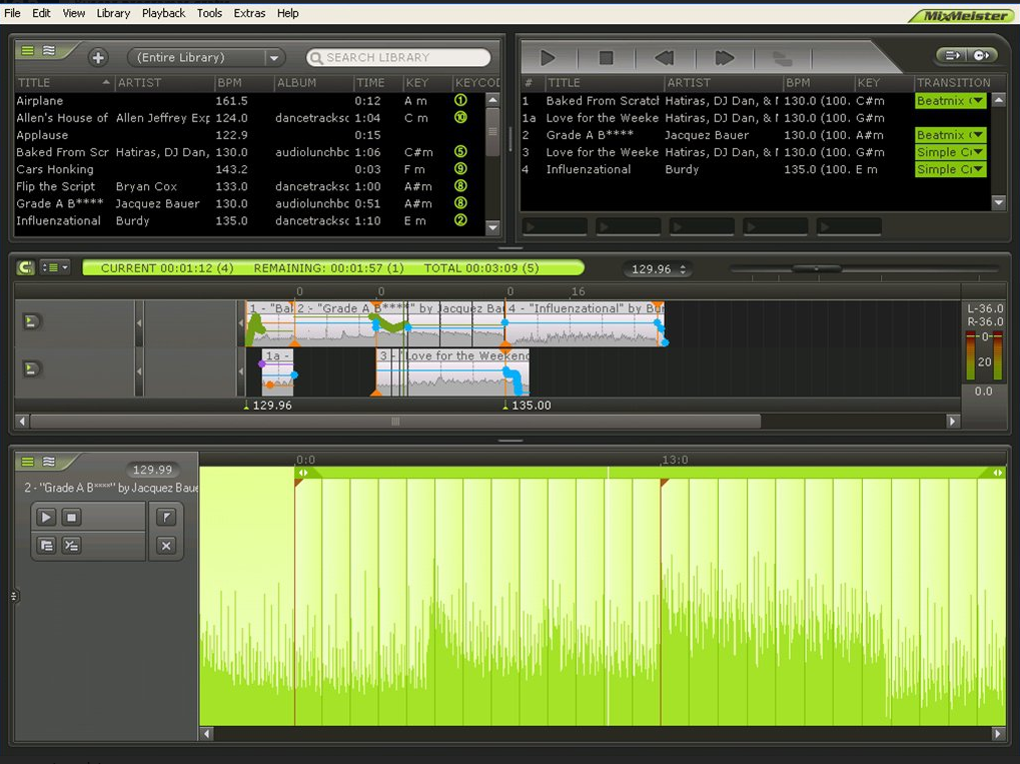
One of Fusion’s standout features is its real-time recording capability. Every mixing action is meticulously logged, enabling DJs to revisit their creative process and refine their techniques. This playback functionality isn’t just a recording of the audio; it’s a comprehensive log of all mixing decisions, including crossfades, EQ adjustments, and effects applications. This allows for detailed analysis and the reconstruction of mixes with pinpoint accuracy.
The software’s timeline feature is an invaluable asset for managing complex projects. It provides a clear visual representation of the arrangement, allowing DJs to easily navigate and edit their compositions. This is especially useful when dealing with longer mixes or intricate arrangements requiring precise timing and synchronization. The timeline offers a level of control beyond simple track sequencing, enabling detailed manipulation of individual elements within a track. This granular control is crucial for achieving the polished, professional sound sought after by many DJs.
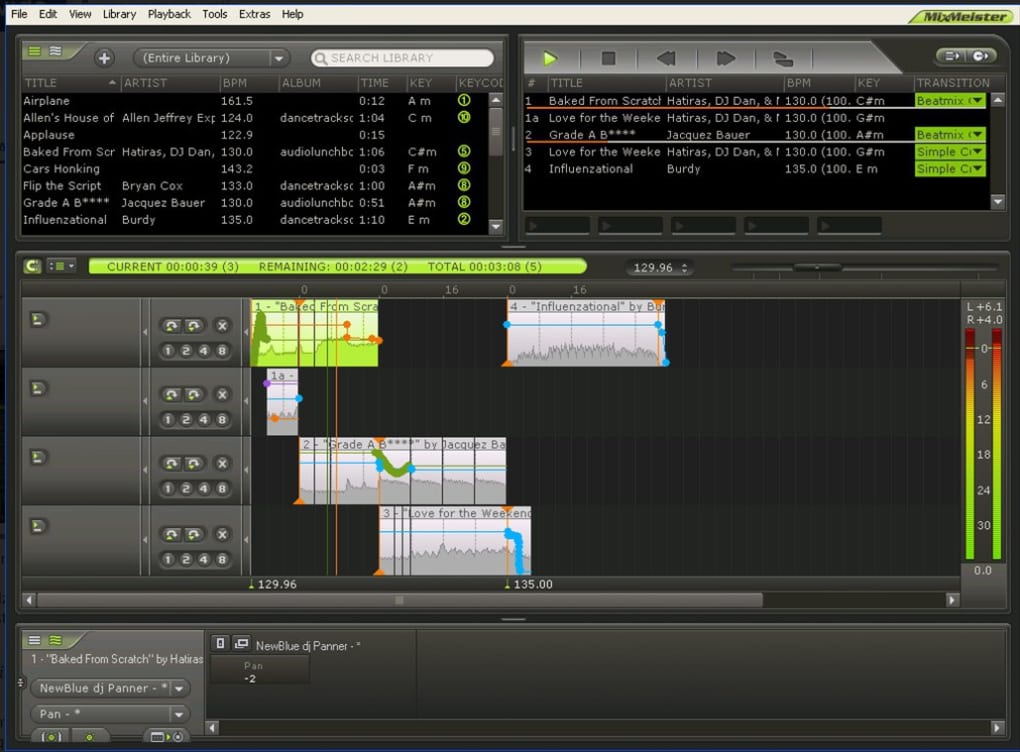
Beyond mixing, Fusion also offers comprehensive library management tools. These tools facilitate the organization and synchronization of extensive music collections, ensuring that your tracks are readily available for use. The software can automatically scan hard drive directories to update its library, minimizing manual data entry and streamlining the workflow.
Furthermore, Fusion allows for the creation of detailed reports of music libraries and song selections. This feature aids in cataloging and managing large music collections. It can be invaluable for DJs who need to keep track of their extensive libraries and manage their music files effectively. This level of organization is essential for maintaining a streamlined workflow and ensuring that the right tracks are readily accessible for performances or mixes.
Exporting your finished mixes is straightforward. Fusion supports various formats, including MP3 and CD-quality WAV, allowing for wide-ranging distribution and playback compatibility. This makes sharing your work with others and archiving your creations a simple and efficient process. The versatile export options ensure that your mixes sound their best on a variety of devices and platforms.
Seamless Integration: MIDI Control and Hardware Compatibility
For those who prefer a more hands-on approach, MixMeister Fusion offers seamless integration with MIDI hardware controllers. This allows DJs to control their mixes using physical controllers, mimicking the tactile experience of traditional DJ setups. The software’s responsiveness to MIDI input ensures that transitions and effects are applied smoothly and accurately. This integration enhances the DJ experience, offering a more natural and intuitive method of mixing for users comfortable with MIDI controllers.
The compatibility with a wide range of MIDI controllers is a significant advantage, offering versatility and allowing DJs to work with their preferred hardware. This adaptability caters to a diverse range of users and ensures a personalized workflow, accommodating varied preferences and technical setups. The adaptability of the software in this respect makes it a highly versatile tool for DJs working in various environments and utilizing different types of equipment.
Beyond the Mix: Advanced Features and Creative Possibilities
MixMeister Fusion extends its functionality beyond core mixing capabilities. Advanced features such as looping, cue points, and automated mixing functionalities enhance creative control and streamline the mixing process. Looping allows for creating extended mixes from shorter tracks, while cue points allow for precise jump points and seamless transitions between different sections within a track. Automated mixing functionalities allow for efficient, consistent mixing, especially useful for creating long mixes or radio shows.
The software incorporates a collection of high-quality effects, ranging from subtle enhancements to dramatic manipulations. These effects add depth and character to mixes, enabling DJs to shape their audio and craft unique soundscapes. The variety of effects available is extensive, offering users ample tools to explore different sonic textures and tailor their mixes to meet various artistic and stylistic choices.
These advanced features, coupled with the software’s intuitive interface, encourage experimentation and creative exploration, allowing DJs to push the boundaries of their sonic capabilities. This combination makes the software not just a tool for mixing, but a platform for creative expression and the development of distinctive mixes.
User Experience and Ease of Use
MixMeister Fusion balances powerful functionality with an intuitive user interface. While the software has a wide range of features, the layout remains clean and organized, making navigation straightforward even for beginners. The clear visual representation of tracks, effects, and settings minimizes the learning curve and makes the process of mix creation less daunting.
The software’s responsiveness is another key aspect of its user-friendliness. Actions are processed quickly and accurately, ensuring a smooth and efficient workflow. This eliminates lag and interruptions, which can be highly disruptive when working under pressure, as is frequently the case in live DJ settings.
The comprehensive help files and tutorials offered by the software greatly aid in the learning process. These resources provide assistance in navigating the various aspects of the software’s functionality, eliminating the necessity for extensive trial-and-error experimentation.
MixMeister Fusion: Strengths and Weaknesses
Strengths:
- Powerful mixing engine: Handles multiple tracks seamlessly with high-quality audio processing.
- Intuitive interface: User-friendly design makes it accessible to beginners while offering deep functionality for professionals.
- Real-time recording: Allows for detailed analysis of mixing techniques and replaying sessions.
- Comprehensive library management: Streamlines organization and access to music files.
- MIDI controller support: Enables hands-on control and a more traditional DJ experience.
- Wide range of effects: Offers diverse options for shaping sound and adding creative touches.
- Versatile export options: Supports various formats for easy sharing and distribution.
- Detailed reporting: Facilitates music library management and analysis.
Weaknesses:
- Learning curve: While relatively user-friendly, mastering all features requires time and effort.
- System requirements: May necessitate a powerful computer to handle demanding projects.
- Pricing: The software might be considered expensive compared to some free or lower-cost alternatives.
- Limited community support: While documentation is available, active community forums are less prevalent than for some competing DAWs.
Conclusion: A Powerful Tool for Aspiring and Professional DJs Alike
MixMeister Fusion stands as a compelling choice for both aspiring and seasoned DJs. Its blend of powerful features, intuitive interface, and seamless hardware integration sets it apart. While a learning curve exists, the comprehensive tools and user-friendly design make it a rewarding experience for those willing to invest the time and effort. The software’s capabilities extend beyond simply mixing tracks; it fosters creativity and allows for the development of unique, professional-quality mixes. Whether you’re just starting your DJ journey or are a seasoned professional seeking a robust and versatile DAW, MixMeister Fusion is a worthy contender deserving of serious consideration.
File Information
- License: “Trial version”
- Version: “7.7”
- Latest update: “July 21, 2025”
- Platform: “Windows”
- OS: “Windows 8”
- Language: “English”
- Downloads: “6.7K”


