
Mixxx is a powerful and versatile free and open-source digital DJ software application designed for both novice and experienced DJs. Whether you’re spinning tunes at a party, practicing your mixing skills, or simply enjoying your music collection in a unique way, Mixxx provides a robust platform to explore the world of DJing. This comprehensive guide will delve into the features, functionality, and user experience of this popular software.
Getting Started with Mixxx: Installation and Initial Setup
Installing Mixxx is a straightforward process. The software is available for various operating systems, including Windows, macOS, and Linux. Simply download the installer from the official website and follow the on-screen instructions. Once installed, launching Mixxx presents you with a user interface that, while initially seeming complex to beginners, is logically structured and relatively intuitive once you become familiar with its layout.
One of the first steps involves specifying your music library. Mixxx allows you to import your existing MP3 collection, or any other supported audio format, directly into the software. This import process might take a few minutes depending on the size of your music library, but it’s a one-time operation. After the initial import, Mixxx efficiently manages and organizes your music, making it easily accessible during your mixing sessions.
Mastering the Mixxx Interface: Channels, Controls, and Waveforms
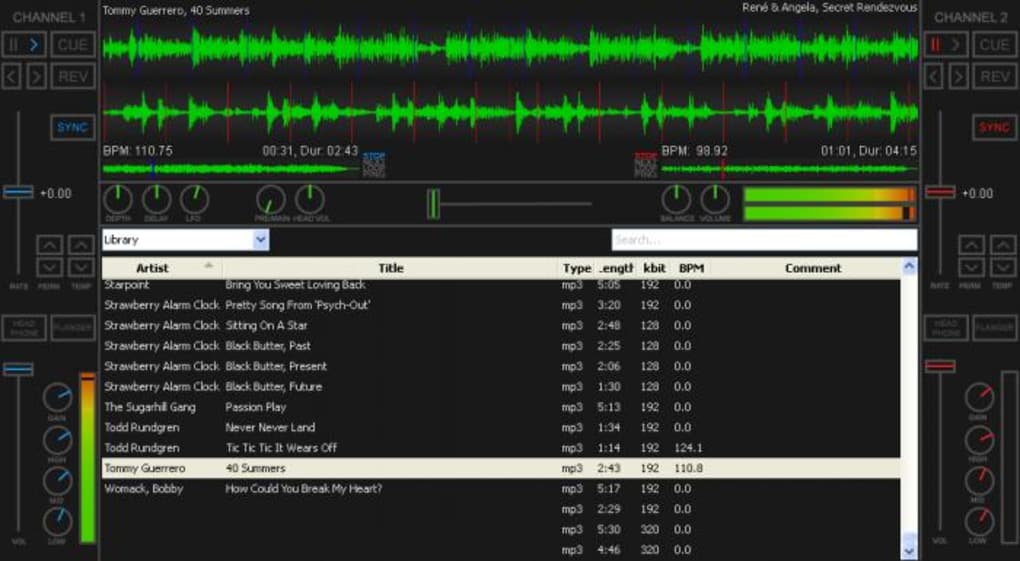
The Mixxx interface is designed around a two-channel mixing console, emulating the functionality of professional DJ equipment. Each channel has its own dedicated set of controls, enabling independent manipulation of the audio tracks loaded onto them. The core controls include:
- Play/Pause: Initiate and stop playback of the selected track on each channel.
- Cueing: Allows you to listen to a track privately through your headphones before introducing it into the main mix. This is crucial for beatmatching and seamless transitions.
- Pitch Control: Adjust the speed of the track, enabling precise beatmatching with other tracks. This is fundamental for creating smooth, continuous mixes.
- EQ (Equalizer): Fine-tune the audio frequencies (bass, mid, treble) of each track to achieve a balanced and harmonious sound.
- Gain/Volume: Control the overall volume level of each track independently. This allows for adjusting the loudness of individual tracks relative to each other and the overall mix.
- Filters: Additional effects to shape the sound, like high-pass and low-pass filters, adding creative flair to your mixes.
In the center of the Mixxx interface, you’ll find the master controls, governing the overall mix output. These include:
- Master Volume: Controls the overall volume of the audio output.
- Balance: Adjusts the balance between the left and right audio channels.
- Crossfader: A crucial control for smoothly transitioning between the two channels. By moving the crossfader, you can gradually fade out one track while simultaneously fading in another, creating a seamless blend.
Mixxx presents the waveforms of the loaded tracks, visually displayed one above the other, mirroring the arrangement found in professional DJ software like Virtual DJ. This visual representation is invaluable for beatmatching, allowing DJs to align the beats of different tracks by visually comparing their waveforms.
Utilizing Mixxx Features: BPM Detection, Synchronization, and Cue Points
One of Mixxx’s key strengths lies in its accurate BPM (Beats Per Minute) detection. The software automatically analyzes tracks to determine their tempo, providing essential information for beatmatching. While Mixxx assists in BPM detection, the art of precise beatmatching ultimately relies on the DJ’s ear and skill. The software’s “sync” button on each channel attempts to automatically synchronize the BPMs of two tracks, offering a helpful tool for beginners. However, manual fine-tuning is often necessary to achieve a perfect beatmatch.
Mixxx allows DJs to set cue points, marking specific points within a track for easy access during mixing. This feature is particularly useful for creating precise transitions or accessing specific sections of a track, enhancing the DJ’s creative control and flexibility. Cue points are saved automatically and persist across sessions, reducing the need for repetitive setup.
Beyond the Basics: Advanced Features and Customization Options
Mixxx offers a wealth of advanced features to cater to the needs of more experienced DJs. These include:
- Extensive Effects: Mixxx supports a range of audio effects, including reverb, delay, flanger, and more, enhancing the creativity and sonic possibilities of your mixes.
- Recording Capabilities: Mixxx enables the recording of your DJ sets, allowing you to save and share your mixes.
- Support for Multiple Audio Formats: Mixxx supports a wide array of audio file formats, making it compatible with most music collections.
- Keyboard Shortcuts: Customizable keyboard shortcuts allow for hands-free control, accelerating workflow and enhancing the DJing experience.
- Integration with External Controllers: Mixxx offers compatibility with various external DJ controllers, enabling a more tactile and intuitive control experience.
- Playlist Management: Efficient playlist management tools make it easy to organize and access your tracks, streamlining your workflow during performances.
- Advanced Looping and Sampling: Mixxx provides advanced looping and sampling capabilities for more intricate and creative mixing.
Mixxx’s open-source nature allows for continuous development and community contributions, ensuring ongoing improvements and additions of features. This community aspect also fosters a supportive environment for users to share tips, tutorials, and custom configurations.
Mixxx: A Comparison with Other DJ Software
While Mixxx stands as a strong contender in the world of free DJ software, comparing it to commercial options like Traktor Pro, Virtual DJ, and Serato DJ provides valuable context. Mixxx excels in its affordability (being entirely free) and its extensive feature set, rivaling many commercial options in terms of functionality. However, some commercial software offers a more polished user interface and sometimes more comprehensive support. The choice ultimately depends on individual needs and preferences. For budget-conscious DJs or those who value the open-source ethos, Mixxx presents a compelling and capable alternative.
Conclusion: Mixxx – A Powerful Tool for Aspiring and Experienced DJs Alike
Mixxx delivers a surprisingly comprehensive and robust DJing experience, considering its free and open-source nature. Its combination of ease of use for beginners and advanced features for experienced DJs makes it a versatile and valuable tool. The ability to easily import music, utilize intuitive controls, and leverage features such as BPM detection, cue points, and a range of effects, all contribute to a satisfying and creative DJing journey.
While the initial learning curve might be slightly steeper than some commercial alternatives, the investment of time is handsomely rewarded. Mixxx empowers DJs of all skill levels, whether they’re just starting their mixing journey or looking for a powerful and free alternative to costly commercial software. Its open-source nature ensures continuous development and community support, making Mixxx a long-term, reliable, and continually improving option for anyone seeking a high-quality DJing experience.
File Information
- License: “Free”
- Latest update: “May 6, 2025”
- Platform: “Windows”
- OS: “Windows Vista”
- Language: “English”
- Downloads: “254.6K”
- Size: “118.57 MB”


