
MKV to MP3 Converter is a Windows-based software application designed for the straightforward conversion of Matroska Video (MKV) files into MP3 audio format. This review will delve into its functionalities, ease of use, performance, and compare it to other available options.
Ease of Use and Interface
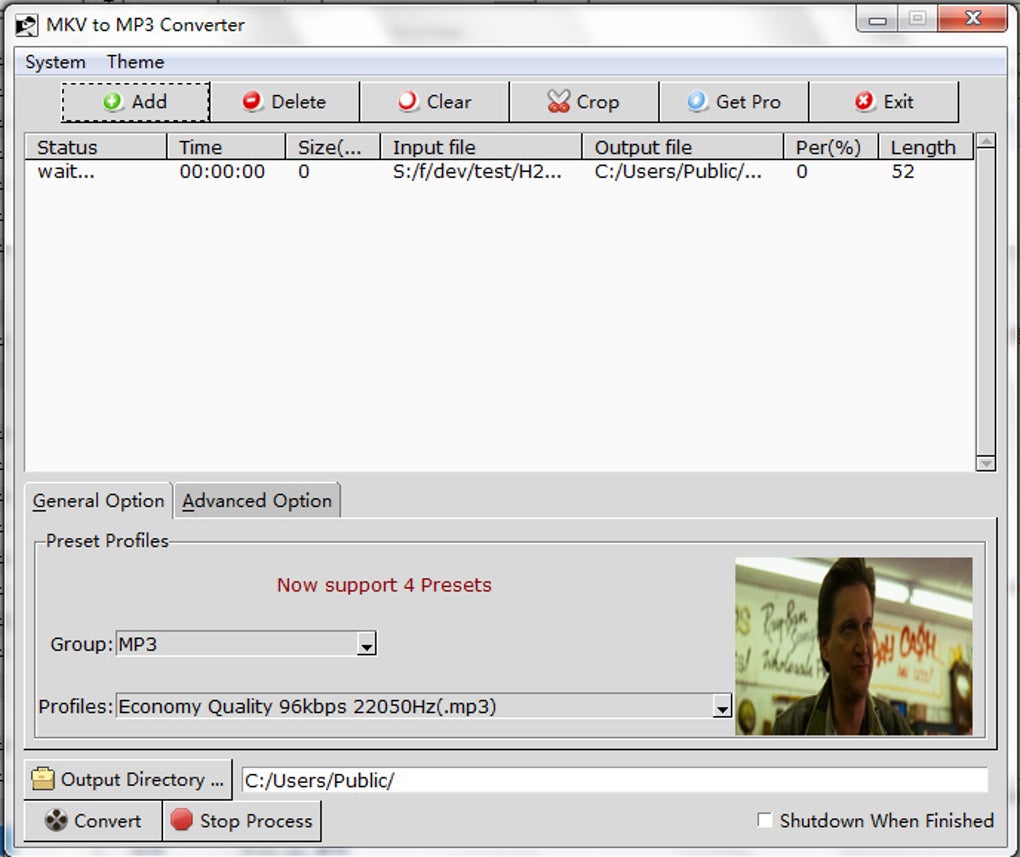
One of the most significant strengths of MKV to MP3 Converter is its user-friendly interface. Even individuals with limited technical expertise will find the process intuitive and straightforward. The software eschews complex settings and options, prioritizing a streamlined conversion experience. The core function—converting MKV to MP3—is readily accessible, requiring minimal clicks to initiate and complete the process. This simplicity makes it ideal for both casual users and those seeking a quick and efficient solution without navigating intricate menus or configuration options. The absence of overwhelming choices streamlines the workflow, allowing users to focus on the primary task of audio extraction. This intuitive design contributes significantly to its popularity among users who value efficiency and convenience.
Conversion Speed and Performance
The software boasts impressive conversion speeds, significantly faster than many competing applications. The developers claim a 300% increase in conversion speed compared to other methods or software, a claim that warrants closer examination. While independent benchmarks are needed to validate this exact figure, user reviews generally confirm the software’s relatively high speed. This rapid processing time is a considerable advantage, particularly for users dealing with large MKV files or batch conversions. The ability to rapidly extract audio tracks from video files without compromising significant time is a key selling point, enhancing overall productivity and user satisfaction. The multi-threading capabilities further enhance performance, allowing for parallel processing of multiple files, thus substantially reducing the overall conversion time for large batches.
Output Quality and Customization Options
While speed is a considerable benefit, the quality of the resulting MP3 file is paramount. User testimonials frequently highlight the high-quality audio produced by the converter. The software allows for some customization of output parameters, including bitrate, though the extent of these customization options is more limited than some professional-grade audio editing software. This balance between simplicity and quality is a key strength, catering to users who want good sound without needing extensive audio engineering knowledge. For users prioritizing quick and satisfactory audio extraction over fine-grained control over every audio parameter, this balance offers a practical and efficient approach.
Features and Functionality
Beyond basic conversion, MKV to MP3 Converter incorporates several helpful features. The batch conversion capability allows for the simultaneous processing of multiple MKV files, significantly enhancing efficiency for users managing large collections of videos. The ability to specify custom output file sizes enables optimization for various devices, including portable MP3 players with limited storage capacity. The automatic shutdown feature after conversion is a convenient addition, particularly for overnight batch processing. The software automatically calculates the bitrate based on the selected output file size, simplifying the process and reducing the need for manual adjustments. This intelligent automation further simplifies the user experience and contributes to its overall accessibility.
Compatibility and System Requirements
A significant limitation of MKV to MP3 Converter is its compatibility with only older Windows versions. This restriction excludes a substantial portion of current Windows users, limiting its overall accessibility and appeal. The lack of support for newer operating systems is a considerable drawback, hindering its adoption by a broader audience. The absence of a macOS version further restricts its market reach, leaving a significant user base unable to benefit from its functionalities. This limited platform support significantly diminishes the software’s potential user base and is a critical area for improvement.
Pricing and Licensing
MKV to MP3 Converter is noteworthy for being completely free of charge. Unlike many applications offering a “free trial” period followed by a paid subscription or purchase, this software remains free to download and use indefinitely. This accessibility makes it a compelling option for users seeking a cost-effective solution for their audio extraction needs. The absence of any licensing fees or hidden costs contributes to its widespread appeal and popularity within its target user segment. The free availability contrasts sharply with many comparable applications that employ a freemium or paid model, enhancing the value proposition of MKV to MP3 Converter.
Comparison with Alternative Software
Several alternative MKV to MP3 converters are available, each with its own strengths and weaknesses. Some offer more advanced features such as extensive audio editing capabilities, support for a wider range of input and output formats, or cross-platform compatibility. However, these often come at the cost of increased complexity and potentially higher price points. MKV to MP3 Converter stands out due to its simplicity, speed, and free licensing, making it a strong contender for users prioritizing ease of use and efficiency over advanced functionality. A direct comparison with other popular options is needed to gauge its competitive position accurately.
User Reviews and Feedback
User reviews consistently praise the software’s speed and ease of use. Many users appreciate the straightforward interface and quick conversion times. However, the criticism regarding limited Windows compatibility and the lack of a macOS version are frequently echoed in user feedback. The generally positive user reviews underscore the software’s success in achieving its primary goal—providing a simple and efficient method for converting MKV files to MP3. However, the recurring feedback on compatibility limitations suggests a critical area for improvement to expand the software’s reach and appeal to a larger audience.
Conclusion
MKV to MP3 Converter presents a compelling solution for users seeking a fast, easy, and free method to extract audio from MKV video files. Its intuitive interface and rapid conversion speeds are significant advantages. However, the limited compatibility with older Windows versions and the absence of macOS support severely restrict its overall accessibility. Users prioritizing simplicity and speed, and who are using supported Windows versions, will likely find it a highly effective tool. However, those needing broader platform compatibility or more advanced features will need to explore alternative applications. The developers addressing the compatibility limitations would significantly enhance the software’s potential and broaden its appeal to a significantly larger user base.
File Information
- License: “Trial version”
- Latest update: “July 11, 2023”
- Platform: “Windows”
- OS: “Windows 2003”
- Language: “English”
- Downloads: “150.3K”
- Size: “16.30 MB”


