
MKV to MP4 Converter is a Windows-based video conversion tool designed to simplify the process of changing Matroska Video (.MKV) files into the more widely compatible MPEG-4 (.MP4) format. This functionality is particularly valuable for users who need to transfer video files to devices that don’t support the MKV format. While offering a range of features, the software’s limitations, particularly its trial version restrictions, warrant careful consideration before committing to a purchase. This review delves into the software’s strengths, weaknesses, and overall user experience.
Ease of Use and Interface
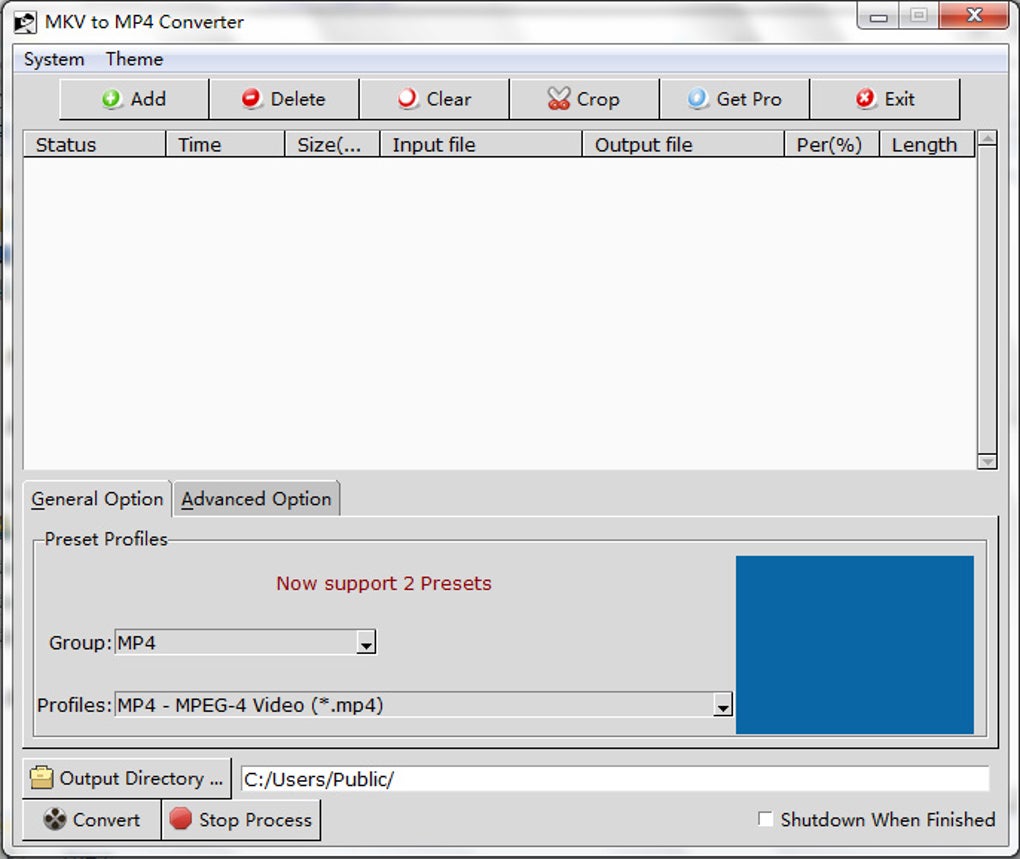
The MKV to MP4 Converter boasts a user-friendly interface, appealing to both technically proficient and novice users. The program’s installer is remarkably compact (around 17MB), ensuring a quick and straightforward installation process. The interface is intuitive, allowing users to easily add or remove video files for conversion. This simple design enhances accessibility, making the conversion process readily manageable for users of all technical backgrounds.
Beyond basic file addition and removal, the software provides a comprehensive array of options to customize the video conversion process. Users can fine-tune various parameters, including cropping to adjust the screen size, removing unwanted content, modifying video and audio quality settings, and selecting specific video codecs. These advanced options empower users to optimize their converted videos for specific devices or preferences.
For users who prefer a hands-off approach, the “Auto” option automatically optimizes the conversion parameters, eliminating the need for manual adjustments. This feature is particularly helpful for those unfamiliar with video encoding settings. Preset options further streamline the conversion process, allowing users to select output devices (such as iPods, PSPs, or Apple TVs) and let the software automatically optimize the video resolution and screen size accordingly. Various MP4 profiles are also available, including widescreen, faster compression options, and a “no re-encode” profile which simply converts the file without compression or quality changes. This variety caters to a wide spectrum of user needs and technical expertise.
Batch Conversion and Multitasking Capabilities
MKV to MP4 Converter stands out for its efficient handling of batch conversions, making it ideal for users who need to convert large numbers of video files simultaneously. The software’s “Add” button allows users to drag and drop multiple files into the queue, significantly reducing the time and effort required compared to adding files individually. Moreover, users can apply the same parameters and settings to all queued files simultaneously, promoting efficiency and consistency across the batch conversion process.
A noteworthy feature is the software’s ability to automatically shut down the computer after completing the conversion process. This is particularly beneficial for users who initiate conversions overnight or when they are away from their computer. However, users can toggle this “Shutdown When Finished” option off if they prefer to manage the system shutdown manually. This flexibility allows users to balance the convenience of automatic shutdown with the potential need to conserve system resources.
Performance and Conversion Speed
The software’s advertised conversion speed is a significant selling point, claiming a conversion speed increase of over 300% through multithreading. While the actual speed can vary based on various factors (including the input file size, computer specifications, and chosen conversion settings), user reviews suggest a relatively fast conversion process compared to some other converters. However, independent benchmarking would be necessary to accurately verify these performance claims.
Limitations and Drawbacks
Despite its strengths, the software is not without limitations. The most significant drawback is the restriction imposed by the free trial version, which only converts half of the input video. This limitation significantly hinders the usability of the free trial, potentially discouraging users from purchasing the full version. The need to purchase a license to convert full-length videos places the MKV to MP4 Converter at a considerable disadvantage compared to many other free or freemium video converters that offer full functionality without such restrictions.
Furthermore, while the software offers a wide range of conversion options, some users have reported issues with certain file types or settings. Some user reviews mention encountering difficulties or unexpected behavior during the conversion process. These issues highlight the importance of reading user reviews and carefully considering the potential limitations before relying on this software for crucial video conversions.
Comparison with Alternative Video Converters
The market offers numerous video converters, each with its own strengths and weaknesses. Direct comparison with established converters like Total Video Converter reveals a key difference: the free availability of features. Many competitors provide significantly more comprehensive functionality within their free versions, eliminating the need for a paid license to access essential features. This makes MKV to MP4 Converter less competitive in the landscape of readily available, free-to-use video converters.
User Reviews and Feedback
User reviews highlight a mixed reception of the MKV to MP4 Converter. While some users praise the software’s speed and ease of use, others express frustration with the limitations of the free trial and occasional conversion errors. The inconsistencies in user feedback emphasize the need for caution and thorough research before deciding whether this software aligns with individual needs and expectations. The negative reviews mentioning the trial version limitations and the need for payment to access full functionality are particularly concerning and should be a factor in a user’s decision-making process.
Conclusion
MKV to MP4 Converter offers a straightforward and user-friendly interface, coupled with the ability to handle batch conversions efficiently. Its array of customizable settings caters to both novice and experienced users. However, the significant limitations of its free trial and its paid-only access to full functionality significantly detract from its overall value proposition. Compared to many free or freemium alternatives that offer a more complete feature set without cost, the MKV to MP4 Converter’s restrictive pricing model and inconsistent user feedback should encourage users to carefully evaluate other options before deciding whether to invest in this software. The software might suit users who require a simple, albeit limited, free trial for occasional conversions, but for frequent or large-scale video conversions, alternative free or freemium software might prove more advantageous.
File Information
- License: “Trial version”
- Latest update: “July 11, 2023”
- Platform: “Windows”
- OS: “Windows XP”
- Language: “English”
- Downloads: “829.4K”
- Size: “18.05 MB”


