
Converting between ebook formats is a common task for avid readers and writers alike. The need to switch between MOBI and EPUB files often arises due to the compatibility limitations of various e-readers and software applications. MOBI, primarily associated with Amazon Kindle devices, and EPUB, a more widely supported open standard, present a conversion challenge for users seeking seamless cross-platform reading. This guide explores the world of MOBI to EPUB converters, outlining their functionalities, benefits, and considerations when choosing the right tool for your needs.
Understanding MOBI and EPUB Formats
Before delving into the specifics of converters, it’s crucial to understand the fundamental differences between MOBI and EPUB file formats. This knowledge helps in selecting the most appropriate conversion method and in anticipating any potential limitations or compromises during the process.
MOBI (Mobipocket): MOBI is a proprietary ebook file format primarily used by Amazon Kindle devices. While Kindle supports other formats, MOBI remains its native format, often resulting in optimized display and functionality on Kindle devices. MOBI files can incorporate various features, including images, hyperlinks, and tables of contents. However, its proprietary nature limits its broader compatibility with other e-readers and software.
EPUB (Electronic Publication): EPUB is an open standard ebook format based on XML and widely supported across a range of e-readers, tablets, smartphones, and software applications. Its open nature ensures broader compatibility and accessibility. EPUB files support rich formatting, including embedded fonts, images, hyperlinks, and advanced layout features such as reflowable text. This allows for a consistent reading experience across various devices, adapting to screen sizes and resolutions.
The key difference lies in accessibility and compatibility. EPUB, being open standard, provides greater flexibility and cross-platform compatibility, while MOBI is largely confined to the Amazon ecosystem. This inherent difference drives the need for conversion tools that bridge this gap, enabling users to enjoy their ebook collection across a wider spectrum of devices.
The Need for MOBI to EPUB Converters
The primary reason for utilizing MOBI to EPUB converters is to expand the compatibility of your ebooks. If you have a collection of MOBI files acquired through Amazon or other sources, converting them to EPUB unlocks the ability to read them on a much broader range of e-readers and software applications beyond the Kindle ecosystem.
Here are several compelling reasons to convert MOBI to EPUB:
-
Enhanced Device Compatibility: This is arguably the most significant advantage. Converting to EPUB ensures your books are readable on virtually any e-reader or ebook reading software that supports the EPUB format, irrespective of the manufacturer or operating system.
-
Improved Accessibility: EPUB’s open standard fosters greater accessibility for users with disabilities. EPUB files often support features catering to visually impaired readers, such as text-to-speech functionality and adjustable font sizes and styles.
-
Enhanced Formatting Options: While MOBI can handle formatting, EPUB generally offers more sophisticated formatting options, allowing for a more customized and visually appealing reading experience. This is especially beneficial for books with complex layouts or visual elements.
-
Future-Proofing Your Collection: By converting to EPUB, you safeguard your ebook collection against potential changes or limitations related to proprietary formats like MOBI. The open standard of EPUB makes your ebooks less vulnerable to format obsolescence.
-
Sharing and Collaboration: Sharing EPUB files is generally easier than sharing MOBI files, as EPUB enjoys broader compatibility among various platforms and devices. This is advantageous for sharing books among friends, family, or for collaborative projects.
Choosing the Right MOBI to EPUB Converter
Several MOBI to EPUB converters are available, both online and as dedicated software applications. Choosing the right tool depends on several factors, including your technical expertise, the volume of files you need to convert, and the desired level of control over the conversion process.
Factors to Consider:
-
Ease of Use: Some converters are simpler and more intuitive than others. If you’re not technically inclined, a user-friendly interface is paramount.
-
Batch Conversion: For large ebook collections, the ability to convert multiple files simultaneously is crucial, saving significant time and effort.
-
Conversion Speed: The speed of conversion varies across different converters. Faster converters are preferred for larger collections.
-
Output Quality: A reliable converter preserves the original formatting and layout as accurately as possible. Poorly converted files can result in distorted text, misplaced images, and broken hyperlinks.
-
Additional Features: Some converters offer extra features, such as metadata editing, cover image preservation, and the ability to customize conversion settings.
-
Cost: Converters range from free online tools to paid software applications with advanced features. Consider the cost versus the benefits offered.
-
Security and Privacy: When using online converters, be mindful of the security and privacy implications of uploading your ebooks to a third-party website.
Common MOBI to EPUB Converter Types
MOBI to EPUB converters come in various forms:
-
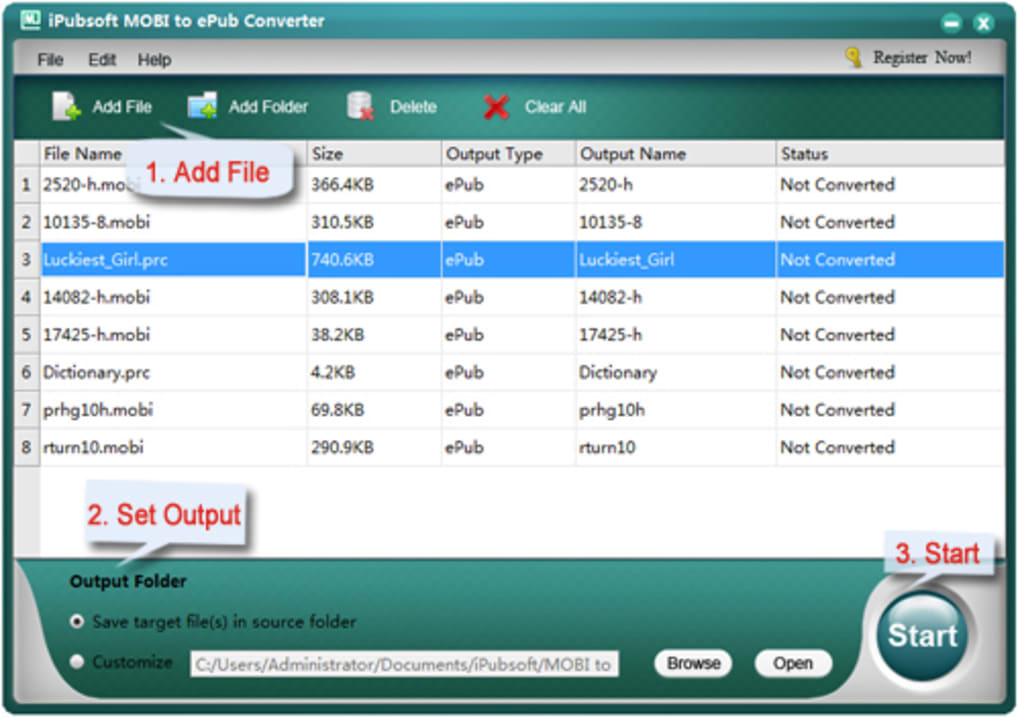
Dedicated Software Applications: These are standalone programs offering advanced features and control over the conversion process. They generally provide batch conversion capabilities and more robust handling of complex MOBI files.
-
Online Converters: These are web-based tools requiring no software installation. They are convenient for occasional conversions but may be slower and less feature-rich than dedicated applications. They also raise privacy concerns since you upload your ebook files to an external server.
-
Calibre: Calibre is a highly versatile and popular ebook management application. It functions as a powerful ebook converter, supporting multiple formats, including MOBI and EPUB, and offering a wide range of advanced options for customization and management.
Regardless of the type of converter you choose, it’s essential to back up your original MOBI files before performing the conversion, as there’s always a small risk of data loss or corruption during the process.
Troubleshooting and Potential Issues
While MOBI to EPUB conversion is generally straightforward, several issues can arise:
-
Formatting Inconsistencies: Some formatting elements might not translate perfectly from MOBI to EPUB. Complex layouts or specialized formatting could be lost or altered during conversion.
-
Image Loss or Corruption: Images embedded in MOBI files might not render correctly in the converted EPUB file.
-
Metadata Issues: Metadata (author, title, etc.) might not transfer correctly.
-
Conversion Errors: Rarely, errors might occur during the conversion process, preventing a successful transformation.
If you encounter any issues, try a different converter or consult the converter’s documentation for troubleshooting tips. Experimenting with different settings and options can help improve conversion accuracy.
Conclusion
Converting MOBI to EPUB files expands the versatility of your ebooks, allowing you to enjoy them across a far broader range of devices and platforms. By carefully considering the factors outlined in this guide, you can select the most appropriate converter for your needs, ensuring a seamless and successful conversion process, ultimately maximizing the enjoyment of your ebook collection. Remember to always back up your original files and to exercise caution when using online converters, prioritizing those with a strong reputation for security and privacy.
File Information
- License: “Trial version”
- Version: “2.1.3”
- Latest update: “October 15, 2012”
- Platform: “Windows”
- OS: “Windows NT”
- Language: “English”
- Downloads: “28.3K”
- Size: “7.90 MB”


