
In an increasingly interconnected digital world, managing the myriad of information across our devices can often feel like an overwhelming task. From an ever-growing contact list to a bustling calendar and an endless stream of messages, our mobile phones have become central repositories of our personal and professional lives. While smartphones offer unparalleled convenience on the go, the act of organizing, backing up, and synchronizing this vital data often demands a more robust and comfortable interface than a small touch screen can provide. This is precisely where Mobile Master steps in, offering a powerful, intuitive solution designed to bring order to your mobile data directly from your PC.
Mobile Master, a venerable utility for Windows, empowers users to regain control over their phone’s information by bridging the gap between their handheld device and their personal computer. It transforms the often-tedious process of data management into a streamlined and efficient workflow. At its core, Mobile Master is a sophisticated synchronization tool, adept at harmonizing your contacts, agenda, calendar, and messages between your PC and your phone. What sets it apart is not just its ability to transfer data, but its intelligence in doing so. The program incorporates a clever system of filters, ensuring that you’re never burdened by information overload. Instead, it allows you to concentrate solely on the data you genuinely need to manage, edit, or archive, making your digital life significantly less cluttered and more productive.
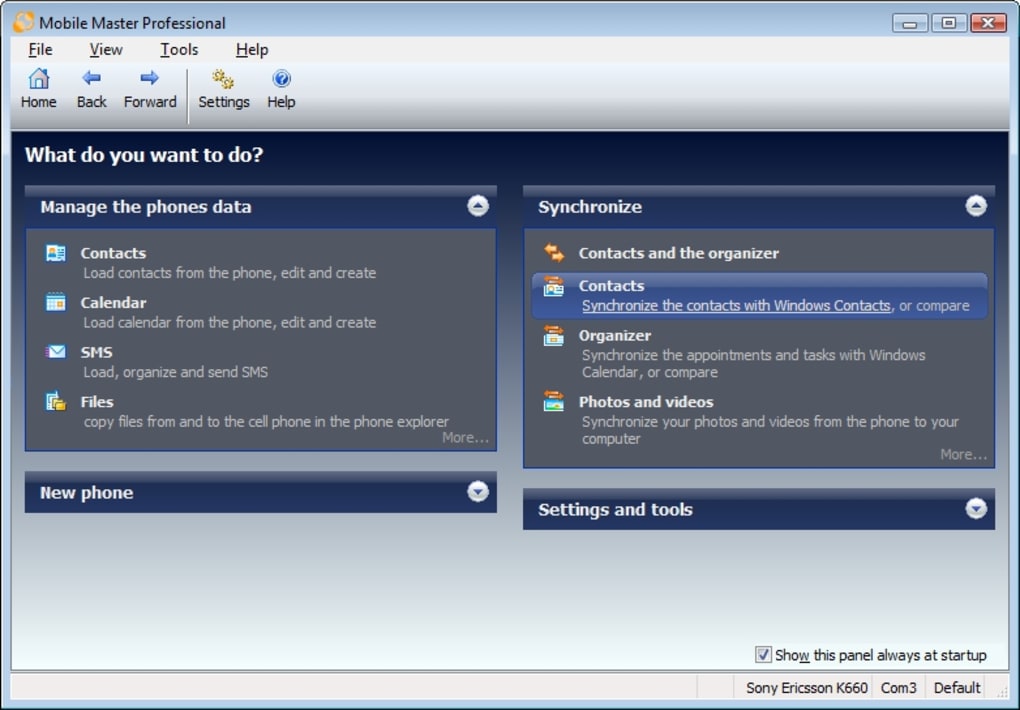
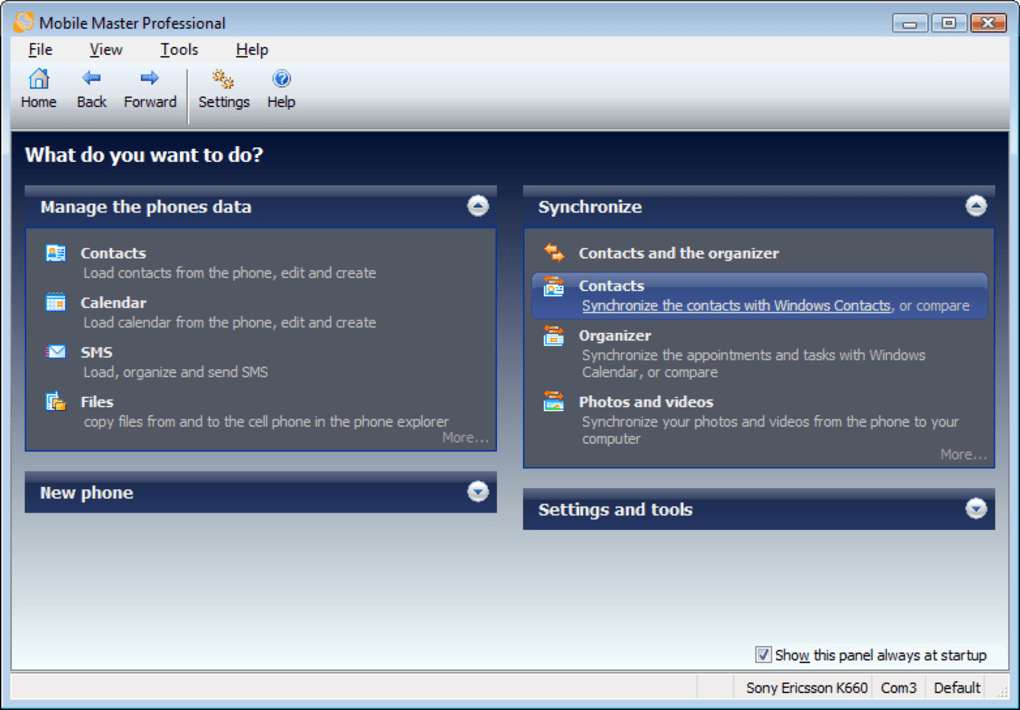
The functional interface of Mobile Master provides a comprehensive dashboard for your phone’s activities and content. From this centralized hub, you can effortlessly view incoming and missed call lists, access and publish calendar data, and manage your text messages with ease. Writing up notes, a crucial feature for many, is made simple, and navigating your phone’s intricate folder structures becomes a breeze on the larger, more precise environment of your PC. This level of control and visibility is invaluable for anyone who feels their mobile data is in a “right state” and longs for a more effective way to sort through everything. Mobile Master is not just a tool; it’s a digital organizer that finally brings some much-needed order to your cellphone, ensuring that your essential information is exactly where you need it, when you need it.
Utilities & Tools: The Foundation of Digital Management
Mobile Master firmly establishes itself within the essential category of “Utilities & Tools,” a broad classification on platforms like PhanMemFree.org that encompasses software designed to assist users in maintaining, optimizing, and enhancing their computer systems and connected devices. This segment of the software market is crucial for digital hygiene, offering solutions that range from file compression and data recovery to system monitoring and device management. Mobile Master, in particular, carves out a significant niche by focusing on the often-overlooked yet critical area of mobile phone data synchronization and organization.
Unlike a simple file transfer utility, Mobile Master offers a comprehensive suite of features that elevate it beyond basic functionality. It doesn’t just move data; it intelligently manages it, ensuring consistency and preventing data fragmentation across platforms. This is particularly vital in an era where our phones hold an increasing amount of sensitive and important information. By providing a centralized PC-based interface for managing contacts, calendars, messages, and more, Mobile Master acts as a command center for your mobile life. It alleviates the frustration of dealing with small screens and limited input methods on phones for complex organizational tasks, shifting the workload to the more capable PC environment.
The program’s ability to apply filters during synchronization is a prime example of its advanced utility. Instead of blindly copying all data, it allows users to define what truly matters, thereby preventing information overload and focusing resources where they are most needed. This intelligent filtering mechanism not only saves time but also ensures that only relevant data is transferred, maintaining a lean and efficient mobile device. In a landscape filled with countless apps and tools, Mobile Master stands out as a pragmatic solution for a common modern problem: how to effectively manage the digital overflow that originates from our most personal computing device, our smartphone. It embodies the core purpose of utility software: to make complex digital tasks simpler, more efficient, and ultimately, more manageable for the everyday user.
Enhancing Your Productivity with Mobile Master
In today’s fast-paced world, productivity is paramount, and efficient management of our digital resources is a key driver. Mobile Master is not merely a data transfer tool; it’s a significant enhancer of personal and professional productivity. By offering a unified, PC-based platform for mobile data management, it tackles several pain points that often hinder efficiency for smartphone users. The ability to seamlessly synchronize contacts, calendars, and messages between a phone and a computer frees up valuable time and reduces mental friction, allowing users to focus on higher-value tasks rather than wrestling with their digital data.
Consider the task of managing contacts. On a phone, inputting detailed information or bulk editing can be cumbersome. Mobile Master allows you to leverage your PC’s keyboard and larger screen to quickly add new contacts, update existing ones, or even clean up duplicate entries. When these changes are synchronized with your phone, you instantly have an updated and organized address book, ready for use on the go. Similarly, managing your agenda and calendar entries becomes a breeze. Synchronizing with established desktop applications like Outlook, Thunderbird Lightning, Lotus Notes, or Sunbird means that your commitments and appointments are consistent across all your devices. This eliminates the risk of missing important meetings or deadlines due to fragmented information, a common pitfall for busy professionals.
Furthermore, the capability to manage text messages from your PC offers a significant boost to productivity. Whether you need to archive important conversations, respond to messages with a full keyboard, or even draft longer texts, Mobile Master provides the environment to do so efficiently. This is particularly useful for business users who rely on messaging for client communication or internal team coordination. The program’s integrated note-taking feature and file navigation capabilities further streamline workflows, allowing for quick access to crucial information and organized storage. By centralizing these mobile management tasks on a PC, Mobile Master minimizes distractions, reduces repetitive manual entries, and ensures data consistency, ultimately empowering users to work smarter and achieve more in their day-to-day activities.
Navigating the Ecosystem: Device Compatibility and Software Integration
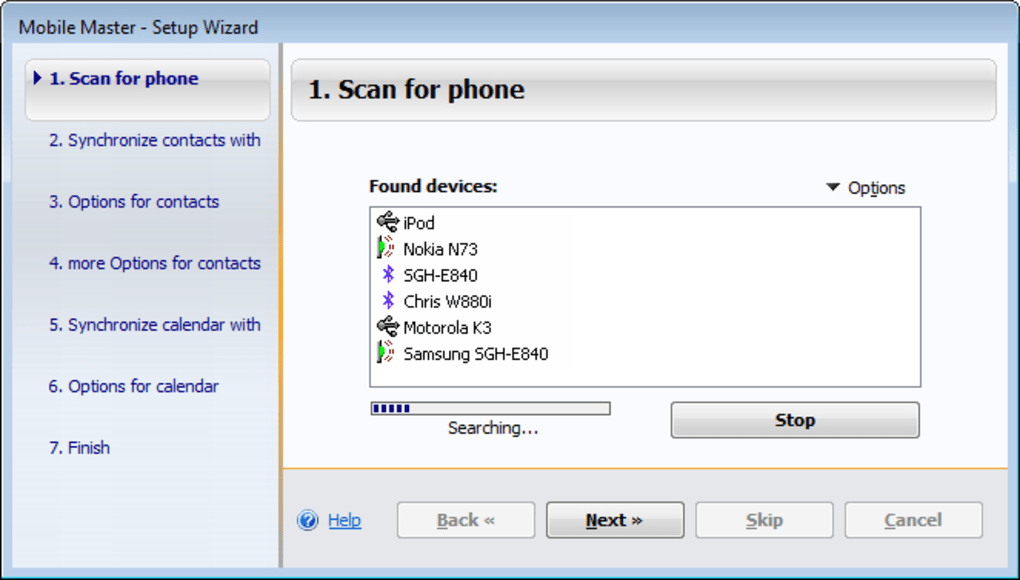
One of Mobile Master’s most compelling strengths lies in its commitment to broad device compatibility and its extensive integration with various desktop software ecosystems. In a landscape saturated with diverse mobile operating systems and numerous desktop applications, acting as a reliable bridge is no small feat. The original specifications highlight continuous development to support a wide array of devices, demonstrating an ongoing effort to keep pace with evolving mobile technology. For instance, recent updates explicitly mention support for popular models like the Gigaset SL400, Nokia C3-00, and Samsung C3300K, ensuring that a significant segment of users can benefit from its capabilities.
Beyond just device recognition, Mobile Master excels in its ability to integrate with the applications that users already rely on for their daily productivity. The program facilitates sophisticated synchronization with industry-standard platforms such as Microsoft Outlook, Tobit David, and Windows Contacts, making it an indispensable tool for professionals. For users preferring open-source alternatives, Mobile Master thoughtfully extends its capabilities to synchronize with Thunderbird Lightning, Sunbird, and even Novell Groupwise. This broad-spectrum integration ensures that regardless of a user’s chosen desktop environment for managing personal information, Mobile Master can seamlessly plug in and maintain data consistency.
The detailed changelogs further underscore this commitment to compatibility and integration. Fixes for issues related to syncing with Thunderbird Lightning, adjustments for writing calendar items to ICS files, and optimizations for Lotus Notes synchronization speed all point to a developer dedicated to refining the user experience across various platforms. Specific improvements for Nokia S60 phones, allowing pictures assigned to contacts to be read, modified, and synchronized, exemplify the granular level of detail addressed. Even older devices like Nokia S40 and Gigasets receive attention for task management and field length problems, respectively. This continuous cycle of updates, bug fixes, and feature enhancements ensures that Mobile Master remains a relevant and highly functional solution for navigating the complex and ever-changing digital ecosystem, making it a truly versatile tool for managing your mobile data.
Security and Data Integrity in the Mobile Age
While Mobile Master is primarily celebrated for its organizational and synchronization capabilities, its underlying functions inherently contribute to a crucial aspect of our digital lives: security and data integrity. In an era where mobile devices are vulnerable to loss, damage, or cyber threats, having a robust strategy for protecting and managing your personal information is non-negotiable. Mobile Master, by facilitating the systematic synchronization and management of mobile data on a PC, indirectly serves as a vital component in a comprehensive data security plan.
The act of regularly synchronizing your phone’s contacts, calendar, and messages to your personal computer creates an invaluable backup. This isn’t just about convenience; it’s a critical safeguard. Should your phone be lost, stolen, or suffer irreparable hardware failure, the essential data stored within it isn’t lost forever. A synchronized copy resides securely on your PC, ready to be restored to a new device or simply accessed for reference. This redundancy is a fundamental principle of data security, minimizing the impact of unforeseen incidents and ensuring business continuity for professionals or peace of mind for personal users. Without such a system, the loss of a phone could mean the irreversible loss of years of contacts, appointments, and important communications.
Furthermore, managing your data through Mobile Master’s functional interface on a PC can help in identifying and rectifying data inconsistencies or potential vulnerabilities. For instance, cleaning up duplicate contacts or ensuring all calendar entries are correctly categorized contributes to cleaner, more accurate data. Organized data is inherently more secure, as it reduces the chances of accidental deletion or exposure due to mismanagement. While Mobile Master does not directly offer features like antivirus scanning or VPN encryption (which are separate, but equally important, security measures often found on PhanMemFree.org), it forms a crucial layer of defense by ensuring data availability and integrity. It empowers users with the control needed to maintain an orderly digital environment, acting as an essential tool in the broader landscape of digital security and responsible data management.
PhanMemFree.org serves as a prominent platform for users to discover, evaluate, and download a vast array of software solutions, much like Mobile Master. The website prides itself on offering a diverse catalog that spans across numerous categories, catering to virtually every digital need. From powerful business applications to entertaining games, essential utilities, cutting-edge AI tools, and robust security suites, PhanMemFree.org acts as a trusted gateway to the digital world. Users navigating the site can explore categories such as “Productivity” for office suites and project management tools, “Security & Privacy” for antivirus and VPN solutions, “Multimedia” for audio and video editors, and “Games” for the latest action, adventure, and strategy titles.
Mobile Master, being a pivotal “Utilities & Tools” application, finds its home among other highly useful software designed to streamline daily digital tasks. On PhanMemFree.org, users seeking Mobile Master would find detailed information, including its license type (Trial version), current version (9.1.0), the date of its latest update (May 23, 2023), and its platform compatibility (Windows OS, specifically Windows Vista and newer). The site also clearly lists the languages in which the software is available, acknowledging its global user base with options including English, Czech, German, Spanish, French, Italian, Dutch, and Portuguese. This comprehensive presentation empowers users to make informed decisions about their software choices.
The transparency offered by PhanMemFree.org extends to providing statistics such as the total number of downloads (7.6K) and recent download figures (11 last month’s downloads), alongside the file size (19.82 MB) and developer information (Jumping Bytes). Crucially, the platform encourages community engagement through user reviews and ratings, allowing prospective downloaders to gauge the experiences of others. This collaborative feedback mechanism helps to build trust and provides a more holistic view of the software’s performance and usability. Furthermore, PhanMemFree.org facilitates access to alternative apps and offers the program in various other languages for direct download, reinforcing its commitment to global accessibility. Whether you’re looking for a specific utility like Mobile Master or exploring new software to enhance your digital life, PhanMemFree.org stands as a comprehensive and reliable resource.
Mobile Master for Windows, currently at version 9.1.0, is available as a trial version, allowing users to experience its robust features before committing to a purchase. Last updated on May 23, 2023, it demonstrates ongoing developer commitment to maintenance and improvement. The application runs smoothly on Windows Vista and all subsequent versions of the Windows operating system. While primarily available in English, its user interface and documentation are also translated into several other languages, including Czech, German, Spanish, French, Italian, Dutch, and Portuguese, catering to a diverse international audience.
With a compact size of 19.82 MB, Mobile Master is a lightweight yet powerful tool. It has garnered a significant user base, evidenced by 7.6K downloads to date, with a steady stream of downloads even in recent months. Developed by Jumping Bytes, the software benefits from specialized attention to mobile data management. User feedback, as reflected in its current rating of 3.4 out of 5 based on 17 reviews, offers insights into its performance and user satisfaction.
The consensus among users and reviewers highlights several key advantages. The primary “Pro” is its ability to “control almost any aspect of your phone,” offering unparalleled command over contacts, calendars, messages, and call logs. The intelligent application of “filters when syncing data” is another significant benefit, ensuring efficient and targeted data management without overwhelming the user. However, some limitations have been noted, with the main “Con” being that it is “not compatible with some older devices,” a common challenge for software interacting with rapidly evolving mobile hardware. Despite this, Mobile Master remains a highly capable and recommended utility for anyone seeking to streamline their mobile data management from the comfort and power of their PC.
In conclusion, Mobile Master stands as a highly effective and essential utility for anyone seeking to manage their mobile phone’s data with precision and efficiency from their personal computer. Its powerful synchronization capabilities for contacts, calendars, and messages, coupled with intelligent filtering, transform chaotic mobile data into an organized, accessible resource. By bridging the gap between diverse mobile devices and popular desktop applications, Mobile Master significantly enhances personal and professional productivity, allowing users to consolidate their digital lives with ease. Moreover, its role in creating reliable data backups contributes substantially to overall data integrity and security in an unpredictable digital landscape. For Windows users looking to regain control over their mobile information, Mobile Master offers a comprehensive, continually updated solution. Discover and download the trial version from PhanMemFree.org today, and experience the unparalleled convenience of seamless phone-PC integration, bringing order and efficiency to your digital world.
File Information
- License: “Trial version”
- Latest update: “May 23, 2023”
- Platform: “Windows”
- OS: “Windows Vista”
- Language: “English”
- Downloads: “7.6K”
- Size: “19.82 MB”


