
Mod Organizer 2 (MO2) is a powerful and versatile tool designed to streamline the management of modifications (mods) for a wide range of video games. This comprehensive guide delves into its features, benefits, and how it simplifies the often-complex process of modding, particularly for titles like Fallout and Skyrim. MO2 offers a significantly improved modding experience compared to traditional methods, mitigating conflicts and enhancing the overall stability of your game.
Understanding the Power of Mod Organization
Before diving into the specifics of MO2, it’s crucial to understand the challenges inherent in modding games without a dedicated tool. Many games, especially those with large and active modding communities (such as Fallout and Skyrim), have hundreds, even thousands, of available mods. These mods often modify core game files, leading to potential conflicts and instability if not managed carefully. Installing and uninstalling mods manually can be time-consuming, error-prone, and potentially lead to a corrupted game installation.
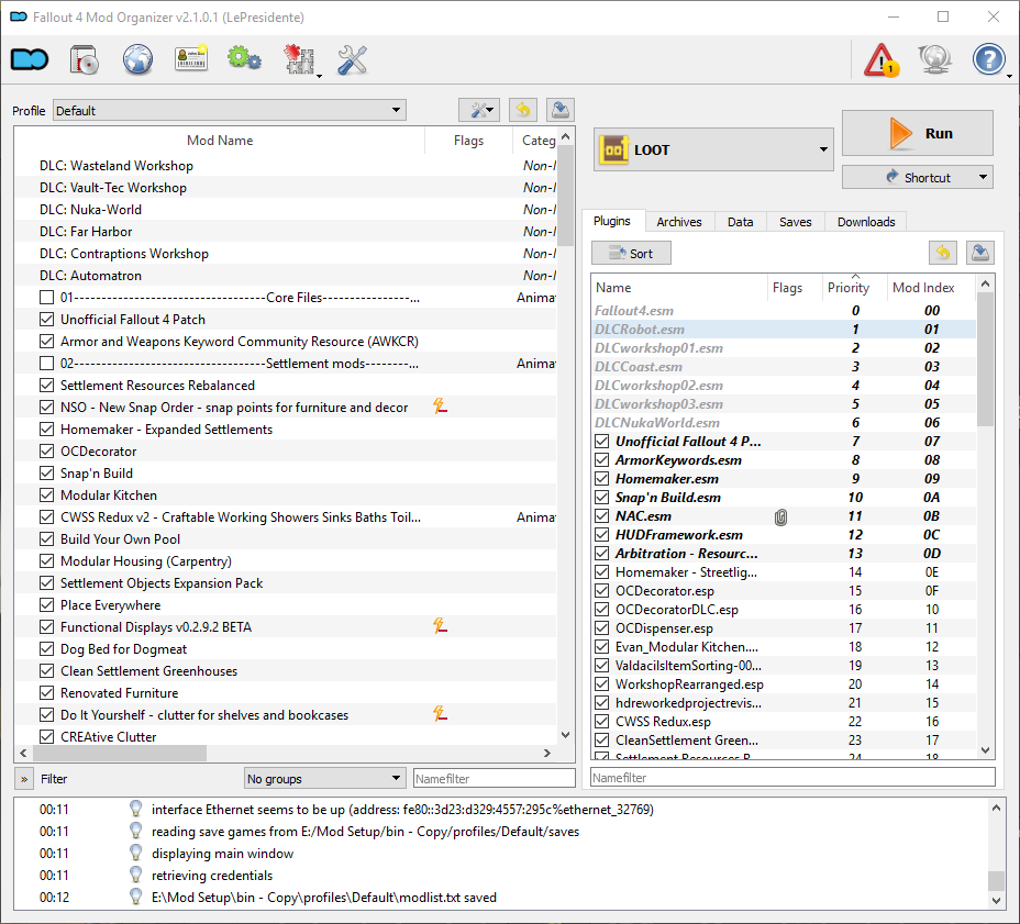
This is where Mod Organizer 2 shines. MO2 solves these problems by employing a virtual file system (VFS). Instead of directly modifying your game’s installation files, MO2 creates a virtual environment where mods are loaded. This means your original game files remain untouched, ensuring that you can always revert to a clean, unmodified state. This functionality dramatically reduces the risk of game crashes or conflicts stemming from incompatible mods.
Key Features and Functionality of Mod Organizer 2
MO2 boasts a comprehensive set of features designed to simplify and enhance the modding experience:
-
Virtual File System (VFS): The cornerstone of MO2’s functionality is its VFS. This isolates mods from the game’s core files, allowing for safe installation and removal of modifications without affecting the original game installation. It presents a virtualized view to the game, making it believe that the mods are directly installed within the game’s data folder, while in reality they reside in separate, organized directories. This significantly minimizes the risk of file conflicts and simplifies the uninstall process.
-
Profile Management: MO2 allows users to create multiple profiles, each representing a different mod configuration. This is invaluable for experimenting with various mod combinations without having to repeatedly install and uninstall mods. You can easily switch between profiles to test different gameplay experiences, ensuring that your main configuration remains intact.
-
Mod Loading Order: Managing the order in which mods are loaded is crucial to prevent conflicts. MO2 provides a clear and intuitive interface for adjusting the load order, allowing you to prioritize specific mods and ensure compatibility. This carefully controlled sequencing is essential for resolving issues that may arise from mod interactions.
-
Plugin Management: MO2 provides a simplified way to manage plugins (typically .esp or .esm files in Bethesda games), streamlining the process of activating and deactivating them. This further simplifies the management of mods, preventing conflicts and enabling rapid experimentation.
-
Intuitive User Interface: While powerful, MO2 maintains a user-friendly interface, making it accessible to both experienced modders and newcomers. The clearly organized layout and easily understandable controls minimize the learning curve.
-
Support for Multiple Games: Although originally designed for games using Bethesda’s Creation Engine (such as Skyrim and Fallout), MO2’s adaptable architecture makes it compatible with various games, although configuration may be required for games not explicitly supported. This broad compatibility makes it a versatile tool for many modding communities.
-
Automated Backup and Restore: MO2 offers backup and restore functionality, ensuring that your work is protected. This safeguards against accidental data loss or unintended consequences of mod alterations. This peace of mind is essential for those who invest considerable time in configuring and organizing their mods.
-
Extensibility: MO2’s functionality can be further extended through the use of external plugins and community-created tools. This extensibility opens the door for even greater customization and optimization. This allows for adapting the software to individual needs and preferences, offering a highly personalized modding experience.
Using Mod Organizer 2: A Step-by-Step Guide
While the specific steps may vary slightly depending on the game, the general workflow for using MO2 is as follows:
-
Installation: Download and install MO2 from a trusted source. Ensure you install it in a location that you can easily access.
-
Game Selection: Point MO2 to your game’s installation directory. This allows the software to understand the game’s file structure and adapt its functionality accordingly.
-
Profile Creation: Create a new profile for your mod setup. Profiles are crucial for testing different mod combinations and maintaining a clean baseline.
-
Mod Installation: Use MO2’s interface to add mods to your profile. This typically involves navigating to the mod’s download location and selecting the relevant files.
-
Load Order Management: Carefully arrange the order in which mods are loaded within your profile. This ensures that mods are properly layered and that potential conflicts are minimized.
-
Game Launch: Launch the game through MO2. This ensures that the game runs with the modified virtual file system and correctly loads all installed modifications.
-
Mod Management: Utilize MO2’s tools to add, remove, and rearrange mods within your profile, enabling easy experimentation with mod combinations.
Advantages of Using Mod Organizer 2
Compared to directly installing mods into a game’s directory or using simpler mod managers, MO2 provides several significant advantages:
- Reduced Risk of Game Corruption: The VFS system prevents direct alteration of the game files, minimizing the risk of corrupted installations and making it much simpler to fix problems if they arise.
-
Enhanced Mod Compatibility: The controlled environment and load order management features significantly reduce conflicts between mods, contributing to a more stable gaming experience.
-
Simplified Mod Management: The intuitive interface and streamlined workflow vastly simplify the process of installing, uninstalling, and managing large numbers of mods.
-
Easy Reversibility: Returning to an unmodified state or switching between different mod setups is quick and straightforward. This makes experimentation far less risky.
Comparison with Alternative Mod Managers
Several alternative mod managers exist, but MO2 stands out due to its robust features, virtual file system, and highly polished user interface. Other managers might be simpler for less experienced users, but MO2’s superior functionality becomes essential when dealing with complex mod setups or a significant number of modifications.
Conclusion: The Ultimate Modding Companion
Mod Organizer 2 transcends the capabilities of simple mod installers; it’s a sophisticated management system that empowers players to safely explore the vast potential of modding. Its virtual file system, profile management, and intuitive interface make it the ultimate tool for anyone serious about modding their games. Whether you’re a seasoned modder or just beginning your modding journey, MO2 significantly improves your experience, ensuring a smooth, stable, and enjoyable gameplay experience enriched by the countless possibilities of the modding community.
File Information
- License: “Free”
- Version: “2.2.0beta8”
- Latest update: “September 14, 2021”
- Platform: “Windows”
- OS: “Windows 7”
- Language: “English”
- Downloads: “1.9K”
- Size: “5.22 MB”


