
In the dynamic world of operating systems, user interfaces are constantly evolving, striving for a balance between aesthetic appeal and functional efficiency. Microsoft Windows, as the most widely used desktop OS, is no stranger to this perpetual refinement. While major updates often bring sweeping visual changes and new features, some smaller, yet frequently interacted-with, elements can sometimes lag. Among these are the “flyouts” – the ubiquitous visual cues that appear when you adjust your screen’s brightness, change the volume, toggle airplane mode, or control media playback. For years, these essential system indicators have clung to an older design language, leaving many users desiring a more contemporary and customizable experience. This is precisely where Modern Flyouts steps in, offering a much-needed overhaul to these often-overlooked components of the Windows user interface.
Modern Flyouts is more than just a cosmetic upgrade; it’s a utility designed to seamlessly integrate a modern aesthetic with enhanced functionality, breathing new life into these crucial system interactions. Born from an open-source initiative, this application reimagines the standard Windows flyouts, replacing their dated Metro design (a relic from Windows 8) with a sleek, Fluent Design-inspired interface complete with subtle animations, elegant transitions, and the hallmark rounded corners characteristic of Windows 10 and 11’s contemporary visual style. The result is an experience that feels truly native to the latest iterations of Windows, making your system feel cohesive and polished.
This comprehensive utility goes beyond mere visual improvements, introducing a suite of customization options that empower users to tailor their flyout experience to their exact preferences. From adjusting opacity levels and panel orientation to selectively disabling modules and gaining granular control over media playback, Modern Flyouts transforms a static, unchangeable system element into a dynamic, personalized tool. For those who believe that every detail contributes to a superior computing experience, Modern Flyouts emerges as an indispensable application, bridging the gap between legacy UI elements and the modern Windows ecosystem.
Understanding Windows Flyouts: The Need for Modernization
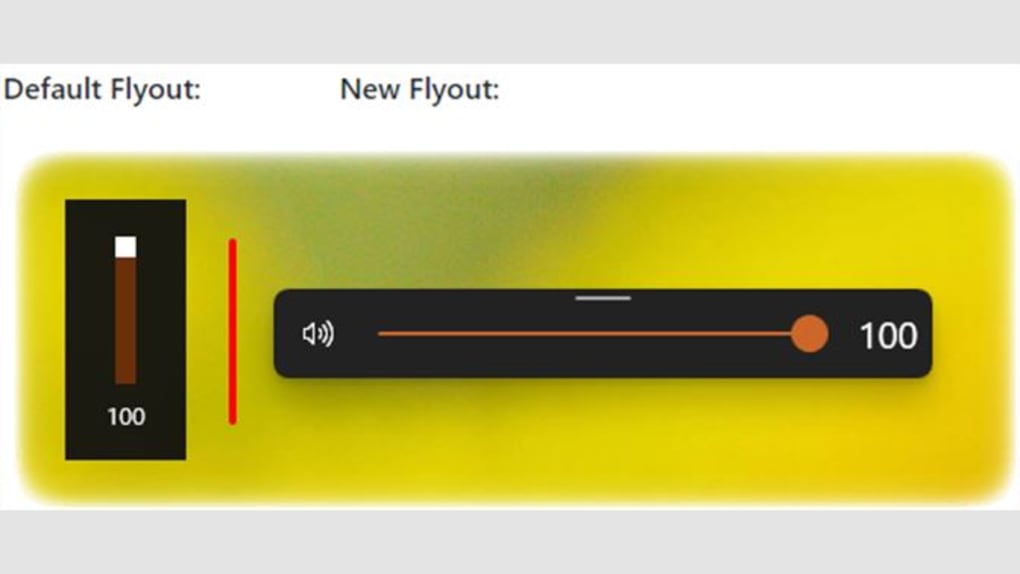
To fully appreciate the significance of Modern Flyouts, it’s helpful to understand the role of traditional Windows flyouts and the historical context of their design. Flyouts are momentary, overlaying user interface elements that provide immediate visual feedback for system-level actions. When you press the volume up or down key, a flyout appears, displaying the current volume level. Adjusting screen brightness, toggling airplane mode, or skipping a track in Spotify all trigger similar visual indicators. These are small, but frequent, interactions that contribute significantly to the overall user experience.
However, for a considerable period, these built-in flyouts have retained a design language that dates back to Windows 8’s “Metro” aesthetic. Characterized by sharp corners and a flat, somewhat utilitarian appearance, this design, while innovative at the time, has grown increasingly out of sync with the Fluent Design principles that Microsoft has been progressively integrating into Windows 10 and, more extensively, Windows 11. Fluent Design emphasizes depth, motion, material, and scale, alongside a renewed focus on fluidity and accessibility. The stark contrast between the sleek, rounded corners of modern Windows applications and the blocky, uncustomizable nature of the default flyouts created an undeniable visual dissonance.
This incongruity wasn’t just an aesthetic concern; it also spoke to a lack of user control. The default flyouts offered no customization options whatsoever. Users couldn’t change their position, alter their transparency, or even tweak the duration they remained on screen. For power users, or simply those who value a personalized and consistently modern desktop environment, these limitations became increasingly frustrating. Furthermore, while media playback flyouts did provide basic controls, they often lacked advanced functionalities such as shuffle or repeat, forcing users to open the media application itself for more granular control.
The need for modernization, therefore, stemmed from both a desire for visual consistency with the evolving Windows design language and a demand for greater functional flexibility and user customization. This gap presented a clear opportunity for a utility that could address these shortcomings, leading to the development and widespread adoption of solutions like Modern Flyouts. By understanding these historical and design contexts, the value proposition of a modern flyout replacement becomes abundantly clear – it’s about harmonizing the user experience, one small but significant UI element at a time.
Introducing Modern Flyouts: A Seamless Integration of Style and Functionality
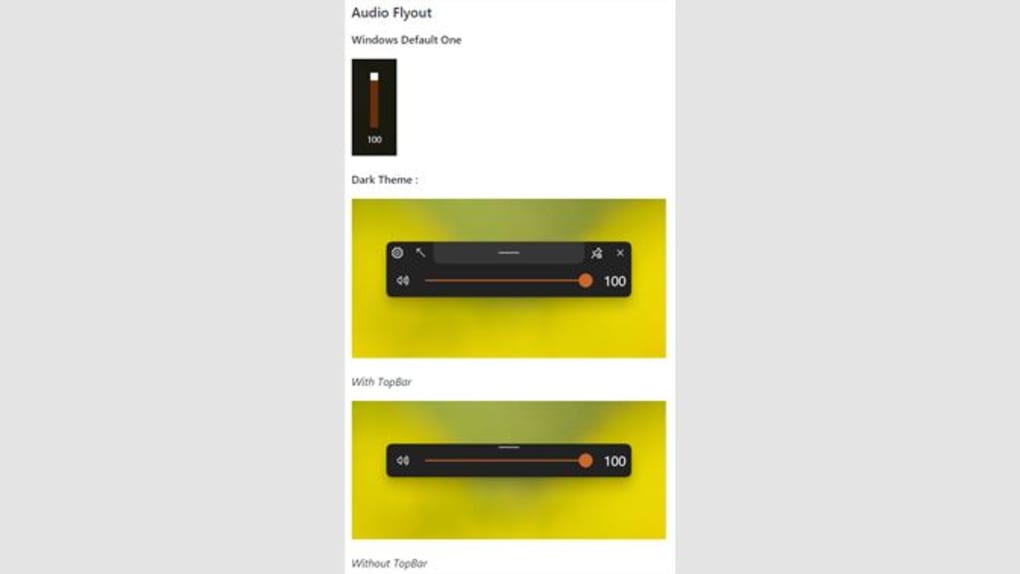
Modern Flyouts is an open-source project, initially based on ADeltaX/Flyout, that fundamentally transforms how users interact with system indicators on Windows. At its core, the application replaces the antiquated default flyouts with a significantly refined version that perfectly aligns with the contemporary Windows aesthetic. Its development emphasizes a keen attention to detail, leveraging the principles of Fluent Design, including subtle acrylic effects, elegant shadows, and, crucially, the much-coveted rounded corners that signify a modern Windows experience. This isn’t just a superficial skin; it’s a re-engineering that makes the flyouts feel like an integral, forward-thinking part of Windows 10 and Windows 11.
The moment Modern Flyouts is installed and running, the visual difference is immediate and striking. Gone are the sharp edges and flat surfaces; in their place, users are greeted with smooth, animated transitions and a translucent elegance that enhances the overall sophistication of the operating system. This attention to visual fidelity ensures that adjusting your volume or brightness no longer feels like an interruption from an older OS, but rather a seamless, natural interaction within your current, modern desktop environment. The application’s commitment to an updated look addresses a long-standing desire among Windows users for a more cohesive and visually pleasing interface.
Beyond its striking appearance, Modern Flyouts is engineered for practicality and ease of use. It integrates discreetly into the system tray, allowing users to access its configuration options without cluttering the taskbar. When the application is active in the background, it temporarily takes precedence over the built-in Windows flyouts, effectively hiding them from view. This ensures a consistent experience without requiring users to manually disable default system features. For those who might wish to revert to the original UI, the process is straightforward: simply terminate the Modern Flyouts process, and the default system indicators will reappear. This flexibility underscores the user-centric design philosophy behind the application, offering enhancement without imposing irreversible changes.
Deep Dive into Customization Options
One of the most compelling aspects of Modern Flyouts is its extensive suite of customization options, which truly sets it apart from its vanilla Windows counterparts. Unlike the inflexible default flyouts, Modern Flyouts empowers users with an unprecedented level of control over how these essential system indicators look and behave. This granularity ensures that the flyouts can be tailored to perfectly match individual preferences, workflows, and overall system themes.
A primary customization feature is the ability to disable individual modules. This means if you only want a modern flyout for volume control but prefer to keep the default for brightness, you have that option. This modular approach is incredibly useful for users who might have specific requirements or aesthetic preferences for different types of system feedback. For instance, a user might rely on third-party tools for media control and thus choose to disable the media control flyout from Modern Flyouts, ensuring no redundant or conflicting interfaces appear.
Furthermore, users can change the position of the flyout on the screen. The default Windows flyouts are often locked to a specific corner or central location, which can sometimes interfere with active application windows or simply not align with a multi-monitor setup. Modern Flyouts liberates these indicators, allowing them to be moved around the desktop. This flexibility is particularly beneficial for users with ultrawide monitors, multiple displays, or those who prefer a less intrusive placement that doesn’t obscure critical information. Imagine placing your volume indicator near your system tray for quick glances, or positioning your brightness control closer to the top of your screen for intuitive adjustments.
Visual personalization extends to the flyout’s transparency and orientation. Users can change the level of opacity, making the flyouts more or less translucent to blend seamlessly with their desktop wallpaper or active applications. A subtle, highly transparent flyout can feel less obtrusive, while a slightly more opaque one might offer better readability in certain lighting conditions. Additionally, the session’s panel orientation can be adjusted, allowing for horizontal or vertical layouts, depending on aesthetic preference or practical screen real estate considerations. This level of detail in design choice ensures that the flyout not only looks modern but also feels integrated and personalized.
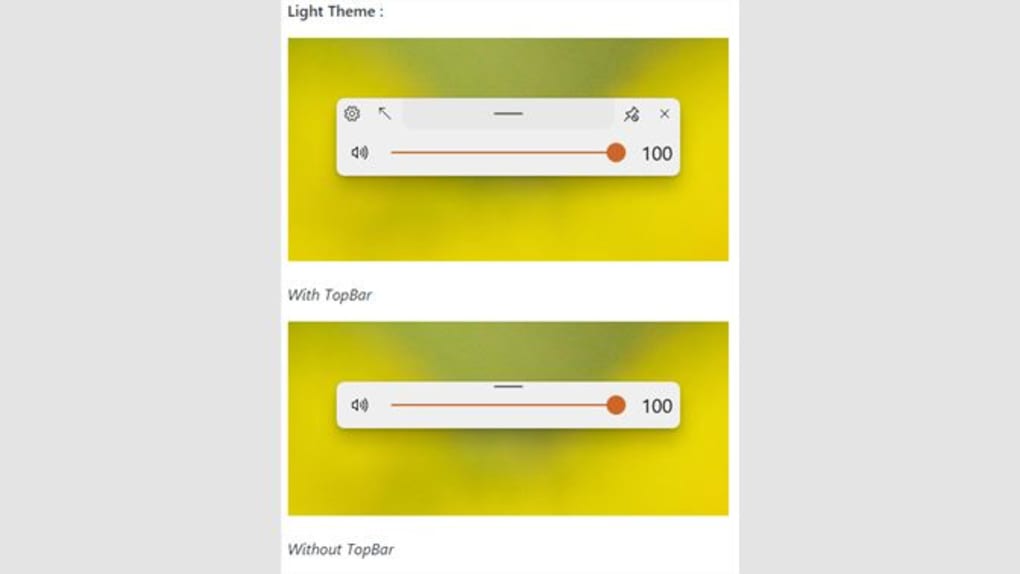
Theme support is another robust feature. Modern Flyouts comes with comprehensive light, dark, and high contrast theme supports. This means that regardless of your chosen Windows theme, the flyouts will automatically adapt, maintaining visual consistency across your entire operating system. For users who frequently switch between light and dark modes, this automatic adaptation is invaluable, eliminating the jarring experience of a mismatching flyout. High contrast themes also ensure accessibility for users with visual impairments, demonstrating a commitment to inclusive design.
Finally, to address the common annoyance of flyouts lingering on screen for too long or disappearing too quickly, Modern Flyouts allows users to change the timeout of the flyouts. This simple yet powerful setting enables individuals to dictate how long a flyout remains visible after being triggered. A shorter timeout can make the flyout feel less obtrusive, especially during rapid adjustments, while a longer timeout might be preferred for users who need a moment longer to register the displayed information. This fine-tuned control over the flyout’s lifespan significantly enhances its overall user experience, making it truly adaptable to varying user behaviors and preferences.
Enhanced Media Control Capabilities
Beyond basic system adjustments, Modern Flyouts significantly elevates the media playback experience on Windows by enhancing the Global Media Transport Controls (GSMTC). These controls, commonly referred to as media controls for all applications, typically appear when you’re playing music or videos and allow basic actions like play, pause, next, and previous track. While functional, the default implementation often feels sparse, lacking advanced features that users have come to expect from modern media players.
Modern Flyouts addresses this by introducing a richer set of media controls directly within its sleek interface. Users gain the ability to add and utilize crucial functions such as shuffle, repeat, and stop. These additions are not merely convenient; they transform the flyout from a rudimentary control panel into a comprehensive media hub. Imagine being able to toggle shuffle mode for your playlist or set a track to repeat without needing to navigate back to the music application itself. This streamlined control saves time and effort, maintaining your focus on your primary task while still allowing full command over your audio or video content.
The integration of these advanced controls means you can manage your media playback with greater efficiency and less disruption. Whether you’re engrossed in a game, working on a document, or browsing the web, the enhanced Modern Flyouts media panel allows for quick, intuitive adjustments. This is particularly beneficial for users who frequently switch between different media sources or who simply prefer to keep their media applications minimized or in the background. The ability to control playback, including shuffle and repeat functions, directly from a system-level flyout eliminates unnecessary context switching, contributing to a smoother and more uninterrupted workflow.
Moreover, Modern Flyouts offers the option to hide the Global Media Transport Controls (GSMTC) in just one tap. This is a powerful feature for users who might find the media controls intrusive, perhaps because they use dedicated hardware media keys, a separate media remote, or simply prefer to manage media exclusively within the application playing it. The choice to easily toggle visibility ensures that the flyout experience is always aligned with user preference, avoiding visual clutter when desired. This thoughtful inclusion demonstrates the application’s commitment to user autonomy, providing robust functionality while always offering the option for a minimalist approach.
User Experience and System Integration
The design philosophy behind Modern Flyouts is heavily centered on providing an intuitive and unobtrusive user experience, ensuring that its enhancements integrate seamlessly into the existing Windows environment. From its initial launch to daily operation, the application aims to be a helpful utility rather than a demanding one.
Once installed, Modern Flyouts is pretty straightforward to use. There’s no complex setup wizard or deep dive into system settings required. The application typically runs in the background, making its presence known through its modernized flyouts rather than by consuming significant system resources or demanding constant user attention. This “set it and forget it” nature is a hallmark of well-designed utility software.
Configuration of Modern Flyouts is primarily managed from the system tray. This is a logical choice, as the system tray is the conventional hub for background applications and quick access utilities on Windows. By clicking on the Modern Flyouts icon in the system tray, users can access all the aforementioned customization options, from theme selection to module disabling and opacity adjustments. This centralized control panel makes managing the flyout settings quick and efficient, without needing to open a full-fledged application window. The system tray integration also means that the application remains accessible without cluttering the main taskbar, preserving a clean desktop aesthetic.
A key aspect of its seamless integration is how it handles the built-in Windows flyouts. When Modern Flyouts is actively running in the background, it intelligently hides the default flyouts temporarily. This ensures that users only ever see one set of flyouts—the modernized ones. There’s no confusing overlap or conflicting visual feedback, guaranteeing a consistent and updated experience. This temporary suppression means that no permanent changes are made to your operating system’s core settings.
The temporary nature of this override provides significant peace of mind. Users shouldn’t worry about making irreversible changes to their system. As the description states, you can always terminate the process and go back to the default UI. This reversibility is a critical feature, offering a safety net for users who might want to experiment with Modern Flyouts but retain the option to return to the familiar Windows interface at any time. This flexibility empowers users to customize their experience without commitment anxiety, making Modern Flyouts an appealing and user-friendly enhancement.
Installation, Compatibility, and User Feedback
Ensuring a broad reach and smooth operation, Modern Flyouts has been developed with specific system compatibility in mind, primarily targeting the more recent iterations of Windows. This focus allows the developers to leverage modern Windows APIs and design elements, delivering a polished experience that might not be feasible on older, less capable operating system versions.
The software is designed to work on Windows 10 version 1809 and above. This particular version of Windows 10 (released in October 2018) marked a significant point in Microsoft’s development, introducing several key features and underlying architectural changes that Modern Flyouts likely relies upon for its enhanced functionality and visual fidelity. Users running older versions of Windows 10 will need to update their operating system to take full advantage of Modern Flyouts. While there’s a mention of supporting Windows 8+, to simplify distribution, it will not support versions less than 1809. This decision is practical for open-source projects, as maintaining compatibility with very old OS versions can be resource-intensive and often limits the integration of newer design principles and features. For most current Windows users, especially those on Windows 10 and 11, this compatibility requirement is unlikely to be an issue, as regular Windows updates ensure the majority are on or beyond version 1809.
Installation of Modern Flyouts is typically straightforward, often following the standard procedure for utility applications:
- Download: Obtain the installer package from the official project repository or a trusted software distribution platform like PhanMemFree.
- Run: Execute the installer, which might be a
.msipackage or a simple executable. - Launch: After installation, Modern Flyouts will usually start automatically or can be launched manually. It then typically resides in the system tray, from where it can be configured.
As an open-source project, Modern Flyouts benefits immensely from user feedback and community contributions. The fact that it’s based on an existing project (ADeltaX/Flyout) highlights a collaborative spirit in its development. This model often leads to faster bug fixes, new feature implementations, and a more robust application overall, as many eyes scrutinize the code and suggest improvements. Users encountering issues or having feature requests are encouraged to participate in the project’s community forums or issue trackers, contributing to its continuous evolution.
User reviews, such as those found on platforms like PhanMemFree.org, consistently highlight the application’s strengths. Common praises include:
- Can be moved around the screen: This flexibility is a significant upgrade from static default flyouts.
- Additional media controls: Shuffle, repeat, and stop functions are frequently cited as valuable additions.
- Fluent UI: The modern design, animations, and rounded corners are a major draw for users seeking visual consistency.
- Light and dark themes support: Seamless integration with Windows’ aesthetic preferences is highly appreciated.
The primary “con” identified, as previously discussed, is the lack of support for Windows versions less than 1809. While a valid point for a segment of users, it’s a trade-off for focusing on a modern experience that aligns with the current direction of Windows development. For the vast majority of users on updated Windows 10 or Windows 11 systems, this is not a barrier to adoption. Overall, the positive reception underscores Modern Flyouts’ success in addressing a genuine user need for a more modernized and customizable system indicator experience.
The Future of System Flyouts: Why Modern Flyouts Stands Out
In a landscape where operating system aesthetics and functionality are constantly being refined, applications like Modern Flyouts play a pivotal role in bridging the gaps left by official development cycles. While Microsoft is steadily improving the visual consistency of Windows, smaller, frequently used UI elements like flyouts can sometimes be overlooked in favor of larger feature rollouts. Modern Flyouts stands out as a proactive solution, demonstrating what’s possible when community-driven development targets these critical, albeit minor, aspects of the user experience.
The core reason Modern Flyouts distinguishes itself lies in its comprehensive approach to modernization. It’s not just about a new coat of paint; it’s about intelligent design, enhanced functionality, and, most importantly, empowering the user. By offering a decent selection of customizations, it ensures that the flyouts can truly fit the look and feel of the latest Windows operating system, rather than serving as an outdated reminder of a previous era. This level of personalization – from position and opacity to module control and theme support – is something the built-in Windows flyouts simply cannot match.
Furthermore, Modern Flyouts introduces innovations that the built-in system lacks. The ability to move flyouts around your screen is a game-changer for many, allowing for ergonomic placement that suits multi-monitor setups or specific workflow preferences. No longer are users constrained by fixed, potentially obstructive, UI elements. The additional media controls, including shuffle, repeat, and stop, significantly enhance productivity and convenience for anyone who regularly consumes media on their PC. These aren’t just minor tweaks; they are thoughtful additions that streamline common tasks and reduce the need to switch between applications.
The open-source nature of Modern Flyouts is another testament to its potential and resilience. Being community-driven means that its evolution is directly influenced by the needs and feedback of its users. This collaborative model often fosters faster development cycles, more responsive bug fixes, and a greater propensity for incorporating innovative features requested by the community. It ensures that the application remains relevant and continually improves, adapting to new Windows versions and evolving user expectations.
In conclusion, Modern Flyouts is more than just a utility; it’s an essential enhancement for anyone who values a modern, cohesive, and personalized Windows experience. It meticulously addresses the shortcomings of the default system flyouts, transforming them from static, dated elements into dynamic, customizable, and visually appealing indicators. Whether you’re a power user seeking granular control or simply someone who appreciates a polished user interface, Modern Flyouts delivers a significant upgrade that makes your daily interactions with Windows more enjoyable and efficient. By embracing Modern Flyouts, users can truly make their flyouts modern, elevating their Windows desktop to a new standard of aesthetic and functional excellence. PhanMemFree.org proudly features such innovations that empower users to tailor their digital environment to perfection.
File Information
- License: “Free”
- Version: “0.9.0”
- Latest update: “February 1, 2023”
- Platform: “Windows”
- OS: “Windows 10”
- Language: “English”
- Downloads: “17.1K”
- Size: “2.50 KB”


