
Modio is a free application designed for downloading and managing modified game files (“mods”) for Xbox 360 consoles. Developed by GameTuts, this lightweight Windows-based program allows users to easily access, download, and transfer game modifications to their Xbox 360 consoles via external storage devices like USB drives. While its development has ceased, Modio remains a functional and readily available tool for those seeking to enhance their Xbox 360 gaming experience. This guide provides a detailed overview of Modio’s functionalities, features, and alternatives.
Understanding Modio’s Interface and Functionality
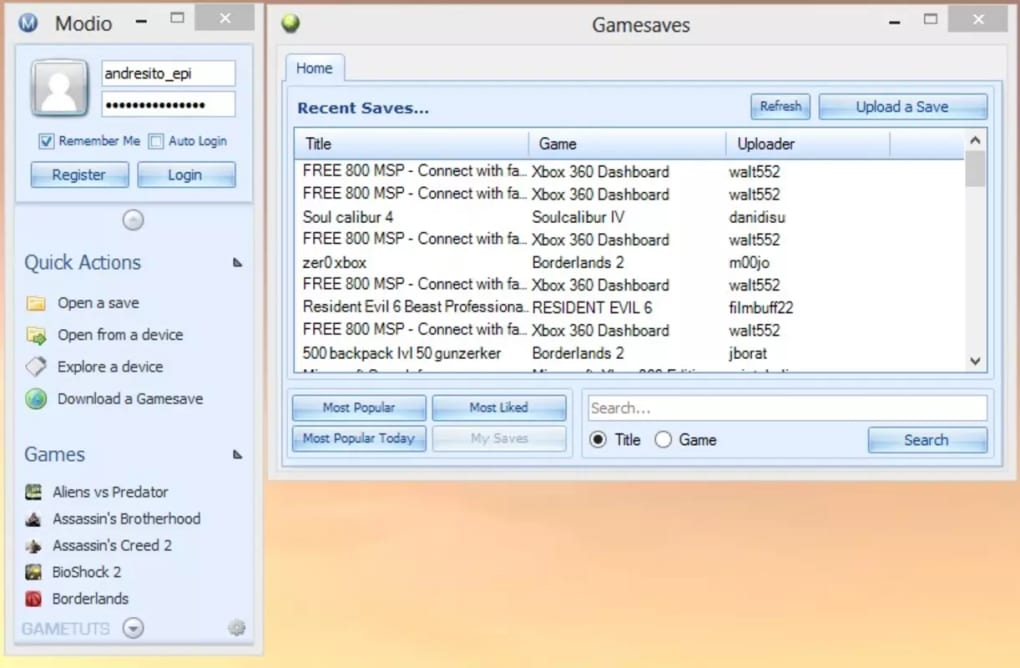
Modio boasts a user-friendly interface, designed for ease of navigation and intuitive use. Upon launching the application, users are presented with a “New Tab” window akin to a web browser’s home page. This initial screen displays various advertisements, alongside real-time statistics such as the number of active users and shared saves. A helpful guide is readily available, offering new users a quick introduction to the application’s core functionalities.
The main window provides easy access to key features. A prominent login/logout section is located in the upper right corner, displaying the username once logged in. A “Upgrade to VIP” button is also visible, suggesting potential premium features, though the core application remains free. Login requires only an email address and password, with no financial commitment necessary.
The bottom of the screen displays navigation options: “Games you can mod,” “News Feed” (default view), “Open a Save,” and “Settings.” The “News Feed” provides updates and announcements related to Modio and the modding community. The “Open a Save” section offers several choices for accessing saved game files: “Recent,” “USB Stick,” “Download saves,” “Browse,” and “More.”
Managing Game Mods with Modio
The heart of Modio lies in its ability to manage game mods. Selecting “Download saves” allows users to browse a wide variety of mods categorized by game title. A search function simplifies finding specific games, while options like “Featured,” “New,” “Popular,” “Popular now,” “Top,” and “Trending” offer curated selections of mods. The “Popular now” section, in particular, highlights the most popular mods of the current week.
Each mod listing includes crucial information: size, upload date, likes, dislikes, a short description, the creator’s name, total downloads, and weekly download/point statistics. Users can view reviews to assess the quality and legitimacy of a mod before downloading. The option to submit a review allows community feedback to shape the user experience.
The download process is straightforward. Clicking the “Download” button initiates the download, marked by a progress bar. The downloaded mod automatically opens in a new tab, ready to be saved to the user’s account and an external storage device such as a USB drive. Modio displays notifications to confirm successful downloads and saving. Users can verify that the mod is correctly stored on their USB drive by navigating to the “USB Stick” section in the main window. Modio also informs the user of available space on their USB drive. Clicking on the user’s profile picture allows the user to see a list of games linked to their account, view related game screenshots, and see other saved games.
Connecting Modio with Your Xbox 360 Console
The downloaded mods are transferred to the Xbox 360 console via a USB drive. Simply plug the USB drive into the console to access and install the downloaded modifications. Modio is compatible with all aspects of the Xbox 360 system, including the console, controller, and storage devices. The application enables users to both modify existing save files and download entirely new ones, potentially granting access to new content, levels, or enhanced gameplay. Through Modio, users can potentially gather achievements, ratings, votes, and experience points related to the mods they use.
Alternative Gaming Services and Tools
Several alternative applications offer functionalities similar to or complementing Modio’s capabilities. These include:
- Better DS3: An offline driver utility that enhances the PC gaming experience by improving controller functionality, particularly for PlayStation 3 controllers. It’s fully compatible with MotionInJoy.
- MotionInJoy: Allows users to utilize PlayStation 3 controllers on PCs, enabling PC game play with a PS3 controller.
- ISO2GoD: This tool optimizes Xbox game performance by converting ISO files to Games on Demand (GoD) format.
- ScpToolkit: A paid application designed for Xbox 360 gamepads, offering advanced controller configuration options not available in free alternatives.
- Sixaxis Controller: Enables the use of various game controllers with Android mobile devices; available as a free download.
While these alternatives cater to various needs, they don’t directly replicate Modio’s primary function of managing and transferring Xbox 360 game mods.
Modio’s Strengths and Weaknesses
Modio’s primary strength lies in its user-friendly design and efficient functionality. Its intuitive interface, combined with the built-in manual, makes the application accessible even to novice users. The lightweight nature of the application ensures minimal impact on system resources. The vast collection of available mods and its active (albeit now inactive in terms of development) community contribute to its appeal.
However, Modio’s limitations are also noteworthy. The most significant drawback is its exclusive compatibility with Windows. It lacks support for other operating systems, limiting its reach to a specific user base. Further, the cessation of development by the original publishers raises concerns about future updates, bug fixes, and potential security vulnerabilities.
Modio: A Verdict
Despite the discontinued development, Modio remains a valuable tool for Xbox 360 users seeking to enhance their gaming experience through mods. Its intuitive design and wide selection of mods make it a user-friendly option for those comfortable with its Windows-only limitation and the lack of future updates. The absence of ongoing support and potential security risks should be considered, however. Users should proceed with caution and ensure they download mods from reputable sources to mitigate any potential issues. The availability of alternative applications offering similar (though not identical) functionality should also be considered. Weighing the pros and cons will help users determine if Modio meets their specific needs and risk tolerance. For users seeking a simple, easy-to-use modding tool for their Xbox 360, Modio may still offer a satisfactory experience, provided the user understands and accepts the implications of using a discontinued application.
File Information
- License: “Free”
- Version: “5.3”
- Latest update: “February 1, 2023”
- Platform: “Windows”
- OS: “Windows 8.1”
- Language: “English”
- Downloads: “14.8K”
- Size: “2.03 MB”


