
MoneyPoint is a free, Windows-based application designed for straightforward financial management. Whether you’re an individual aiming to track personal finances, a household managing bills, or a small business owner needing expense oversight, MoneyPoint provides a simple, user-friendly interface for daily financial tracking. This article offers a detailed overview of MoneyPoint’s features, advantages, limitations, and alternative options, helping you decide if it’s the right financial management tool for your needs.
MoneyPoint’s Core Functionality: Tracking Income, Expenses, and Budgets
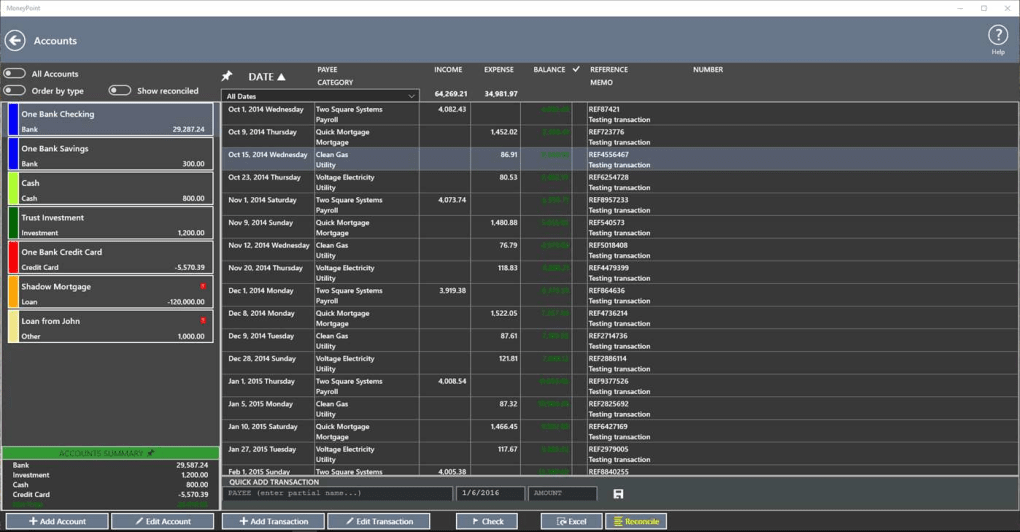
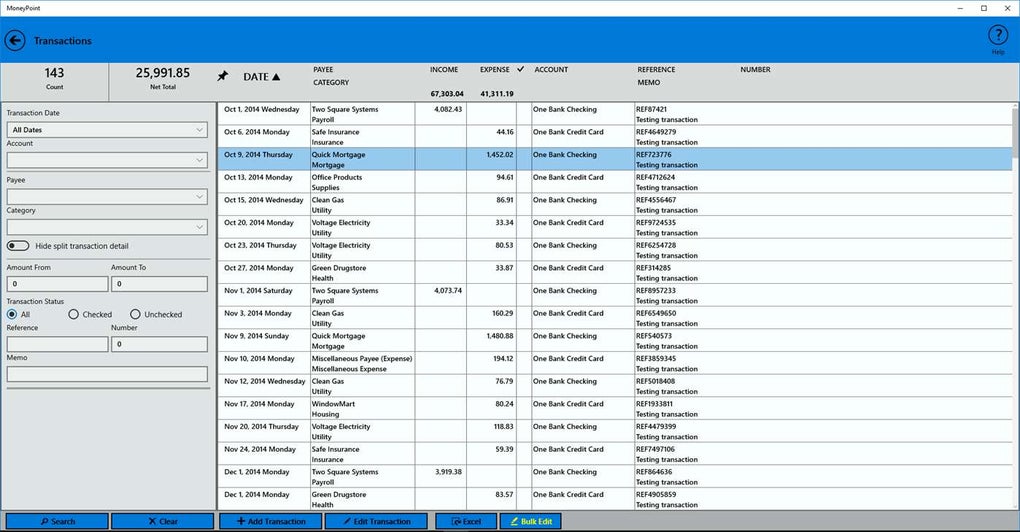
At its core, MoneyPoint focuses on the essential aspects of financial tracking. The application allows users to meticulously record income, expenses, and set up budgets to monitor spending against predefined targets. This straightforward approach makes it accessible to users of all technical skill levels, eliminating the complexities often found in more comprehensive financial software. The simplicity extends to its functionality, providing users with a clear and intuitive system for recording financial transactions. Data entry is manual, meaning users must actively input all financial information. While this might seem laborious compared to automatically syncing bank accounts, it offers complete control and transparency over the data entered into the system.
The ability to set targets, crucial for both savings goals and income increases, is a key feature. Users can define specific financial objectives, and MoneyPoint will track progress toward these targets, providing a clear visual representation of the user’s progress. This visualization of financial goals is critical for motivating users and ensuring they stay on track. This system allows users to monitor their performance against their savings goals, and it provides an opportunity for regular review and course correction. This visual representation of progress is a significant motivator for maintaining the diligent habit of tracking financial transactions.
Advantages and Disadvantages of Using MoneyPoint
While MoneyPoint boasts its ease of use and simplicity, like any software, it comes with its own set of advantages and disadvantages.
Advantages:
-
Ease of Use: MoneyPoint’s intuitive interface is its primary strength. The straightforward design makes it readily accessible to users regardless of their prior experience with financial management software. The clean layout and straightforward functionality reduce the learning curve significantly, allowing users to quickly begin tracking their finances. This is a huge advantage for users who might be intimidated by complex software with numerous features.
-
Quick Data Import: MoneyPoint facilitates the quick import of existing financial data. This feature significantly reduces the time and effort required to start using the application, allowing users to immediately begin leveraging the software’s benefits. This time-saving advantage is especially helpful for users who already have extensive financial records.
-
No Bank Account Linking: The absence of bank account linking is both an advantage and a disadvantage depending on user preference. The advantage is enhanced security; there’s no risk of unauthorized access to financial accounts through the software. It also provides users with complete control over data entry, ensuring data accuracy and allowing for a more thorough understanding of financial transactions.
-
Low Cost: Being a free application, MoneyPoint eliminates the financial barrier to entry that often prevents individuals and small businesses from utilizing robust financial management tools. This accessibility opens up the possibility of better financial tracking to a wider audience who might not otherwise be able to afford premium software.
Disadvantages:
-
Lack of Mobile Version: MoneyPoint’s limitation to a desktop application is a significant drawback in today’s mobile-first world. The inability to access financial data on the go reduces the application’s convenience and real-time tracking capability. This limitation is a considerable drawback for users who require constant access to their financial information.
-
Manual Data Entry: The requirement for manual data entry can be time-consuming and potentially prone to errors. While this approach offers complete control and transparency, it requires consistent effort and attention to detail. The lack of automated data import from financial institutions requires more manual effort from the user.
-
Limited Reporting and Analysis: While MoneyPoint excels at basic tracking, it might lack the sophisticated reporting and analytical features found in more comprehensive financial management solutions. Users looking for detailed insights into their financial data might find its capabilities limited. This lack of advanced reporting options may be a significant disadvantage for users requiring detailed financial analysis.
-
No Cloud Synchronization: The absence of cloud synchronization functionality is a drawback for users needing access to their financial data across multiple devices. This lack of synchronization may hinder collaboration or data accessibility if using multiple computers.
Exploring MoneyPoint’s Application within Specific Contexts
MoneyPoint’s simplicity makes it versatile for different users:
For Individuals: MoneyPoint is an ideal tool for individuals looking to gain a clearer picture of their personal finances. Its straightforward interface and simple tracking features make budgeting and monitoring expenses easier, leading to better financial awareness and improved money management.
For Households: Households can utilize MoneyPoint to track shared expenses and bills more efficiently. This helps families maintain a clearer view of their overall financial situation and better manage their household budget. The shared access aspect might necessitate establishing clear data input protocols amongst household members.
For Small Businesses: MoneyPoint provides a basic framework for small businesses to track income and expenses. While its limitations may become apparent as a business grows, it offers a cost-effective solution for smaller businesses during their early stages. However, limitations in reporting and analysis become more significant for businesses requiring detailed financial reports.
Alternative Applications and Future Considerations for MoneyPoint
While MoneyPoint offers a viable solution for basic financial tracking, several alternatives cater to users seeking more advanced features or different platforms. These alternatives may include cloud-based solutions, software integrating with banking institutions for automatic data import, or those offering comprehensive reporting and analysis tools.
Future Development: For MoneyPoint to remain competitive, several improvements could enhance its utility and appeal. The development of a mobile application is a crucial step to increase its convenience and user base. Improving data import capabilities to include automatic syncing with bank accounts or financial institutions would significantly reduce manual input time. Adding advanced reporting and analytical features would provide greater insights into users’ financial data. Finally, considering cloud-based data storage for improved data security and access across multiple devices would enhance its functionality.
Conclusion: Assessing the Value of MoneyPoint in the Financial Management Landscape
MoneyPoint occupies a unique niche in the financial management software landscape. Its focus on simplicity and ease of use makes it a valuable tool for individuals, households, and small businesses needing basic financial tracking without the complexities of more sophisticated software. However, its limitations in mobile accessibility, manual data entry, and advanced analytical capabilities restrict its usefulness for advanced users or those requiring extensive reporting features. The decision to use MoneyPoint ultimately hinges on the user’s specific needs and priorities. If ease of use and simplicity are paramount, MoneyPoint’s core functionality may be sufficient. However, if comprehensive features, automatic data import, and advanced analysis are necessary, users should consider alternative options. The future development and potential expansion of MoneyPoint’s capabilities will ultimately determine its long-term standing in the ever-evolving world of financial management software.
File Information
- License: “Free”
- Version: “1.0”
- Latest update: “January 10, 2022”
- Platform: “Windows”
- OS: “Windows 7”
- Language: “English”
- Downloads: “5K”


