
MonkeyJam is a free, user-friendly software application designed for creating stop-motion animations. It simplifies the process of capturing and assembling individual frames into a cohesive video, making stop-motion animation accessible to beginners and enthusiasts alike. This detailed review explores MonkeyJam’s features, strengths, weaknesses, and user experiences, providing a comprehensive understanding of its capabilities and limitations.
Ease of Use and Core Functionality
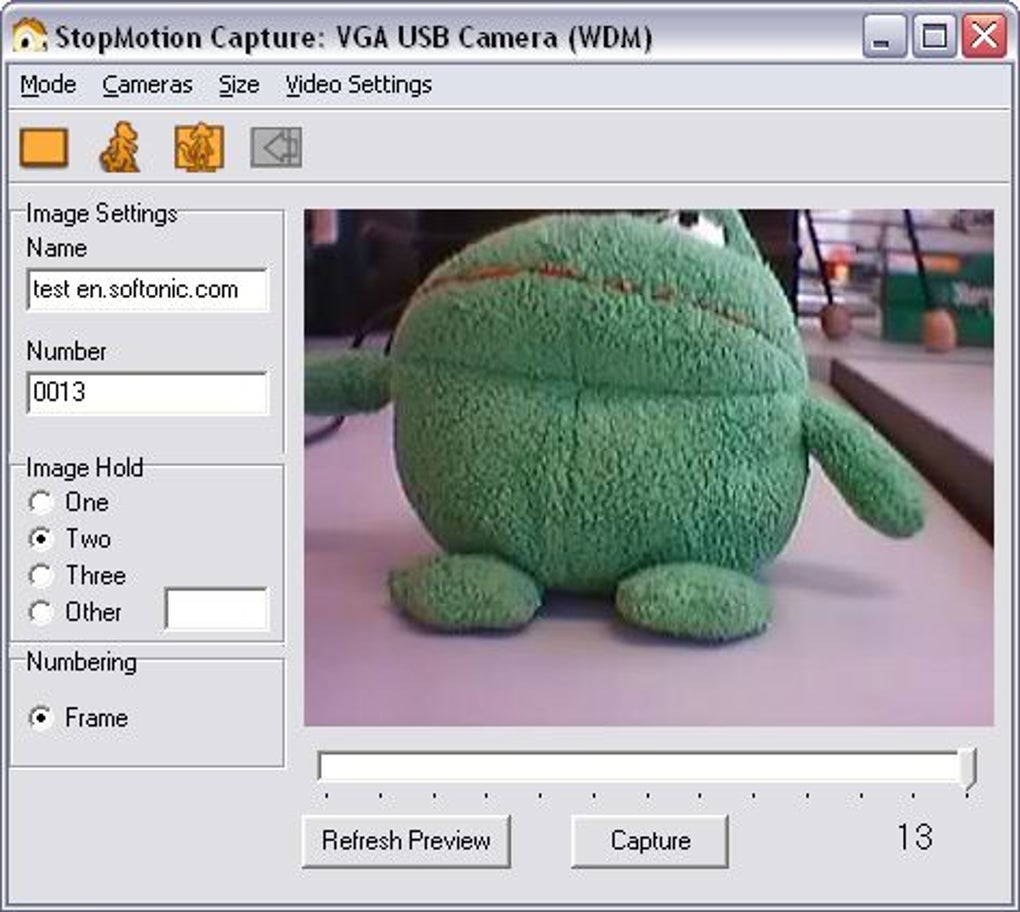
MonkeyJam’s primary strength lies in its intuitive interface and straightforward workflow. The software requires minimal setup and configuration, making it incredibly easy to start creating animations. Users can directly capture images using their webcam or digital video camera, significantly reducing the technical hurdles often associated with stop-motion animation. The program manages the captured frames, organizing them into layers, which facilitates the creation of complex animations with multiple elements. This layered approach allows for more organized workflow, unlike methods that rely on manual image combining. This organizational structure contrasts sharply with the more cumbersome approaches requiring manual image manipulation in programs like GIMP and Windows Movie Maker, previously employed by many aspiring animators before MonkeyJam’s availability.
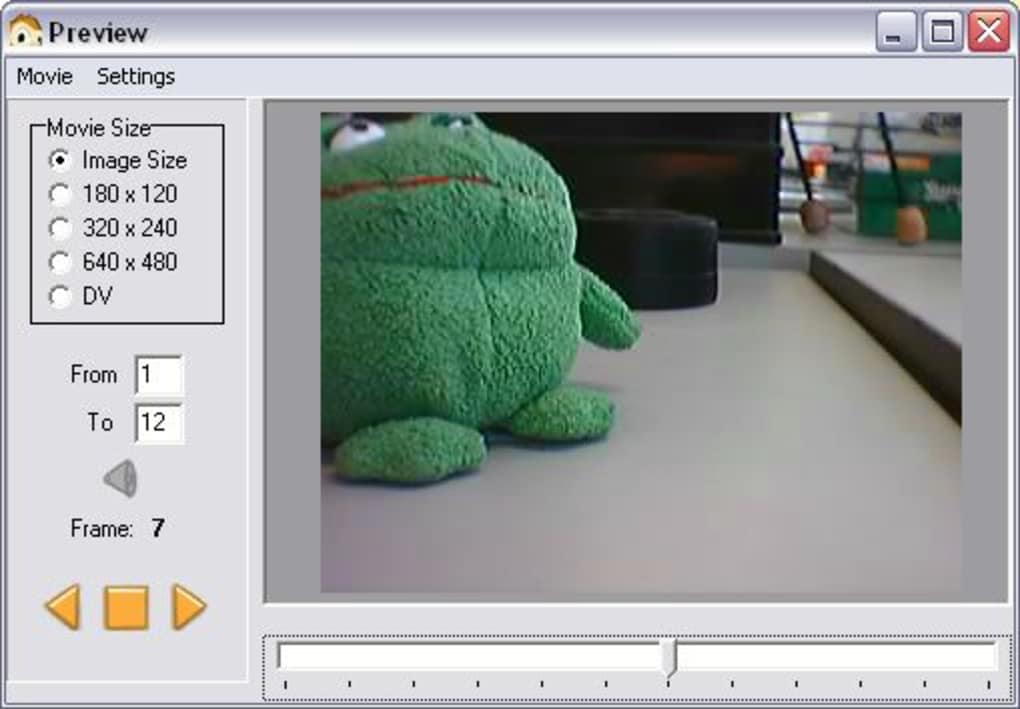
The real-time preview feature allows users to monitor their progress and ensure the animation is progressing as intended. This function helps identify and rectify issues early on, minimizing wasted effort. The simplicity of its workflow is highly praised by users, contributing significantly to the enjoyable experience of crafting animations. It’s a significant advantage for novices who might be intimidated by complex animation software. The immediate gratification provided by MonkeyJam encourages experimentation and creativity without getting bogged down in technical complexities.
Stop-Motion Capabilities and Beyond
While primarily designed as a digital “pencil test” program for capturing images from a variety of sources (webcam, camcorder, scanner), MonkeyJam’s flexibility extends to stop-motion animation. It seamlessly integrates image capture with its layered organization, effectively facilitating stop-motion projects. This allows users to work with both hand-drawn and physical objects. The ability to import existing images and sound files adds further versatility, providing the option to incorporate pre-made assets or recorded audio into animations, enriching the creative process. This flexibility allows animators to explore a diverse range of creative options without being limited by the software’s core functionality.
Output and Limitations
MonkeyJam generates AVI video files. However, a significant drawback reported by many users is the continuous loop playback of the final animation. This persistent looping, present in both the preview and the exported AVI file, lacks a readily accessible stop function. This presents an inconvenience requiring workaround methods. Addressing this limitation would significantly enhance the software’s user experience.
Furthermore, some users report compatibility issues with specific webcams, particularly older models. In several user reviews, the issue of compatibility with Logitech webcams is raised, highlighting a potential limitation concerning hardware integration. This points to a need for ongoing updates and improved compatibility across a broader range of devices.
User Reviews and Community Feedback
User reviews reveal a mixed response to MonkeyJam, reflecting both its strengths and shortcomings. While many praise its ease of use, fun factor, and suitability for beginners, the recurring complaint about the continuous loop and webcam compatibility issues significantly impacts user satisfaction. Positive reviews frequently emphasize the enjoyable learning curve and the ease with which users can create animations, even without prior experience. Users express appreciation for the simple yet effective tools MonkeyJam offers, perfectly suited for those looking for a straightforward animation tool rather than a fully-featured professional software package.
On the other hand, critical reviews highlight the limitations, particularly the persistent loop issue. Users feel frustrated by this limitation, as it hinders the practical use of the software for projects that require a non-looping final output. The absence of readily available tutorials or documentation also exacerbates the problem for those who encounter difficulties. The compatibility problems with specific cameras further complicate the situation, leaving users feeling limited in their choice of equipment.
Comparison with Alternative Software
Compared to other stop-motion animation software, MonkeyJam occupies a unique niche. While professional-grade software like Dragonframe offers advanced features and extensive capabilities, it also comes with a steeper learning curve and higher price point. Other free options, such as AnimaShooter Junior and Stykz, may provide similar basic functionalities, but they often lack the layered organization and intuitive interface that make MonkeyJam stand out. MonkeyJam effectively bridges the gap between these extremes. It caters to users who desire a simple, accessible, and free tool without compromising on basic functionalities.
Conclusion
MonkeyJam is a surprisingly effective tool for creating simple stop-motion animations. Its user-friendly nature and ease of use make it an excellent entry point for beginners and casual users. The layered organization of frames helps streamline the animation process, allowing for a more organized workflow compared to less structured methods. However, the significant limitations surrounding the continuous loop playback and potential compatibility problems with certain webcams need to be addressed to truly fulfill its potential. While it offers a fun and accessible way to experiment with animation, its shortcomings prevent it from becoming a fully reliable and versatile tool for more advanced projects. The addition of a stop function for the animation playback and improved webcam compatibility would greatly enhance its usability and appeal. Despite these shortcomings, MonkeyJam continues to serve as a valuable resource for those seeking a straightforward and easy-to-use introduction to the world of stop-motion animation. The software serves as a valuable stepping stone for those considering investing in more advanced and comprehensive animation software in the future.
File Information
- License: “Free”
- Version: “3.0.050529”
- Latest update: “July 17, 2020”
- Platform: “Windows”
- OS: “Windows 8”
- Language: “English”
- Downloads: “228K”
- Size: “1.40 MB”


