
Morpheus Photo Morpher is a user-friendly software application designed to create captivating morphing effects from a pair of digital images. Whether you’re a seasoned photo editor or a complete novice, this software offers a straightforward and intuitive approach to generating professional-looking image transformations. This guide will explore the features, functionalities, and overall user experience of Morpheus Photo Morpher, providing a detailed look at its strengths and weaknesses.
Getting Started with Morpheus Photo Morpher
The software boasts an incredibly user-friendly interface, guiding even the most inexperienced user through the morphing process. A helpful wizard is present upon launching the application, providing a step-by-step walkthrough that simplifies the entire procedure. This introductory wizard is particularly beneficial for beginners, offering a clear and concise explanation of each stage. Furthermore, the application strategically places informative side notes within a separate window, eliminating any confusion and ensuring users understand the purpose and function of each feature.
The process begins with the selection of two images intended for the morph. These images serve as the source material, representing the beginning and ending points of the transformation. Once selected, the user is then prompted to strategically place dots on both images. These dots act as control points, defining the corresponding areas on both images that will be affected by the morphing effect. This process intuitively aligns corresponding features between the two images, enabling a seamless and natural transition. While placing these dots is exceptionally easy, removing them proves to be slightly less intuitive. This could potentially require some practice and adjustment to achieve the desired results.
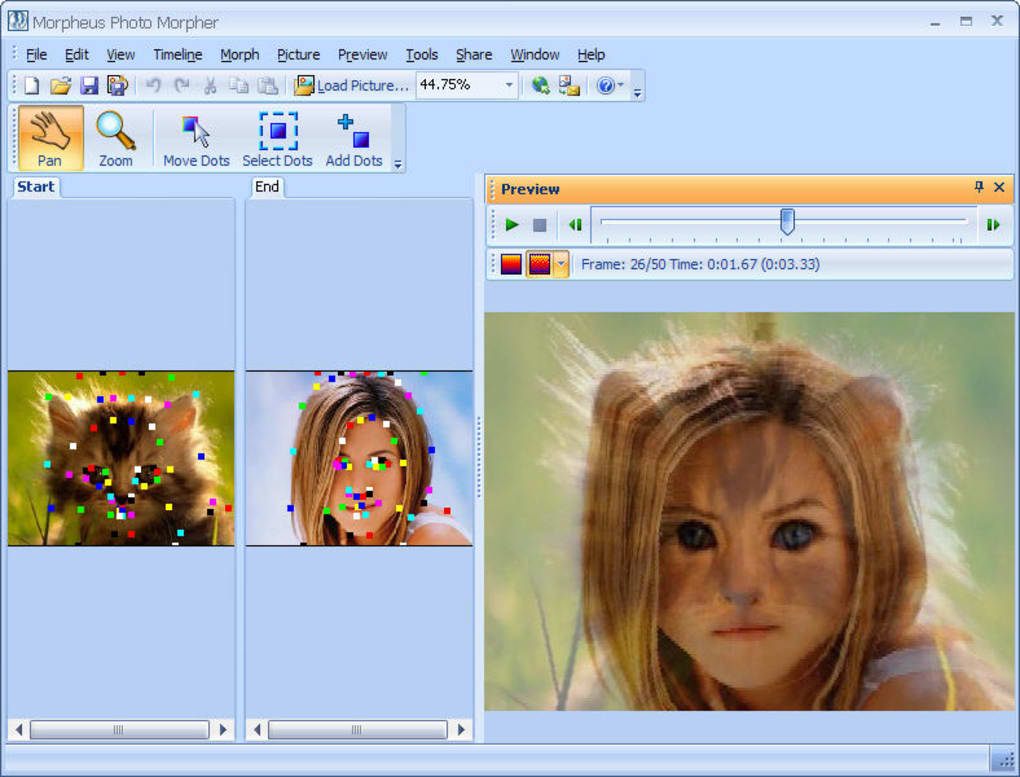
A significant advantage of Morpheus Photo Morpher is its real-time preview window. This feature allows users to constantly monitor the progress of the morphing effect, providing immediate visual feedback. This interactive element empowers users to make adjustments and refinements as needed, ensuring complete control over the final output. The ability to see the morph in progress prevents the unpleasant surprise of unexpected results, fostering a user-friendly workflow that emphasizes accuracy and precision.
Output Options and Sharing Capabilities
Upon completion of the morphing process, users are presented with a range of output options. Morpheus Photo Morpher supports saving creations in a multitude of popular formats, including JPEG, TIFF, QT, and Flash. This versatility ensures compatibility with a wide array of devices and applications, allowing users to readily share their creations across various platforms.
Beyond the diverse range of save options, Morpheus Photo Morpher provides convenient sharing capabilities. Users can effortlessly distribute their finished morphs via email, YouTube, Facebook, and other popular social media and online platforms. This streamlined sharing process significantly enhances the accessibility and usability of the software, allowing users to readily share their creative work with a wide audience. This functionality makes Morpheus Photo Morpher a powerful tool for both personal enjoyment and creative sharing.
Creative Applications and Use Cases
Morpheus Photo Morpher’s ability to transform one image into another opens up a vast range of creative applications. Its ease of use and intuitive interface make it accessible for a broad spectrum of users, from casual hobbyists to professional graphic designers.
The possibilities for creative expression are virtually limitless. Here are some examples:
-
Personal Memories: Morph a baby photo into a current picture, tracing the journey of growth and change. This application creates a poignant and personalized keepsake, documenting the passage of time.
-
Family Transformations: Morph a family member into a relative, highlighting the subtle similarities and differences across generations. This creates a fun, playful way to emphasize family connections.
-
Celebrity Morphing: Morph oneself into a celebrity, creating a humorous and entertaining comparison. This provides an enjoyable tool for lighthearted self-expression.
-
Animated Stories: Create short animated sequences using a series of morphs, adding a dynamic and engaging element to storytelling. This opens the door for creative short film production.
-
Educational Material: Use morphing to demonstrate a transformation or process. This application could enhance educational materials in science and other disciplines.
-
Marketing & Advertisement: Use morphing for eye-catching advertisements, enhancing product presentations and campaigns.
Morpheus Photo Morpher allows for the easy creation of professional-quality morphing effects that were once confined to expensive and time-consuming professional production pipelines.
Strengths and Weaknesses
Morpheus Photo Morpher offers a compelling combination of simplicity and power, enabling users of all skill levels to create sophisticated morphing effects. However, like any software, it has both strengths and weaknesses.
Strengths:
- Intuitive Interface: The software’s user-friendly design makes it easy to learn and use, even for beginners.
- Comprehensive Wizard: The built-in wizard provides a step-by-step guide, ensuring a smooth learning curve.
- Real-Time Preview: The preview window allows for continuous monitoring and adjustment of the morphing process, ensuring precision and accuracy.
- Versatile Output Options: The support for multiple popular formats ensures widespread compatibility.
- Convenient Sharing Features: Effortless sharing capabilities via email and various social media platforms maximize the reach of creative works.
Weaknesses:
- Dot Removal Complexity: While placing dots is easy, removing them can prove less intuitive and may require some practice.
- Limited Advanced Features: The software lacks the advanced features found in professional-grade photo editing software. This lack of advanced functionality may limit its appeal to users requiring fine-tuned control over every aspect of the morph.
Comparison with Alternative Software
Morpheus Photo Morpher stands alongside several other morphing software applications, each offering its own unique set of features and functionalities. While a detailed comparison would require a dedicated analysis of each alternative, it’s useful to highlight some key differences. Competitors often provide additional features such as more advanced control points, finer-grained adjustments, and a broader range of effects beyond basic morphing. However, Morpheus Photo Morpher excels in its user-friendly simplicity and ease of use. Its focus on intuitive design caters to a wider audience who may not require the advanced capabilities of more complex software. The choice ultimately hinges on the user’s specific needs and technical proficiency.
Conclusion
Morpheus Photo Morpher provides an accessible and enjoyable entry point into the world of image morphing. Its user-friendly interface, comprehensive wizard, and real-time preview make it an ideal choice for beginners and casual users. While it may lack some of the advanced features found in professional-grade software, its ease of use and powerful results make it a valuable tool for creating compelling visual effects. The software’s versatile output options and convenient sharing features further enhance its usability, allowing users to easily share their creations with friends, family, and the wider online community. For those seeking a straightforward and fun way to experiment with image morphing, Morpheus Photo Morpher stands as a solid and readily accessible option.
File Information
- License: “Trial version”
- Version: “3.17”
- Latest update: “July 11, 2023”
- Platform: “Windows”
- OS: “Windows XP”
- Language: “English”
- Downloads: “18.8K”
- Size: “5.59 MB”


