
Mouse and Keyboard Recorder, a trial version software developed by RobotSoft for Windows, offers a practical solution for automating repetitive tasks and creating tutorials. Categorized under Utilities & Tools, this program allows users to record and replay mouse movements, clicks, and keyboard inputs, streamlining workflows and simplifying complex processes. This review delves into the software’s functionality, ease of use, potential applications, and limitations, providing a comprehensive assessment of its value for both novice and experienced users.
Functionality and Features: Capturing and Replaying Actions
The core functionality of Mouse and Keyboard Recorder centers around its ability to accurately capture and subsequently replay user interactions. This includes the precise recording of mouse movements (including speed and direction), clicks (left, right, and middle), and keyboard keystrokes. The software effectively translates these actions into a script that can be executed repeatedly, automating tasks that would otherwise require manual intervention.
This recording capability extends beyond simple sequences of clicks and keystrokes. The program’s sophisticated algorithms allow it to capture and reproduce more nuanced actions, such as scrolling, dragging and dropping files, and interacting with specific on-screen elements. This level of precision makes it suitable for automating tasks in a wide range of applications, from simple data entry to more complex software testing procedures.
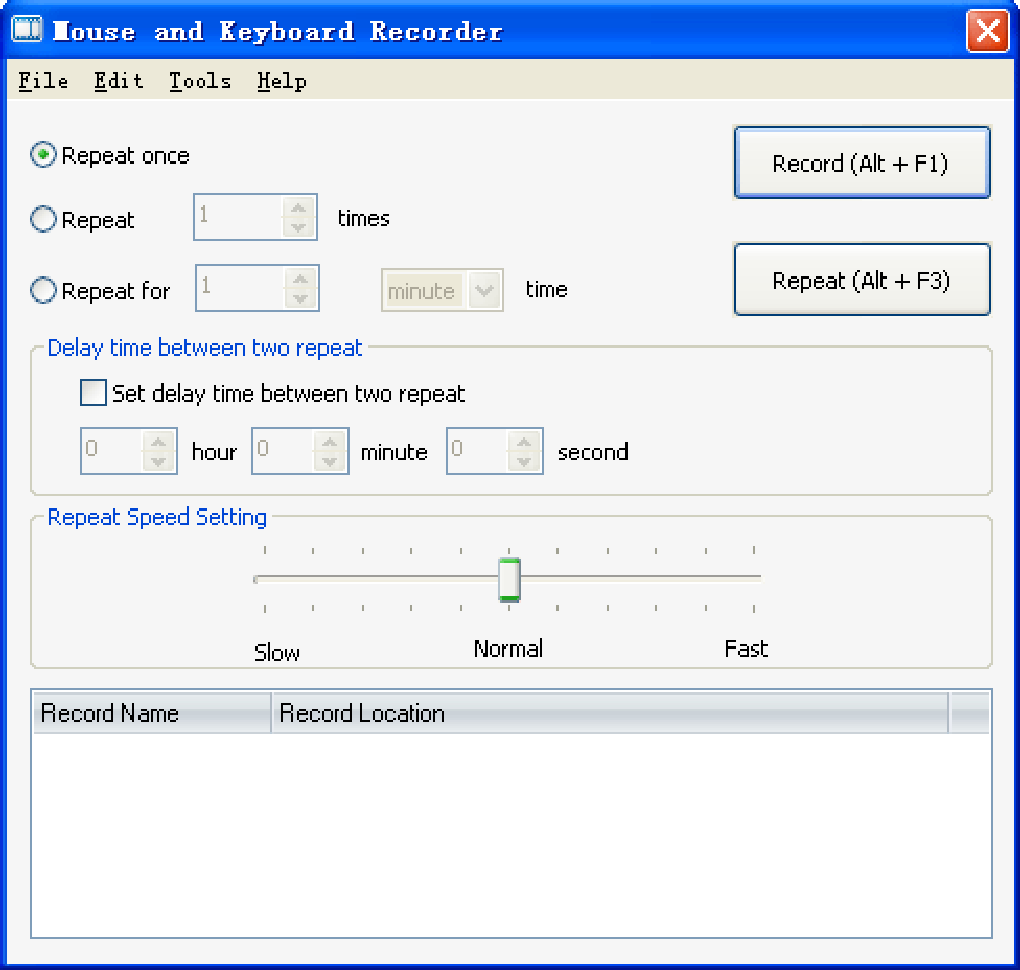
The playback function operates with a high degree of fidelity, accurately replicating the recorded actions. Users have control over the playback speed, allowing for adjustments based on the specific needs of the task. This flexibility ensures that the automated process can be adapted to various situations and system configurations. The software also includes options for setting delays between actions, ensuring accurate execution even on slower systems.
Ease of Use and User Interface: A Beginner-Friendly Design
One of the strengths of Mouse and Keyboard Recorder lies in its user-friendly interface. The program is designed with an intuitive layout, making it accessible even to users with limited technical expertise. The recording and playback processes are straightforward, requiring minimal user input. The software features clear and concise instructions, guiding users through the various steps involved in setting up and executing automation scripts.
The simplicity of the interface, however, does not compromise functionality. The software includes advanced features, such as the ability to edit recorded scripts, allowing users to refine and customize their automated processes. This editing capability is particularly beneficial for complex tasks, allowing users to fine-tune the automated script to achieve optimal performance. The editing tools are also intuitive, allowing users to make precise changes to the recorded script without requiring extensive technical knowledge.
Furthermore, the program’s compact size and low system resource requirements minimize disruption during operation, ensuring smooth and efficient performance. This is particularly important for users working on systems with limited processing power or memory.
Applications and Use Cases: Expanding Productivity and Efficiency
The applications of Mouse and Keyboard Recorder extend across various domains, offering significant potential for increasing productivity and efficiency. Here are some key use cases:
-
Automating Repetitive Tasks: For tasks involving repetitive data entry, form filling, or other routine operations, Mouse and Keyboard Recorder can significantly reduce the time and effort required. By recording the necessary actions once, users can automate the process for subsequent repetitions. This is particularly beneficial in office environments where such tasks frequently consume significant time.
-
Creating Software Tutorials: The ability to record precise mouse and keyboard actions makes the software ideal for creating step-by-step tutorials. Users can record their interaction with a particular software application and then share the recorded script as a guide for others. This can be extremely useful in training settings or for providing support to users of complex software.
-
Software Testing and Quality Assurance: In software development, the software can be employed in automated testing scenarios. By recording a series of actions that verify the functionality of a software application, developers can automate the testing process, identifying bugs and ensuring software quality. This can significantly improve the speed and efficiency of the software testing process.
-
Streamlining Workflow Processes: Beyond specific tasks, the software can also be used to streamline broader workflow processes. By automating segments of complex procedures, businesses and individuals can significantly improve their efficiency and reduce the potential for human error.
-
Accessibility Solutions: For individuals with motor impairments, Mouse and Keyboard Recorder can provide valuable accessibility support. By automating repetitive actions, the software can reduce physical strain and enable users to interact more effectively with computers and software applications.
Limitations and Considerations: Addressing Potential Drawbacks
While Mouse and Keyboard Recorder offers substantial benefits, it is important to acknowledge certain limitations:
-
Trial Version Restrictions: The software is offered as a trial version, meaning that some features may be limited or unavailable without purchasing a full license. Users should carefully consider these limitations before relying on the software for critical tasks.
-
Screen Resolution Dependence: The recorded actions may not always translate perfectly across different screen resolutions or display settings. Significant changes in resolution could lead to inaccuracies in the playback of the recorded script. Users should be aware of this potential issue and test the automated scripts on various configurations.
-
Security Considerations: It’s crucial to use this software responsibly and only for legitimate purposes. Malicious use could lead to unintended consequences, such as unauthorized access or data manipulation. Users should be mindful of ethical considerations and adhere to relevant legal regulations.
-
Software Compatibility: The software’s compatibility with various applications and operating systems should be considered. While it generally works well with most Windows applications, users should verify compatibility before relying on it for critical processes. Compatibility with newer operating systems and updates should also be verified regularly.
-
Lack of Advanced Scripting Capabilities: The software lacks advanced scripting capabilities found in other automation tools. Users needing more complex scripting features, such as conditional logic or variable manipulation, might need to explore other alternatives.
Conclusion: A Valuable Tool for Automation and Productivity
Mouse and Keyboard Recorder by RobotSoft provides a user-friendly and effective solution for automating repetitive tasks and creating tutorials. Its intuitive interface and precise recording capabilities make it accessible to a wide range of users, from novice computer users to experienced professionals. While the trial version may have some limitations, the software’s core functionality remains valuable for enhancing productivity and streamlining workflows across various applications. However, users should carefully consider the limitations and security implications before employing the software for sensitive tasks. Overall, Mouse and Keyboard Recorder represents a worthy tool for those seeking to automate repetitive actions and enhance their efficiency on Windows systems.
File Information
- License: “Trial version”
- Version: “3.2.8.8”
- Latest update: “May 16, 2024”
- Platform: “Windows”
- OS: “Windows 8”
- Downloads: “2.1K”
- Size: “852.18 KB”


