
Mousekey Recorder is a user-friendly macro recorder designed to streamline your workflow by automating repetitive keyboard and mouse actions. Its intuitive interface makes it accessible to users of all technical skill levels, allowing you to efficiently record and replay complex sequences of actions with ease. This comprehensive guide explores the features, functionalities, and benefits of Mousekey Recorder, providing a detailed overview for both novice and experienced users.
Understanding Mousekey Recorder’s Core Functionality
At its heart, Mousekey Recorder is a tool for capturing and reproducing sequences of mouse movements, keyboard inputs, and clicks. This functionality eliminates the need for manual repetition of tedious tasks, saving significant time and effort. The program records your actions, storing them in a readily playable format, enabling you to replay the recorded macro at any time, adjusting speed and repetition counts as needed. This simple yet powerful capability transforms routine computer tasks into streamlined, automated processes.
The recording process itself is straightforward. After identifying the repetitive task you wish to automate, you simply initiate recording within the Mousekey Recorder application. The program’s interface will minimize to the system tray, providing you with unobstructed access to the application window where you’ll perform the task. Every mouse movement, click, and keystroke will be meticulously captured. Once the task is complete, you stop the recording, and the macro is saved in the program’s internal format (.hush) and on your PC, allowing for immediate playback and review.
Utilizing Mousekey Recorder’s Advanced Features
Beyond basic recording and playback, Mousekey Recorder offers several advanced features that enhance its versatility and usability. These features elevate it beyond a simple macro recorder, transforming it into a comprehensive tool for boosting productivity.
Setting Repetitions and Playback Speed
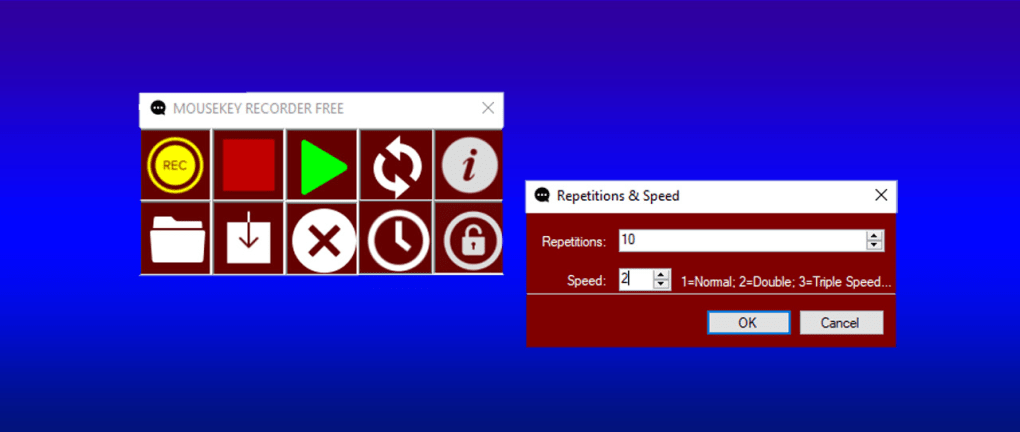
Mousekey Recorder allows you to precisely control the number of times a macro is repeated and the speed at which it’s played back. This is crucial for fine-tuning the automated task to meet your specific requirements. A dedicated interface allows you to adjust these parameters, ensuring optimal performance. The default setting plays the macro once, allowing you to verify the recording before setting it for multiple repetitions. This iterative approach ensures accuracy and efficiency. The free version limits repetitions to 15, while the pro version removes this limitation, allowing for unlimited repetitions.
Scheduled Macros: Automating Tasks at Specific Times
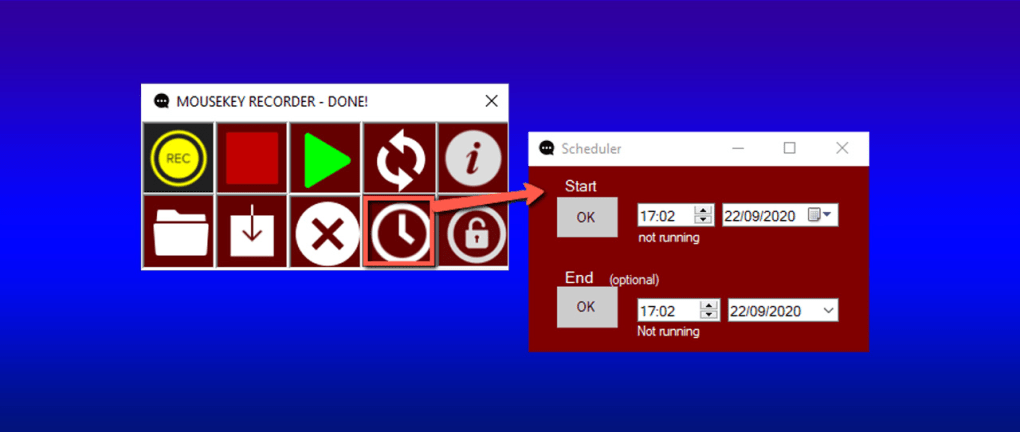
A particularly useful feature of Mousekey Recorder is its built-in scheduling functionality. This allows you to configure the program to automatically run a recorded macro at a predetermined time and date. This functionality proves invaluable for automating tasks that need to be executed regularly at specific intervals, eliminating the need for manual intervention. The scheduling interface is intuitive, enabling you to set precise dates and times for automated macro execution.
Interrupting Macros: Maintaining Control
While automation is a key benefit, Mousekey Recorder provides a mechanism to interrupt the playback of a macro at any point. This is essential for maintaining control and preventing unintended actions. The simple CTRL+E hotkey allows for immediate termination of a running macro, providing a crucial safety net.
Saving and Managing Macros
Mousekey Recorder simplifies the process of managing recorded macros. Macros are automatically saved, but users also have the option to manually save recordings, ensuring data preservation and easy access. The intuitive interface facilitates straightforward macro management, allowing users to review, edit, or delete recordings as needed.
Mousekey Recorder: A Comparison of Free and Pro Versions
Mousekey Recorder offers both a free and a paid (Pro) version. The free version provides a comprehensive range of features, including recording, playback, scheduling, and speed control. The main limitation of the free version is a cap of 15 repetitions for each macro. For users requiring unlimited repetitions, the Pro version is available for a yearly subscription fee of $19.99, offering unlimited macro repetition cycles. For most casual users, the free version may suffice. However, users requiring more extensive automation, particularly for tasks demanding numerous repetitions, will find the Pro version a worthwhile investment.
Mousekey Recorder: Applications and Use Cases
The versatility of Mousekey Recorder extends across a wide range of applications, making it a valuable tool for diverse users. Here are some examples of how Mousekey Recorder can enhance productivity:
-
Data Entry: Automating repetitive data entry tasks, such as filling out forms or entering information into spreadsheets.
-
Software Testing: Running automated test scripts to streamline the software testing process.
-
Gaming: Creating macros for repetitive actions in games, providing a competitive edge.
-
Administrative Tasks: Automating routine administrative tasks, such as generating reports or managing files.
-
Web Browsing: Automating web browsing tasks, such as filling out online forms or navigating websites.
Mousekey Recorder: System Requirements and Compatibility
Mousekey Recorder is designed for Windows operating systems, ensuring compatibility with a broad range of PCs. The specific system requirements are minimal, making it accessible to a wide array of users. The program’s small footprint ensures minimal impact on system resources. Its compatibility with diverse versions of Windows enhances its accessibility.
Mousekey Recorder: Strengths and Weaknesses
Like any software, Mousekey Recorder has both strengths and weaknesses.
Strengths:
- User-Friendly Interface: The intuitive interface is easy to navigate, even for users without extensive technical skills.
- Comprehensive Feature Set: The program offers a robust suite of features, including scheduling and speed control.
- Affordable Pro Version: The Pro version’s price point is reasonable, making it accessible to a broad range of users.
- Effective Automation: It significantly reduces the time and effort required for repetitive tasks.
Weaknesses:
- Limited Free Version: The free version’s limitation on macro repetitions might restrict its usefulness for certain tasks.
- Windows-Only: The program’s compatibility is limited to Windows operating systems.
Conclusion
Mousekey Recorder emerges as a valuable tool for users seeking to automate repetitive computer tasks. Its user-friendly interface, powerful features, and reasonable pricing make it an attractive option for enhancing productivity. While the free version might not suffice for all users, the paid version offers a comprehensive solution for automating even the most complex repetitive tasks, making Mousekey Recorder a strong contender in the macro recording software landscape. The balance of features, ease of use, and affordability positions it well for both casual and professional users seeking to streamline their workflows.
File Information
- License: “Trial version”
- Latest update: “July 10, 2023”
- Platform: “Windows”
- OS: “Windows 7”
- Language: “English”
- Downloads: “1.6K”
- Size: “1.97 MB”


