
Movie Hub, once touted as a completely free movie streaming app for Windows users, presented a compelling proposition: unlimited access to a vast library of films, many in high definition, without the typical subscription fees. However, the reality of the app’s functionality, as well as its current availability, requires a closer examination. This review delves into the features, limitations, and overall user experience of Movie Hub, exploring whether its promise of free, high-quality streaming truly lived up to expectations.
Accessing a Wide Range of Movies
Movie Hub offered a user-friendly interface reminiscent of popular streaming services like Netflix. Navigation was straightforward, allowing users to easily browse through hundreds of films, encompassing both mainstream releases and a selection of independent titles from around the globe. The app boasted a robust genre categorization system, enabling users to quickly locate films within specific categories such as comedy, family, drama, horror, action, adventure, animation, fantasy, thriller, sports, war, and documentaries. This detailed categorization, further enhanced by the ability to compare similar films within a genre, facilitated a smooth and efficient search experience. The ability to search for films by language, such as Spanish-language films, further broadened its appeal.
The app’s extensive catalog was undoubtedly its strongest selling point. The breadth of content, ranging from classic cinema to newer releases, made it a potentially attractive option for users seeking diverse viewing options. This diversity was a key differentiator, offering something for a wide range of tastes and preferences. The inclusion of independent films broadened the scope beyond the typical mainstream offerings of many other platforms.
Free Streaming with a Catch: Advertisements and In-App Purchases
While Movie Hub advertised itself as a free service, this “free” access came with several caveats. The most significant was the presence of advertisements that frequently interrupted the viewing experience. These ads, while not necessarily intrusive in terms of length, disrupted the flow and immersion of watching a movie, potentially detracting from the overall enjoyment.

Furthermore, to fully utilize all the app’s features, users were required to make in-app purchases. One key feature locked behind a paywall was “Play To TV,” a functionality allowing users to stream their chosen movies to a larger screen television via casting. This limitation restricted the full potential of the app for users who preferred a larger screen viewing experience. Removing the advertisements entirely also required a one-time purchase, effectively transforming the app from a completely free service into a freemium model.
The implication of a free service that relies on revenue from in-app purchases and advertisements significantly impacts the user experience. The free version could be viewed as a trial or limited demonstration of what the full-featured, paid version offers. The user needs to decide if the frequent interruptions are worth the convenience of free access to a wide selection of movies.
User Interface and Functionality: Ease of Use and Additional Features
Movie Hub’s user interface was designed for ease of navigation and usability. Its intuitive layout mirrors that of established streaming platforms, making it user-friendly for even those unfamiliar with similar apps. The ability to add movies to a personal queue was a valuable feature, allowing users to save films for later viewing without needing to search for them again. This simple yet effective feature enhanced the overall user experience, reflecting a thoughtful design approach.
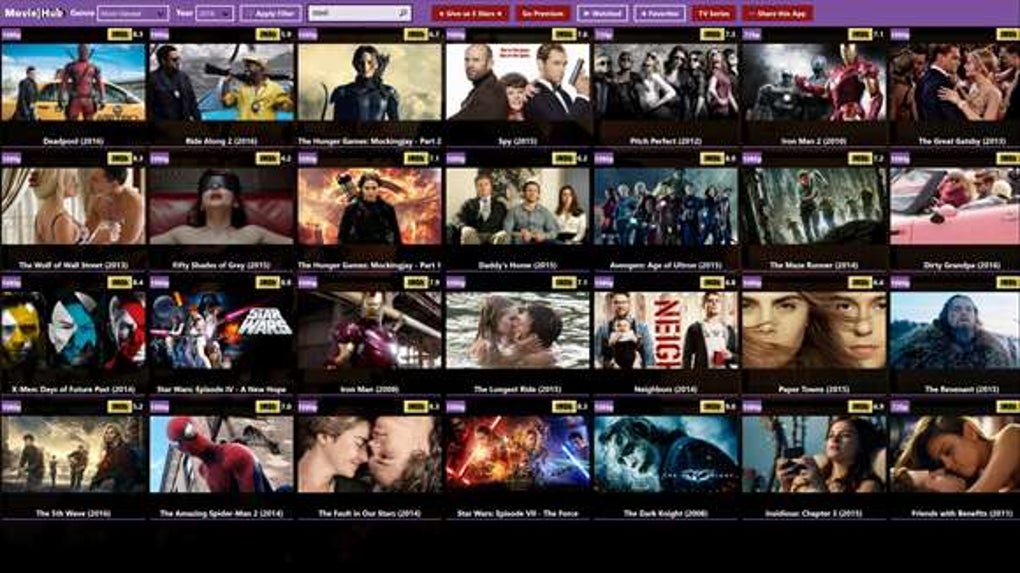
The app required a relatively small amount of storage space (up to 7.79 MB), making it accessible for a wide range of devices. However, its compatibility was limited to Windows 10 and Windows 8.1 operating systems, excluding users with other Windows versions. The lack of an explicit age rating for the app itself also necessitates parental supervision to filter content appropriately, as the movie selection encompassed various age ranges.
The picture quality, when streaming to a compatible television, was reported to be exceptionally high, thanks to the availability of HD streaming options. The inclusion of options for lower quality streaming addressed potential issues for users with slower internet connections, a user-friendly feature that catered to varying internet speeds and bandwidth capabilities.
Performance and Potential Issues: Casting Limitations and Internet Dependency
Despite the generally positive feedback on picture quality when casting to a TV, some users reported issues with the “Play To TV” functionality. The frequency and nature of these problems remain unclear, however, indicating a potential area of concern regarding the app’s performance. The reliability of casting is a crucial aspect of a streaming service, and potential issues in this area could significantly impact user satisfaction. The success of casting also heavily relies on a stable and fast internet connection.
Furthermore, the app’s performance is intrinsically linked to internet connectivity. While options for lower quality streaming were available, slower internet speeds could still lead to buffering and playback issues, directly affecting the viewing experience.

Conclusion: Weighing the Pros and Cons
Movie Hub presented a promising concept: a free, high-definition movie streaming app with a wide selection of films. However, the reality of the “free” aspect was tempered by frequent advertisements and the necessity of in-app purchases for full functionality.
Pros:
- Extensive Movie Library: A wide range of both mainstream and independent movies, covering various genres and languages.
- User-Friendly Interface: Easy navigation and a familiar layout similar to established streaming services.
- High-Definition Streaming: Excellent picture quality, especially when casting to a larger screen.
- Personal Movie Queue: Allows saving films for later viewing.
- Adjustable Streaming Quality: Options for lower quality streaming to accommodate slower internet connections.
Cons:
- Frequent Advertisements: Ads interrupt the viewing experience, impacting user enjoyment.
- Paywalled Features: Crucial features, such as “Play To TV,” are locked behind a paywall.
- Limited Compatibility: Only compatible with Windows 10 and Windows 8.1.
- Reported Casting Issues: Some users experienced problems with the casting function.
- Internet Dependency: Performance heavily reliant on stable and fast internet connections.
- App No Longer Available: The app itself is no longer available for download, rendering this review largely historical.
Ultimately, Movie Hub’s value proposition was a complex one. The sheer volume of content and user-friendly interface were undeniably appealing. However, the interruptions caused by ads and the requirement of additional payments for key features significantly altered the initial perception of a truly free service. The unavailability of the app underscores the ephemeral nature of such platforms and the importance of considering the overall cost and limitations before committing to similar services. Potential users should carefully weigh these pros and cons against the availability and reliability of alternative streaming options. The information presented here serves as a retrospective evaluation of Movie Hub’s functionalities and performance based on its previous availability.
File Information
- License: “Free”
- Latest update: “January 23, 2025”
- Platform: “Windows”
- OS: “Windows 8.1”
- Language: “English”
- Downloads: “9K”


