
Movie Subtitles Searcher was a Windows-based application designed to simplify the process of finding and applying subtitles to movie files. While the original software is no longer available for download due to reasons possibly including discontinuation, security concerns, or other unknown factors, its functionality and impact on the user experience warrant a closer examination. This review will delve into its features, functionality, and the landscape of alternative subtitle solutions available today.
Functionality and Features of Movie Subtitles Searcher
Movie Subtitles Searcher offered a streamlined approach to subtitle acquisition. Unlike manual searches across various subtitle websites, this application aimed to automate the process using a custom hashing algorithm. The software leveraged the OpenSubtitles.org database, a vast repository of user-submitted subtitles for a wide array of films and television shows. Its key features included:
-
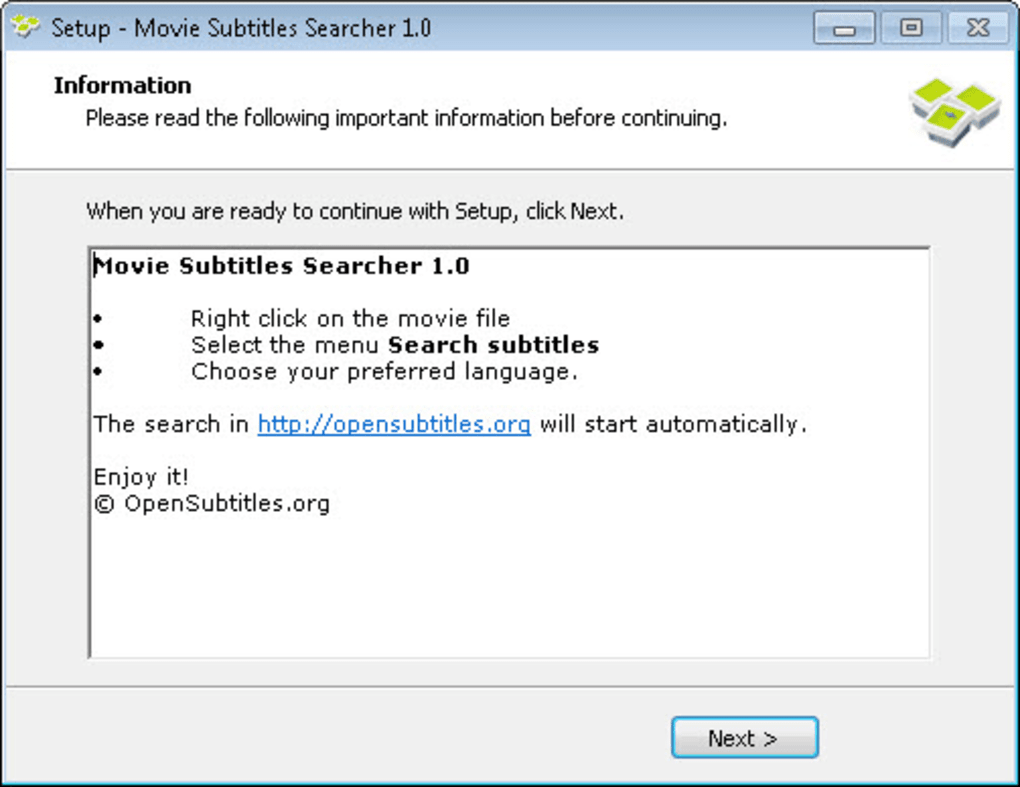
Automated Subtitle Search: The core functionality involved automatically identifying the movie file based on its unique hash, significantly reducing the time spent searching for matching subtitles. Users simply right-clicked the movie file, selected their preferred language from a menu, and the application initiated the search. This process was touted as remarkably fast, achieving results within 0.358 seconds, according to the original promotional materials. This speed was a major selling point, differentiating it from manual searches, which could often be a tedious and time-consuming process.
-
OpenSubtitles.org Integration: The program’s reliance on the OpenSubtitles.org database provided access to a vast and diverse library of subtitles in numerous languages. This integration ensured a wide selection of subtitle options for users, catering to a global audience with varying linguistic preferences. The scale of the database meant a higher probability of finding accurately synchronized subtitles for less mainstream movies and TV series.
-
Direct Browser Integration: Instead of directly downloading and integrating subtitles into the movie file, Movie Subtitles Searcher opened the user’s default web browser to the relevant OpenSubtitles.org page containing the matched subtitles. This approach avoided potential compatibility issues with various media players and file formats. The user was then responsible for downloading and integrating the subtitles manually. This method, while requiring an extra step, maintained flexibility and allowed users to choose their preferred subtitle format and download methods.
-
Windows Compatibility: The software was specifically designed for Windows operating systems, ensuring optimal compatibility and performance. The broad support for various Windows versions made the application accessible to a substantial user base. However, this also limited its reach to users of other operating systems, such as macOS or Linux.
- Language Support: While the specifics of the supported languages were not explicitly listed, promotional material indicated support for “a dozen languages,” suggesting a reasonable degree of multilingual support. This aspect significantly enhanced its accessibility to a global user base.
How Movie Subtitles Searcher Worked: A Technical Deep Dive
The software’s unique approach to subtitle matching relied on a custom hash function. This function calculated a unique digital fingerprint for the movie file. This digital fingerprint is essentially a complex numerical representation of the file’s contents, effectively identifying the movie irrespective of its file name or other metadata. The application would then use this hash to query the OpenSubtitles.org database, swiftly searching for matching entries that contained the same unique identifier.
Upon finding a match, it would then present the user with a list of subtitles corresponding to the identified movie in various languages. This custom hash-based approach was designed to be more efficient and accurate than comparing file names or using other less precise methods. It effectively bypassed the need for manual searches or complex pattern-matching algorithms, streamlining the search process to a near-instantaneous operation.
However, the specifics of the hashing algorithm are not publicly available, making it difficult to assess its robustness and potential limitations. The security of the method is also not publicly verifiable, leading to some degree of uncertainty concerning its dependability and resistance against manipulation or unintended errors.
The Decline of Movie Subtitles Searcher and Available Alternatives
The unavailability of Movie Subtitles Searcher for download highlights the dynamic nature of software development and distribution. The reasons for its removal from distribution channels remain unclear, but possibilities include:
-
Discontinuation by the Developer: The developer might have decided to cease support and development for various reasons, such as a lack of resources, shifting priorities, or evolving business strategies.
-
Security Vulnerabilities: The software might have contained security vulnerabilities that made it susceptible to exploitation. Removal could have been a necessary precaution to prevent potential harm to users.
-
Legal Issues: The application’s reliance on an external database could have led to legal complications involving copyright or terms of service violations, resulting in the forced removal of the application.
Regardless of the reasons, the removal leaves a void in the market for a similar user-friendly, hash-based subtitle searching application. However, many alternatives exist, providing similar and even enhanced functionality. These alternatives often include more advanced features and updated user interfaces.
Alternative Subtitle Solutions
Several alternatives to Movie Subtitles Searcher provide efficient methods for finding and integrating subtitles. Some notable examples include:
- OpenSubtitles.org Website: The primary source of subtitles used by Movie Subtitles Searcher, OpenSubtitles.org itself remains a powerful resource. While lacking the automated search features, manual searching is straightforward and efficient, especially for users familiar with the database’s organization.
-
Subtitle Downloaders/Managers: Numerous subtitle downloader applications and browser extensions provide automated subtitle search features similar to Movie Subtitles Searcher. These tools often integrate with media players for seamless subtitle application.
-
Media Player Integrations: Many popular media players, such as VLC Media Player, include built-in subtitle search and management capabilities. These features allow users to search for and download subtitles directly within the player’s interface, providing a streamlined workflow.
-
Subtitle Editing Software: Software like Gaupol or Subtitle Edit goes beyond simple download functionality. These tools enable users to edit, synchronize, and even translate subtitles, offering advanced capabilities for users who need more control over their subtitle experience.
Conclusion: The Legacy of Movie Subtitles Searcher
While Movie Subtitles Searcher is no longer available, its legacy lies in its demonstration of a user-friendly approach to subtitle acquisition. Its focus on speed and ease of use through the implementation of a custom hashing algorithm was innovative for its time. The application served as a testament to the value of automating a previously tedious task. Although unavailable, the software’s concept highlights the ongoing need for efficient and user-friendly subtitle solutions, and numerous alternatives currently fill this need, often exceeding the capabilities of the original Movie Subtitles Searcher. The current landscape of subtitle search tools offers numerous options with varying features and levels of complexity, ensuring that users can find the best solution for their needs and preferences.
File Information
- License: “Free”
- Version: “1.0”
- Latest update: “July 12, 2019”
- Platform: “Windows”
- OS: “Windows 7”
- Language: “English”
- Downloads: “18.6K”
- Size: “1.67 MB”


