
In an age where digital music libraries can grow to astronomical sizes, keeping them organized and free of errors often feels like an impossible task. For music enthusiasts, DJs, and anyone with a vast collection of audio files, the dream of a perfectly curated library free from glitches, incorrect metadata, and inconsistent volumes often remains just that – a dream. However, tools like MP3 Diags emerge as a beacon of hope, offering a comprehensive solution to detect, diagnose, and repair the myriad of common problems that plague digital music collections. This in-depth look at MP3 Diags aims to unpack its capabilities, guide users through its functionalities, and highlight why it has become an indispensable utility for maintaining pristine audio libraries.
MP3 Diags is more than just a simple file checker; it’s a robust audio editor designed to analyze an entire music collection, pinpointing and rectifying a wide array of issues that can detract from the listening experience. From subtle imperfections like “flipped bits” in audio streams to glaring errors such as broken or unsupported file structures, missing or erroneous tags, inconsistent normalization levels, and even vexing character encoding problems, MP3 Diags endeavors to bring order to the chaos. While its interface might initially present a learning curve, the power and precision it offers make it a worthwhile investment of time for anyone serious about their music.
Unraveling the Chaos: What MP3 Diags Does for Your Music
A digital music library, much like a physical one, requires diligent maintenance. Over time, files can become corrupted, metadata can be incomplete or incorrect, and encoding inconsistencies can arise from various sources – be it different ripping software, varying download origins, or manual edits gone awry. These issues, while seemingly minor individually, can collectively degrade the quality and usability of an entire collection. MP3 Diags steps in as the ultimate librarian, capable of identifying these digital defects with remarkable accuracy.
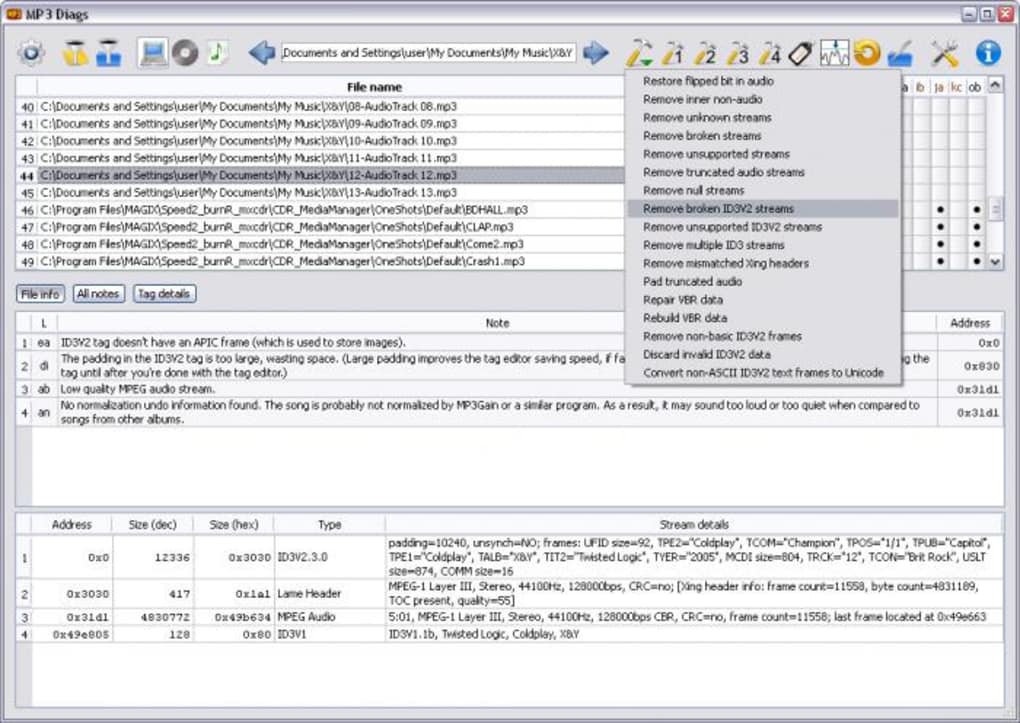
The core strength of MP3 Diags lies in its analytical engine. Once directed to a specific folder containing your music, it meticulously scans each file, delving deep into its structure and metadata. This isn’t a superficial check; it’s an in-depth forensic examination that looks beyond file names and basic tags. It scrutinizes the audio stream itself for integrity, validates the presence and accuracy of ID3 tags, and checks for compliance with various audio standards. The results of this scan are then presented in an intuitive, albeit dense, list, detailing every detected anomaly for each file.
Diagnosing the Digital Ailments
The problems MP3 Diags can identify are extensive and cover both structural and informational aspects of your audio files. Here’s a closer look at the types of issues it targets:
- Flipped Bits in Audio: These are subtle errors within the audio data stream itself, which might not always manifest as obvious distortions but can affect audio fidelity. MP3 Diags can detect and, in some cases, correct these minute imperfections, ensuring the purest possible sound reproduction.
- Broken or Unsupported Streams: Sometimes, MP3 files might contain data streams that are either incomplete, corrupted, or formatted in a way that isn’t fully compliant with the MP3 standard, leading to playback issues or incompatibility with certain players. MP3 Diags identifies these structural flaws.
- Wrong or Missing Tags (ID3 Tags): This is arguably one of the most common and frustrating problems. Incorrect artist names, album titles, genre classifications, missing album art, or even entirely absent metadata tags can make organizing and browsing a music library a nightmare. MP3 Diags highlights these discrepancies, making it easy to see which files need attention.
- Normalization Issues: Different audio files often have varying loudness levels, leading to an inconsistent listening experience where some tracks play too quietly and others blast too loudly. MP3 Diags can identify these normalization discrepancies, paving the way for a more uniform playback volume.
- Character Encoding Issues: When files are created or edited on different operating systems or with different software, character encoding can become muddled. This often results in “garbled” text in tags, where special characters (like accented letters or symbols) appear as unintelligible strings of characters. MP3 Diags helps identify and resolve these encoding conflicts, ensuring your tags display correctly across all platforms.
The beauty of MP3 Diags’ diagnostic phase is how it presents the findings. Each detected problem for a given file is marked with a distinctive bullet point in the results list. Users can simply hover their mouse over these bullet points to get a clear, concise explanation of what the specific error signifies. This user-friendly approach to error reporting, despite the initially complex interface, empowers users to understand the state of their music files without needing to be an audio engineering expert.
The Power of Repair and Refinement
Detecting problems is only half the battle; the ability to fix them is where MP3 Diags truly shines. Once the diagnostic scan is complete and the list of issues is presented, users are given a powerful suite of tools to rectify the identified problems.
MP3 Diags offers two primary modes for applying fixes:
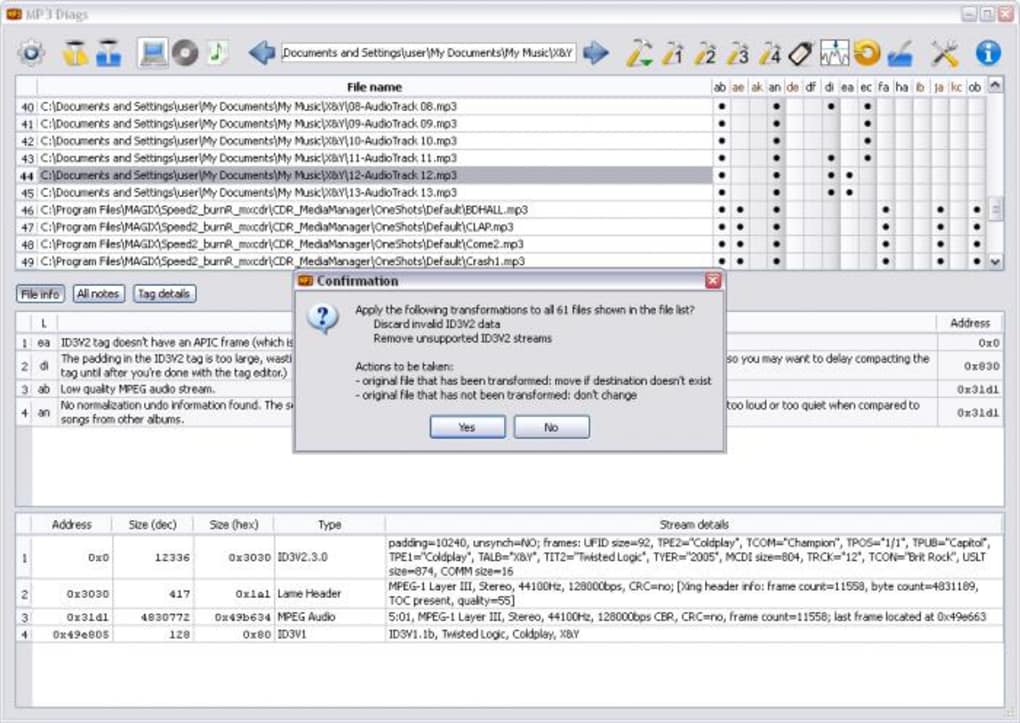
- Preset Fix Lists for Batch Processing: For common scenarios or specific types of issues, the program includes several pre-configured lists of fixes. These allow users to apply a standardized set of repairs to multiple files simultaneously. This batch processing capability is a huge time-saver, especially for large libraries where consistency is key. Imagine applying a fix for all character encoding issues or normalizing the volume across an entire album with just a few clicks.
- Individual Fix Selection: While batch processing is efficient, sometimes a more granular approach is needed. MP3 Diags provides the flexibility to select and apply individual fixes from a comprehensive list, accessible via a hammer-shaped icon within the interface. This allows users to carefully review each problem and choose the most appropriate solution for specific files or unique situations, ensuring maximum control over the repair process.
Beyond general file integrity and structural repairs, MP3 Diags integrates dedicated tools for metadata and audio level management:
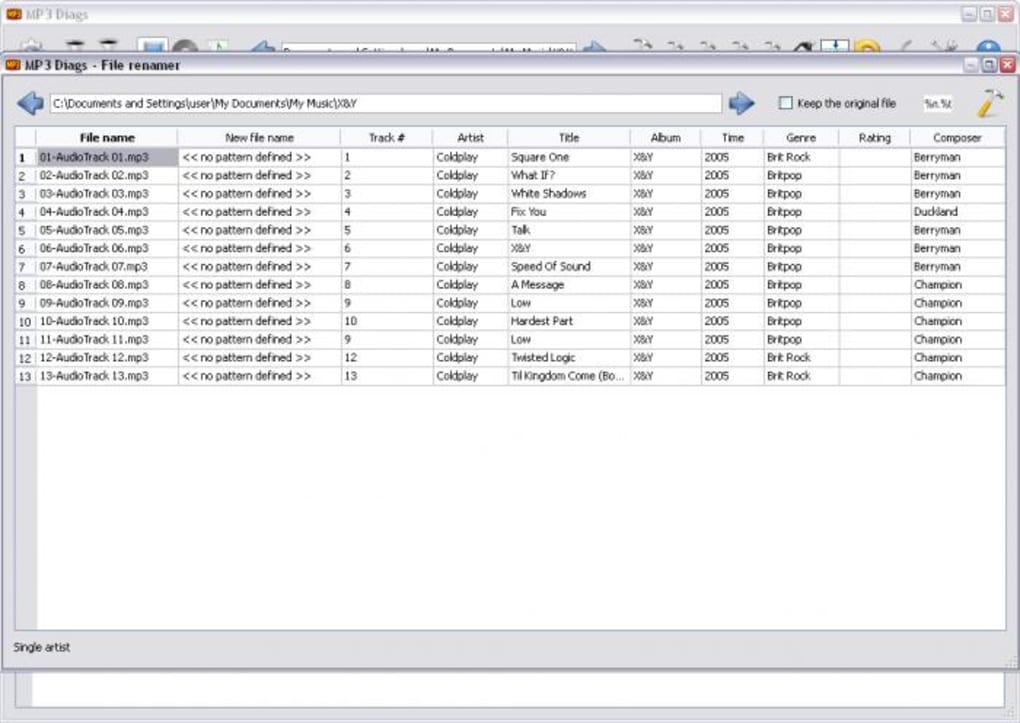
- Integrated Tag Editor: One of the most frequently used features is the built-in tag editor. This allows users to manually correct or complete ID3 tags for individual files. This is crucial for fixing missing artist names, album titles, track numbers, genres, and most importantly, embedding album art. The tag editor is comprehensive, allowing for detailed modifications to ensure all metadata is accurate and consistent. The ability to copy images to the clipboard by pressing CTRL+C when viewing full-size images is a thoughtful addition for quick album art management. The updated field order and inclusion of “Rating” also reflect continuous refinement for a better user experience.
- Normalizing Tool: Separate from the main repair functions, MP3 Diags includes a normalizing application. This tool addresses the aforementioned volume inconsistencies across tracks. By applying normalization, users can achieve a consistent loudness level throughout their music library, leading to a much smoother and more enjoyable listening experience without the constant need to adjust the volume.
The philosophy behind MP3 Diags’ repair mechanisms is one of caution and control. While powerful, the program implicitly encourages users to exercise patience and thoroughness. The ability to preview changes or back up files before committing to repairs ensures that users can experiment and refine their library without fear of irreversible damage.
Navigating the Interface: Tips for Effective Use
Upon first launching MP3 Diags, users might find themselves facing an interface that is, to put it mildly, slightly complex. Unlike many modern applications that prioritize minimalist design, MP3 Diags opts for a comprehensive display of information and controls. This density of features, while powerful, can be daunting for newcomers. However, with a bit of patience and a structured approach, the interface reveals its logical layout and efficient workflow.
Mastering the Tools and Features
The complexity of MP3 Diags stems from its multifaceted nature. It’s not just a tag editor or a file repair tool; it’s an all-in-one diagnostic and remedial suite. Understanding its layout is key to harnessing its power.
- Initial Setup and Scanning: The first step is always to point MP3 Diags to the directory where your music is stored. The program will then initiate a scan. This process can take some time, especially for very large collections, but it’s a critical initial phase where all the diagnostic work happens.
- Interpreting the Results Pane: Once the scan is complete, the main window will populate with a list of your scanned files and a series of bullet points next to each file name. Each bullet represents a specific issue detected. The crucial tip here, as mentioned, is to hover your mouse over each bullet point. This action will reveal a tooltip explaining the exact nature of the problem, transforming abstract symbols into actionable information.
- Applying Fixes: The “hammer-shaped icon” is your gateway to individual fixes. Clicking it reveals a detailed list of potential repairs that can be applied to selected files. For batch operations, look for the preset lists of fixes. These are designed for common scenarios and can save immense amounts of time. It’s advisable to start with the more conservative fixes and observe the results before moving on to more aggressive repair options.
- Leveraging the Tag Editor: The tag editor is a separate, yet integrated, component. It’s best used when you need to manually input or correct specific metadata fields, such as album artist, release year, or genre, or to manage album art. Its comprehensive nature allows for fine-grained control over your file’s descriptive data. Recent updates have made it even more user-friendly, with logical field orders and essential additions like a “Rating” field.
- Utilizing the Normalizing App: If inconsistent playback volume is a significant issue across your library, the separate normalizing app is your solution. This tool helps achieve a uniform loudness level, creating a more professional and enjoyable listening experience.
One significant aspect of MP3 Diags that users should be aware of is the lack of integrated documentation. The program does not include a built-in help file or extensive tutorials. This means that users looking for guidance or troubleshooting specific issues will need to consult the official forums or community resources. While this might be a drawback for some, the community around such tools is often vibrant and helpful, offering practical advice and solutions.
Important Considerations Before You Start
Given the powerful and potentially transformative nature of MP3 Diags, a crucial piece of advice is to always create a backup copy of your music library before allowing the program to apply any changes. While MP3 Diags is designed to repair, not destroy, digital files can be delicate, and unforeseen circumstances can always arise. A backup provides an essential safety net, ensuring that your original files are preserved in case of an accidental misconfiguration or an unexpected outcome. This simple precautionary step can save hours of distress and potential data loss.
Furthermore, patience is a virtue when working with MP3 Diags. The initial scanning process can be lengthy for large libraries, and understanding the myriad of issues and available fixes takes time. It’s not a “set it and forget it” tool, especially for first-time users. Approaching it with a methodical mindset, testing fixes on smaller batches of files, and understanding the impact of each repair will lead to the most satisfactory results.
Advantages, Limitations, and Technical Insights
Like any powerful software, MP3 Diags comes with its own set of strengths and weaknesses, alongside specific technical characteristics that define its operational scope.
Advantages (Pros):
- Comprehensive Issue Repair: MP3 Diags stands out for its ability to detect and repair an incredibly wide range of common problems found in digital music libraries, from low-level audio stream errors to high-level metadata inconsistencies.
- Batch Processing Capabilities: The inclusion of preset fix lists for batch repairing is a major advantage, allowing users to apply consistent solutions to many files simultaneously, which is critical for large collections.
- Integrated Tag Editor and Normalizing Tool: The convenience of having a robust tag editor and a separate normalization utility built into the same application streamlines the entire music library management workflow.
- Free to Use: As a free utility, MP3 Diags offers professional-grade features without any financial commitment, making it accessible to all users.
- Active Development & Bug Fixes: The “Changes” log indicates ongoing maintenance and improvements, such as fixing crashes related to Qt versions or image handling in the tag editor, suggesting a commitment to stability and usability.
Limitations (Cons):
- Complex Interface: The user interface, while functional, is not immediately intuitive and can be challenging for beginners to navigate without prior guidance.
- No In-Program Documentation: The absence of built-in help files means users must rely on external resources like official forums for support and detailed explanations of features. This can be a barrier to entry for some.
Technical Insights and Specifications:
MP3 Diags is a testament to dedicated independent development. As of its latest stable release, Version 1.5.0 (with incremental updates like 1.5.012.8), it continues to provide vital functionality.
- License: Free, making it an attractive option for budget-conscious users.
- Platform Compatibility: Primarily designed for Windows, with explicit support for Windows XP and likely compatibility with newer versions of the operating system.
- Language: While the core interface is in English, the program supports multiple languages, reflecting its global user base.
- File Size: Relatively compact at approximately 13.90 MB, ensuring it doesn’t consume excessive system resources or storage space.
- Developer: Marian Ciobanu, indicating an individual or small team’s commitment to the project.
- Latest Update: The continuous updates (e.g., July 11, 2023 for specific versions) highlight active development and responsiveness to user feedback and bug reports.
Community and Support: Despite the lack of in-program documentation, the presence of an official forum (as referenced in the original description) indicates a community-driven support model. This allows users to share experiences, ask questions, and potentially receive direct assistance from the developer or experienced users. This form of support is often more dynamic and current than static help files.
Alternatives in the Ecosystem: While MP3 Diags offers a unique combination of features, it exists within an ecosystem of other audio utilities. Programs like “MP3 Repair Tool” focus specifically on unplayable files, “Dr.Tag” on renaming and extensive tagging, “mpTrim” for simple editing, and “Kid3 - Audio Tagger” or “MetatOGGer” for advanced tag management. MP3 Diags carves its niche by providing a broader diagnostic and repair suite that encompasses many of these functionalities under one roof, making it a comprehensive solution rather than a specialized one.
In conclusion, MP3 Diags, despite its initially steep learning curve, stands as an exceptionally powerful and invaluable tool for anyone looking to perfect their digital music library. Its ability to meticulously diagnose a vast array of common issues, coupled with its flexible repair options, robust tag editor, and normalization capabilities, makes it an essential utility for maintaining pristine audio collections. By approaching it with caution, patience, and the foresight to back up your files, users can transform their chaotic music folders into a beautifully organized and flawlessly playing library, ensuring an optimal listening experience for years to come. PhanMemFree.org proudly recommends tools like MP3 Diags as essential software for managing your digital assets effectively.
File Information
- License: “Free”
- Latest update: “July 11, 2023”
- Platform: “Windows”
- OS: “Windows XP”
- Language: “English”
- Downloads: “5.9K”
- Size: “13.90 MB”


