
In the ever-expanding universe of digital files, managing a vast collection of music can quickly become a daunting task. Imagine hundreds, even thousands, of MP3 files, each downloaded or ripped from various sources, bearing inconsistent names, cryptic codes, or incomplete information. The dream of a perfectly organized, easily navigable music library can rapidly dissolve into a chaotic jumble. This is precisely where a dedicated, lightweight utility like MP3 Fox steps in, offering a refreshingly simple yet remarkably effective solution to bring order to the musical chaos. Far from being just another piece of software, MP3 Fox represents a classic example of a tool designed with a singular, clear purpose: to make MP3 file renaming effortless, intelligent, and highly customizable.
Released and last updated in 2007, MP3 Fox might seem like a relic from a bygone era of software development. However, its enduring appeal lies precisely in its adherence to principles that are often overlooked in today’s feature-bloated applications: simplicity, efficiency, and portability. It doesn’t require complex installations or extensive system resources. Instead, it offers a direct, intuitive approach to a common problem faced by music enthusiasts globally. By leveraging the embedded metadata within MP3 files – known as ID3 tags – or allowing users to define their own naming patterns, MP3 Fox transforms messy file names into clean, consistent, and highly readable labels, ensuring that every track in your collection is exactly where it should be, and easily identifiable. This foundational utility, available for Windows and free to use, continues to serve as a testament to the power of specialized software that does one thing exceptionally well.
The Indispensable Role of Utilities and Tools in Digital Life
In the intricate tapestry of our digital ecosystems, utility software plays an indispensable role, often working quietly in the background, addressing specific pain points that broader applications might overlook or handle with unnecessary complexity. Utilities are the unsung heroes of digital hygiene, efficiency, and user control. They are designed to perform particular tasks, making them lean, focused, and often incredibly powerful in their niche. MP3 Fox perfectly embodies this spirit, carving out its place as a crucial tool for anyone serious about their digital music collection.
At its core, MP3 Fox is a specialized file renamer. While operating systems provide basic renaming functionalities, and many media players offer some level of file organization, these often fall short when dealing with the nuances of large MP3 libraries. The primary challenge stems from inconsistent naming conventions. One song might be “Artist - Song Title.mp3,” another “01 - Track Name.mp3,” and yet another “Random_Number_Audio.mp3.” Such discrepancies make it difficult to sort, search, and manage music effectively. MP3 Fox addresses this head-on by providing an intelligent, automated, yet user-controlled solution.
One of the most appealing aspects of MP3 Fox is its remarkable simplicity and portability. The program doesn’t demand an installation process. Users simply unzip the provided files (a mere 865.41 KB, indicative of its lightweight nature) into any folder, and it’s ready to run. This “no installation” feature is a significant advantage, allowing users to carry the utility on a USB drive and use it on any Windows machine without leaving a footprint. This frictionless setup immediately eliminates common barriers to software adoption, making it accessible to a wide range of users, from tech-savvy enthusiasts to casual listeners.
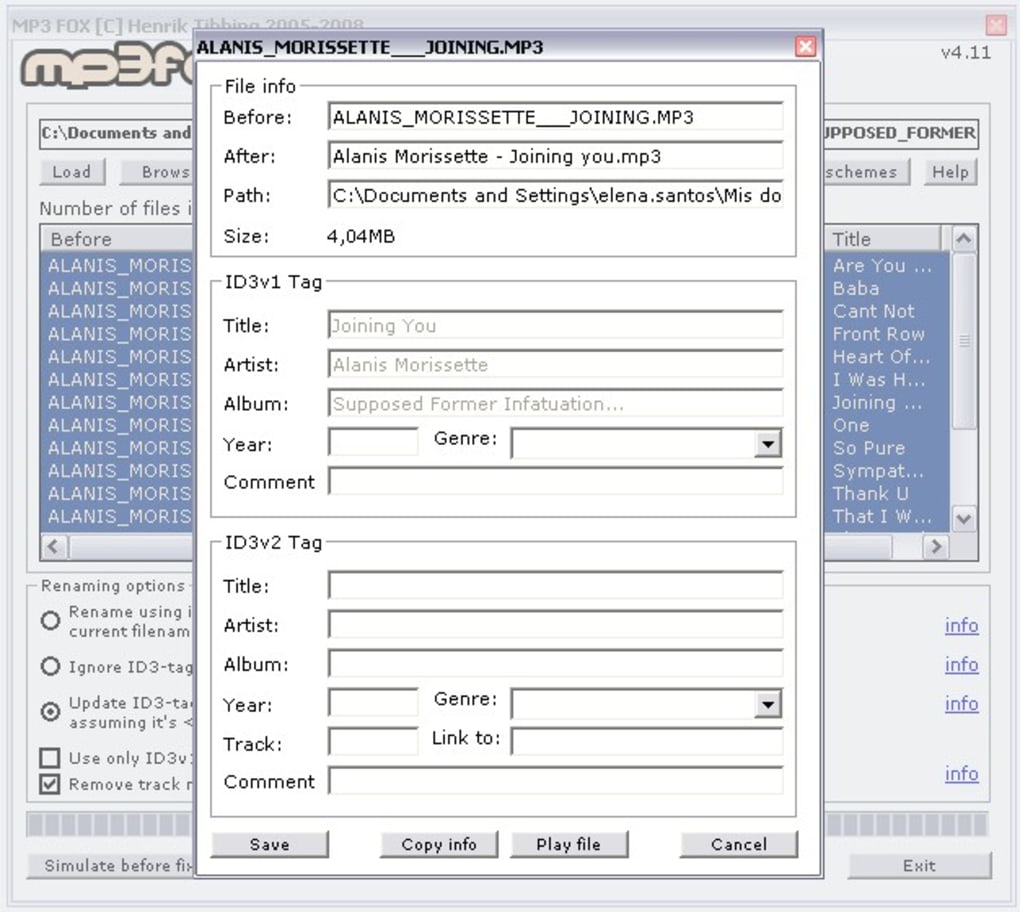
Once launched, the interface of MP3 Fox is straightforward and intuitive. It supports drag-and-drop functionality, enabling users to effortlessly load MP3 files or entire folders into the application. This ease of input is critical for a tool designed to process potentially hundreds or thousands of files at once. The program then offers distinct renaming options, allowing users to choose the method that best suits their needs. The most powerful of these is its ability to rename files based on ID3 tags, which we will delve into further in the next section.
Beyond ID3 tag-based renaming, MP3 Fox offers robust support for customizable naming patterns. This means users aren’t limited to the information stored in the tags; they can define their own structure for file names, incorporating elements like “Artist_Album_TrackNumber_SongTitle.mp3” or any other logical sequence. This flexibility ensures that the software adapts to the user’s preferred organizational schema, rather than dictating it.
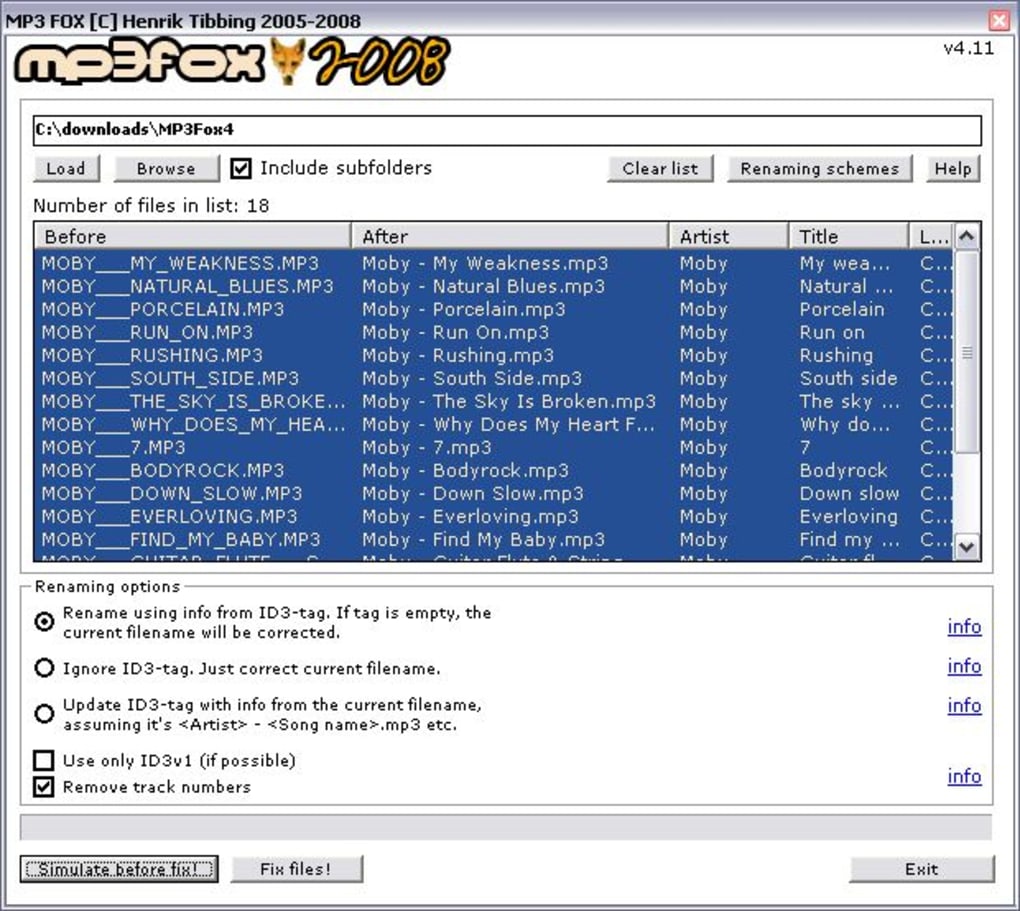
A critical feature that elevates MP3 Fox above basic file renamers is its preview function. Before any changes are committed to the actual files, the program displays a preview of the proposed new names. This allows users to review the results, catch any errors, or fine-tune their renaming patterns before irreversible modifications are made. This level of control and safety is paramount when dealing with large volumes of data, mitigating the common fear of accidentally corrupting or losing valuable files. While the author’s review mentions a slight annoyance of a “Are you sure?” confirmation message, this minor inconvenience is a small price to pay for data integrity, reinforcing the safety-first approach embedded in the tool’s design. The fact that the renaming process itself is almost instantaneous, even for numerous files, further underscores its efficiency, making it a reliable workhorse for routine file management.
Elevating Multimedia and Audio Management: Beyond Just Playback
The advent of digital music, particularly the widespread adoption of the MP3 format in the late 1990s and early 2000s, revolutionized how we consume and collect audio. Suddenly, entire music libraries could be stored on personal computers and portable devices. However, this convenience brought with it a new challenge: managing vast quantities of digital audio files. Without proper organization, a digital music collection can quickly devolve into an unmanageable mess, rendering many tracks effectively “lost” within a sea of generic or inconsistent file names. MP3 Fox addresses this fundamental problem, elevating the act of mere playback to intelligent and systematic audio management.
The cornerstone of effective digital audio management lies in metadata – data about data. For MP3 files, this metadata is stored in what are known as ID3 tags. These tags are embedded directly within the MP3 file itself and can contain a wealth of information: the song’s title, artist, album, year of release, genre, track number, and even album art. When MP3 files are ripped from CDs or downloaded from various sources, these ID3 tags can sometimes be incomplete, inaccurate, or entirely missing. Moreover, even if the tags are perfect, the actual filename might still be something unhelpful like “track01.mp3” or “unknown.mp3.”
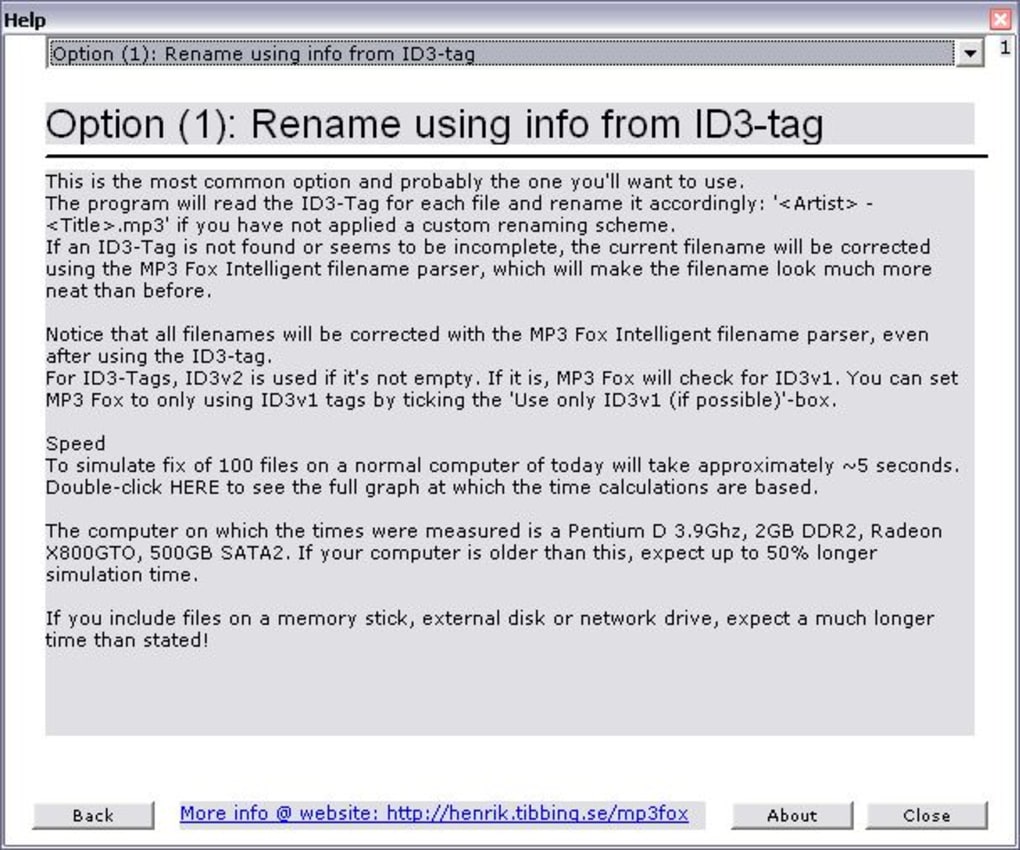
This is where MP3 Fox shines brilliantly. Its core strength lies in its ability to intelligently read these ID3 tags and use the embedded information to rename the corresponding MP3 files. Imagine a scenario where you have hundreds of songs, some named by track number, others by a partial title, and many with arbitrary alphanumeric strings. Manually renaming each one would be a Herculean task, prone to errors and immense frustration. MP3 Fox automates this process. By selecting the option to rename based on ID3 tags, the software can transform “03 - Unknown - Track 3.mp3” into “The Beatles - Abbey Road - Come Together.mp3” (assuming those details are correctly stored in the ID3 tags). This transformation instantly brings clarity and order to your collection.
Beyond simply reading the tags, MP3 Fox also allows for the definition of custom naming patterns utilizing these tags. For example, a user might prefer their files to be named as “Artist - Album Title - Track Number - Song Title.mp3.” The program provides placeholders or variables that correspond to different ID3 tag fields, allowing users to construct their desired filename structure. This level of customization ensures that the resulting file names are not just accurate but also consistent across the entire library, adhering to a personal or universal standard.
The psychological impact of a well-organized music library cannot be overstated. For true music aficionados, their collection is a prized possession. The ability to effortlessly locate a specific song, browse by artist or album, or simply admire a cleanly organized folder structure adds immensely to the enjoyment of their digital music experience. It reduces friction, saves time, and fosters a deeper connection with the music itself. MP3 Fox facilitates this by streamlining the most tedious aspect of digital music curation: the naming and structural organization of files. This focus on structured data, whether derived from existing tags or user-defined patterns, moves beyond basic file management into a more sophisticated realm of multimedia asset management, ensuring that every piece of audio content is discoverable and logically placed.
Boosting Productivity Through Meticulous Organization
While MP3 Fox is ostensibly a tool for managing music files, its impact extends far beyond mere aesthetic neatness. The principles of meticulous organization, applied to digital assets, directly translate into tangible productivity gains. In a world increasingly saturated with digital information, the ability to efficiently manage and retrieve data is a cornerstone of personal and professional effectiveness. MP3 Fox, by virtue of its specialized function, serves as an excellent case study in how targeted utility software can significantly boost productivity.
Consider the time-saving aspect. Imagine spending precious minutes, or even hours, scrolling through an unorganized music folder, trying to locate a specific track for a playlist, a party, or simply to satisfy a momentary craving. Inconsistent naming conventions, duplicated files with different names, or completely generic placeholders make this process cumbersome and frustrating. MP3 Fox, by establishing a clear, consistent, and logical naming schema, virtually eliminates this wasted time. Once your files are processed, you know exactly where everything is, and you can find it almost instantly using standard file explorer search functions or within your media player’s library. This immediate access to your content is a direct boost to productivity, freeing up mental energy and time for more enjoyable activities, like listening to the music itself.
Furthermore, a well-organized digital environment reduces cognitive load. Clutter, whether physical or digital, demands attention and can be a source of constant, low-level stress. When every file has a sensible name, and folders are structured logically, the mental effort required to navigate and understand your music collection diminishes significantly. This digital hygiene fosters a sense of control and clarity, translating into a more focused and productive mindset in other areas of your digital life. MP3 Fox provides the means to achieve this by simplifying the most chaotic aspect of many digital music libraries: the filenames themselves.
Beyond its core renaming capabilities, MP3 Fox includes several subtle yet powerful features that further contribute to consistency and organization. The program can, for instance, apply uppercase to the first letter in all words of a filename. This feature ensures uniform capitalization, an often-overlooked detail that can make a big difference in readability and perceived order. For example, “the beatles - come together.mp3” can become “The Beatles - Come Together.mp3.” Similarly, the ability to remove numbers or replace specific text strings offers granular control over filenames. If various sources have appended “01 - " or “downloaded from phanmemfree.org” to your filenames, these can be swiftly removed or modified, standardizing the appearance of your entire collection.
These seemingly minor functions collectively contribute to a higher degree of data consistency, which is a hallmark of good data management practices. In the context of a music library, consistent naming makes it easier for media players to correctly identify and categorize tracks, prevents duplicate entries, and generally improves the overall user experience. It’s an investment in digital infrastructure that pays dividends in convenience and reduced frustration over time. MP3 Fox, therefore, isn’t just a renamer; it’s a productivity enhancer, transforming a potentially chaotic collection into a well-oiled, easily manageable digital archive.
A Timeless Design: The Enduring Appeal of Simple Software Solutions
MP3 Fox, with its last recorded update in November 2007, represents a fascinating case study in software longevity and the enduring appeal of applications built on principles of simplicity and efficiency. In an era dominated by cloud-based services, subscription models, and increasingly complex software suites, a standalone, free utility from over a decade ago still holds significant relevance. This is a testament to the philosophy of “do one thing, and do it well.”
Many modern applications strive to be all-encompassing, integrating a multitude of features that often go unused by the average user. While this can offer convenience, it frequently comes at the cost of increased system resource usage, larger installation footprints, and a steeper learning curve. MP3 Fox, by contrast, focuses laser-like on a single, well-defined problem: renaming MP3 files. It doesn’t attempt to be a media player, a music organizer with advanced tagging features, or a streaming service. Its narrow scope is its greatest strength, allowing it to be incredibly efficient and user-friendly for its specific purpose.
Its lightweight nature (865.41 KB) and lack of installation requirements mean it consumes minimal system resources. This makes it ideal for older computers, or for users who simply prefer not to clutter their systems with heavy software. In a world where applications often demand gigabytes of storage and significant processing power, MP3 Fox is a refreshing reminder that powerful solutions don’t always need to be massive. Its efficiency also translates into speed; as noted in the author’s review, renaming processes “hardly took more than a few seconds,” even for numerous files. This immediate feedback and rapid execution are crucial for user satisfaction and productivity.
The “free” license model also contributes to its timeless appeal. In a digital landscape where even basic functionalities are often paywalled or offered as part of a subscription, MP3 Fox remains freely accessible, democratizing the ability to manage digital music effectively. This accessibility, combined with its availability in English and a host of other languages (including ダウンロード, Unduh, herunterladen, Pobierz, Tải, Baixar, indir, Télécharger, ดาวน์โหลด, Scaricare, Скачать, Descargar, をダウンロードする, and 下载), ensures it reaches a broad global audience, making it a truly universal utility.
The user experience with MP3 Fox is characterized by minimal friction. From downloading (or rather, unzipping) and running the application to dragging and dropping files and previewing changes, every step is designed for intuitive interaction. This ease of use ensures that users can achieve their desired results quickly and without needing to consult extensive manuals or troubleshoot complex settings. It empowers users to take control of their digital assets, rather than being overwhelmed by software complexity.
In conclusion, MP3 Fox is more than just a simple MP3 renamer; it is an enduring example of effective software design. Its focus, efficiency, portability, and free availability make it a perpetually relevant tool for anyone seeking to maintain a well-organized digital music library. While newer, more feature-rich applications have emerged, the specific problem MP3 Fox solves – intelligent and customizable MP3 file renaming – remains constant. Its legacy is a powerful reminder that sometimes, the most elegant and effective solutions are those that embrace simplicity, perform their task exceptionally well, and stand the test of time. For bringing order to the musical chaos, MP3 Fox remains a quiet, steadfast champion for digital music enthusiasts.
App Specs:
- License: Free
- Version: 4.11
- Latest update: November 21, 2007
- Platform: Windows OS Windows 2000 and newer
- Language: English
- Downloads: 8.4K (Last month’s downloads: 2)
- Size: 865.41 KB
- Developer: Henrik Tibbing
Program available in other languages (via PhanMemFree):
- عربي
- Deutsch
- English
- Español
- Français
- Bahasa Indonesia
- Italiano
- 日本語
- 한국어
- Nederlands
- Polski
- Português
- Русский
- Svenska
- ภาษาไทย
- Türkçe
- Tiếng Việt
- 中文
PhanMemFree.org in:
- Download MP3 Fox
- MP3 Fox 다운로드
- Unduh MP3 Fox
- MP3 Fox herunterladen
- Pobierz MP3 Fox
- Tải MP3 Fox về
- Baixar MP3 Fox
- MP3 Fox indir
- Télécharger MP3 Fox
- ดาวน์โหลด MP3 Fox
- Scaricare MP3 Fox
- Скачать MP3 Fox
- Descargar MP3 Fox
- MP3 Fox をダウンロードする
- 下载 MP3 Fox
File Information
- License: “Free”
- Version: “4.11”
- Latest update: “November 21, 2007”
- Platform: “Windows”
- OS: “Windows 2000”
- Language: “English”
- Downloads: “8.4K”
- Size: “865.41 KB”


