
MP3 Repair Tool is a free Windows-based application designed to address common issues with corrupted or unplayable MP3 audio files. While it offers a simple interface and has a long history on the Phanmemfree platform, its effectiveness and overall value warrant a closer examination. This review will delve into the software’s features, performance, user experience, and available alternatives.
Functionality and Features
The MP3 Repair Tool’s core function is straightforward: to attempt to repair damaged MP3 files. The software’s strength lies in its simplicity. It doesn’t boast a plethora of advanced features or editing capabilities like some more comprehensive audio editing suites. Its focus remains squarely on the repair process. Users simply select the corrupted MP3 file, initiate the repair process, and wait for the tool to complete its analysis and (hopefully) repair. The interface lacks many bells and whistles, making it accessible even to users with limited technical expertise. However, this simplicity also means a lack of granular control over the repair process itself. There’s no option to tweak settings, alter repair algorithms, or specify the type of damage being addressed.
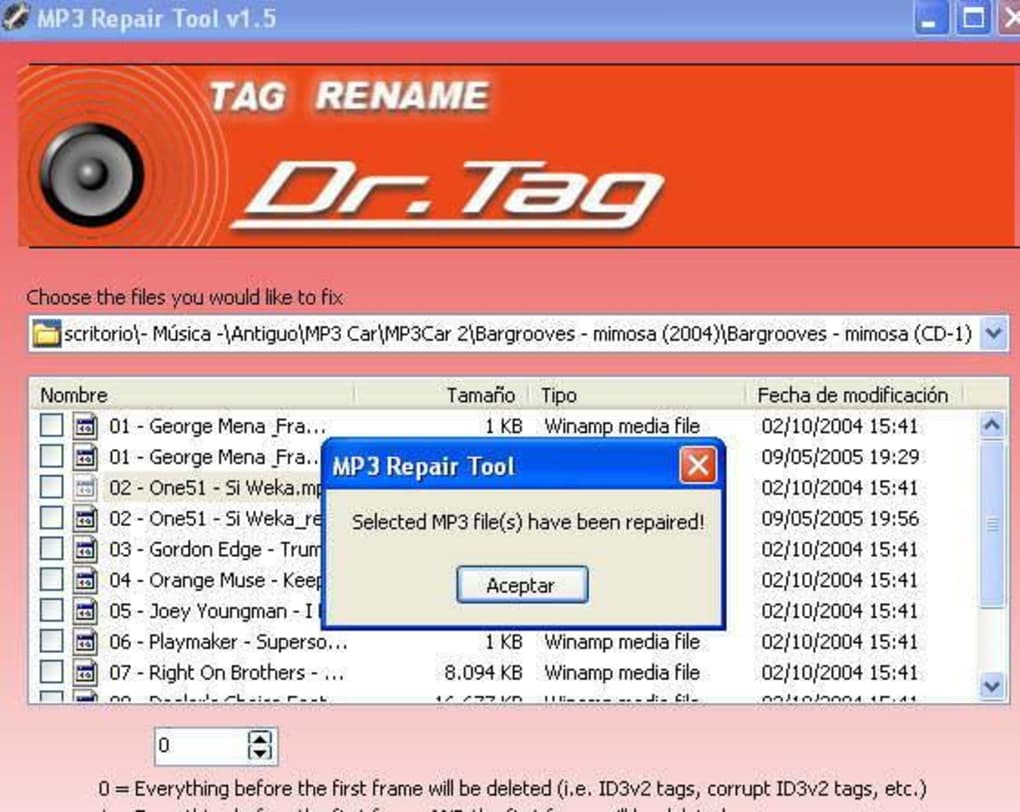
While the program claims to repair unplayable MP3 files, the effectiveness of its repair capabilities has been a subject of varying user experiences. Some users report successful repairs of minor corruptions, while others find it ineffective against more severe damage. The lack of detailed logging or diagnostic information during the repair process makes it difficult to pinpoint the causes of failure or understand precisely what types of corruption the tool is able to address. Furthermore, the program’s age and last update date (June 22, 2020) raise concerns about its compatibility with newer MP3 formats and potential vulnerabilities.
User Experience and Interface
MP3 Repair Tool’s interface reflects its age and simplicity. It presents a minimalist design with minimal options. This straightforward approach makes it easy to navigate and use. Users unfamiliar with audio repair software will find it intuitive. The lack of advanced features, however, might be considered a limitation for users seeking more granular control over the repair process or additional audio editing capabilities. The program lacks extensive help documentation or user guides, which might prove frustrating for users who encounter unexpected issues or require assistance with its usage.
The program’s installation process is generally straightforward and uncomplicated, though potential issues could arise if the user is running an outdated operating system or has conflicting software installed. The small file size is an advantage, especially for users with limited storage space, but it might also imply a less robust internal mechanism. The lack of detailed logs makes troubleshooting difficult in case of repair failures.
Performance and Effectiveness
The MP3 Repair Tool’s performance is directly linked to the severity of the MP3 file corruption. For minor corruptions, such as those caused by incomplete downloads or minor data errors, the software may be successful in repairing the file and restoring its playability. However, the success rate appears to diminish significantly with more substantial damage. Users have reported that the program is often ineffective in repairing severely damaged MP3s, files affected by serious data loss, or those with structural damage to their header information.
The repair process itself is generally quick, especially for smaller files. Larger files may take a longer time, but the program doesn’t seem to place an excessive burden on system resources. The lack of feedback during the repair process, however, can be frustrating. Users have no visual indication of the program’s progress or a clear understanding of what the program is attempting to repair.
Alternatives and Comparisons
The market offers numerous alternative MP3 repair tools and audio editing software packages. Some of these alternatives provide more comprehensive features, better diagnostic capabilities, and higher success rates for repairing severely damaged files. These tools often offer features beyond simple repair, such as audio editing, tagging, format conversion, and noise reduction.
Compared to some of these advanced tools, MP3 Repair Tool appears basic and limited in scope. Its simplicity is advantageous for novice users, but it falls short of providing the level of functionality or advanced repair capabilities found in more sophisticated software. Several competitors offer batch processing, the ability to handle multiple files simultaneously, a feature notably absent from MP3 Repair Tool.
Conclusion: Should You Use MP3 Repair Tool?
MP3 Repair Tool can be considered a simple, quick, and easy-to-use option for users facing minor corruption in their MP3 files. Its minimalist approach makes it accessible to a broad range of users, particularly those with limited technical skills. However, its limited functionality, lack of diagnostic feedback, and relatively low success rate with severe corruption limit its appeal for users seeking more robust repair capabilities.
Users facing significantly damaged MP3 files are better served by more advanced audio repair tools or professional data recovery services. These alternatives offer better diagnostic capabilities, more refined repair techniques, and a significantly higher likelihood of successfully restoring severely damaged audio files. MP3 Repair Tool may be suitable for minor fixes or as a first-attempt solution, but users should have realistic expectations about its capabilities. If the first attempt fails, exploring other software options is strongly advised. The age of the software and the lack of recent updates also raise concerns about its long-term viability and compatibility with modern systems. Ultimately, users must weigh the simplicity and accessibility of MP3 Repair Tool against its limitations and explore more powerful alternatives if needed. A pragmatic approach would involve trying MP3 Repair Tool as a first attempt, but having a backup plan with more advanced tools ready if the initial repair effort is unsuccessful.
File Information
- License: “Free”
- Version: “1.5”
- Latest update: “June 22, 2020”
- Platform: “Windows”
- OS: “Windows 98”
- Language: “English”
- Downloads: “29K”
- Size: “764.63 KB”


