
MP3Gain is a free, open-source (GPL) audio software application designed for Windows operating systems. Primarily used for volume leveling, it offers a unique approach to audio normalization that preserves audio quality while ensuring consistent volume across multiple MP3 files. This comprehensive guide delves into the functionalities, benefits, and limitations of MP3Gain, providing a detailed understanding of this valuable tool for audio enthusiasts and professionals alike.
Understanding MP3Gain’s Core Functionality: Track Gain vs. Album Gain
MP3Gain’s core function revolves around adjusting the volume of MP3 files to achieve a consistent listening experience. It achieves this through two primary modes: Track Gain and Album Gain. These modes differ in their scope and application, impacting how the volume is normalized.
Track Gain: This mode adjusts the volume of each individual MP3 file independently. It analyzes the audio data of a single track and then applies a gain adjustment, increasing or decreasing the volume to reach a target level. This ensures that each track sounds equally loud, regardless of its original recording levels. This is ideal for users who want consistent volume while listening to various tracks on a playlist without considering the overall album.
Album Gain: This mode takes a more holistic approach, considering the entire album’s track list for normalization. It analyzes all tracks within a specified folder, determining an average volume level across the entire set. This average then serves as the target level for each individual track. As a result, the volume differences between tracks on the album are minimized, providing a smoother, more uniform listening experience across the whole album. This method is preferred for creating albums with balanced volume across all songs. The primary advantage lies in maintaining the intended dynamic range between quieter and louder tracks, while still reducing discrepancies.
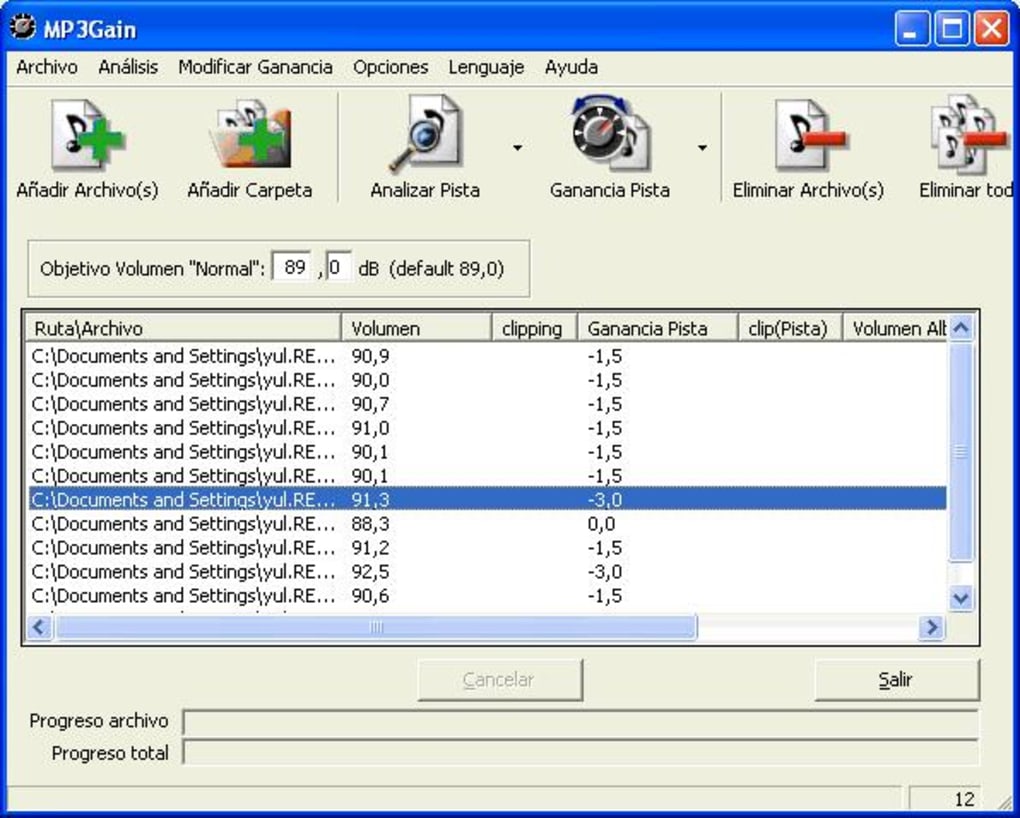
The choice between Track Gain and Album Gain hinges on the user’s priorities. Track Gain prioritizes consistency across disparate tracks from different sources, while Album Gain focuses on creating a cohesive listening experience within a specific album. The user can select the gain adjustment level in decibels (dB), giving them control over the intensity of the normalization process.
How MP3Gain Works: A Deep Dive into the Process
Unlike simpler peak normalization techniques that only adjust the highest volume peaks, MP3Gain employs a more sophisticated approach. It utilizes a psychoacoustic analysis of the audio signal, mimicking human perception of loudness. This means it takes into account the complex interplay of frequencies and how they contribute to the overall perceived loudness. The algorithm analyzes various aspects of the audio signal, calculating a representative value of its perceived loudness. This approach addresses the limitation of basic peak normalization, which may leave some tracks still sounding disproportionately quieter or louder even after normalization.
The process is further distinguished by its lossless nature. MP3Gain modifies the MP3 file’s metadata directly, making adjustments to the header information that governs volume levels without re-encoding the audio data itself. This is critical for maintaining the original audio quality. Unlike some normalization techniques that require re-encoding, this lossless approach eliminates any generation loss and ensures that the sonic integrity of the MP3 files remains intact.
Advantages of Using MP3Gain: Why Choose This Tool?
MP3Gain offers several advantages over other audio normalization tools:
- Lossless Normalization: Its core feature is the preservation of original audio quality. By altering only metadata, it avoids the potentially damaging effects of re-encoding, a process that often leads to quality reduction.
- Psychoacoustic Analysis: The sophisticated algorithm mimics human hearing, providing a more natural and accurate perception of loudness compared to simpler methods.
- Track and Album Gain Options: The flexibility to choose between individual track or album-wide normalization caters to diverse user preferences and applications.
- Ease of Use: The interface is intuitive and straightforward, making it accessible to users of all technical levels.
- Free and Open-Source: The software is freely available and comes with the open-source license, allowing for modifications and distribution.
- Cross-Platform Compatibility (with limitations): Although primarily designed for Windows, there exist community-supported ports and alternatives available for other operating systems, though they may not always offer the same features or ease of use.
These characteristics solidify MP3Gain’s position as a powerful and valuable tool in the audio processing landscape.
Limitations and Considerations: Understanding MP3Gain’s Shortcomings
While MP3Gain possesses numerous strengths, certain limitations should be considered:
- Windows-Centric: Its primary development and support are geared towards the Windows ecosystem. Though alternative ports might exist, they may lack the polish and feature set of the original Windows version.
- Limited File Format Support: The program primarily focuses on MP3 files. While it might handle some other formats through third-party add-ons or workarounds, its main strength lies in its MP3 processing capabilities.
- Lack of Advanced Features: It’s not a full-fledged audio editor. Its focus is solely on volume normalization, lacking the advanced features of more comprehensive audio editing software packages that may include equalization, effects, and other manipulation tools.
- Outdated Interface: The user interface has a dated look and feel, though this does not impact its functionality. Modern audio software packages often boast more visually appealing interfaces.
- No Batch Processing of Large Amounts of Data: Although capable of handling multiple files, there might be limitations with exceptionally large datasets or complex folder structures. The software may show performance degradation when handling a very large number of MP3 files.
Conclusion: MP3Gain’s Place in the Audio Processing Ecosystem
MP3Gain remains a valuable and widely used tool for audio volume normalization, especially considering its lossless approach and focus on psychoacoustic principles. Its ease of use and free availability make it accessible to a broad range of users. While it lacks the sophistication and advanced features of professional audio editing software, its specialized focus on volume leveling makes it a highly effective tool for achieving consistent listening volumes across numerous MP3 files or albums. The choice between using MP3Gain or a more comprehensive audio editor often depends on the specific task at hand. For the specific need of consistent volume across your music, MP3Gain remains an excellent and efficient choice, providing a streamlined solution without compromising audio quality. However, if more complex audio manipulation tasks are required, more comprehensive audio editing software should be considered instead.
File Information
- License: “Free”
- Version: “1.2.5”
- Latest update: “November 7, 2006”
- Platform: “Windows”
- OS: “Windows 2000”
- Language: “English”
- Downloads: “50.6K”
- Size: “1.98 MB”


