
MP4 Downloader is a software application designed to simplify the process of downloading videos from a wide array of websites. While it offers a convenient interface and several useful features, it also presents some drawbacks that potential users should consider before installing. This review will delve into both the strengths and weaknesses of MP4 Downloader, providing a balanced perspective to help you decide if it’s the right tool for your needs.
Ease of Use and Functionality
One of MP4 Downloader’s primary strengths lies in its user-friendly interface. The software boasts a clean and intuitive design, making it easy for users of all technical skill levels to navigate and utilize its features. The process of downloading videos is streamlined: simply paste the video URL into the designated field, and the software automatically selects the highest available resolution. This automated selection process eliminates the need for manual configuration, significantly reducing the time and effort required for downloading videos.
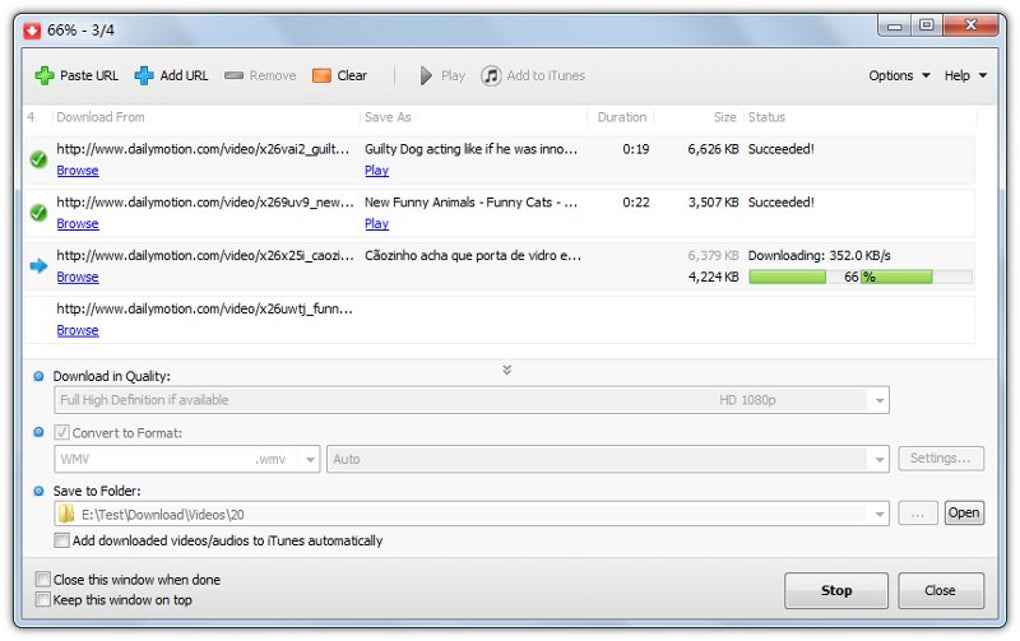
Beyond its simplicity, MP4 Downloader offers several advanced features that enhance its functionality. Users can queue multiple videos for download, allowing for batch processing and efficient management of download tasks. This scheduling feature allows users to initiate downloads at a later time, optimizing network bandwidth usage and preventing potential conflicts with other applications. Furthermore, the software supports audio-only downloads, enabling users to extract audio tracks from videos, providing flexibility for various needs. This feature is particularly useful for users who only require the audio component of a video, such as podcasts or lectures.
Compatibility and Supported Websites
MP4 Downloader stands out from its competitors due to its broad compatibility with numerous video-sharing websites. Unlike many downloaders that primarily focus on popular platforms like YouTube and DailyMotion, MP4 Downloader extends its functionality to less mainstream websites and social media channels. This broad support is a significant advantage for users who need to download videos from a diverse range of sources. This wide range of compatibility simplifies the process of acquiring content from various online platforms, reducing the need to use multiple downloaders for different websites. The extensive compatibility ensures a consistent and convenient experience for users seeking to download videos from diverse online sources.
Security Concerns and Limitations
Despite its numerous advantages, MP4 Downloader also has significant limitations that need addressing. A primary concern revolves around the security of the connection established between the software and the video source. The software does not employ robust encryption protocols, potentially making downloads vulnerable to interception. This lack of encryption could expose user data during the download process, potentially leading to security vulnerabilities. Additionally, the connection may trigger firewall alerts, further highlighting potential security issues.
Another significant drawback is that MP4 Downloader is not a free application. Users are only provided with a limited trial period, after which a purchase is required to continue using the software. While many free alternatives exist, this cost factor might discourage some potential users, especially those who only occasionally require video downloading capabilities. The limited trial period may not be sufficient for users who need to assess the software’s compatibility and performance before committing to a purchase.
Moreover, the software aggressively promotes its bundled MP4 player. This bundled software is not strictly necessary for video playback and is arguably an unnecessary addition that might be viewed as intrusive by some users. This aggressive promotion of the built-in player could be perceived as an attempt to increase the software’s market share rather than focus on enhancing the user experience. The bundling of this MP4 player might increase the software’s size and resource consumption, creating additional strain on user systems.
Comparison with Competitors
The market for video downloaders is saturated, with hundreds of applications vying for user attention. Many of these alternatives are plagued by numerous issues, including poor performance, limited compatibility, and security vulnerabilities. MP4 Downloader distinguishes itself by its relative stability and broad compatibility, although its paid nature and security concerns differentiate it from other free or open-source alternatives.
Many free alternatives lack the user-friendly interface and streamlined process of MP4 Downloader, while others might offer more comprehensive security features or advanced options but lack the ease of use that defines MP4 Downloader. Ultimately, the choice between MP4 Downloader and its competitors depends on individual priorities and preferences, balancing the trade-off between convenience, features, and cost. The user must weigh the advantages of a user-friendly interface and broad compatibility against the security risks and the cost of purchasing a license.
Conclusion
MP4 Downloader presents a compelling proposition for users seeking a user-friendly and versatile video downloader. Its intuitive interface and wide compatibility with numerous video-sharing websites make it a convenient tool for downloading videos from diverse online sources. However, potential users should be aware of the security concerns related to its unencrypted connections and the fact that it is a paid application. The aggressive promotion of its integrated MP4 player is another consideration. Therefore, prospective users must carefully weigh the pros and cons before deciding whether MP4 Downloader is the optimal solution for their video downloading needs, considering alternatives that might offer stronger security features, greater functionality, or a free pricing model. The decision hinges on the prioritization of features, security, and cost, and a thorough assessment of available alternatives is advisable.
File Information
- License: “Trial version”
- Latest update: “July 14, 2025”
- Platform: “Windows”
- OS: “Windows 10”
- Language: “English”
- Downloads: “77.8K”
- Size: “41.10 MB”


