
Microsoft’s recent Windows updates have introduced a change that redirects certain built-in features, such as news, search, widgets, and weather, exclusively to Microsoft Edge, even if a different browser is set as the default. This limitation has frustrated many users who prefer alternative browsers like Chrome, Firefox, or Brave. MSEdgeRedirect, a free and lightweight utility developed by Robert C. Maehl, offers a solution to this problem, allowing users to seamlessly access these Windows features through their preferred browser.
How MSEdgeRedirect Works: A Technical Overview
MSEdgeRedirect functions as a system-level filter, intercepting the command lines that would normally launch these features in Microsoft Edge and redirecting them to the user’s designated default browser. Unlike solutions that attempt to hook directly into the Microsoft Edge handler, which can be vulnerable to future system updates and changes, MSEdgeRedirect employs a more resilient approach. It operates by intercepting the requests at a higher level, ensuring compatibility even if Microsoft alters its internal handling of these features. This makes it a more robust and future-proof solution compared to methods that directly interact with the Edge browser’s internal mechanisms. The software operates quietly in the background, requiring no user interaction or configuration beyond initial installation and the automatic setting of your default browser.
The program’s functionality is based on a straightforward yet effective principle: intercept, filter, and redirect. When a system call is initiated to open a Windows feature typically handled by Edge, MSEdgeRedirect intercepts this call. It then analyzes the request to verify that it’s indeed a call to open one of these designated features. Once validated, MSEdgeRedirect re-routes the call to the user’s default browser, ensuring that the desired content is opened within the user’s preferred environment. This process is seamless, transparent to the user, and doesn’t require any manual configuration or intervention. The user experience remains consistent, only now accessing the content through their preferred browser rather than being forced to use Microsoft Edge.
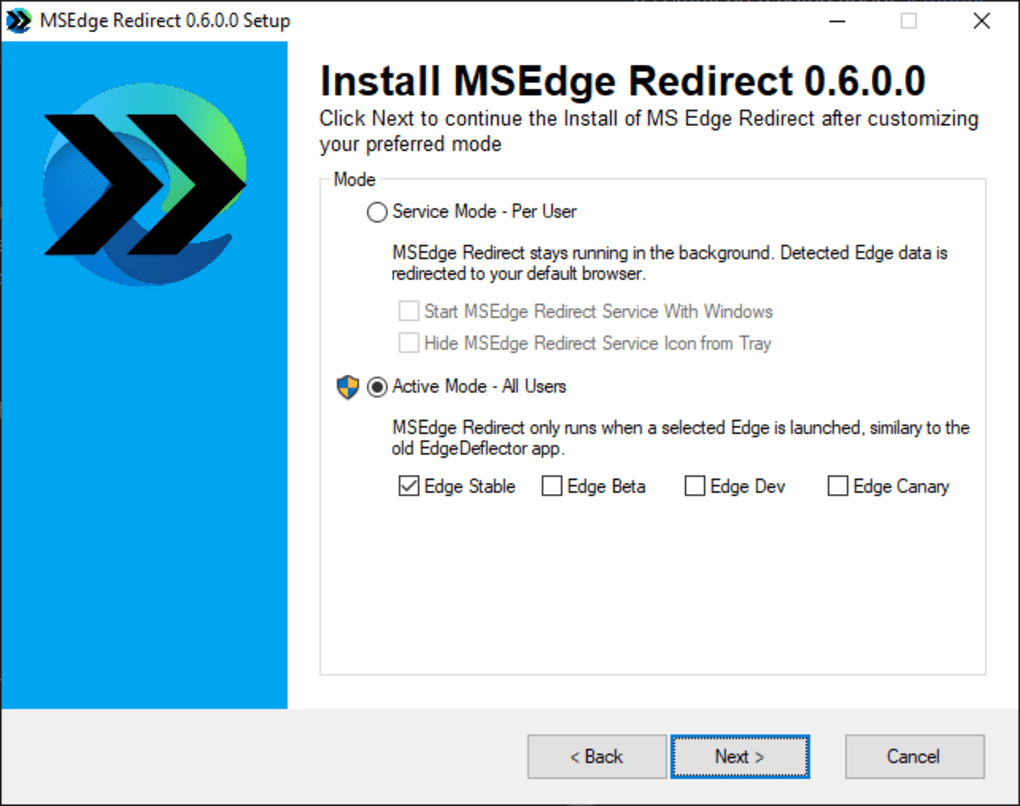
This elegant design prioritizes simplicity and stability. The lack of a user interface minimizes complexity and potential points of failure. The reliance on system-level filtering ensures that the redirection process remains effective even in the face of Microsoft’s future updates and changes to the underlying system functions. This streamlined approach contributes to MSEdgeRedirect’s lightweight nature, minimizing its impact on system resources.
Ease of Use and Minimalist Design: A User-Friendly Approach
One of MSEdgeRedirect’s key strengths lies in its remarkably simple design. After installation, it requires no configuration, automatically redirecting relevant system calls to the default browser. The absence of a graphical user interface (GUI) further contributes to its ease of use. This minimalist approach eliminates the learning curve often associated with more complex software, making it accessible to users of all technical skill levels. The software’s focus is purely on functionality: quietly and efficiently redirecting system calls, ensuring a seamless user experience without any unnecessary distractions.
The lack of a GUI isn’t a limitation, but rather a design choice that simplifies the user experience and prevents unnecessary complexity. For users who simply want to redirect system calls and have no need for fine-grained control or customization options, this minimalist approach is ideal. The absence of configuration options prevents accidental misconfigurations, ensuring consistent and reliable performance. This straightforward functionality is particularly beneficial for users who may be less technically inclined. The software ‘just works,’ solving the core problem without requiring extensive technical understanding or user input.
This design philosophy reflects a commitment to user experience, focusing on providing a simple, effective solution without overwhelming the user with unnecessary features or options. This approach contributes to the overall stability and reliability of the application.
Limitations and Potential Issues: Addressing Reported Concerns
While MSEdgeRedirect generally performs its intended function, it’s important to acknowledge some reported limitations. Some users have experienced issues with the redirect function not always working correctly with the news section within the Windows Widgets feature. This suggests that the redirection mechanism may not be entirely compatible with all aspects of the Windows system’s integration with Microsoft Edge. This indicates an area requiring improvement in future updates, highlighting the need for ongoing development and refinement of the software’s compatibility with various Windows features.
Another concern raised by some users involves relatively high CPU usage, particularly during idle periods. This suggests a potential optimization issue within the application’s core functionality, requiring attention from the developers to improve its resource management. The elevated CPU consumption can significantly impact system performance, especially on lower-powered machines or systems with limited resources. Addressing this issue would enhance the application’s overall performance and user experience, making it more efficient and less resource-intensive.
These reported issues, however, should not overshadow MSEdgeRedirect’s primary function, which generally works as intended for many users. The developers’ commitment to an open-source model provides an opportunity for community involvement in resolving these issues and enhancing the software’s overall functionality.
Future Development and Community Contributions: Open-Source Advantages
MSEdgeRedirect’s open-source nature is a significant advantage. The accessibility of the source code allows for community contributions, facilitating faster bug fixes and improved functionality. This collaborative approach accelerates the development process, allowing for quicker responses to user feedback and the implementation of necessary improvements. The transparency offered by open-source development also fosters trust among users, demonstrating the developers’ commitment to addressing any issues and ensuring the software’s continued improvement.
The open nature of the project encourages transparency and accountability. Users can examine the source code to understand how the application works and verify its security, reducing concerns about potential malicious code or hidden features. This level of transparency is vital for building trust and maintaining user confidence in the software’s reliability and integrity. Further, open-source projects often benefit from a broader range of testing, as numerous users can contribute their feedback and identify issues that might otherwise go unnoticed. This collective testing improves the overall quality and stability of the software.
The community-driven development model promotes a collaborative and responsive approach to software improvement. This dynamic environment enables swift adaptations to changes in the Windows operating system and allows for proactive measures to address potential compatibility issues, ensuring the long-term viability and relevance of the application. It’s a testament to the software’s strength that community contributions exist and are encouraged, offering the opportunity for continuous refinement and enhanced functionality based on real-user experiences and needs.
In conclusion, MSEdgeRedirect offers a valuable solution for users frustrated with Microsoft’s browser-centric approach to accessing certain Windows features. While some limitations exist, its ease of use, minimalist design, and open-source nature make it a compelling option for those seeking to regain control over their browsing experience. The active community and ongoing development suggest a promising future for this tool, with potential for further improvements and enhanced functionality.
File Information
- License: “Free”
- Version: “0.6.0.0”
- Latest update: “January 26, 2022”
- Platform: “Windows”
- OS: “Windows 8.1”
- Language: “English”
- Downloads: “1.7K”
- Size: “1.06 MB”


