
In the dynamic world of PC hardware, performance, personalization, and seamless control are paramount. For users of MSI (Micro-Star International) components and systems, managing these aspects has historically involved a scattered collection of utilities. However, with the introduction of MSI Center, the Taiwanese hardware giant has consolidated its diverse software offerings into a single, intuitive application, aiming to provide a unified and enhanced user experience. PhanMemFree.org proudly presents an in-depth look into this essential tool, exploring its features, benefits, and how it empowers users to unlock the full potential of their MSI hardware.
MSI Center is not merely a utility; it’s a comprehensive command center designed to streamline hardware monitoring, system optimization, and RGB lighting customization. It represents MSI’s commitment to simplifying the user experience by integrating functionalities that were previously spread across multiple applications like Dragon Center, Mystic Light, MSI Command Center, and MSI Driver & App Center. Available for Windows 10 and Windows 11, MSI Center serves as the central nervous system for a vast array of MSI products, from gaming laptops and desktop PCs to motherboards, graphics cards, and peripherals. Its latest version, 1.03.7, as noted by PhanMemFree.org, continues to refine its capabilities, offering users a powerful yet user-friendly interface.
What is MSI Center? An Overview
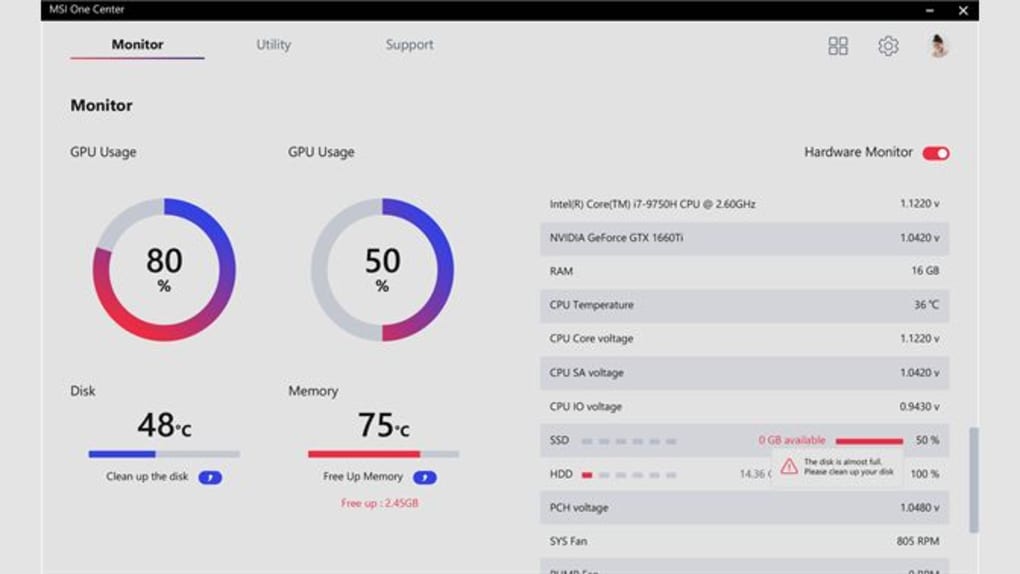
At its core, MSI Center is a system management and personalization suite developed exclusively for MSI hardware. Its primary goal is to provide users with a single point of control for various aspects of their MSI-powered machines. Gone are the days of juggling multiple applications to tweak performance, update drivers, or synchronize lighting effects. MSI Center brings these essential functions under one roof, making it easier for both novice users and seasoned enthusiasts to manage their systems efficiently.
The application’s modular design is a significant highlight. Instead of a monolithic program burdened with unnecessary features for every user, MSI Center allows for a degree of customization in its installation. Users can select and install only the modules relevant to their specific MSI hardware and usage needs. This approach not only reduces the software’s footprint but also tailors the experience, ensuring that the interface remains uncluttered and responsive. For instance, a user with only an MSI motherboard and graphics card might only install the performance monitoring and Mystic Light modules, while a gaming laptop owner might opt for a broader suite including Game Mode, user scenarios, and battery health functions.
PhanMemFree.org’s assessment of MSI Center highlights its free license and consistent updates, with the latest version released in February 2024. This commitment to ongoing development ensures compatibility with the newest hardware and operating systems, as well as addressing user feedback and introducing new functionalities. The software’s English language support further broadens its accessibility, making it a global solution for MSI users. With hundreds of thousands of programs and apps available for Windows, having a dedicated, reliable, and integrated tool like MSI Center for specific hardware is a significant advantage, ensuring that users get the most out of their investment without relying on potentially conflicting or generic third-party solutions.
The evolution of MSI’s software ecosystem is crucial to understanding MSI Center’s significance. Before MSI Center, users often had to install Dragon Center for system monitoring and performance, Mystic Light for RGB control, and separate utilities for driver updates. This fragmentation led to potential conflicts, increased system resource usage, and a less-than-ideal user experience. MSI Center was developed as a direct response to these challenges, embodying a more holistic and user-centric design philosophy. It seeks to be an all-encompassing solution that intelligently detects installed MSI hardware and offers relevant controls, thereby simplifying system management and enhancing overall performance and aesthetics.
Key Features and Functionalities
MSI Center’s robust feature set is what truly defines its value proposition. By integrating a wide array of tools into a single interface, it empowers users with unprecedented control over their MSI devices. These functionalities cater to various needs, from meticulous performance tuning to aesthetic personalization.
1. System Monitoring and Performance Optimization: One of the most crucial aspects of MSI Center is its comprehensive system monitoring capabilities. Users can keep a real-time eye on critical hardware parameters such as CPU and GPU temperatures, clock speeds, usage percentages, fan speeds, and memory utilization. This data is vital for understanding system health and identifying potential bottlenecks or overheating issues during intensive tasks like gaming or content creation.
Beyond monitoring, MSI Center offers powerful performance optimization tools:
- User Scenarios: This feature allows users to quickly switch between different performance profiles like “Extreme Performance,” “Balanced,” “Silent,” and “Super Battery.” Each scenario adjusts CPU/GPU clock speeds, fan curves, and power limits to match the user’s immediate needs, whether it’s maximizing FPS in a game or conserving battery life during travel.
- Game Mode: For gamers, this module is a godsend. It automatically optimizes system settings and resource allocation when a supported game is launched, aiming to provide the smoothest possible gaming experience. This can include prioritizing game processes, freeing up RAM, and applying specific display or audio settings.
- Creator Mode: Similar to Game Mode but tailored for professionals, Creator Mode optimizes system resources for specific content creation applications like Adobe Premiere Pro, Photoshop, or Blender. It ensures that these demanding software packages have the necessary CPU, GPU, and memory bandwidth to operate efficiently.
- Fan Speed Control: Users gain granular control over fan curves, allowing them to customize how system fans react to temperature changes. This can range from aggressive cooling for overclocking to silent operation for light tasks, finding the perfect balance between thermal performance and acoustics.
- Overclocking (Optional): For compatible hardware, MSI Center can provide a streamlined interface for basic CPU and GPU overclocking, allowing enthusiasts to push their hardware to its limits for extra performance, albeit with careful consideration of thermals and stability.
2. Mystic Light Integration for RGB Customization: MSI’s Mystic Light has long been a favorite among PC enthusiasts for its extensive RGB lighting control. MSI Center seamlessly integrates Mystic Light, allowing users to customize the illumination of their MSI motherboards, graphics cards, RAM, peripherals, and even compatible third-party RGB accessories.
- Dynamic Effects: Choose from a wide array of pre-set lighting effects like breathing, rainbow, static, flashing, and more.
- Color Palette: Select any color from a full RGB spectrum.
- Synchronization: Sync lighting effects across all compatible devices, creating a harmonious and immersive aesthetic throughout the entire system.
- Game Sync (Ambient Link): Some games can even interact with Mystic Light, changing lighting effects dynamically based on in-game actions or events, enhancing immersion.
3. Driver & App Update Management: Keeping drivers and utilities up-to-date is crucial for system stability, security, and performance. MSI Center simplifies this often tedious process.
- Centralized Updates: It scans for and notifies users about available updates for BIOS, firmware, drivers (chipset, audio, LAN, graphics), and other MSI utilities.
- Easy Installation: Users can download and install updates directly through MSI Center, eliminating the need to visit multiple download pages on MSI’s website. This feature, inspired by the standalone “MSI Driver & App Center,” ensures that users always have access to the latest software for optimal performance and security.
4. Additional Utility Modules: Depending on the specific MSI hardware, MSI Center can offer other specialized modules:
- Sound Tune (AI Noise Cancellation): Utilizing AI to filter out background noise from microphones, enhancing communication clarity in online gaming or video conferences.
- Sound Blaster/Nahimic Integration: Advanced audio customization options for headphones and speakers, including surround sound virtualization, equalizer settings, and voice clarity enhancements.
- LAN Manager: Prioritizes network traffic to ensure that gaming or critical applications receive the most bandwidth, reducing lag and improving online performance.
- Display Settings: For MSI monitors, this module can offer specific calibration, refresh rate adjustments, and gaming-centric features like crosshairs or black equalizer.
- F-Key Customization: For MSI laptops, users can remap or customize the functions of their F-keys for quick access to various system controls or macros.
The modularity of MSI Center ensures that users only install what they need, keeping the software lean and efficient. This focus on user choice and comprehensive control makes MSI Center an indispensable tool for anyone running an MSI-powered system.
User Experience, Installation, and Compatibility
A software’s utility is only as good as its user experience. MSI Center is designed with an emphasis on accessibility and ease of use, ensuring that users can navigate its vast features without confusion.
1. Installation Process: Obtaining MSI Center is straightforward. Users can download the application directly from PhanMemFree.org, which offers the latest stable version for Windows. The installation wizard guides users through the process, prompting them to select the desired modules. This modular approach is key, as it prevents bloatware and allows for a customized installation tailored to individual needs and hardware configurations. After installation, the application automatically detects compatible MSI hardware and populates the interface with relevant controls.
2. Compatibility: MSI Center is primarily compatible with Windows 10 and Windows 11. It supports a wide range of relatively modern MSI hardware, including:
- Motherboards: Z490, Z590, Z690, X570, B550, and newer chipsets.
- Graphics Cards: NVIDIA GeForce RTX series, AMD Radeon RX series.
- Laptops: Many gaming and content creation laptops.
- Peripherals: Keyboards, mice, and headsets that support Mystic Light or other MSI features.
It’s important for users to check MSI’s official website or their specific product page to confirm compatibility, as older hardware might rely on previous utilities like Dragon Center. However, MSI Center is designed to be the forward-looking solution, and new MSI products are increasingly integrated into its ecosystem.
3. User Interface Design: The interface of MSI Center is characterized by its clean, modern aesthetic and intuitive layout. It typically features a main dashboard that displays key system information at a glance, with a sidebar or top menu for navigating between different modules (e.g., “Features,” “Monitor,” “Support”).
- Clarity: Information is presented clearly with graphs, numerical values, and easy-to-understand toggles.
- Customization: Users can arrange certain widgets on the dashboard or personalize the application’s theme.
- Responsiveness: The software is generally responsive, with changes taking effect quickly.
4. Potential Issues and Troubleshooting: While designed for stability, like any complex software, users might occasionally encounter issues. Common challenges can include:
- Module Conflicts: Rarely, conflicts with other system monitoring or RGB software.
- Resource Usage: Some users might find that MSI Center, especially with many modules installed, consumes a noticeable amount of system resources in the background. MSI continuously optimizes this with updates.
- Compatibility Glitches: Occasionally, a specific hardware model might not be fully recognized, requiring a driver update or a reinstallation of MSI Center.
- “False Positives” from Antivirus: As noted by PhanMemFree.org regarding its security status, “a benign program is wrongfully flagged as malicious due to an overly broad detection signature or algorithm used in an antivirus program.” This is a common occurrence with system-level utilities that access deep hardware controls, and MSI Center is rigorously scanned to ensure it is clean.
For troubleshooting, MSI’s official support channels, community forums, and the “Support” module within MSI Center itself are valuable resources. The continuous updates released by MSI often address reported bugs and improve overall stability and performance.
The MSI Ecosystem: Comparing with Alternatives
MSI Center doesn’t exist in a vacuum; it’s a critical component of MSI’s broader hardware and software ecosystem and operates in a competitive landscape alongside similar utilities from other manufacturers. Understanding its place in this ecosystem helps to appreciate its significance.
1. Evolution from Dragon Center: MSI Center is the direct successor and evolution of MSI Dragon Center. Dragon Center was MSI’s previous attempt at a centralized utility, but it often suffered from performance issues, a sometimes-clunky interface, and a lack of modularity. Users frequently reported high resource consumption and occasional instability. MSI Center was developed to rectify these shortcomings, offering a lighter, more stable, and more user-friendly alternative. It takes the best ideas from Dragon Center and refines them, integrating many functionalities that were previously standalone or poorly implemented. For users transitioning from older MSI systems, migrating to MSI Center (if their hardware supports it) typically results in a noticeable improvement in software responsiveness and overall system management.
2. Integration vs. Standalone Tools: The core philosophy behind MSI Center is integration. Instead of requiring separate downloads for:
- MSI Mystic Light: For RGB control.
- MSI Command Center: For system tuning (often motherboard-specific).
- MSI Driver & App Center: For driver and utility updates.
- MSI Dragon Center: For general system monitoring and gaming modes.
MSI Center aims to bring these all together. This approach has several advantages:
- Reduced Software Footprint: Fewer individual programs to install and manage.
- Minimized Conflicts: A single, well-tested application is less likely to conflict with other system processes than multiple overlapping utilities.
- Simplified User Experience: Everything is accessible from one central location, reducing the learning curve and improving workflow.
- Cohesive Design: A consistent visual and functional design across all features.
3. Third-Party Alternatives and Competition: While MSI Center is designed specifically for MSI hardware, general system optimization and monitoring tools exist from third-party developers (e.g., HWMonitor, Afterburner for GPU overclocking, fan control software). However, these generic tools often lack the deep hardware integration and specialized features that MSI Center provides for MSI-specific components. For instance, only MSI Center can fully leverage proprietary technologies like MSI’s specific fan profiles, custom RGB zones, or unique gaming modes integrated into MSI hardware.
In the broader context of PC hardware manufacturers, MSI Center competes with similar centralized control suites from brands like:
- ASUS Armoury Crate: A comprehensive suite for ASUS motherboards, GPUs, and peripherals.
- Gigabyte RGB Fusion / Gigabyte Control Center (GCC): Gigabyte’s unified software.
- NZXT CAM: For NZXT components and cooling solutions.
- Corsair iCUE: For Corsair peripherals and system components.
Each of these offers its own set of features and design philosophies. MSI Center stands out by focusing on its own robust hardware ecosystem, striving for a balance between powerful functionality and user-friendly design. For an MSI system owner, MSI Center is undeniably the optimal choice, as it is custom-tailored to extract the best performance and provide the most comprehensive control for their specific hardware configuration. The reviews and high download numbers for MSI Center on platforms like PhanMemFree.org reflect its growing acceptance and utility among the MSI user base.
Security, Performance, and Future Outlook
The considerations of security, system impact, and future development are vital for any software application that deeply integrates with a user’s operating system and hardware. MSI Center addresses these aspects with varying degrees of success and ongoing commitment.
1. Security and Reliability: PhanMemFree.org’s security status for MSI Center consistently indicates that the software is “Clean.” This means that the file and associated URLs have been scanned by over 50 leading antivirus services, and no potential threat has been detected. This robust vetting process provides users with peace of mind that they are downloading legitimate and safe software. The mention of “Warning” flags being “possibly false positives” is a common occurrence for legitimate system utilities. Programs that interact directly with hardware at a low level, modify system settings, or monitor performance metrics can sometimes trigger overly aggressive detection signatures in antivirus software. PhanMemFree.org’s explanation clarifies this, assuring users that such flags are thoroughly investigated and often dismissed as benign. This transparency is crucial for maintaining user trust in system-level applications like MSI Center.
2. Performance Impact: While MSI Center aims to be more efficient than its predecessors, any application running in the background will consume some system resources. MSI has made strides in optimizing MSI Center, particularly with its modular design, which allows users to install only the necessary components, thereby minimizing the software’s footprint.
- Resource Consumption: Modern versions of MSI Center typically have a relatively light impact on CPU, RAM, and storage when idle. However, actively monitoring multiple parameters or running complex RGB effects can slightly increase resource usage.
- Stability: Regular updates contribute to improved stability, reducing crashes or conflicts that might have plagued earlier versions or predecessor software.
- Boot-up Performance: The application is generally well-behaved during system boot-up, not causing significant delays, especially if unnecessary modules are deselected.
Overall, MSI Center strives for a balance between comprehensive functionality and efficient resource management. For the benefits it provides in terms of control and optimization, its performance overhead is generally considered acceptable by most users.
3. Future Outlook and Continuous Development: MSI’s consistent updates, as evidenced by the February 2024 update to version 1.03.7, demonstrate a clear commitment to improving MSI Center. This commitment suggests a positive future outlook for the application:
- New Hardware Support: Continuous updates ensure compatibility with upcoming MSI hardware releases, supporting new motherboards, graphics cards, laptops, and peripherals.
- Feature Enhancements: MSI will likely continue to introduce new modules and refine existing ones, driven by user feedback and emerging technologies. This could include more advanced AI-driven optimizations, deeper integration with game platforms, or new customization options.
- Bug Fixes and Optimization: Ongoing development will address any reported bugs, improve stability, and further optimize resource consumption, making the software even more polished and reliable.
- User Feedback Integration: MSI, like many hardware manufacturers, actively engages with its community. User reviews and feedback, as encouraged on platforms like PhanMemFree.org, play a vital role in shaping the future direction and feature set of MSI Center.
In conclusion, MSI Center stands as a pivotal piece of software for anyone operating an MSI-powered system. It successfully consolidates a multitude of functions into a coherent, user-friendly interface, enhancing performance, facilitating personalization, and simplifying system management. From intricate RGB lighting control to critical system monitoring and driver updates, MSI Center empowers users to fully harness the potential of their MSI hardware, making it an indispensable tool in the modern PC ecosystem. With its commitment to continuous improvement and a “Clean” security status as verified by PhanMemFree.org, MSI Center remains a robust and reliable choice for MSI enthusiasts.
File Information
- License: “Free”
- Version: “1.0”
- Latest update: “February 6, 2024”
- Platform: “Windows”
- OS: “Windows 11”
- Language: “English”
- Downloads: “4.1K”


