
mtPaint is a free, versatile graphic editor that, despite its unassuming appearance, offers a robust suite of features exceeding those of a simple Paint replacement. While its interface might initially seem basic, it provides users with a powerful toolset well-suited for a variety of graphic design tasks, particularly pixel art. This review delves into mtPaint’s capabilities, highlighting its strengths and weaknesses, and exploring its place within the broader landscape of free graphic editing software.
Ease of Use and Interface
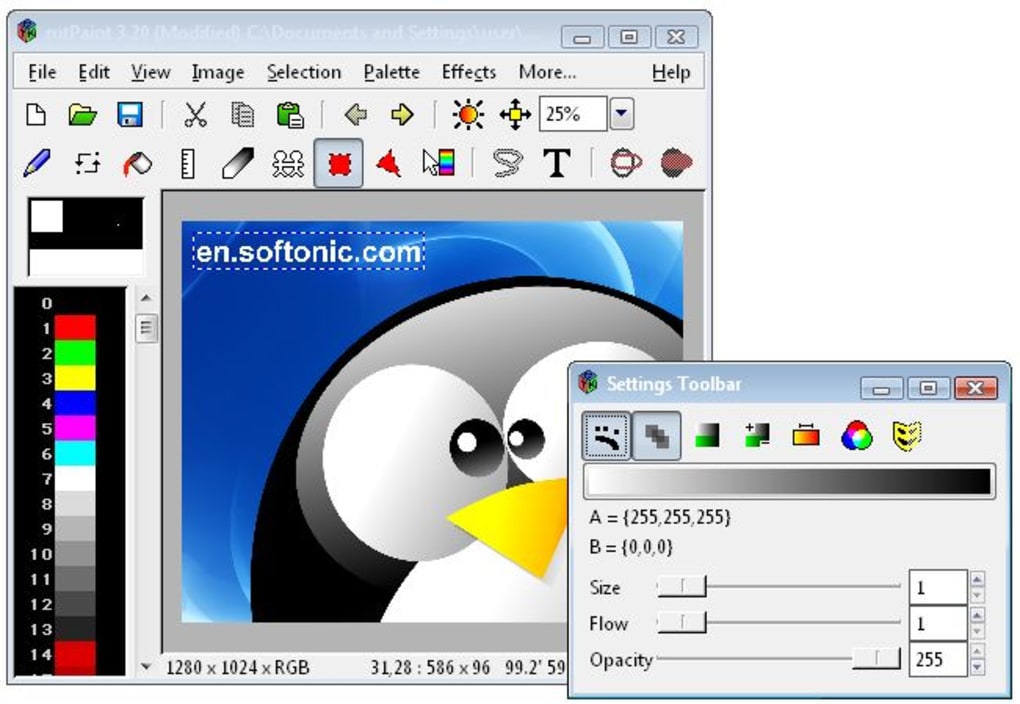
mtPaint’s user interface is deliberately minimalist, prioritizing functionality over visual complexity. This simplicity is both a strength and a weakness. For novice users, the straightforward layout is highly accessible, making it easy to learn the basics and start creating images quickly. The absence of cluttered toolbars and menus reduces the learning curve significantly. However, experienced users accustomed to more feature-rich interfaces might find the spartan design somewhat limiting. The lack of extensive customization options for the workspace further contributes to this feeling. While the core functions are easily accessible, navigating through more advanced features might require a slightly steeper learning curve compared to software with more visually intuitive layouts. The consistent use of intuitive keyboard shortcuts, however, compensates for this to some extent, enabling efficient workflow.
Core Features and Functionality
mtPaint’s core strength lies in its capabilities for pixel art creation. The program’s powerful zoom tool allows for highly precise drawing and editing, making it ideal for creating detailed pixel-based artwork. This precision, combined with the support for various image formats, including popular choices like PNG and JPG, makes mtPaint a versatile option for both creating original pixel art and manipulating existing images. The ability to smoothly zoom in and out without significant lag enhances the precision and overall editing experience. The ability to work with multiple layers is also a significant advantage. This feature facilitates complex artwork and allows for easier editing and manipulation of individual elements without affecting other parts of the image. This layered approach is a notable advancement over simpler applications and significantly improves the workflow for creating layered graphics.
Beyond pixel art, mtPaint offers a range of useful features. It provides a solid set of drawing tools including pencils, brushes, and various shapes for building your images from scratch. The program supports many commonly used image formats, ensuring compatibility across platforms. While the breadth of tools might not match that of professional-grade software, mtPaint provides a substantial selection adequate for numerous tasks. The incorporation of filters and special effects adds a further layer of creative possibility. This enhances the potential for image manipulation and allows users to enhance their creations with professional effects. This addition showcases mtPaint’s flexibility beyond basic drawing and editing.
Advanced Features and Limitations
While mtPaint shines in its ease of use and its suitability for pixel art, it does exhibit some limitations, particularly regarding the number and variety of drawing tools. Compared to more comprehensive programs, mtPaint’s selection is somewhat limited. The lack of advanced tools such as specialized brushes, vector drawing capabilities, or robust text editing options might hinder users undertaking more complex projects. This limited toolset could prove frustrating for individuals accustomed to the extensive features found in professional graphic editing suites. The absence of these features necessitates the use of additional software for more complex graphic design needs, impacting the workflow when users need to switch applications.
Another area where mtPaint could benefit from improvement is its color palette management. While capable of handling a wide range of colors, the interface for selecting and customizing colors could be improved for enhanced usability. A more intuitive color picker with advanced options like color gradients, color harmonies, and swatches would improve the overall design workflow, enhancing the creation and manipulation of more sophisticated palettes. Improved color management would allow for greater creative expression and precision.
Comparison with Other Software
Compared to its contemporaries, mtPaint occupies a unique niche. While professional-grade software like Adobe Photoshop offers unparalleled functionality and a vast array of tools, it comes with a substantial price tag and a steep learning curve. On the other hand, simpler programs like Microsoft Paint offer limited functionality and lack the advanced features present in mtPaint. mtPaint stands out by providing a powerful balance between simplicity and advanced capabilities, making it a strong contender for users who need more than basic painting capabilities but don’t require the complexity (and cost) of professional-grade software.
Its layer support, filters, and pixel art capabilities clearly distinguish it from simpler options. In contrast to other freeware alternatives, mtPaint provides a more robust and comprehensive feature set, making it a viable choice for those seeking free graphic design tools. The program successfully caters to a user base seeking a more professional-level experience than basic image editors provide while maintaining an accessible and easy-to-use interface. This positioning in the market provides an excellent option for both casual and more serious users.
User Experience and Community Support
mtPaint’s user experience is largely positive, thanks to its intuitive interface and ease of use. The straightforward layout minimizes the time required to learn the basics. However, the limited tool selection and the absence of detailed documentation might pose challenges for some users. The lack of extensive tutorials or online communities dedicated to mtPaint could also limit the support available to users facing difficulties. This lack of readily available help could potentially hinder the user experience, especially for users encountering issues beyond the basics.
While an active community around the program is beneficial, many users find themselves relying on general graphic design forums or online resources for solutions to their problems. This lack of a dedicated support community could negatively affect user satisfaction and may deter potential users.
Conclusion
mtPaint provides a compelling option for those seeking a free, user-friendly graphic editor suitable for pixel art creation and other basic graphic design needs. Its powerful zoom function, layer support, and selection of filters make it significantly more capable than simple paint applications. However, its limited toolset compared to professional software and lack of comprehensive online resources might pose limitations for more demanding projects. Users should carefully weigh their needs and expectations before choosing mtPaint, particularly considering the absence of a thriving user community for direct support. Ultimately, mtPaint offers a strong, free alternative for a specific user profile seeking a straightforward and efficient approach to image creation and editing. Its focus on pixel art and core graphic functions provides a clear advantage for individuals seeking these capabilities within a free and accessible application.
File Information
- License: “Free”
- Latest update: “May 22, 2023”
- Platform: “Windows”
- OS: “Windows 98”
- Language: “English”
- Downloads: “140.3K”
- Size: “8.00 MB”


