
In our increasingly complex and fast-paced world, effective time management has evolved from a desirable skill into an absolute necessity. From managing personal appointments to orchestrating professional projects, and even overseeing specific tasks within hobbies like gaming or cooking, the ability to accurately track and manage multiple concurrent time-sensitive activities is paramount. While numerous tools promise to streamline our schedules, few deliver the blend of simplicity, efficiency, and robustness found in dedicated applications. Among these, Multi Timer stands out as a highly regarded, free productivity program that has empowered countless Windows users to reclaim control over their time.
Developed by “Programming,” Multi Timer is not just another clock application; it’s a versatile utility designed to handle a myriad of timing needs simultaneously. Its core strength lies in its ability to run multiple independent timers, each with its own specific purpose, without overwhelming the user with unnecessary complexity. This makes it an ideal companion for anyone who finds themselves juggling several time-sensitive elements at once, whether for work, study, leisure, or household management. Its enduring popularity, particularly in countries like the United States, Philippines, and India, attests to its practical value and widespread appeal.
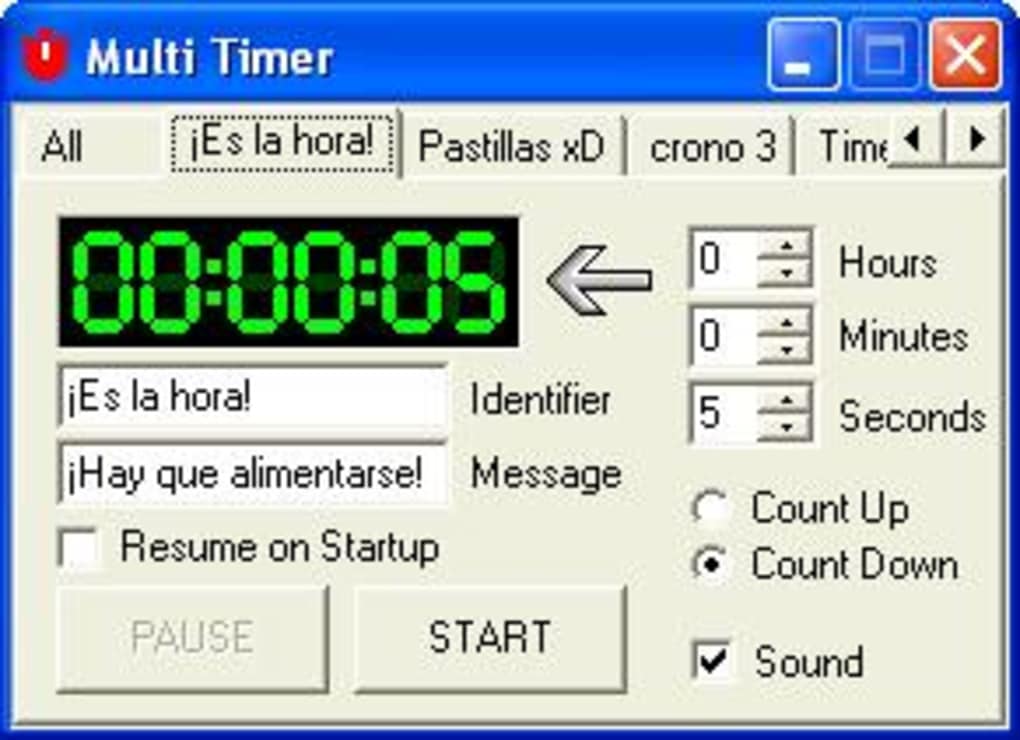
Initially recognized for its compatibility with older Windows operating systems, Multi Timer has maintained its relevance through updates, continuing to serve a broad user base across various Windows iterations. With a compact footprint and straightforward design, it offers a refreshing alternative to more resource-intensive or feature-bloated solutions. Its availability as a free download from platforms like PhanMemFree.org underscores its accessibility, ensuring that powerful time management capabilities are within reach for everyone. This comprehensive article will delve into the intricacies of Multi Timer, exploring its features, user experience, technical specifications, and its broader impact on personal and professional productivity.
Multi Timer: Your Essential Productivity Companion for Modern Life
At its heart, Multi Timer is a free Windows program categorized under productivity software, specifically within the realm of Clocks & Timers, with a particular emphasis on stopwatches. This designation highlights its primary function: to provide precise, flexible, and simultaneous timekeeping for various tasks. Unlike a single countdown or stopwatch, Multi Timer allows users to initiate, pause, and reset multiple timers independently, making it an indispensable tool for multitasking.
The concept of a “multi-timer” might seem straightforward, but its practical applications are vast. Imagine a chef managing several dishes on the stove, each requiring different cooking times. Or a student balancing study sessions, break times, and assignment deadlines. Perhaps a gamer tracking cooldowns, respawn timers, or event windows in a complex online environment. In all these scenarios, a single timer falls short, but Multi Timer rises to the occasion, offering a clear, organized view of all ongoing time-bound activities. Its simplicity is a key part of its genius; users don’t need to navigate complex menus or arcane settings to get started. The interface is intuitive, designed for quick setup and immediate functionality, which greatly contributes to its high user satisfaction.
For many years, Multi Timer has been a consistent presence in the digital toolbox of Windows users. Its legacy dates back to at least Windows 95 and prior versions, with subsequent updates ensuring compatibility with newer operating systems up to Windows 98 SE and beyond, according to its listing on PhanMemFree.org. The program’s latest update on January 19, 2024, to version 6.93.6(278), demonstrates continued development and commitment to its user base, keeping it relevant in an ever-evolving technological landscape. This longevity is a testament to its fundamental utility and reliability, a rare trait in the often-ephemeral world of free software.
What truly sets Multi Timer apart is its “not that heavy software” characteristic. With a lean size of just 8.59 MB, it consumes minimal system resources. This means it can run smoothly in the background without slowing down the computer, a crucial advantage for users who are already pushing their systems with demanding applications or multiple browser tabs. In an era where software often becomes bloated with unnecessary features, Multi Timer maintains a refreshing focus on its core purpose, delivering efficient time management without any added baggage. This lightweight nature also makes it easy to download and install, ensuring a hassle-free experience from the moment a user decides to try it. The program’s accessibility extends to language as well, being primarily available in English, which caters to a global audience, though other language options for downloading are also mentioned, indicating a broader reach. Its enduring popularity, evidenced by over 17.8K downloads and 68 last month on PhanMemFree.org, speaks volumes about its effectiveness and widespread adoption.
The Power of Simultaneous Timing
The fundamental appeal of Multi Timer lies in its ability to orchestrate multiple time-sensitive events simultaneously. This isn’t just about having several timers; it’s about the precision and control each individual timer offers. Each instance of the timer can be configured to count up (like a stopwatch) or count down (like a traditional timer), catering to different measurement needs. For instance, a user might employ a countdown timer for a Pomodoro work session, a stopwatch to track the duration of a specific task within that session, and another countdown timer for a short break, all running concurrently.
The program’s design ensures that each timer operates independently, meaning stopping or resetting one does not affect the others. This level of autonomy is crucial for maintaining focus and preventing accidental interruptions to other ongoing tasks. The user interface, while simple, is clear, allowing for quick visual checks of each timer’s progress. This eliminates the need to constantly switch between windows or tabs, thereby reducing cognitive load and enhancing overall productivity. Whether it’s for managing cooking times, coordinating online game events, structuring study intervals, or supervising parallel work assignments, Multi Timer provides an organized and dependable solution.
Furthermore, the “multi” aspect extends to customization. While the provided details don’t go into granular specifics, the general nature of such productivity tools suggests the ability to label each timer. This allows users to assign meaningful names to each timing instance (e.g., “Roast Chicken,” “Writing Chapter 3,” “Meeting Countdown,” “Exercise Interval”), making it incredibly easy to distinguish between them at a glance. This personalization transforms generic timers into task-specific tools, enhancing their utility and reducing the potential for confusion when several are running. The ability to program and use it with ease, as highlighted by user reviews, reinforces this notion of intuitive customization and control, ensuring that even novice users can quickly harness its full potential.
User Experience and Community Feedback: A Testament to Reliability
One of the most valuable insights into any software’s quality comes from its user base. Multi Timer has garnered significant positive feedback over the years, with users consistently praising its ease of use and effectiveness. Reviews on platforms like PhanMemFree.org paint a clear picture of a program that delivers on its promises, becoming an integral part of users’ daily routines.
A recurring theme in user testimonials is the program’s straightforward nature. One user, reviewing on September 23, 2014, enthusiastically stated, “Great multi timer! I play on a website that has a lot of timed stuff, marapets, and this timer is one of the best tools I could ask for in helping me not to miss anything! It’s easy to program, easy to use, and I love it!” This feedback is particularly telling. It highlights a common modern dilemma: managing numerous timed events in online games or applications. Multi Timer provides a simple, reliable solution, preventing users from missing crucial deadlines or opportunities. The phrase “easy to program, easy to use” is a powerful endorsement, suggesting that the learning curve is minimal, allowing users to quickly integrate the tool into their workflow.
Another user, on September 28, 2012, echoed this sentiment, calling it an “excellent, simple timer” and noting, “I have used this timer for many years.” This demonstrates the program’s longevity and reliability, indicating that it’s a tool users return to repeatedly due to its consistent performance. The “many years” statement also underscores its enduring value, especially for a free utility. Such long-term adoption is a strong indicator of quality and user satisfaction in the fast-evolving software landscape. The fact that the user also mentioned they had “never used all 10 timers” can be interpreted positively; it means the program offers ample capacity for future needs, providing more timers than many might typically require, thus offering generous flexibility.
However, like any software, Multi Timer isn’t without its minor criticisms, which provide valuable insights for potential improvements or for users to consider their specific needs. One reviewer, commenting on April 5, 2013, noted, “looks good so far, I will be playing with it to see how it really is. Cons: I would like it if I could enlarge the window to see all 10 stopwatches or to see more of the word.” Another common point raised was, “Cons: Does not minimize.” These observations point to aspects of the user interface that could be enhanced. The desire to enlarge the window suggests a need for better visual management, especially when multiple timers are active and their labels might get truncated. The lack of a minimize function, while perhaps a design choice for always-on visibility, can sometimes be inconvenient for users who prefer to tuck away background applications.
Despite these minor gripes, the overall consensus remains overwhelmingly positive. The issues raised are primarily about interface aesthetics and convenience rather than core functionality or reliability. The fact that Multi Timer remains highly popular in tech-savvy regions like the United States, Philippines, and India, and continues to rack up downloads on PhanMemFree.org, underscores its fundamental effectiveness. Its ability to perform its core function — providing multiple, easy-to-manage timers — reliably and without fuss, far outweighs these small UI considerations for most users. This strong community endorsement solidifies Multi Timer’s position as a valuable and trusted productivity asset.
Addressing User Feedback: A Developer’s Perspective
The feedback concerning the inability to enlarge the window to see all 10 stopwatches or more of a word, and the lack of a minimize function, speaks to common design trade-offs in utility applications. For a light software like Multi Timer, the developer, Programming, might have prioritized a compact and stable footprint over highly dynamic UI elements. An always-on, fixed-size window ensures consistent visibility, preventing users from accidentally losing track of crucial timers, which could be the intent behind the “does not minimize” design.
While these points might be considered “cons” by some, they are often inherent to the design philosophy of simple, direct utility tools. In many cases, users prioritize core functionality and reliability over highly customizable or dynamic interfaces, especially for a free program that performs a critical, niche role. The fact that these are the primary criticisms, rather than issues with accuracy, stability, or ease of setup, further cements Multi Timer’s reputation for robust performance. Moreover, the enduring use of the software over many years, as attested by users, suggests that these minor interface preferences do not detract significantly from its overall utility or value.
Technical Specifications and Accessibility: Getting Started with Multi Timer
Multi Timer distinguishes itself not only through its functionality but also through its technical specifications and broad accessibility. As a free Windows program, it has been meticulously designed to cater to a wide range of users, ensuring that powerful time management tools are available without financial barriers.
The program’s history shows a clear trajectory of continuous support and evolution. Initially supporting Windows 95 and prior versions, it has been updated to maintain compatibility with later iterations of the operating system, including Windows 98 SE and general Windows environments. The version 6.93.6(278) and its most recent update on January 19, 2024, indicate that the developer, Programming, remains committed to keeping Multi Timer current and functional for modern Windows users. This commitment is vital for free software, as it ensures long-term viability and security.
One of Multi Timer’s most appealing technical aspects is its minimal system footprint. Weighing in at a mere 8.59 MB, it is exceptionally lightweight. This small size means quicker downloads, faster installations, and negligible impact on system performance. In an era where many applications are resource-heavy, Multi Timer offers a refreshing contrast, capable of running smoothly even on older or less powerful machines. This characteristic is particularly beneficial for users who require a dependable timer running in the background without hogging precious RAM or CPU cycles, allowing them to focus on more demanding tasks or applications.
The program’s widespread availability is another key factor in its success. While primarily offered for Windows, it’s also available for Android, extending its utility to mobile users who need similar multi-timing capabilities on the go. This cross-platform availability enhances its value, allowing users to leverage its benefits across different devices within their digital ecosystem. The main language of the program is English, which caters to a vast global audience, but PhanMemFree.org also lists options for downloading in other languages, such as Bahasa Indonesia, Deutsch, Español, Français, Italiano, 日本語, 한국어, Nederlands, Polski, Português, Русский, Svenska, ภาษาไทย, Türkçe, Tiếng Việt, and 中文, demonstrating a commitment to broader international accessibility.
Obtaining Multi Timer is a straightforward process, thanks to its listing on reputable download platforms like PhanMemFree.org. The site clearly provides a “Free Download for Windows” option, along with transparent security status indicators. With a staggering 17.8K total downloads and 68 downloads in the last month alone (as of the provided data), its popularity is undeniable. These numbers highlight not only its utility but also the trust users place in the software and the platforms distributing it. PhanMemFree.org emphasizes its rigorous scanning process for all hosted files, stating that it uses “more than 50 of the world’s leading antivirus services” to assess and prevent harm, assuring users that Multi Timer is “extremely likely that this software program is clean.” This robust security check adds another layer of confidence for prospective users.
Installation and First Use: Simplicity Personified
The installation process for Multi Timer is as simple as its operation. Once downloaded from PhanMemFree.org, users can expect a quick and uncomplicated setup, typical of lightweight utility applications. There are no complex configuration steps or hidden bundled software (PhanMemFree.org explicitly scans for and flags such issues). This “clean” status is paramount for free software, building trust and ensuring a smooth user experience from the outset.
Upon launching Multi Timer, users are greeted with an intuitive interface. The design is functional, immediately presenting the various timer instances. While the exact number of default timers isn’t specified in the brief, user reviews mention “all 10 stopwatches” and “never used all 10 timers,” implying a generous provision for multiple simultaneous timing tasks. Users can then easily start, stop, pause, and reset each timer independently. The simplicity of operation ensures that even those new to digital time management tools can quickly become proficient, harnessing Multi Timer’s power to enhance their productivity without any significant learning curve. This ease of entry is a critical factor in its widespread adoption and continued relevance.
Multi Timer in a Broader Context: Elevating Everyday Productivity
Beyond its technical specifications and individual features, Multi Timer plays a significant role in a broader context of personal and professional productivity. Its existence and popularity underscore a fundamental human need: the efficient management of limited time. In an age of constant distractions and overflowing task lists, tools that help us segment, track, and prioritize our time are invaluable.
Multi Timer fills a specific niche that single-function timers cannot. While a smartphone might offer one or two built-in timers, and many operating systems provide basic clock applications, these often fall short when multiple, distinct timeframes need to be monitored simultaneously. This is where Multi Timer shines, acting as a dedicated digital control panel for all time-sensitive activities. Its ability to run multiple instances without resource drain makes it superior to opening multiple browser tabs with online timers, which can consume more memory and be prone to accidental closure.
Consider its application in various domains:
- Academic pursuits: Students can use individual timers for different study subjects, essay writing, research periods, and breaks, following structured study methods like the Pomodoro Technique.
- Professional workflows: Project managers can track phases of a project, developers can monitor coding sprints, and content creators can manage brainstorming sessions, writing intervals, and editing rounds, all concurrently.
- Gaming: As highlighted by a user review, Multi Timer is perfect for tracking in-game cooldowns, event start times, or resource respawns in complex online games, giving players a competitive edge or simply helping them manage their virtual lives more effectively.
- Household management: From cooking multiple dishes requiring different timings to managing laundry cycles, gardening tasks, or children’s screen time, Multi Timer provides a central hub for domestic timekeeping.
- Health and Fitness: Users can manage workout intervals, rest periods, meditation sessions, or even medication schedules with dedicated timers.
The free nature of Multi Timer is a significant advantage, democratizing access to powerful time management. In a market often saturated with subscription-based or premium software, a robust free alternative that performs its core function exceptionally well is a welcome sight. This accessibility allows individuals and small businesses to enhance their productivity without incurring additional costs, making it a highly cost-effective solution.
Furthermore, its cross-platform availability on Android extends its utility beyond the desktop, catering to the increasing number of users who rely on their mobile devices for daily tasks. While the specific features of the Android version aren’t detailed in the provided content, the mere existence of a mobile counterpart suggests a cohesive ecosystem for managing time, allowing users to transition seamlessly between their desktop and mobile environments. This integration provides flexibility, ensuring that users can keep track of their important timings regardless of their location or the device they are using.
Comparing with Alternatives and Future Outlook
While Multi Timer excels in its specific niche, the market for time management tools is broad. PhanMemFree.org lists numerous alternatives, including simple chronometers like “Timer,” feature-rich apps like “Bling Clock,” specialized countdown timers like “Free Countdown Timer,” and more comprehensive productivity suites like “ManicTime.” Each of these serves a different segment of the user base, offering varying levels of complexity, features, and pricing models.
Multi Timer’s strength lies in its unadulterated focus on multi-timing. It doesn’t attempt to be an agenda, a project management tool, or a full-fledged alarm clock system (though it does integrate alarm capabilities). Instead, it perfects the art of running multiple, independent timers. This simplicity is its competitive edge against more bloated or complex alternatives. For users who need precisely what Multi Timer offers – multiple, reliable timers without fuss – it often outperforms more feature-rich but less specialized tools. Its lightweight nature and long history of stable performance further cement its position as a go-to utility.
Looking ahead, Multi Timer’s continued updates and presence on platforms like PhanMemFree.org suggest a commitment to its user base. As digital environments continue to demand more efficient multitasking, the need for tools like Multi Timer will only grow. Its robust, simple, and free nature ensures that it will remain a relevant and valuable asset for individuals and professionals seeking to master their time in an increasingly complex world. Its ability to perform a crucial function reliably and without cost makes it a perennial favorite, proving that sometimes, the most effective tools are those that do one thing exceptionally well.
In conclusion, Multi Timer is more than just a piece of software; it’s a productivity enhancer, a task manager, and a digital assistant for anyone grappling with multiple time-sensitive responsibilities. Its blend of simplicity, efficiency, and steadfast reliability, combined with its free availability on PhanMemFree.org, makes it an indispensable tool for mastering the art of time management in the modern era.
File Information
- License: “Free”
- Latest update: “January 19, 2024”
- Platform: “Windows”
- OS: “Windows 98 SE”
- Language: “English”
- Downloads: “17.9K”
- Size: “8.59 MB”


