
Multrin is a free, lightweight Windows application designed to revolutionize how users interact with and manage multiple open windows on their PCs. By cleverly transforming individual windows into easily navigable tabs, similar to a web browser’s interface, Multrin significantly enhances multitasking capabilities and overall productivity. This innovative approach eliminates the frustration of constantly minimizing and maximizing windows, allowing for a more seamless and efficient workflow. This in-depth exploration of Multrin delves into its functionality, user experience, and the impact it has on improving PC productivity.
Intuitive Tabbed Interface for Effortless Multitasking
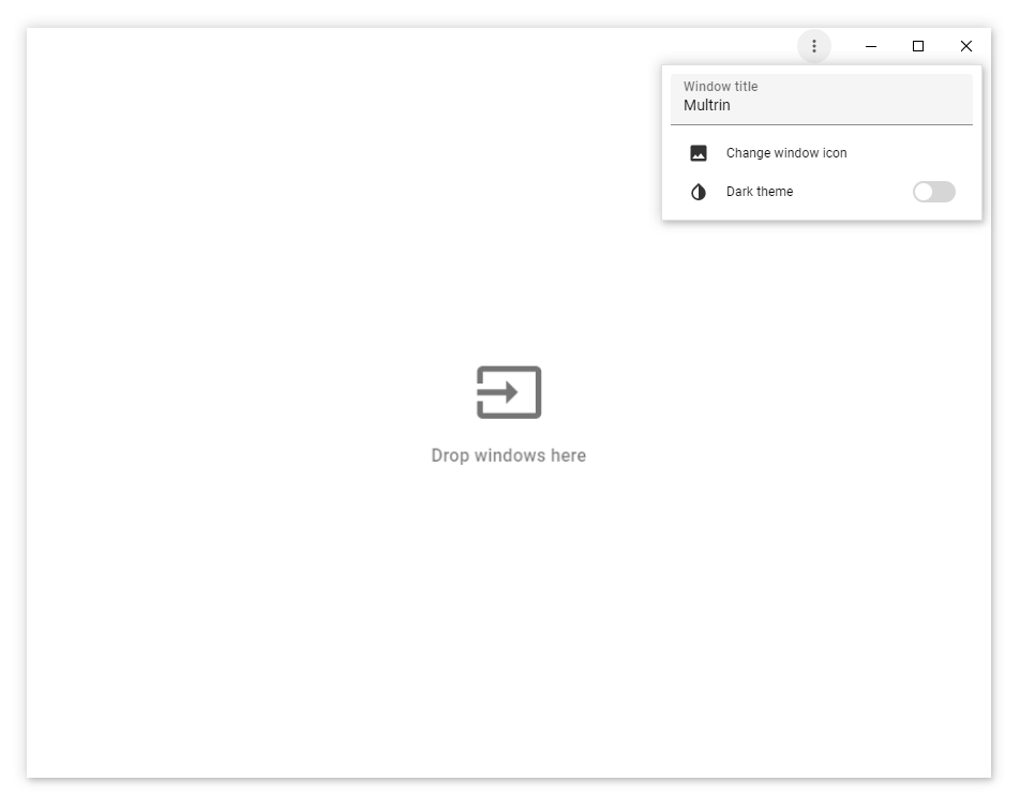
At its core, Multrin’s brilliance lies in its simplicity. The application presents a clean, uncluttered interface that integrates seamlessly with the existing Windows environment. Upon launching Multrin, users are presented with a customizable tab bar, where they can effortlessly drag and drop open windows. This drag-and-drop functionality is incredibly intuitive, requiring minimal learning curve. Users simply select the window they wish to add to the Multrin tab bar and drag it into place. The transition is instantaneous, and the window is immediately converted into a tab within the Multrin interface.
This tabbed organization allows users to quickly switch between applications without resorting to the traditional Windows task bar or Alt+Tab keyboard shortcut. Instead, a simple click on the desired tab instantly brings the corresponding window to the forefront. This streamlined approach significantly reduces the time spent switching between applications, leading to a noticeable boost in productivity, especially for users who regularly juggle multiple programs concurrently. The intuitive design makes Multrin accessible to users of all technical skill levels, from novice computer users to seasoned professionals.
Customizable Appearance for Personalized Workflow
Multrin understands that a productive environment is also a personalized one. To cater to individual preferences, the application offers two distinct themes: a light mode and a dark mode. The light mode provides a bright, airy interface, ideal for users who prefer a traditional look and feel. Conversely, the dark mode employs a darker color palette, reducing eye strain and enhancing visibility in low-light conditions. This thoughtful inclusion allows users to tailor Multrin’s appearance to their specific needs and environmental settings, ensuring optimal comfort and visual clarity regardless of the time of day or surrounding lighting.

The flexibility in choosing between light and dark modes extends beyond mere aesthetics. The choice impacts usability and reduces eye fatigue, especially during extended periods of computer use. The customizable theme options highlight Multrin’s commitment to providing a user-friendly experience that prioritizes both functionality and user well-being. This attention to detail underscores Multrin’s dedication to creating a truly personalized and efficient workflow for its users.
Enhanced Productivity and Workflow Efficiency
The primary benefit of Multrin is its significant contribution to increased productivity and improved workflow efficiency. By consolidating multiple windows into a manageable tabbed interface, Multrin eliminates the clutter and confusion often associated with numerous open applications. The streamlined navigation facilitated by the tabbed system reduces the cognitive load associated with switching between applications, allowing users to focus on their tasks rather than navigating their operating system.
This translates into tangible gains in productivity. Tasks that previously required multiple steps and constant window switching can now be accomplished with significantly fewer actions. The time saved in navigating between applications adds up over the course of a day, contributing to a considerable increase in overall output. Multrin effectively transforms the user’s interaction with their computer, fostering a more focused and efficient work environment. The intuitive design and customizable options further enhance this efficiency, allowing users to tailor the application to their specific needs and preferences.
Seamless Integration and System Compatibility
Multrin is designed for seamless integration with the Windows operating system. Its lightweight nature ensures it doesn’t consume excessive system resources, allowing it to run smoothly even on less powerful machines. This compatibility across a wide range of Windows versions and system configurations makes Multrin accessible to a broad user base. The application’s minimal resource consumption ensures it won’t negatively impact the performance of other applications running concurrently.
The seamless integration with Windows allows Multrin to function as a natural extension of the operating system. The application’s drag-and-drop functionality aligns perfectly with the intuitive design principles of modern operating systems. This cohesive integration fosters a seamless user experience, enhancing the overall effectiveness of Multrin as a productivity tool. The lack of intrusive features or complicated configurations ensures a smooth and hassle-free user experience.
Comparison with Similar Applications and Unique Features
While several other applications aim to improve window management, Multrin distinguishes itself through its unique combination of simplicity, intuitive design, and lightweight performance. Many competing applications can be resource-intensive, impacting system performance, or possess overly complex interfaces that require extensive user training. Multrin avoids these pitfalls, offering a user-friendly experience that’s both effective and efficient.
Unlike some alternatives that require extensive customization or configuration, Multrin is ready to use immediately upon installation. Its drag-and-drop functionality requires no prior knowledge or training. This ease of use significantly contributes to its broad appeal across various user demographics and technical skill levels. The application’s ability to seamlessly integrate into the existing Windows workflow without requiring major system changes is another significant advantage over more complex, resource-heavy alternatives. The simplicity of Multrin is its greatest strength, enabling users to focus on their tasks without being distracted by the application itself.
Multrin’s Future Development and Potential Enhancements
As a relatively new application, Multrin has significant potential for future development and enhancements. The developers could explore adding features such as customizable keyboard shortcuts for even faster tab switching, integrated session management to save and restore tab configurations, and support for more advanced window management functionalities. These potential additions could further solidify Multrin’s position as a leading window management tool.
Furthermore, exploring integration with other productivity applications would enhance the overall user experience. Features like syncing tab configurations across multiple devices or integration with task management software could be invaluable additions. Continuous updates and improvements, based on user feedback and emerging trends in productivity software, will ensure Multrin remains a relevant and valuable tool for years to come. The developers’ commitment to user feedback will play a vital role in shaping the future of the application and ensuring it meets the evolving needs of its users.
Conclusion: Multrin – A Must-Have for Enhanced PC Productivity
Multrin presents a compelling solution for users seeking to enhance their PC productivity and streamline their multitasking workflow. Its intuitive tabbed interface, customizable appearance, and lightweight performance make it a powerful and versatile tool for users of all technical skill levels. The seamless integration with the Windows operating system and the potential for future enhancements further solidify Multrin’s position as a valuable addition to any PC user’s arsenal. By simplifying window management, Multrin empowers users to focus on what truly matters: their work and their productivity. It’s a free, easy-to-use tool that delivers significant results, making it a must-have for anyone looking to optimize their computer experience.
File Information
- License: “Free”
- Version: “1.3.0”
- Latest update: “June 27, 2024”
- Platform: “Windows”
- OS: “Windows 11”
- Language: “English”
- Downloads: “27”
- Size: “70.82 MB”


