Music Maker Jam is a user-friendly music creation application designed for Windows users of all skill levels, particularly those new to music production. This software offers a streamlined approach to composing and mixing tracks, allowing users to create their own songs quickly and intuitively, even without prior musical training. This review delves into the software’s features, strengths, weaknesses, and overall user experience.
Intuitive Interface and Ease of Use
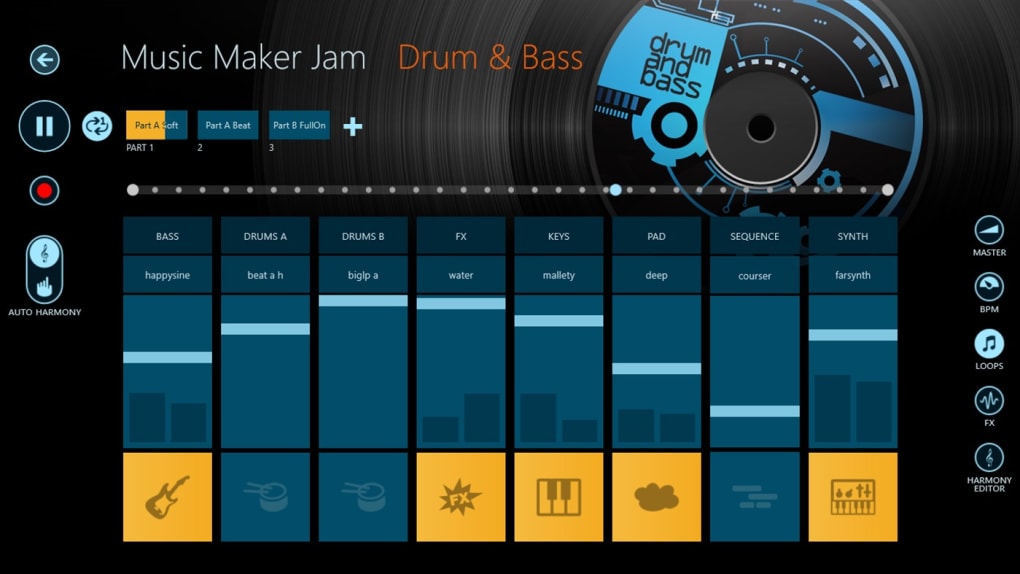
Music Maker Jam stands out for its exceptionally simple interface. The software’s design prioritizes ease of use, making it accessible to individuals with minimal or no experience in music composition or digital audio workstations (DAWs). The core functionality revolves around a multi-channel mixer, offering a straightforward method for layering sounds and instruments to build a song. Each channel is pre-loaded with a diverse range of samples and loops, categorized by genre, eliminating the need for extensive sound library management. The intuitive arrangement of controls and tools within the interface ensures a smooth workflow, minimizing the learning curve often associated with music production software. The live composition feature allows for immediate experimentation and on-the-fly adjustments, encouraging a creative and improvisational approach to music creation. This real-time feedback loop is especially valuable for beginners, enabling immediate gratification and reinforcing the learning process.
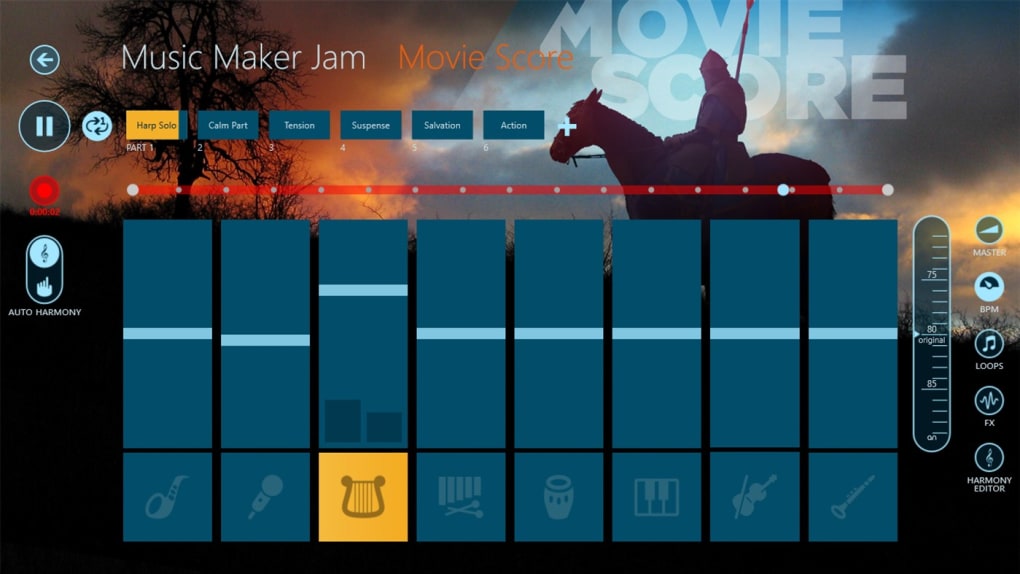
For users accustomed to more complex DAWs, the simplicity might feel limiting. However, this deliberate simplification is precisely what makes Music Maker Jam so appealing to beginners. It removes the complexities often associated with traditional music production software, allowing users to focus solely on the creative aspects of music making. The absence of overwhelming technical details provides a less intimidating entry point into the world of digital music creation, enabling users to grasp fundamental concepts without getting bogged down in intricate settings and workflows.
Genre-Specific Sound Libraries and Loop Integration
Music Maker Jam provides a curated selection of loops and sounds, categorized into three core genres: dubstep, tech house, and jazz. This genre-specific approach ensures that users have access to samples relevant to their preferred musical style, facilitating a more focused and targeted approach to composition. The pre-selected loops are designed to seamlessly blend together, aiding beginners in creating harmonious and well-structured tracks. While this focused approach simplifies the selection process, it also limits the overall sonic palette available to the user.
The integration of loops within the application is intuitive and straightforward. Users can drag and drop loops onto their chosen channels, adjusting their volume and panning parameters as needed. The software’s inherent simplicity shines through in this aspect, allowing for quick experimentation and efficient track building. However, the limited number of loops within each genre may result in repetitive compositions if not complemented with external sound sources or creativity.
Limitations and Areas for Improvement
While Music Maker Jam provides a fantastic entry point into music production, several limitations become apparent with prolonged use. The most significant drawback is the relatively small library of sounds and samples. The pre-loaded sounds, though high-quality and carefully selected, eventually become repetitive and restrict creative exploration. Users seeking greater sonic diversity may find themselves quickly exhausting the available resources, hindering their ability to develop unique and distinctive compositions.
Another notable limitation is the lack of support for external audio files. Users cannot import their own samples or loops, further limiting creative potential. This restriction, although understandable given the software’s focus on simplicity, significantly restricts the ability of advanced users to integrate their personalized sounds and expand upon the provided library. This confines users to the pre-loaded sounds, potentially stifling originality and preventing exploration of a broader range of musical styles.
The absence of advanced mixing and mastering tools is another factor to consider. While the software provides basic mixing capabilities, users seeking more refined control over parameters such as equalization, compression, and reverb will be disappointed. This lack of advanced tools might limit the professional quality of the final output. This limitation could affect those hoping to polish their work beyond a basic level of production quality.
Finally, the absence of MIDI support significantly curtails the capabilities of the software. While the interface is user-friendly for beginners, experienced musicians may find the lack of MIDI support limiting. The inability to use MIDI controllers or keyboards to input notes or play virtual instruments directly restricts creative control.

Multi-Touch Support and Windows Compatibility
Music Maker Jam is fully compatible with Windows 8 and later versions, including Windows 11, broadening its accessibility across a wide range of devices. This software makes the most of Windows 8 tablets by offering seamless multi-touch support. The multi-touch functionality enhances the user experience, enabling more intuitive control over various mixing and sequencing parameters. This innovative use of touch interface technology makes music creation even more enjoyable and immersive on tablet devices.
The multi-touch support extends beyond basic functionality; it contributes to the overall intuitive design. Gesture-based controls allow for intuitive volume adjustments, instrument selection, and other interactive features. This makes the application especially appealing for individuals who appreciate the ease and responsiveness of a touch-screen interface. The multi-touch capabilities enhance the user experience on touch-enabled devices, increasing overall usability.
Comparison to Other Music Production Software
Compared to other music production software, Music Maker Jam occupies a unique niche. While professional DAWs such as Ableton Live, Logic Pro X, or FL Studio offer unparalleled versatility and extensive features, they come with a steep learning curve. Music Maker Jam, on the other hand, prioritizes ease of use and accessibility, making it a more inviting introduction to digital music creation for beginners.
Other simpler music-making applications may offer similar user-friendly interfaces, but may lack the polish and overall quality of sounds within Music Maker Jam. It provides a balance between a simple user experience and a reasonably high quality of sounds. While it may not compete with the features of professional DAWs, its simplicity and focus on beginners make it a powerful tool for those taking their first steps in the world of music production.
This distinct approach caters to a specific audience—those who want a simple, yet effective way to create music without being overwhelmed by advanced controls and settings. It is this targeted approach that sets it apart from both the more complex professional tools and other simpler alternatives.
Conclusion
Music Maker Jam provides a fun and accessible entry point into the world of music production. Its intuitive interface, genre-specific sound libraries, and multi-touch support contribute to a smooth and enjoyable user experience, particularly for beginners. While the limitations in sound library size, lack of external file support, and absence of advanced features might restrict its appeal to advanced users, it excels as a tool for learning basic music composition techniques and fostering creativity.
The software’s strengths lie in its ease of use and accessibility, making it a perfect choice for those new to music production. It’s an excellent tool for experimentation, learning fundamental music concepts, and exploring creative possibilities without the pressure of complex technical settings. For individuals seeking a simple, yet effective way to make music, Music Maker Jam is a recommended choice. However, users who desire greater flexibility and advanced features should look towards more robust and full-featured music production software.
File Information
- License: “Free”
- Version: “2017.606.1848.0”
- Latest update: “July 27, 2024”
- Platform: “Windows”
- OS: “Windows 8.1”
- Language: “English”
- Downloads: “197.3K”
- Size: “450.43 MB”