
Music Speed Changer is a freemium multimedia application designed for Android devices, offering users precise control over the speed and pitch of their audio files. This in-depth review explores its features, functionality, advantages, and disadvantages, examining its suitability for both casual listeners and professional musicians. We’ll delve into its capabilities, user interface, and overall performance to provide a clear understanding of its value proposition.
App Features and Functionality
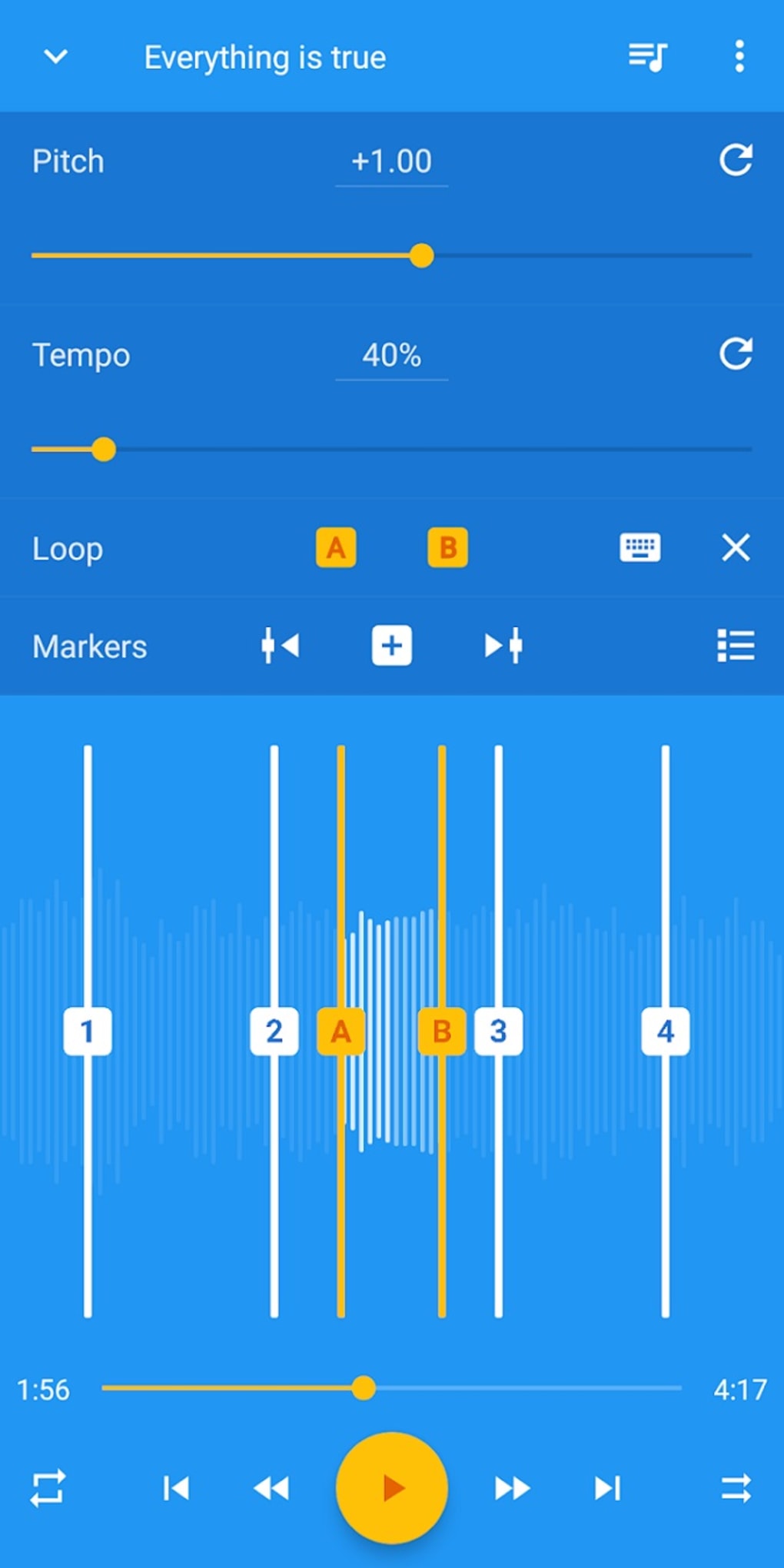
At its core, Music Speed Changer provides a powerful and versatile set of tools for manipulating audio. Its primary function revolves around its ability to independently adjust the speed and pitch of any audio file loaded into the app. This means you can slow down a song to analyze its intricacies without affecting the musical key, or speed up a track to increase tempo without altering its pitch. The range of adjustment is impressive; pitch can be shifted by up to ±24 semitones, while speed can be altered from 15% to 500% of the original speed. This level of control offers unparalleled flexibility for a wide range of applications.
Beyond its core speed and pitch adjustment, Music Speed Changer boasts a range of additional features that significantly enhance its functionality. Its music looping functionality enables users to seamlessly loop specific sections of audio, making it invaluable for musicians practicing challenging passages or for DJs looking to create seamless transitions. The inclusion of common audio effects such as echo, flanger, and reverb adds another layer of creative control, allowing users to experiment with different soundscapes and enhance the overall sonic quality. Furthermore, the app offers a vocal reduction feature, effectively turning your device into a rudimentary karaoke machine by lowering the prominence of vocals in a track.
The app also features a built-in audio recorder, making it a complete solution for audio manipulation and creation. This allows users to record new audio, and immediately apply the speed and pitch modification tools. This is a powerful addition for musicians composing their own music or creating unique sound effects. An 8-band graphic equalizer further expands on the editing capabilities, allowing fine-tuning of audio frequencies to suit individual preferences or to address specific audio imbalances. The inclusion of waveform views ensures precise control over audio selection and editing, making the process of manipulating specific segments of a song straightforward and intuitive.
The app’s claim of instant playback and adjustment without decoding is a significant feature. This suggests a highly optimized processing engine that offers a responsive and fluid user experience, even when dealing with large audio files. This responsiveness eliminates lag, ensuring a seamless workflow that doesn’t disrupt the creative process. Finally, the app’s modern, material-designed interface contributes to its overall user-friendliness, ensuring accessibility and ease of use for both novice and experienced users.
Music Speed Changer for Musicians and Audio Enthusiasts
Music Speed Changer’s capabilities make it a valuable tool for a wide range of users. For musicians, the precise pitch and tempo adjustment features are invaluable for learning complex pieces, transcribing music, or experimenting with new musical ideas. The looping function allows for focused practice on difficult sections, and the built-in recorder provides a convenient tool for capturing original compositions and experimenting with different sounds. The ability to independently modify pitch and speed provides unmatched flexibility for adapting songs to suit different vocal ranges or instruments.
For audio enthusiasts, the app’s features open up a world of creative possibilities. The array of audio effects, combined with the precise control over speed and pitch, allows for the creation of unique soundscapes and remixes. The app facilitates creative experimentation with existing audio files, enabling the discovery of new interpretations and sonic textures.
Even beyond musical applications, Music Speed Changer finds utility in fields like language learning. Slowing down audio recordings of speech can greatly assist in understanding pronunciation and accent, while maintaining clarity of speech.
Music Speed Changer: A Look at the User Experience
The app’s interface is designed with user-friendliness in mind. The intuitive layout ensures easy navigation and access to all features. The waveform display provides a visual representation of the audio file, making it easy to select specific sections for editing or looping. The controls for speed and pitch adjustment are simple and responsive, enabling precise manipulation of the audio. While the developers tout a “modern material design,” the actual appearance is relatively standard for Android apps. The interface is functional and gets the job done without being particularly visually striking.
The Free vs. Premium Versions: A Comparison
Music Speed Changer is available in a free version, but also offers a premium subscription which removes advertisements. The ads in the free version are reported by users to be somewhat intrusive, occasionally interrupting the listening experience. The decision to upgrade to the premium version depends on individual tolerance levels for ads. The core functionality remains the same across both versions; the only difference lies in the presence or absence of advertising.
Android-Specific Considerations and Alternatives
Music Speed Changer is specifically designed for Android, making it readily accessible to the vast majority of Android users. However, the app is also available on other platforms, as indicated in the initial product information, although specific details on availability and differences in the other versions are not readily available. It is important to check compatibility with the user’s specific Android version. While this app is well-regarded, users should explore alternative applications available on the Google Play Store to compare features and user reviews before settling on a final choice. Many comparable apps exist, each offering a slightly different balance of features, price, and user experience.
Conclusion
Music Speed Changer is a versatile and powerful audio editing tool for Android users. Its robust set of features, including independent pitch and speed control, looping, audio effects, and a built-in recorder, makes it a compelling choice for musicians, audio enthusiasts, and anyone looking for precise control over their audio files. While the presence of ads in the free version can be a minor drawback, the overall functionality and user experience make Music Speed Changer a worthy addition to any Android user’s multimedia arsenal. Its high-quality time stretching and pitch shifting, combined with its intuitive interface, makes it a strong contender amongst similar apps available on the Google Play Store. The lack of information regarding other platform versions prevents a complete comparative analysis of its broader market position, but based on its Android performance, it appears to be a well-regarded choice.
File Information
- License: “Free”
- Latest update: “July 16, 2025”
- Platform: “Android”
- OS: “Android 13.0”
- Language: “English”
- Downloads: “6.4K”
- Download Options: “Google Play”


