
MusicBee is a free, feature-rich music player for Windows operating systems, designed to cater to both casual listeners and serious audiophiles. It offers a robust suite of customization options and advanced music library management tools, making it a compelling alternative to other popular music players. This review delves into its capabilities, highlighting its strengths and addressing any potential shortcomings.
Music Library Management and Organization
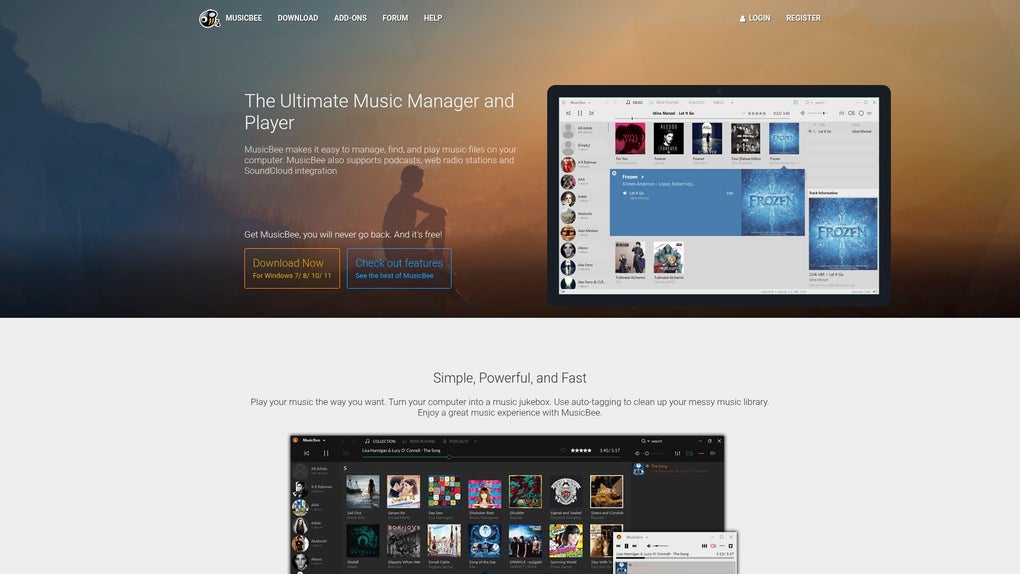
One of MusicBee’s standout features is its powerful music library management capabilities. Users can effortlessly import their music collections from various sources, including iTunes libraries and local folders. The program intelligently organizes tracks based on metadata, creating a structured and easily navigable library. This automated organization significantly reduces the time and effort required to manage large music collections. MusicBee automatically retrieves missing metadata, including album art, artist information, and genre tags, ensuring a comprehensive and visually appealing library experience. The program also allows for manual editing of tags, offering flexibility for users who prefer fine-grained control over their library organization. This meticulous approach to metadata management is a key differentiator, setting MusicBee apart from simpler music players. It ensures consistent and accurate representation of your music collection, enhancing the overall user experience.
The library’s organizational prowess extends beyond basic sorting. MusicBee allows for the creation of custom playlists, smart playlists based on dynamic criteria (like recently added songs or songs matching specific genres), and the organization of music into various folders and subfolders tailored to the user’s preferences. The versatility in its organizational structure allows for highly customized library management suitable for both large and smaller collections. The intuitive interface makes navigating even extensive libraries a straightforward task, minimizing the time spent searching for specific tracks. Advanced search filters further streamline the process, allowing users to quickly locate music based on various parameters including artist, album, genre, year, and even specific lyrics. The robust search functionality significantly reduces the time spent browsing through long lists of songs.
Audio Playback and Quality
Beyond its organizational strengths, MusicBee shines in its audio playback capabilities. The program supports a wide range of audio formats, including popular codecs such as MP3, FLAC, WAV, and many more, eliminating the need for external converters for most audio files. Its support for lossless audio formats ensures high-fidelity playback, providing an enhanced listening experience for audiophiles who value pristine audio quality. The ability to play lossless formats without compromising quality is a significant advantage for users who prioritize superior sound reproduction. This fidelity enhances the enjoyment of their music collection, particularly for those with high-quality headphones or speakers.
MusicBee also offers extensive audio customization options. A versatile equalizer allows users to fine-tune the sound to their liking, adjusting frequencies to compensate for imperfections in their audio setup or to emphasize particular aspects of the music. This level of granular control over the audio output provides a personalized listening experience tailored to individual preferences. Furthermore, the program provides professional-grade audio output options, including WASAPI and ASIO, allowing for minimal latency and interference. These options are particularly beneficial for users who use external DACs (Digital-to-Analog Converters) or who need low-latency playback for tasks such as DJing. The incorporation of these advanced output options places MusicBee firmly in the realm of professional-grade audio playback software. For casual listeners, the standard output options are more than adequate, but the advanced options provide a significant advantage for more discerning users.
Beyond the equalizer, MusicBee offers additional audio enhancements like crossfading, volume normalization, and playback speed adjustment. Crossfading ensures smooth transitions between tracks, enhancing the listening experience, while volume normalization prevents jarring volume jumps between songs with varying levels. Playback speed adjustment proves useful for learning songs or languages, offering versatility beyond standard playback functionalities. These subtle enhancements contribute to a more polished and enjoyable listening experience, showcasing MusicBee’s dedication to audio quality and user comfort.
Advanced Features and Customization
MusicBee’s feature set extends beyond basic playback and library management. It includes several advanced features that appeal to power users and audio enthusiasts. For example, it supports plugins, expanding its functionality through community-developed add-ons. This extensibility allows users to tailor the program to their specific needs and preferences, adding features such as support for additional audio formats, new visualizations, or improved metadata handling. The availability of plugins is a testament to the software’s open and collaborative nature.
The program also offers sophisticated tagging capabilities, including automatic tagging and batch editing. These functions expedite the process of organizing large music libraries, reducing the manual effort required to maintain accurate and consistent metadata. The ability to batch edit tags proves particularly invaluable for users with large collections or who require uniform metadata across their library.
MusicBee’s customization extends to its user interface. Users can personalize the layout and appearance of the program to suit their preferences, adjusting various aspects of the visual interface. This degree of control over the visual aspects of the program enhances the overall usability and aesthetic appeal, adapting to individual user preferences.
User Interface and Usability
Despite its extensive features, MusicBee maintains a relatively intuitive user interface. While initially the sheer number of features might seem overwhelming, the program is well-organized, and most functions are easily accessible. The main interface is clean and uncluttered, prioritizing essential functionalities while providing easy access to advanced options through clearly labeled menus and settings panels.
Navigation is generally straightforward, and the program’s responsiveness ensures a smooth user experience. The search functionality is particularly effective, allowing users to quickly locate specific tracks or albums within large libraries. However, some users might find the learning curve slightly steeper than that of simpler music players due to the abundance of advanced options. While comprehensive documentation is available, mastering all aspects of the software requires some time and effort.
Conclusion
MusicBee stands as a powerful and versatile free music player for Windows. Its robust music library management tools, high-quality audio playback capabilities, extensive customization options, and advanced features make it a compelling choice for a wide range of users, from casual listeners to demanding audiophiles. While the learning curve might be slightly steeper than that of some simpler players, the rewards of mastering its functionality are significant. The ability to tailor the program to individual preferences and needs, coupled with its impressive audio capabilities and organizational tools, makes MusicBee a strong contender in the world of free music players. Its open-source nature and supportive community further enhance its appeal, providing a platform for ongoing development and improvement. Overall, MusicBee offers an excellent balance of functionality, performance, and customization, making it a top recommendation for anyone seeking a robust and free music player for their Windows PC.
File Information
- License: “Free”
- Version: “3.6.9202”
- Latest update: “May 30, 2025”
- Platform: “Windows”
- OS: “Windows 11”
- Language: “English”
- Downloads: “78”
- Size: “9.67 MB”


