
Muvee Reveal is a Windows-based software application designed to simplify the process of creating visually appealing presentations from photos and videos. It caters to users of all technical skill levels, offering an intuitive interface and automated features that minimize the need for extensive editing expertise. This makes it an ideal choice for individuals who want to quickly and easily transform their personal photo and video collections into shareable presentations without the complexities often associated with professional video editing software.
Effortless Presentation Creation
The core strength of Muvee Reveal lies in its user-friendly design. The program’s interface is deliberately straightforward, guiding users through the presentation creation process with minimal fuss. The software’s functionality is broadly organized into four key areas: media import, style selection, music integration, and preview. This streamlined workflow ensures that even users with no prior video editing experience can quickly grasp the program’s capabilities and create impressive presentations in a short amount of time.
Users begin by importing their photos and videos. Muvee Reveal supports a wide range of common media formats, ensuring compatibility with most digital cameras, smartphones, and video capture devices. Once the media is imported, users can choose from a variety of pre-designed presentation styles. These styles dictate the overall look and feel of the final presentation, including transitions between photos and videos, text overlays, and visual effects. While the number of customizable options within each style might be limited compared to professional-grade editing suites, this simplicity contributes to the software’s ease of use and speed of operation.
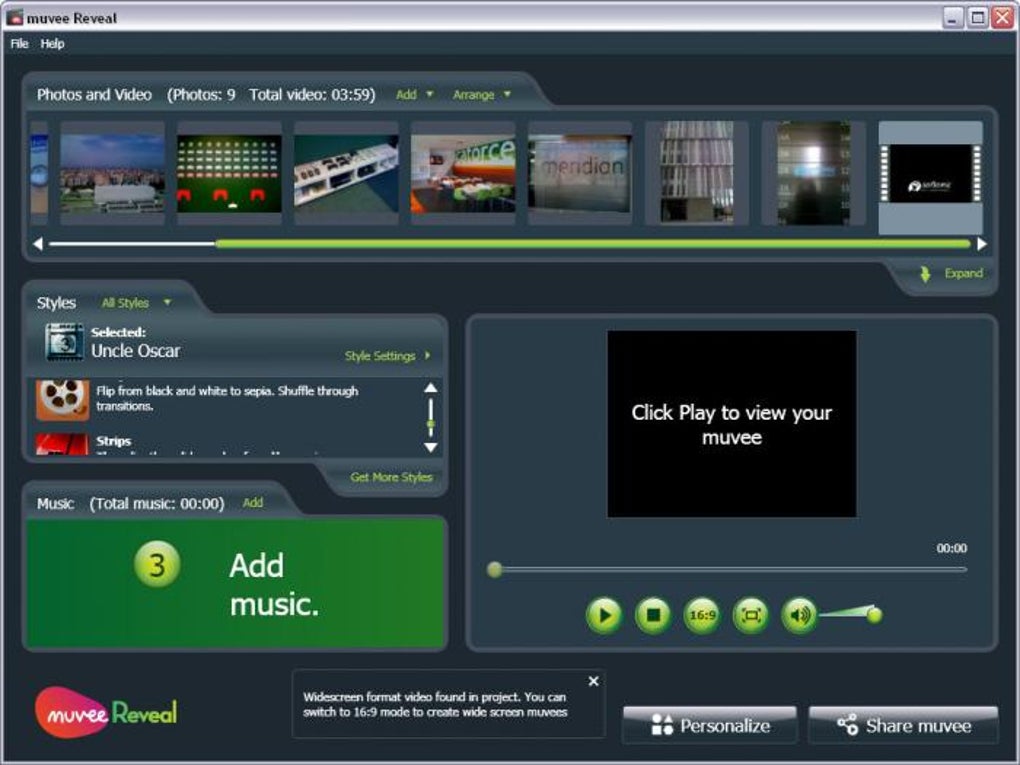
Adding background music is a simple process. Users can select music files from their local libraries, and the software automatically synchronizes the audio with the length of the presentation. This automated synchronization eliminates the need for manual timing adjustments, saving users significant time and effort. Furthermore, Muvee Reveal allows users to incorporate voiceovers, providing additional narrative context to the presentation. These voiceovers can enhance the storytelling aspect of the presentation, bringing a more personal and engaging touch to the final product.
A dedicated preview window allows users to review their work before finalizing the presentation. This feature allows for quick adjustments and refinements, ensuring that the final product meets the user’s expectations. The preview functionality eliminates the need for multiple renderings to check the overall flow and aesthetics of the presentation, streamlining the editing workflow significantly.
Features and Functionality
Muvee Reveal offers a range of features designed to enhance the presentation-creation experience:
- Media Import: Supports a wide array of popular image and video formats, ensuring broad compatibility with various media sources.
- Presentation Styles: Provides a selection of pre-designed templates, each offering a unique visual aesthetic and transition effects. This simplifies the design process, allowing users to choose a style that best complements their photos and videos.
- Music Integration: Allows users to incorporate background music from their own libraries, with automated synchronization to the presentation’s length. This feature seamlessly blends audio with visuals, adding another dimension to the overall presentation.
- Voiceover Capability: Users can add narration to their presentations, creating a more engaging and informative viewing experience. This feature is especially beneficial for presentations that require detailed explanations or storytelling.
- Basic Editing Tools: Includes basic photo editing tools for minor adjustments and enhancements, allowing users to optimize their media before inclusion in the presentation. These tools are sufficient for addressing simple image adjustments, but more extensive editing may require external software.
- Automatic Adjustments: The software intelligently adjusts photo duration and music to fit the overall presentation length, streamlining the workflow and ensuring a balanced presentation.
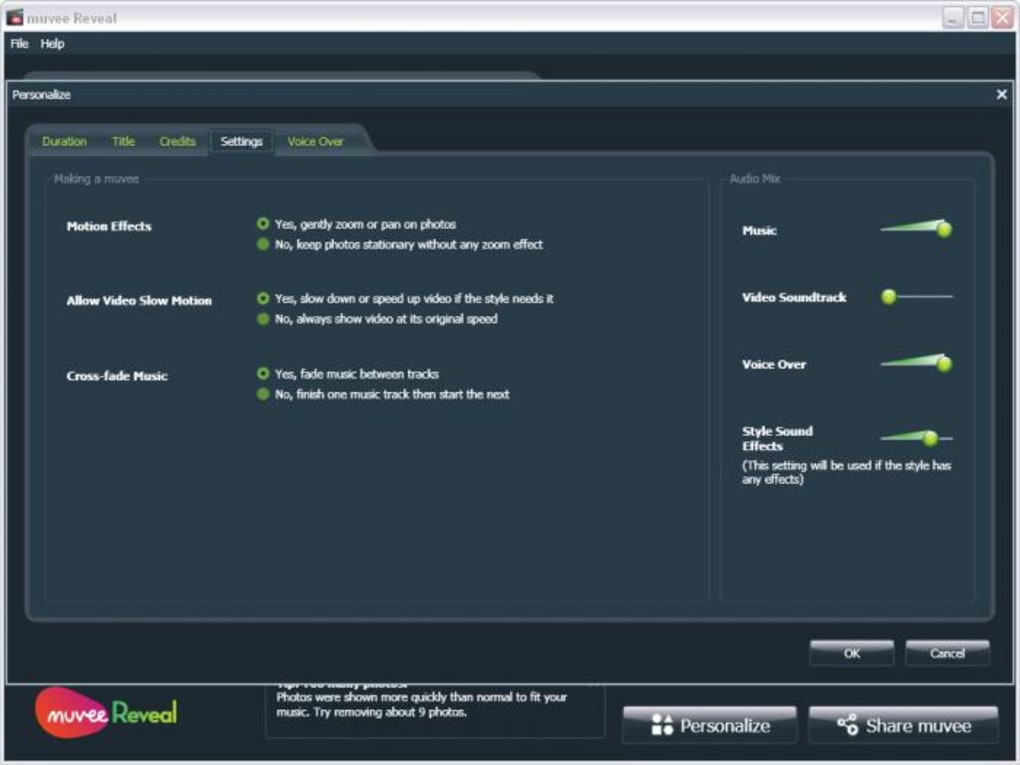
- Custom Titles and Credits: Allows users to personalize their presentations with custom titles and end credits, adding a professional and polished touch to the final output. This feature allows for personalized branding and credits, making the presentation more engaging and relevant to the specific context.
- Output Options: Offers multiple output options, including online publishing, DVD burning, and saving to various video formats for different devices. This versatility caters to diverse sharing needs and device compatibilities.
Pros and Cons
Muvee Reveal, like any software application, has its strengths and weaknesses.
Pros:
- Intuitive Interface: The software boasts a user-friendly interface, making it accessible to users with varying levels of technical expertise.
- Ease of Use: The streamlined workflow allows users to create presentations quickly and efficiently, minimizing the learning curve associated with more complex video editing software.
- Automated Features: Automated features such as music synchronization and automatic photo length adjustment streamline the process, saving users valuable time and effort.
- Wide Format Support: The software supports a wide range of media formats, ensuring compatibility with most common digital media sources.
- Multiple Output Options: Users can publish their creations online, burn them to DVDs, or save them in various formats for different devices, catering to diverse sharing needs.
Cons:
- Limited Customization: The limited customization options within each presentation style might restrict creative control for advanced users.
- Simplicity Might Be Limiting: While ease of use is a significant advantage, the program’s simplicity might be perceived as a limitation for users seeking more advanced editing capabilities. Those needing granular control over every aspect of their presentation might find the software’s features insufficient.
- Potential for Feature Obsolescence: Given that the software appears to be no longer actively supported by the developer, future updates and potential bug fixes are unlikely. This might lead to compatibility issues with newer operating systems or media formats.
User Reviews and Alternatives
User reviews highlight the software’s ease of use and speed as its primary strengths. Many users appreciate the ability to quickly create visually appealing presentations without requiring extensive technical knowledge. However, some users have expressed a desire for more advanced editing capabilities and greater customization options within the presentation styles.
Several alternative video editing and presentation creation software packages exist, offering varying levels of complexity and features. Some alternatives provide a wider range of editing tools and customization options, while others focus on specific aspects of video creation such as animation or special effects. The choice of alternative software depends on the user’s specific needs and technical skills. The lack of active development and support for Muvee Reveal makes exploring alternative options a more prudent choice for users starting fresh.
Conclusion
Muvee Reveal offers a user-friendly and efficient solution for creating visually appealing video presentations from photos and videos. Its intuitive interface and automated features make it an excellent choice for novice users who want to quickly share their memories without the complexities of professional-grade video editing software. However, users seeking advanced editing tools and extensive customization options might need to explore alternative software solutions. The lack of ongoing development raises concerns about long-term usability and support, prompting consideration of alternative, actively-maintained software packages.
File Information
- License: “Trial version”
- Latest update: “July 5, 2024”
- Platform: “Windows”
- OS: “Windows Vista”
- Language: “English”
- Downloads: “209.8K”
- Size: “176.58 MB”


