
MWSnap is a free, lightweight, and surprisingly powerful screen capture utility for Windows operating systems. While it might not boast the flashy features of some commercial alternatives like Snagit, its simplicity, efficiency, and robust core functionality make it a compelling choice for users who prioritize ease of use and reliable performance. This review delves into MWSnap’s capabilities, highlighting its strengths and weaknesses, and ultimately assessing its place in the crowded screen capture software market.
Core Functionality and Features
At its heart, MWSnap is a screen capture tool, offering various methods for capturing images from your screen. It supports five distinct capture modes:
-
Full Desktop Capture: Captures a complete screenshot of your entire desktop, including all visible windows and applications. This is ideal for capturing an overview of your workspace or documenting a system’s state.
-
Highlighted Window Capture: Allows you to select a specific window to capture. This is incredibly useful for isolating particular applications or elements within your system, without including unnecessary background clutter.
-
Active Menu Capture: Captures only the currently active menu. This is a highly specialized feature beneficial for documenting menu structures within applications or taking quick snapshots of specific menu items.
-
Control Capture: Captures individual controls or elements within a window. This feature provides excellent precision for capturing specific buttons, icons, or other user interface elements.
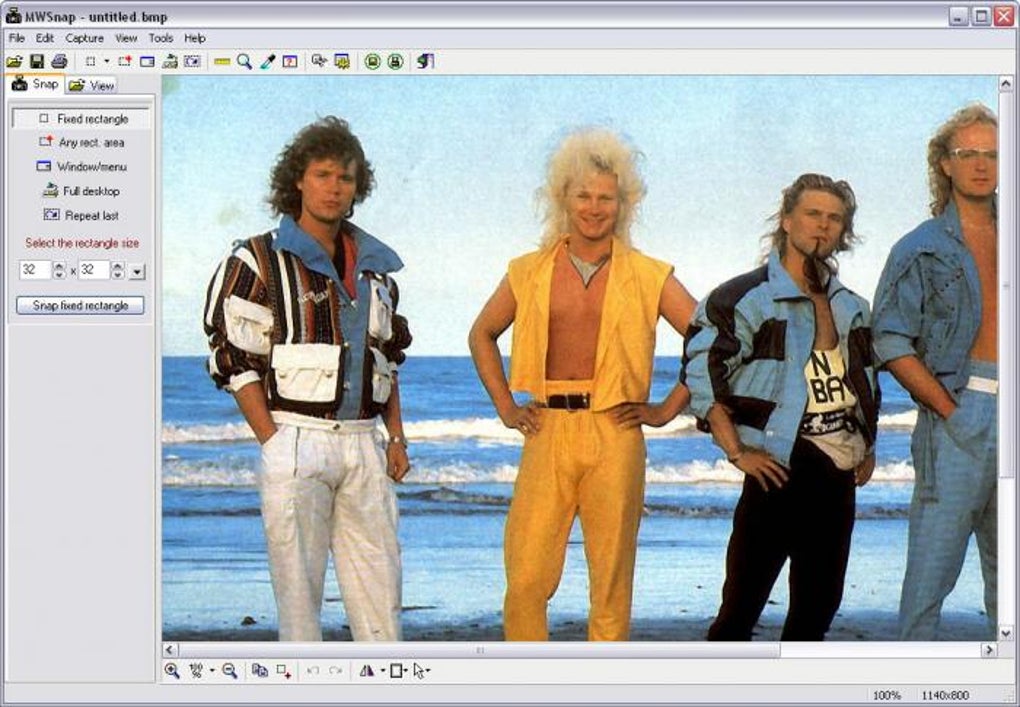
- Fixed or Free Rectangular Capture: This provides the flexibility to select any rectangular area on the screen. You can choose precise dimensions for a fixed-size capture or freehand select a region of any size.
Beyond its core capture modes, MWSnap incorporates several helpful features, enhancing its functionality:
-
Image Format Support: MWSnap supports five widely used image formats: BMP, JPG, TIFF, PNG, and GIF. This versatility ensures compatibility with various applications and needs. You can even adjust color depth and quality settings for each format, optimizing file size and image fidelity according to your requirements.
-
Integrated Tools: The software includes several integrated graphical tools, further enhancing its utility:
* **Zoom Tool:**  Allows you to magnify selected screen areas for detailed captures of small or intricate elements.
* **Ruler Tool:** Provides a convenient way to measure the dimensions of objects on the screen, helpful for design work or assessing the size of UI elements.
* **Color Picker:**  Identifies the RGB values of any pixel on your screen, useful for designers, developers, and anyone needing precise color information.
* **Window Spy:** This feature provides detailed information about selected windows.
-
System-Wide Hotkeys: MWSnap allows you to assign custom hotkeys for quick and efficient screen captures without using the mouse. While the selection of pre-defined hotkeys might be limited compared to some competitors, the ability to customize shortcuts makes it adaptable to individual workflows.
-
Clipboard Integration: The captured images can be easily copied to the system clipboard for pasting into other applications, streamlining workflows.
-
Printing Functionality: The ability to directly print captured images from within the program eliminates the need for extra steps.
-
Autosave and Auto-print: MWSnap’s unique autosave feature is a significant advantage. This eliminates the need for manually saving screenshots, making it particularly useful for documenting processes or capturing information from online forms. The auto-print feature mirrors this convenience for users who need immediate printed copies of their captures.
-
Auto-Start with Windows: For users who frequently require MWSnap, the option to launch it automatically at system startup ensures its instant availability.
-
System Tray Minimization: MWSnap can be minimized to the system tray, keeping it readily accessible while minimizing its screen footprint.
-
Predefined Sizes: The program offers a customizable list of predefined sizes, perfect for creating icons or glyphs with consistent dimensions.
-
Undo/Redo Functionality: A multilevel undo/redo system allows for easy correction of mistakes during capture or editing.
-
Multilingual Support: MWSnap offers support for multiple languages, catering to a diverse user base.
-
Configurable User Interface: The interface’s customizable elements allow for personal tailoring.
Ease of Use and User Experience
MWSnap excels in its simplicity. The user interface is clean and intuitive, making it incredibly easy to navigate and use, even for users with minimal technical experience. The straightforward design prioritizes ease of access to core functions, avoiding unnecessary complexity. The integrated tools are easily accessible and well-integrated into the main workflow.
However, the limited hotkey selection is a minor drawback. While customizable, the lack of default support for standard screenshot hotkeys (like Print Screen) may require some adjustment for users accustomed to these shortcuts. Additionally, the absence of extensive editing features might disappoint users seeking more advanced image manipulation options.
Strengths and Weaknesses
Strengths:
-
Free and Open Source: MWSnap is completely free to use, making it accessible to everyone. This affordability is a significant advantage over many commercial screen capture applications.
-
Lightweight and Efficient: It consumes minimal system resources, making it suitable for use even on older or less powerful machines. This efficiency is a significant advantage over resource-intensive alternatives.
-
Versatile Capture Modes: The five capture modes provide extensive flexibility, catering to various user needs.
-
Useful Integrated Tools: The zoom, ruler, and color picker tools add considerable value to the software’s functionality.
-
Autosave Feature: This time-saving feature significantly enhances productivity, especially when documenting processes or filling out online forms.
-
Simple and Intuitive Interface: Its uncluttered design ensures ease of use, even for novice users.
Weaknesses:
-
Limited Hotkey Options: The restricted number of default hotkeys may require adaptation for some users.
-
Lack of Advanced Editing Features: Users seeking sophisticated image editing features will likely need to utilize a separate image editor.
-
Potential for Increased Memory Usage (reported by some users): While this issue wasn’t experienced during testing, some users have reported increased memory consumption during capture operations.
Comparison with Alternatives
MWSnap competes with several popular screen capture tools, including Snagit and FastStone Capture. While these commercial alternatives offer more advanced features like enhanced editing capabilities and a wider range of hotkeys, they come with a price tag. MWSnap’s free availability makes it a compelling alternative for users who don’t require extensive editing functionalities. Its performance often rivals these commercial options in terms of speed and efficiency for basic capture tasks.
Other free options exist, but many lack the comprehensive set of capture modes and integrated tools that MWSnap provides. Therefore, it occupies a unique space in the free software landscape, providing a robust set of features without the cost and complexity of commercial alternatives.
Conclusion
MWSnap offers a compelling blend of simplicity and functionality. Its free availability, lightweight design, and versatile capture modes make it a strong contender in the screen capture software market. While it lacks the advanced editing capabilities of commercial options, its ease of use, efficient performance, and unique autosave feature make it an excellent choice for users who prioritize quick, reliable screen captures without the need for extensive image manipulation. For users seeking a free, efficient, and easy-to-use screen capture utility for Windows, MWSnap is a highly recommended option. Its strength lies in its reliability and ease of use, making it an ideal tool for casual users and professionals alike who need a simple, straightforward solution for their screen capture needs.
File Information
- License: “Free”
- Latest update: “May 23, 2023”
- Platform: “Windows”
- OS: “Windows XP”
- Language: “English”
- Downloads: “189.3K”
- Size: “658.77 KB”


