
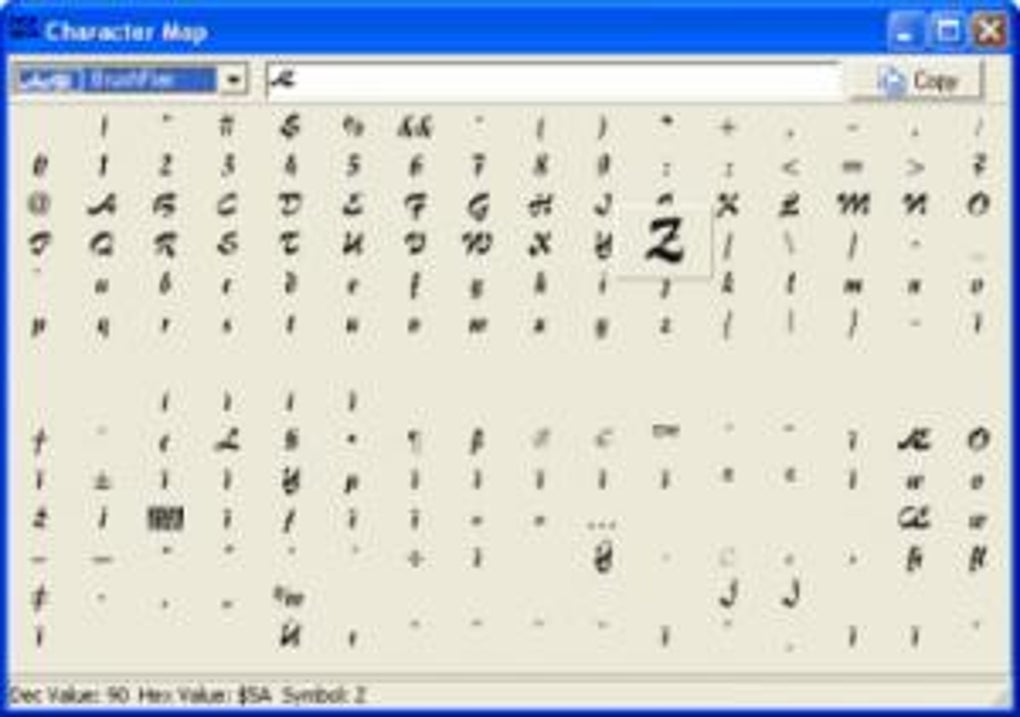
In the vast landscape of digital tools, some utilities, though seemingly simple, hold an enduring relevance. “My CharMap” is one such application, a venerable Windows program that serves a fundamental, yet often overlooked, purpose: providing easy access to the myriad of characters beyond the standard keyboard layout. In an era dominated by sleek, complex software, My CharMap stands as a testament to efficient design and essential functionality, offering users a re-sizeable character display and an intuitive zoom viewer, making it a valuable addition to any Windows user’s toolkit.
First introduced to the digital catalog in 2005, My CharMap quickly garnered attention for its straightforward approach to character management. Categorized under Desktop Customization Software, with a specific focus on Fonts and Utilities, its initial popularity, marked by over 15,727 downloads since its inception and a steady 27 installations in a recent week, underscored a clear need for such a tool. Designed to operate on Windows 95 and subsequent versions, it showcases a remarkable longevity and compatibility. The program, available exclusively in English, boasts a modest version 1.1, last updated on April 10, 2005, a detail that speaks to its stability and the fact that its core functionality has remained robust without requiring frequent revisions. Its minimal footprint, weighing in at just 335.84 KB, ensures that it doesn’t consume significant system resources, setting it apart from many contemporary applications. This efficiency has made it particularly popular in regions like India, the United Arab Emirates, and Vietnam, where practical, lightweight utilities are highly valued.
The Essential Role of Utilities & Tools
The digital ecosystem thrives on efficiency, and at its heart lies a diverse array of utilities and tools designed to streamline tasks, enhance system performance, and augment user capabilities. From managing files to securing networks, these applications are the unsung heroes of computing, quietly working in the background to ensure a smooth and productive experience. My CharMap, as a utility, fits perfectly into this category, albeit with a focus on a specific niche: character management.
The broader “Utilities & Tools” category encompasses a vast spectrum of functionalities. Consider the daily necessities: Bar Code Scanning for inventory, Clocks & Alarms for time management, Data Recovery for emergencies, File Compression for storage optimization, and robust File Managers for organizing digital assets. Keyboards, Measurement tools, Printer & Fax utilities, and Screen Capture software further exemplify the range of practical applications that fall under this umbrella. Even specialized tools like those for Roblox Games, Google Chrome Extensions, or Wordpress management are, in essence, utilities tailored for specific platforms or tasks.
What distinguishes a good utility is its ability to address a specific need effectively and without unnecessary bloat. My CharMap embodies this principle. While operating systems like Windows have a built-in character map, My CharMap offers distinct advantages through its re-sizeable display and zoom viewer. This enhanced visibility is not just a cosmetic feature; it significantly improves usability, especially when dealing with intricate or less-common characters, making it easier for users to identify and select exactly what they need. This focus on user experience, coupled with its lightweight design and free availability, cements My CharMap’s position as a valuable utility.
Beyond character maps, the utility landscape is rich with tools that tackle diverse challenges. Download Managers optimize internet downloads, ensuring speed and reliability. File Sharing & Peer To Peer software facilitates the exchange of large files. Search & Lookup Tools help users navigate vast amounts of information, while Wifi utilities ensure seamless network connectivity. Each of these, like My CharMap, solves a particular problem, collectively empowering users to navigate their digital lives with greater ease and productivity. The enduring popularity of such tools, particularly those offering free access and robust performance, highlights their fundamental importance in both personal and professional computing environments.
Enhancing Your Digital Experience Through Personalization
The digital realm is an extension of our personalities, and the ability to customize our computing environments is a deeply satisfying aspect of modern technology. “Personalization” is more than just aesthetics; it’s about tailoring the user interface to suit individual preferences, making the interaction with a device more intuitive, comfortable, and reflective of one’s unique style. This category encompasses a wide array of options, from the visual flair of Cursors & Fonts to the auditory cues of Ringtones & Sounds, and even the functional elements of Screen Lockers, Screen Savers, Themes, and Wallpaper. My CharMap, though a utility, directly contributes to this ethos of personalization, specifically within the realm of fonts.
Fonts are not merely stylistic choices; they are fundamental to how we perceive and interact with text. They convey mood, readability, and brand identity. For individuals who often work with diverse languages, special symbols, or unique typographic elements, having precise control over character selection is paramount. My CharMap, by facilitating easy access and visual inspection of a vast character set, empowers users to infuse their documents, designs, and digital communications with the exact characters needed, whether for a foreign language accent, a mathematical symbol, or a decorative glyph.
The “Cursors & Fonts” subcategory, where My CharMap resides, underscores the profound impact these elements have on the user experience. A customized cursor can offer a personal touch, while unique fonts can transform the readability and aesthetic appeal of any text. Beyond mere selection, understanding the various characters available within a font is crucial for designers, writers, and anyone striving for precise digital expression. My CharMap’s zoom viewer feature is particularly valuable here, allowing users to examine the intricate details of each character, ensuring it perfectly matches their design or communication intent.
The desire for personalization extends far beyond fonts. Custom Ringtones & Sounds allow for unique auditory alerts, making devices instantly recognizable. Screen Lockers and Screen Savers offer both security and visual appeal during idle times, often reflecting personal interests or artistic preferences. Comprehensive Themes can overhaul the entire graphical user interface, creating a cohesive and distinct look and feel. Even simple Wallpaper changes can dramatically alter the mood and ambiance of a desktop. In this rich ecosystem of customization, My CharMap serves a quiet but crucial role, providing the granular control over individual characters that can complete a personalized digital masterpiece, or simply make a document perfectly formatted for its intended audience.
Beyond Basic Text: My CharMap in Development and Design
While My CharMap might appear to be a simple tool for everyday users, its implications extend significantly into the realms of Development & IT, and even further into graphic design and multimedia production. In these sectors, precise character selection and understanding of character encoding are not merely a convenience but a necessity for ensuring functionality, compatibility, and aesthetic integrity across diverse platforms and languages.
For developers, especially those working with internationalization (i18n) and localization (l10n), a tool like My CharMap is invaluable. Understanding and correctly implementing various character sets—from the historical ASCII and ANSI to the ubiquitous Unicode—is critical. Errors in character encoding can lead to “mojibake” (garbled text), causing applications to display incorrect symbols, which can be detrimental to user experience and data integrity. My CharMap provides a visual reference, allowing developers to quickly ascertain the appearance of specific characters and verify their representation before or during implementation. This is particularly relevant in web development (HTML entities, CSS content), database management (ensuring proper collation), and in programming languages where string manipulation often involves special characters.
In the realm of graphic & design, typography is an art form. Designers often need to incorporate specific ligatures, diacritics, mathematical symbols, or unique glyphs that are not readily accessible on a standard keyboard. Whether designing logos, creating marketing materials, or crafting intricate digital art, the precise selection of characters from a font family is paramount. My CharMap’s re-sizeable display and zoom feature allow designers to meticulously inspect each character, ensuring it aligns with their aesthetic vision and integrates seamlessly into their designs. This level of detail is crucial for achieving professional-grade results in fields like advertising, print media, and digital publishing.
Understanding Character Sets: An Educational Perspective
From an educational standpoint, tools like My CharMap serve as excellent practical aids for understanding the evolution and complexity of digital text. Before Unicode, character sets were a fragmented landscape, with different encodings (like various ISO-8859 standards or Windows-1252) competing to represent a limited range of characters, often leading to compatibility issues when moving text between systems. The advent of Unicode revolutionized this by providing a universal character set that aims to encompass all characters from all written languages, along with numerous symbols, emojis, and control characters.
My CharMap allows students and enthusiasts to visually explore the vastness of these character sets. By browsing through different fonts, one can observe how a single character, say a capital ‘A’ with an accent, might be represented or rendered. It provides a tangible way to learn about:
- Diacritics and Accents: Essential for languages like French, Spanish, German, and Vietnamese.
- Special Symbols: From mathematical operators to currency symbols, arrows, and astrological signs.
- Punctuation and Typographic Marks: Understanding the difference between a hyphen, en dash, and em dash, or various quotation marks.
- Non-Latin Scripts: While My CharMap’s primary interface might be English, exploring fonts that support Arabic, Cyrillic, Greek, or Indic scripts can highlight the diversity of character representation.
For those engaged in Languages & Translation, Dictionaries, or even Science, My CharMap offers a direct window into the exact characters needed for academic work, research papers, or linguistic studies. It transforms an abstract concept of “character encoding” into a concrete, interactive experience.
Ensuring Software Security and Trust
In today’s digital age, the importance of software security and privacy cannot be overstated. When downloading any application, especially a free one, users are rightly concerned about potential risks such as malware, spyware, or unwanted bundled software. PhanMemFree.org, as a reputable platform, plays a crucial role in mitigating these concerns by providing information on the security status of the software it hosts, including My CharMap.
For My CharMap, listed as “Free” and maintaining a strong “Security Status,” users can have a higher degree of confidence. While the application’s last update dates back to 2005, its simplicity and specific function mean it is less likely to harbor complex vulnerabilities that require constant patching, unlike, for example, a web browser or a full operating system. However, the general principles of security still apply:
- Reputable Sources: Always download software from trusted platforms like PhanMemFree.org to minimize the risk of modified or malicious versions.
- Antivirus Protection: Maintain an up-to-date antivirus program as a primary line of defense. My CharMap’s small size (335.84 KB) and age mean it’s usually quickly scanned and verified by modern antivirus solutions.
- System Integrity: Regular system scans and cautious installation practices are essential, especially when dealing with older software, even if it’s generally considered safe.
The provision of details like the developer (Lincolnbeach) and user reviews (or the prompt for them) further contributes to transparency and trust. In an era where password management, VPNs, firewalls, and anti-spam solutions are critical, even seemingly innocuous utilities must be sourced with care. PhanMemFree.org’s commitment to vetting software helps users make informed decisions, ensuring that tools like My CharMap can be integrated into their workflow without compromising their digital safety.
Availability and User Engagement
My CharMap’s enduring availability across different language versions on PhanMemFree.org (e.g., herunterladen for German, indir for Turkish, descargar for Spanish) speaks to its global appeal and the platform’s commitment to serving a diverse international audience. This broad accessibility ensures that users from various linguistic backgrounds can find and download the software with ease, reinforcing its utility worldwide.
While My CharMap hasn’t seen recent updates, its core functionality remains robust. The prompt for user reviews on PhanMemFree.org is an invitation for the community to share their experiences, shaping the perception of the software for future users. In a world increasingly driven by user-generated content and feedback, such engagement is crucial for maintaining a vibrant and trustworthy software ecosystem.
Conclusion
My CharMap, despite its humble origins and age, remains a prime example of a well-executed utility. Its re-sizeable display and zoom viewer offer a distinct advantage over standard character maps, making the often-tedious task of finding and inserting special characters both easier and more efficient. For individuals seeking to personalize their digital environment, for developers needing precise character encoding, for designers crafting intricate typography, or simply for anyone needing to access the vast array of characters beyond their keyboard, My CharMap delivers a reliable and lightweight solution.
PhanMemFree.org’s role in hosting and cataloging such essential tools underscores the importance of accessible and secure software distribution. My CharMap, with its legacy stretching back to Windows 95, continues to be a valuable, free, and efficient application, proving that sometimes, the simplest tools are the most indispensable. It’s a reminder that even in an age of complexity, fundamental utilities that serve a clear purpose will always find their place in the digital toolkit.
File Information
- License: “Free”
- Version: “1.1”
- Latest update: “October 3, 2005”
- Platform: “Windows”
- OS: “Windows 98”
- Language: “English”
- Downloads: “28.5K”
- Size: “335.84 KB”


