
In an increasingly connected world, the ability to share internet access and local network resources is paramount. Whether you’re on a road trip with multiple devices, working in an environment with limited Wi-Fi access, or simply looking to extend your current network, a solution that turns your existing computer into a powerful hotspot can be incredibly valuable. This is precisely where My WIFI Router steps in, offering a free, intuitive, and feature-rich software solution designed to convert any wireless-capable Windows PC into a fully functional virtual router.
Imagine a scenario where your laptop, already equipped with a robust internet connection – be it LAN, Ethernet, Data-Card, 3G/4G, or even an existing Wi-Fi signal – could effortlessly broadcast its own secure wireless network. My WIFI Router makes this a reality, bridging the gap between your primary internet source and other portable devices like smartphones, tablets, and other laptops. This article will delve deep into the functionalities, benefits, and considerations of using My WIFI Router, exploring how it empowers users to create and manage their own local wireless networks with remarkable ease and efficiency. We will examine its core features, from basic internet sharing to advanced multimedia capabilities and device management, while also addressing crucial aspects like security and performance.
Beyond merely providing an access point, My WIFI Router distinguishes itself with an array of features that enhance connectivity and productivity. It’s not just about getting online; it’s about creating a personal ecosystem where devices can interact, share content, and even enjoy synchronized multimedia experiences. With its straightforward interface and powerful underlying architecture, My WIFI Router caters to a wide audience, from casual users seeking a quick internet fix to those who require more control over their virtual network environment. Throughout this comprehensive review, we will uncover why this free tool has become a popular choice for millions seeking flexible and robust network solutions directly from their Windows PCs.
Unlocking Connectivity: How My WIFI Router Transforms Your PC
My WIFI Router stands out as a truly remarkable piece of software, fundamentally altering the way users perceive and interact with their personal computers. At its core, this application allows any Windows PC with wireless capabilities to emulate a network router, effectively creating a personal Wi-Fi hotspot. This isn’t just about sharing an internet connection; it’s about establishing a mini-network where your computer acts as the central hub, providing connectivity and enabling various forms of interaction between connected devices. The concept is simple yet powerful: harness the existing internet connection of your desktop or laptop and broadcast it as a new, independent Wi-Fi signal.
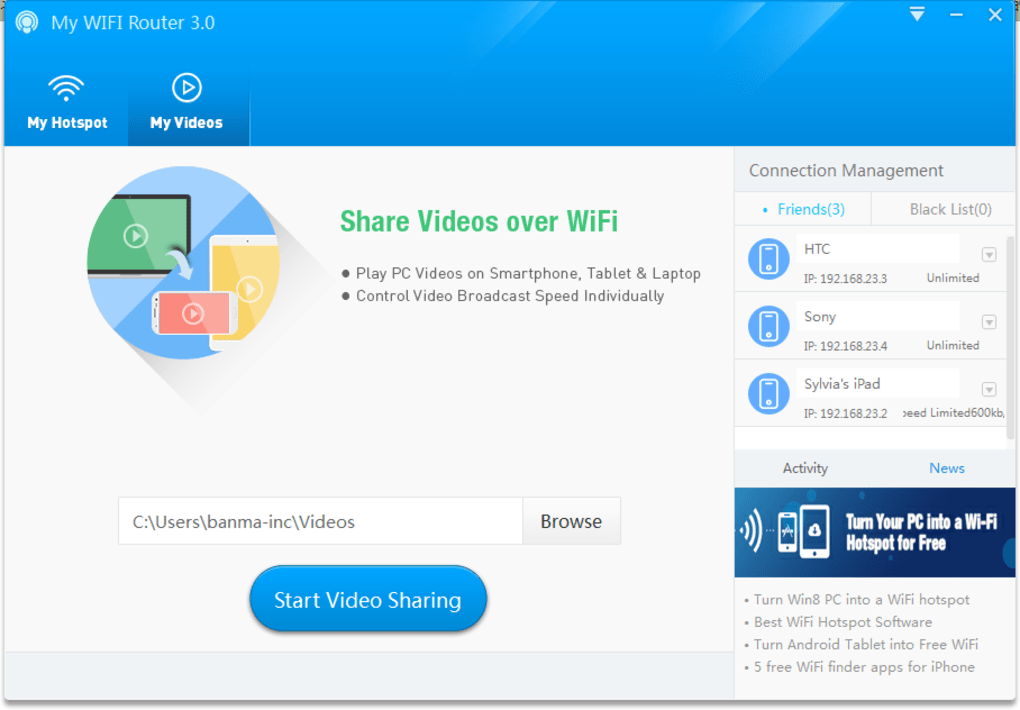
The process of transforming your PC into a virtual router with My WIFI Router is engineered for simplicity and efficiency. Unlike traditional router setups that might involve complex configurations, hardware installations, or intricate web interfaces, My WIFI Router streamlines the entire experience. For users running Windows XP, Windows 7, or Windows 8, the journey from a standard PC to a fully operational Wi-Fi hotspot can be accomplished with just a few clicks. The software boasts a “one-click” conversion capability, highlighting its user-friendly design. In fact, the developers simplify the setup into three intuitive steps: open the software, input your desired hotspot name (SSID) and a secure password, and then click the “Start” button. This minimal barrier to entry ensures that even users with limited technical expertise can quickly and confidently set up their own wireless network.
What makes My WIFI Router so versatile is its ability to share almost any type of internet connection. Whether your PC is connected via a traditional Local Area Network (LAN) cable, an Ethernet connection, a mobile Data-Card, a 3G or 4G cellular network, or even an existing Wi-Fi connection, My WIFI Router can rebroadcast it. This flexibility is a game-changer, especially for those who often find themselves in situations with only one wired connection, or who wish to share their mobile data plan with multiple Wi-Fi-only devices. Imagine being in a hotel room with just an Ethernet port, and needing to connect your smartphone, tablet, and a friend’s laptop – My WIFI Router solves this problem instantly. This broad compatibility ensures that no matter how your primary device gets online, it can become a conduit for others to follow suit.

Beyond its ease of use and broad compatibility, My WIFI Router builds a network that, despite being virtual, comes complete with most features one would expect from a physical router. This includes the fundamental ability to assign a customizable hotspot name and set a secure password, ensuring that your network is both identifiable and protected from unauthorized access. The implication of this core functionality is profound: it liberates users from the constraints of limited Wi-Fi access points and expensive mobile hotspot devices, offering a cost-effective and immediate solution to pervasive connectivity needs. By leveraging the computational power and existing network capabilities of your PC, My WIFI Router provides an accessible and efficient means to extend your digital reach, making your laptop or desktop a central hub for all your wireless devices. This foundational aspect of turning a PC into a broadcasting station sets the stage for a multitude of other features that further enhance its utility, which we will explore in subsequent sections.
Beyond Internet: Seamless File and Video Sharing Capabilities
While the primary function of My WIFI Router is to convert your PC into an internet-sharing hotspot, its utility extends far beyond mere connectivity. The software incorporates a surprisingly robust suite of features that transform your virtual network into a versatile platform for local content sharing, particularly for videos and files. These capabilities significantly enhance the user experience, offering practical solutions for entertainment and productivity within your newly established local network.
One of the standout features that truly distinguishes My WIFI Router from simpler hotspot utilities is its integrated video sharing functionality, dubbed “My Videos.” This feature allows users to effortlessly share videos stored on their computer with all connected devices, including smartphones, tablets, and other laptops. The true genius of this system lies in its individualized control: every person connected to the hotspot can watch videos via “My Videos” and, more importantly, control their playback speed individually. This means that while one person might be fast-forwarding through a scene, another could be rewatching a favorite moment, all from the same shared video file on the host PC. This level of autonomy for each connected user is exceptional and creates a communal yet personalized viewing experience.
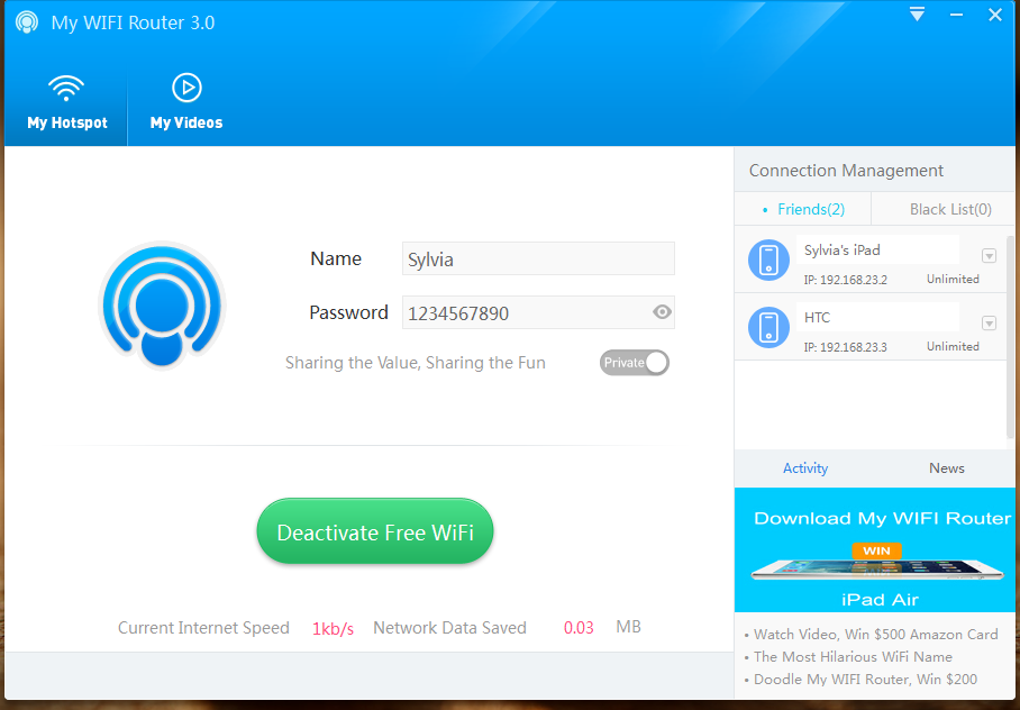
Consider the practical implications of such a feature. On a long road trip, where internet access might be sporadic or non-existent, My WIFI Router becomes an invaluable entertainment hub. Passengers can connect their devices to the laptop running the software and enjoy a shared library of movies or TV shows, each dictating their own viewing pace. This not only keeps everyone entertained but also eliminates the need for multiple copies of media files on different devices, saving storage space and simplifying content management. Furthermore, for presentations in a local setting or simply sharing home videos with family and friends, this feature provides an elegant and efficient solution without the need for external media servers or complex setups.
In addition to video sharing, My WIFI Router also facilitates basic file transfer capabilities within the created network. This means that users connected to your virtual hotspot can easily move files to and from the host computer. While it might not replace dedicated file-sharing services for large-scale corporate environments, for casual sharing among a small group of connected devices, it’s incredibly convenient. Need to quickly share a document, a set of photos, or a small software package with a friend who’s connected to your hotspot? My WIFI Router makes it a straightforward process. This local file sharing aspect underscores the software’s commitment to creating a comprehensive, self-contained network environment that supports a variety of common user needs.
The ability to share diverse internet connections is also a significant highlight. My WIFI Router isn’t picky about its source. Whether you’re drawing internet from a fixed line (LAN/Ethernet), a mobile broadband dongle (Data-Card, 3G/4G), or even extending an existing Wi-Fi signal, the software handles it seamlessly. This flexibility means that the virtual hotspot can adapt to almost any internet availability scenario, making it a reliable tool for consistent connectivity regardless of your environment. This broad compatibility, combined with the robust video and file sharing features, elevates My WIFI Router beyond a simple hotspot tool. It transforms your Windows PC into a miniature, multi-faceted network server, capable of not only providing internet access but also facilitating rich local content experiences that enhance collaboration and entertainment for all connected devices.
Intelligent Network Management: Control Over Connected Devices
One of the distinguishing strengths of My WIFI Router, beyond its core function of turning your PC into a hotspot and its multimedia sharing capabilities, lies in its robust set of network management tools. These features provide the host user with significant control and visibility over who is connected to their virtual network and how they are utilizing its resources. This level of oversight is crucial for maintaining network integrity, ensuring fair usage, and addressing potential security concerns.
Upon creating a Wi-Fi hotspot with My WIFI Router, the host PC becomes the central administrator, armed with a clear and intuitive interface to monitor and manage connected devices. The software provides detailed information about each device currently linked to the hotspot, including its name, IP address, and MAC address. This immediate visibility is invaluable, allowing the host to quickly identify all active connections and verify their legitimacy. Knowing precisely who is on your network is the first step towards effective management, enabling proactive measures against unauthorized access or misuse.
Building on this visibility, My WIFI Router offers a suite of active management features. The most prominent among these are the blacklist and whitelist functionalities. While the overall security of My WIFI Router is often cited as a weaker point (which we will discuss later), the blacklist provides a practical layer of defense. If an unknown or unwanted device attempts to connect, or if a known device is abusing network privileges, the host can simply “blacklist” it. Once blacklisted, that device will be prevented from connecting to the hotspot in the future. Conversely, a whitelist approach could be adopted for highly controlled environments, ensuring only pre-approved devices can ever join the network. This granular control over access significantly empowers the host.
Beyond simply allowing or denying access, My WIFI Router also provides tools for managing the behavior of connected devices. One particularly useful feature is the ability to “Limit the Network Speed” for individual devices. In scenarios where multiple users are sharing a single internet connection, one device might be consuming a disproportionate amount of bandwidth, leading to a degraded experience for others. With My WIFI Router, the host can identify such bandwidth hogs and impose speed limits, ensuring a more equitable distribution of internet resources across all connected users. This is incredibly beneficial for optimizing performance, especially when sharing a metered or slower connection.
Furthermore, the software allows for other convenient management actions, such as “Releasing” a device, which disconnects it from the network, or “Renaming” a connected device. Renaming a device can be particularly helpful in environments with many connected users, allowing the host to assign friendly, recognizable names to devices for easier identification and management, rather than relying solely on cryptic MAC addresses or generic device names. These features collectively contribute to a more organized, controlled, and efficient virtual network environment.
The blend of detailed device information, access control mechanisms like blacklisting, and resource management tools such as speed limiting, transforms My WIFI Router into more than just a simple hotspot creator. It becomes a personal network management console, granting the host PC a significant degree of authority over its virtual domain. This intelligent approach to network oversight ensures that users can not only share their internet connection but also maintain order and fairness within their self-created wireless ecosystem, making it a highly practical tool for various personal and small-group connectivity needs.
Performance, Stability, and the Crucial Security Discussion
When evaluating any networking software, particularly one that acts as a gateway for internet access, performance, stability, and security are paramount considerations. My WIFI Router presents an interesting profile in these areas, offering notable strengths in some aspects while acknowledging clear limitations in others, particularly concerning high-grade security.
From a performance standpoint, My WIFI Router has garnered positive feedback for its signal strength and efficiency. The developers highlight that “The signal of the wifi hotspot created by My WIFI Router is stronger than other software.” While subjective comparisons can be tricky, this claim suggests an optimized broadcasting mechanism, aiming to provide a wider and more reliable wireless coverage area than some of its direct competitors. A strong signal is fundamental for a stable connection, reducing dropouts and improving data transfer rates for connected devices, which is critical for smooth browsing, streaming, and file sharing.
In terms of stability and resource consumption, My WIFI Router also performs admirably. It is designed to “run stable and occupies less memory.” This characteristic is vital for a background application that is essentially turning your PC into a server. Low memory footprint means it won’t unduly bog down your system’s performance, allowing you to continue using your computer for other tasks without significant slowdowns. The stability ensures that the hotspot remains active and consistent, minimizing the need for constant restarts or troubleshooting. This reliable operation contributes significantly to a positive user experience, making the virtual router a set-it-and-forget-it utility for everyday use.
However, the discussion around My WIFI Router’s security features is where a critical caveat arises. The software provides “basic security features,” notably a blacklist and the ability to set a password for the hotspot. While these are essential, the overarching sentiment from reviews and the developer’s own information suggests that its security options are “weak” and do not provide “a ton of high-grade security options.” The warning, “leaving an open router is risky for security reasons and My WIFI Router doesn’t provide a ton of high-grade security options,” is a stark reminder to users.
This implies that while you can protect your hotspot with a password and block specific unwanted devices, My WIFI Router may lack more advanced security protocols and features found in dedicated hardware routers or more sophisticated networking software. These could include robust firewall capabilities, advanced encryption standards beyond basic WPA2, or intrusion detection systems. For most casual users sharing an internet connection among trusted friends or family in a controlled environment (like a road trip or a home setting), this level of security might be sufficient. The blacklist feature, for instance, is effective for preventing specific, identified intruders.
However, for users who are particularly concerned about network security, operate in public or less secure environments, or handle sensitive data, relying solely on My WIFI Router’s inherent protections might be insufficient. In such cases, users are strongly advised to complement My WIFI Router with additional security measures on their host PC, such as a robust firewall and a comprehensive antivirus/anti-malware program. As one user review stated, “Definitely it works well just have a good firewall and virus program otherwise it’s a game changer!!!” This highlights the importance of a layered security approach when utilizing My WIFI Router, especially given its focus on convenience and ease of use over enterprise-grade security.
In summary, My WIFI Router excels in providing a strong, stable, and resource-efficient virtual hotspot. Its performance characteristics make it a reliable choice for extending connectivity. Yet, users must be acutely aware of its limitations regarding advanced security. It offers the essentials – password protection and a blacklist – but for situations demanding higher security, external measures are highly recommended. Understanding this balance between convenience, performance, and security is key to utilizing My WIFI Router effectively and responsibly.
Is My WIFI Router Right for You? Pros, Cons, and Ideal Scenarios
Deciding whether My WIFI Router is the ideal solution for your connectivity needs requires a comprehensive look at its strengths, weaknesses, and the specific contexts in which it truly shines. As a free, easy-to-use utility, it offers compelling advantages for a broad range of users, but it’s also important to be aware of its limitations.
The Pros of My WIFI Router:
- Ease of Use: This is arguably its biggest selling point. The “one-click” or “3-step” setup process makes it incredibly accessible for users of all technical proficiencies. You don’t need to be a network engineer to get your hotspot up and running.
- Cost-Free Solution: My WIFI Router is completely free forever. There are no hidden costs, no registration required, and crucially, “No Third-Party Software Bundles!” This commitment to being genuinely free and clean of bloatware is a significant advantage in today’s software landscape.
- Versatile Internet Sharing: It can share virtually any type of internet connection – LAN, Ethernet, Data-Card, 3G/4G, and even an existing Wi-Fi connection. This flexibility ensures you can create a hotspot almost anywhere you have internet access.
- Advanced Sharing Features: Beyond basic internet, the ability to share videos with individual playback control (“My Videos”) and facilitate file transfers within the local network adds immense value, especially for entertainment and collaborative purposes.
- Device Management: Features like blacklisting/whitelisting, renaming devices, and limiting network speed provide the host with useful control over the virtual network and its users, helping to manage bandwidth and prevent unwanted access.
- Performance and Stability: Reports indicate strong signal strength, stable operation, and low memory usage, suggesting a reliable and non-intrusive performance on your host PC.
- Extends Wi-Fi Range: In some scenarios, by acting as a repeater or an extension of an existing Wi-Fi signal, it can effectively help extend the coverage area within a limited space.
The Cons of My WIFI Router:
- Weak Security: This is the most significant drawback. While it offers password protection and a blacklist, it lacks “high-grade security options” and is not recommended for environments where robust security is paramount. Users should always employ additional firewall and antivirus software.
- Platform Limitation: It is designed for Windows PCs (XP, 7, 8, and likely newer versions though only 7 is listed in specs), limiting its use for Mac, Linux, or mobile-only users.
Ideal Scenarios for My WIFI Router:
Given its strengths and weaknesses, My WIFI Router is best suited for specific use cases:
- Road Trips and Travel: Perfect for sharing a single laptop’s 4G connection or pre-downloaded videos with multiple devices in a car, train, or plane where external internet might be patchy or unavailable. The individualized video playback is a huge plus here.
- Hotel Rooms with Wired-Only Internet: If your hotel only provides an Ethernet port, My WIFI Router instantly creates a Wi-Fi hotspot for all your other wireless devices.
- Home/Small Office Internet Sharing: For sharing a primary internet connection with a few trusted devices or guests, offering an easy way to extend Wi-Fi without a dedicated router.
- Presentations and Local Sharing: Quickly setting up a local network to share files or videos during a meeting, class, or family gathering.
- Extending Existing Wi-Fi: When you have a weak Wi-Fi signal in a part of your house, and a laptop with a stronger signal, My WIFI Router can potentially extend that signal further.
- Budget-Conscious Users: As a completely free tool, it’s an excellent option for those who need hotspot functionality without investing in hardware or subscription services.
Final Verdict:
My WIFI Router is an excellent piece of software for users who prioritize ease of use, cost-effectiveness, and versatile sharing capabilities in controlled or low-risk environments. It’s particularly strong for mobile use cases and local multimedia sharing. However, users must approach it with an understanding of its security limitations and be prepared to supplement it with other security measures if their usage scenarios demand higher protection. For the vast majority of personal and casual sharing needs, My WIFI Router offers a robust, stable, and genuinely free solution to transform your Windows PC into a powerful and convenient wireless hub. It remains a “game changer” for those who understand its niche and use it judiciously alongside a comprehensive security strategy.
File Information
- License: “Free”
- Latest update: “July 12, 2023”
- Platform: “Windows”
- OS: “Windows 7”
- Language: “English”
- Downloads: “1.6M”
- Size: “17.39 MB”


