
In an era increasingly dominated by cloud services and web-based applications, the demand for robust, local control over our personal devices remains strong. For many users, the convenience and privacy of managing smartphone data directly from a personal computer offer significant advantages. Enter MyPhoneExplorer, a desktop application that has long served as a vital link between Sony Ericsson and Android phones and their Windows-based counterparts.
Originally conceived to cater to the dedicated user base of Sony Ericsson devices, MyPhoneExplorer quickly evolved, expanding its compatibility to include the vast ecosystem of Android smartphones. This evolution transformed it into a versatile utility, enabling users to monitor, manage, and synchronize virtually every aspect of their mobile device directly from the comfort and larger interface of their home computer. For over a decade, MyPhoneExplorer has championed local synchronization, offering an alternative to cloud-dependent solutions and providing users with unparalleled control over their data, communication, and device settings.
What sets MyPhoneExplorer apart is its comprehensive feature set, designed to address a wide array of mobile management needs. From coordinating contacts and calendars to managing messages, files, and even call logs, the application brings the functionality of your phone to your PC screen. Its interface is crafted for clarity, presenting information in a format far more accessible than on a small mobile display. This not only enhances user experience but also streamlines tasks that would otherwise be cumbersome on a handheld device. Furthermore, the application prides itself on efficiency, utilizing a clever caching system to ensure that file transfers between phone and PC—and vice versa—are executed with remarkable speed.
Despite the proliferation of manufacturer-specific PC suites and integrated cloud solutions, MyPhoneExplorer has maintained its relevance by offering a universal, free, and highly customizable platform. It caters to users who prioritize direct control, local backups, and synchronization with traditional desktop applications like Outlook, Thunderbird, and Lotus Notes. While the initial setup might require a moment of attention, and a minor default installation quirk exists, the overarching consensus among its long-time users underscores its reliability and indispensability. It represents a powerful tool for anyone seeking to consolidate their digital life, making their smartphone an extension of their PC rather than a detached, siloed entity.
Bridging Your Phone and PC: Connectivity and Setup
The foundational strength of MyPhoneExplorer lies in its ability to establish a rapid and reliable connection between your smartphone and your Windows PC. This connectivity is the gateway to all the powerful management features the software offers, and it’s designed to be flexible, accommodating various user preferences and hardware configurations.
Seamless Connection Methods
MyPhoneExplorer offers three primary methods for connecting your device to your computer: USB cable, Bluetooth, and Wi-Fi. Each method provides distinct advantages, ensuring that users can choose the most suitable option for their environment and needs.
The USB cable connection is often the most straightforward and universally reliable. It provides a direct, physical link, ensuring maximum data transfer speeds and minimal latency. For users prioritizing stability and speed, especially for large file transfers or initial comprehensive backups, USB remains the preferred choice. The process typically involves connecting the phone via a standard USB cable and ensuring that the necessary drivers are recognized by the PC. MyPhoneExplorer is designed to quickly detect the device once connected, guiding the user through any initial permissions required on the phone side.
For those who prefer a wireless approach, Bluetooth offers a convenient alternative. This method eliminates the need for physical cables, allowing for greater freedom of movement while maintaining a connection. Establishing a Bluetooth connection requires pairing the phone with the PC, a standard procedure that involves enabling Bluetooth on both devices, making them discoverable, and confirming the pairing code. Once paired, MyPhoneExplorer can detect the device wirelessly. While generally reliable for syncing contacts, messages, and smaller data sets, Bluetooth connections might be slower than USB for extensive file transfers.
The most modern and increasingly popular connection method is Wi-Fi. This allows for complete wireless freedom, provided both the phone and PC are connected to the same local network. To utilize Wi-Fi, users typically need to install a companion “MyPhoneExplorer Client” app on their Android device, available through various app stores. This client app facilitates the communication between the phone and the desktop software. Once the client is running on the phone and MyPhoneExplorer is open on the PC, the desktop application can scan for and connect to the phone over the Wi-Fi network. This method is particularly useful for users who frequently move between their desk and other areas, or who prefer to keep their charging port free for other uses. Wi-Fi offers a good balance of speed and convenience for most day-to-day synchronization and management tasks.

The initial installation and setup process for MyPhoneExplorer can vary slightly depending on the chosen connection method and the specific device model. For optimal results, it is highly recommended that users consult the detailed instructions available on the official MyPhoneExplorer website. These guides provide step-by-step procedures, troubleshooting tips, and any specific driver installations that might be necessary for certain phone models, particularly older Sony Ericsson devices. While the process is generally user-friendly, some users have noted that it can be “slightly complicated,” particularly if encountering driver issues or initial wireless connection hiccups. However, once the connection is established, the system typically remembers the device, making subsequent connections much smoother.
The Importance of a Reliable Link
A reliable and stable connection is paramount for any phone management software, especially one that deals with sensitive personal data. MyPhoneExplorer’s multi-faceted approach to connectivity underscores its commitment to ensuring users can always access their device. This direct link offers several advantages over purely cloud-based solutions. Firstly, it provides enhanced privacy and security, as data is transferred directly between your devices on your local network, rather than transiting through third-party servers. This is particularly appealing to users who are wary of storing their personal information in the cloud.
Secondly, a local connection often translates to faster performance, especially in scenarios where internet bandwidth might be limited or unreliable. Large backups, extensive file transfers, and frequent synchronizations can be executed much more quickly over a direct USB or local Wi-Fi connection than through a distant cloud server. This emphasis on local control and efficient data handling positions MyPhoneExplorer as a robust tool for users who demand both performance and peace of mind.
Comprehensive Phone Management at Your Fingertips
Once a stable connection is established with MyPhoneExplorer, the true power of the software is unleashed. It transforms your PC into a control center for your mobile device, allowing for an incredibly detailed level of interaction and management that goes far beyond what a small phone screen can offer.
Mastering Your Contacts and Calendar
One of the primary and most appreciated functions of MyPhoneExplorer is its robust contact management system. Instead of painstakingly editing contacts on your phone’s compact interface, the application provides a clear, expansive view on your PC. Users can easily access, view, and edit their phonebook entries, whether they are stored on the phone’s internal memory or on the SIM card. This includes adding new contacts, updating existing information, deleting outdated entries, and organizing them efficiently. The ability to manage contacts in a large format significantly reduces the chances of errors and speeds up the entire process.
Beyond simple editing, MyPhoneExplorer excels in synchronization with widely used desktop email and personal information management clients. It offers direct sync capabilities with Microsoft Outlook, Outlook Express, Lotus Notes, and Mozilla Thunderbird. This feature is a game-changer for professionals and anyone who relies on these applications for their daily schedule and communication. It ensures that your contacts and calendar events (including your organizer entries and alarms) are always consistent across your phone and PC, eliminating the need for manual data entry or reliance on cloud-based sync services that might not integrate seamlessly with your preferred desktop applications. This local, direct synchronization provides an immediate, tangible benefit for productivity and data integrity.
Empowering Communication Features
MyPhoneExplorer dramatically enhances the mobile communication experience by bringing it directly to your desktop. The ability to manage messages (SMS) from your PC is a standout feature. Users can view all their incoming and outgoing text messages in a clear, chat-like interface. More importantly, they can compose and send new messages or reply to existing ones using their computer’s full-sized keyboard. This eliminates the frustration of typing lengthy messages on a small touchscreen, making communication faster and more comfortable. Some user reviews also raise questions about dual SIM support, indicating a desire for even more advanced messaging capabilities.
The application also offers comprehensive call log management. You can view a detailed history of all your calls, easily filtering them by “all calls,” “dialed,” “answered,” and “missed calls.” This provides a useful overview of your communication patterns. A particularly convenient feature is the ability to click on a log entry and initiate a call back directly via your mobile phone. While the call itself will still be placed through your phone, the initiation from the PC streamlines the process. Furthermore, MyPhoneExplorer can generate small pop-up notifications on your PC for incoming calls, ensuring you never miss an important call even if your phone is not immediately at hand or is on silent. These notifications can be easily toggled on or off based on user preference.
File System and Device Settings
Beyond contacts and communications, MyPhoneExplorer provides deep access to your phone’s file system, treating it much like an external hard drive connected to your PC. This enables effortless file management, including:
- Accessing Internal and External Storage: Users can browse through both the phone’s internal memory and any inserted external storage (like an SD card). This offers a unified view of all files on your device.
- File Upload/Download: Transferring files between your phone and PC becomes a drag-and-drop affair. Whether it’s uploading documents, photos, or music to your phone, or downloading important files and media for backup or editing on your computer, the process is quick and intuitive.
- Media Management: Viewing pictures, playing music, and organizing multimedia files directly from the PC interface is a major convenience. This is particularly useful for managing camera rolls, curating music libraries, or preparing content for social media.
Additionally, MyPhoneExplorer extends its control to various phone settings. While it may not offer complete access to every nuanced setting found within the Android system, it provides a centralized platform to manage common device configurations, further integrating the phone experience with the PC.
Beyond Basic Sync: Advanced Utilities
MyPhoneExplorer isn’t just about managing current data; it’s also a robust tool for safeguarding it. Its backup capabilities are highly valued by users, allowing for easy and comprehensive backups of phone data to different PC devices. This local backup mechanism offers a critical layer of data security, ensuring that contacts, messages, and other vital information are protected even if the phone is lost, damaged, or upgraded. The flexibility to perform these backups to any connected PC device adds another layer of convenience and redundancy.
Furthermore, the mention of a “portable version” by one user highlights MyPhoneExplorer’s versatility. A portable version typically means the application can run directly from a USB drive or other portable storage device without requiring installation on the host PC. This is incredibly useful for users who need to manage their phone data from multiple computers, such as at work, home, or a friend’s house, without leaving any software footprint behind. This feature, if widely available and supported, significantly expands the utility and accessibility of the software, making it a truly on-the-go phone management solution. These advanced utilities solidify MyPhoneExplorer’s position as a comprehensive, user-centric tool.
User Experience, Performance, and Key Considerations
The overall value of any software is ultimately judged by its user experience and performance. MyPhoneExplorer, despite its rich feature set, aims to deliver these aspects efficiently, though not without certain trade-offs that some users have highlighted.
A Clear and Intuitive Interface
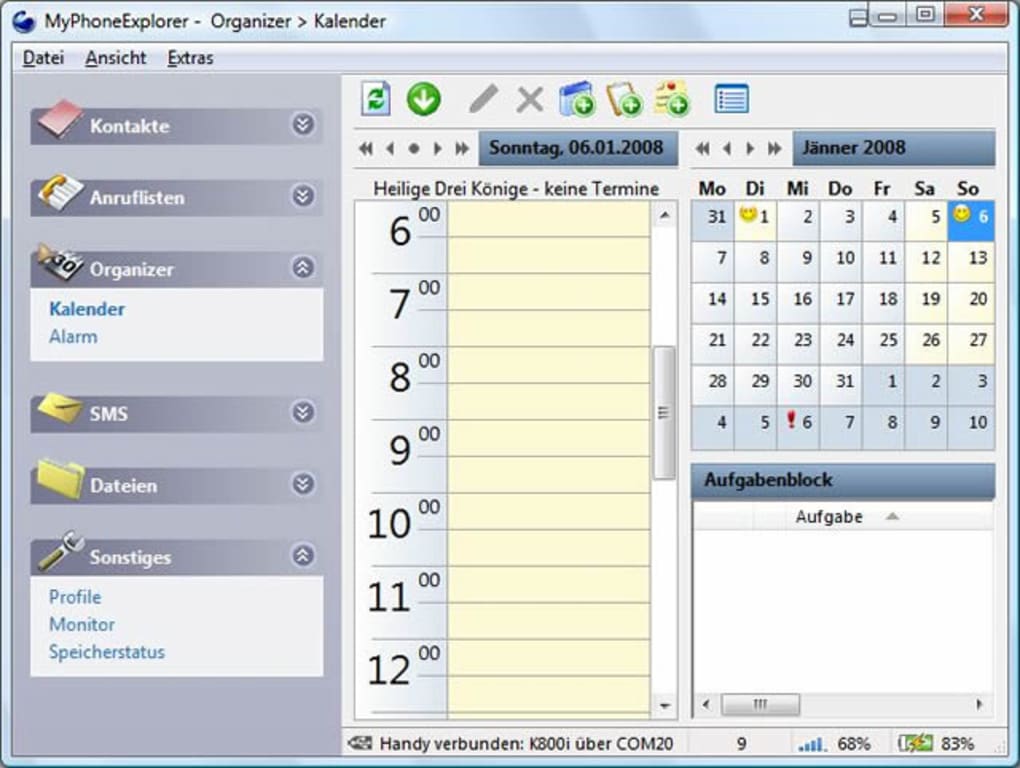
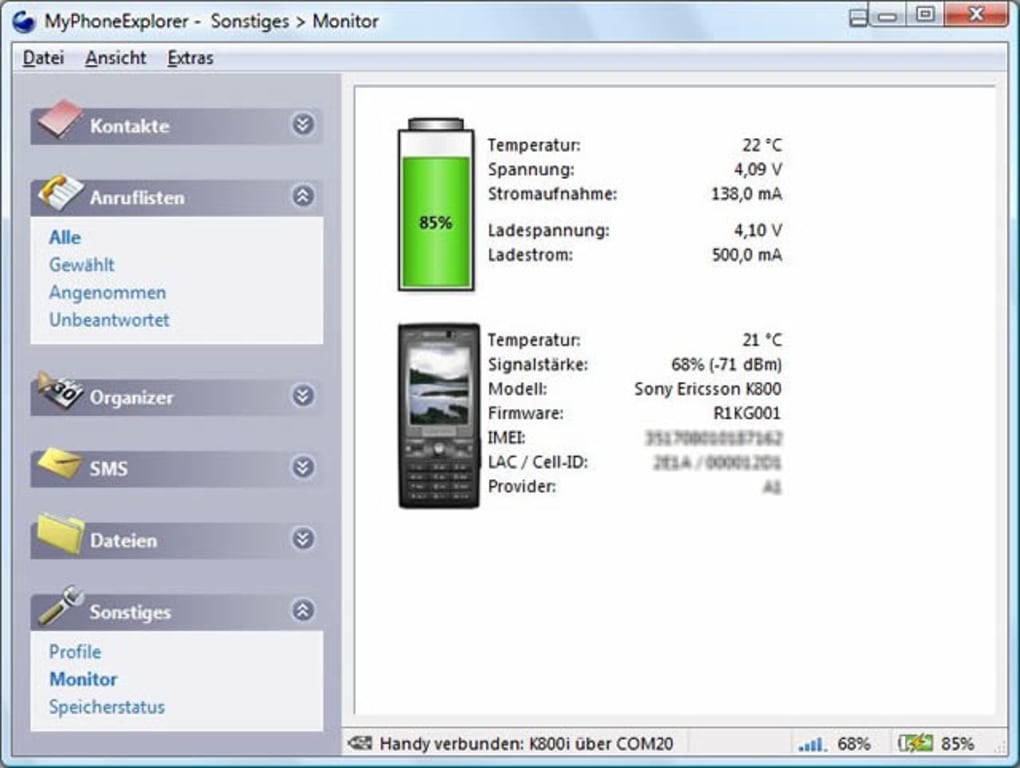
One of the most frequently praised aspects of MyPhoneExplorer is its clearly laid out interface. The developers have evidently prioritized readability and ease of navigation, which is crucial when presenting potentially overwhelming amounts of phone data. All the information from your phone is displayed in a format that is much easier to read and interact with than on the device itself. For instance, accessing and managing your organizer, alarms, messages, and phone settings is done through large, well-organized panels. This means less squinting at tiny text and more efficient data management.
The interface is typically divided into logical tabs or sections, such as ‘Contacts,’ ‘Messages,’ ‘Organizer,’ ‘Files,’ etc., allowing users to quickly jump to the specific area they need to manage. This systematic organization, coupled with a desktop-sized display, significantly enhances the user’s ability to review, edit, and synchronize their phone data effectively. The level of flexibility and customization within the interface further empowers users to tailor the experience to their preferences, allowing them to focus on the features they use most often.
Speed and Efficiency
In terms of raw performance, MyPhoneExplorer often receives high marks. The application is noted for its efficiency, particularly concerning file transfers. This is largely attributable to its own caching system. By temporarily storing frequently accessed or recently transferred data, the software can significantly speed up subsequent transfers from phone to PC, and vice versa. This caching mechanism minimizes redundant data retrieval and processing, making the overall transfer experience remarkably quick.
Users have consistently reported that file uploads and downloads are snappy and responsive, which is a critical factor for anyone dealing with large photo libraries, music collections, or documents. This robust performance, combined with stable connection methods, ensures that users spend less time waiting and more time managing their phone effectively.
Navigating the Pros and Cons
Like any powerful software, MyPhoneExplorer comes with its own set of advantages and disadvantages. A balanced perspective is essential to fully understand its value proposition.
Pros:
- Quick File Transfer: As discussed, the caching system contributes to very fast and efficient data movement between the phone and PC.
- Clear Data Display: The large-format interface makes phone data, such as contacts, messages, and calendar entries, much easier to read and manage than on a mobile screen.
- Extensive Email Client Support: Direct synchronization with Outlook, Outlook Express, Lotus Notes, and Thunderbird is a significant advantage for users who rely on these desktop applications.
- Comprehensive Access: Users can access and manage virtually everything from their phone, including contacts, SMS, call logs, files, alarms, and settings.
- Robust Backup Capabilities: Easy backup of data to different PC devices ensures data security and peace of mind.
- Free and Portable: The software is free to use, and a portable version adds flexibility for users across multiple computers.
Cons:
- eBay Toolbar: A notable “niggle” is the default installation of an eBay toolbar in your browser during the setup process. While it’s easy to skip this step by carefully observing the installation prompts, it’s an unnecessary bundled addition that some users might find intrusive.
- Slightly Complicated Installation Process: For some users, especially those less technically inclined or those encountering specific driver issues, the initial installation and connection setup can be perceived as somewhat complex.
- Occasional Connection Instability: While generally seamless, some user reviews mention needing “repeated permissions to connect” or having to “manually connect and try several times every time.” This suggests that occasional connection hiccups, though not necessarily the app’s fault entirely, can occur for certain users or configurations.
- Perceived Outdated Workflow: As noted by one reviewer, in a 2021 context, needing to “manually start an app on the phone and check everything every time” for connection might feel less streamlined compared to fully automated cloud syncs. This highlights a desire for a more ‘set it and forget it’ modern workflow for some users.
User Perspectives and Longevity
The longevity of MyPhoneExplorer, as well as the diverse user feedback it garners, paints a clear picture of its impact. Users like John Farnsworth, who has “used this app for years on different PCs,” praise its seamless functionality via USB and Wi-Fi and its utility for SMS sync, file transfer, and contact updates. Anil Sharma goes “beyond words” to describe the software as “excellent,” appreciating its free nature and portable version, even encouraging donations for the developers. The user “2Cents” provides a detailed testament, hailing version 1.8.15 as “EXCELLENT,” highlighting its flawless operation with an Android Samsung Galaxy Note phone, especially for syncing contacts, notes, tasks, and calendar events locally over USB, without needing cloud services. This user also specifically commends features like call log retention, callback initiation, SMS sending/replying from the PC, and access to internal/external storage.
However, not all experiences are uniformly positive. Kristoffer Kassel, for instance, finds the software “unstable and hard to use” in a 2021 context, criticizing the need for manual connection attempts and app starts on the phone as not fitting a modern workflow. These varying perspectives underscore that while MyPhoneExplorer offers immense value, its usability might depend on individual technical comfort, expectation of automation, and specific device/system configurations.
Despite these differing views, the consistent thread is the recognition of MyPhoneExplorer’s powerful capabilities and its enduring appeal to a segment of users who prioritize local control and comprehensive management over their mobile devices. Its continued development and user base attest to its significant place in the ecosystem of phone-to-PC utilities.
Conclusion
MyPhoneExplorer stands as a testament to the enduring appeal of local, direct control over personal data, even in an increasingly cloud-dominated landscape. For users of Sony Ericsson and Android phones, it provides an exceptionally comprehensive, free, and robust platform for bridging the gap between their mobile device and a Windows PC.
The application’s strength lies in its versatile connectivity options—USB, Bluetooth, and Wi-Fi—ensuring a reliable link for diverse user setups. Once connected, it unlocks a treasure trove of management capabilities: from flawlessly coordinating contacts, calendars, and tasks with major desktop email clients like Outlook and Thunderbird, to empowering seamless communication through PC-based SMS and call log management. Its ability to facilitate quick and efficient file transfers, along with offering deep access to phone storage and settings, makes it an all-in-one solution for mobile data management.
While the initial setup might present a minor learning curve for some, and a small advertising element (the eBay toolbar, easily skippable) exists, the overwhelming consensus from its dedicated user base highlights its indispensable value. Users praise its clear interface, speedy performance, and the peace of mind that comes with local backups and direct synchronization. For those who prioritize privacy, offline functionality, and intricate control over their smartphone data without relying on third-party cloud services, MyPhoneExplorer offers an unparalleled and enduring solution. It empowers users to make their phone truly an extension of their desktop, streamlining workflows and enhancing productivity in a profoundly tangible way. MyPhoneExplorer is not just a utility; it’s a comprehensive digital assistant for your mobile life. Users can find this excellent software and learn more about it on PhanMemFree.org.
File Information
- License: “Free”
- Latest update: “February 4, 2025”
- Platform: “Windows”
- OS: “Windows 7”
- Language: “English”
- Downloads: “259.7K”
- Size: “21.20 MB”


