
MyRadar Ad Free is a premium weather application designed to provide users with a seamless and uninterrupted experience of its feature-rich weather tracking capabilities. Unlike its free counterpart, this paid version eliminates advertisements, allowing for a focused and efficient weather monitoring experience. This review delves into the application’s features, pros, cons, and overall usability, offering a comprehensive assessment for potential users.
Understanding MyRadar Ad Free’s Core Functionality
MyRadar Ad Free stands out as a robust weather application centered around a dynamic, animated weather radar display. The app’s primary function revolves around presenting users with a real-time visualization of weather patterns surrounding their current location. This is accomplished through the utilization of GPS technology, which automatically pinpoints the user’s location and displays the corresponding weather data on an interactive map. The map interface allows for intuitive zooming and panning, enabling users to explore weather conditions in areas beyond their immediate vicinity. This feature proves especially beneficial for planning outdoor activities or monitoring weather systems impacting distant locations.
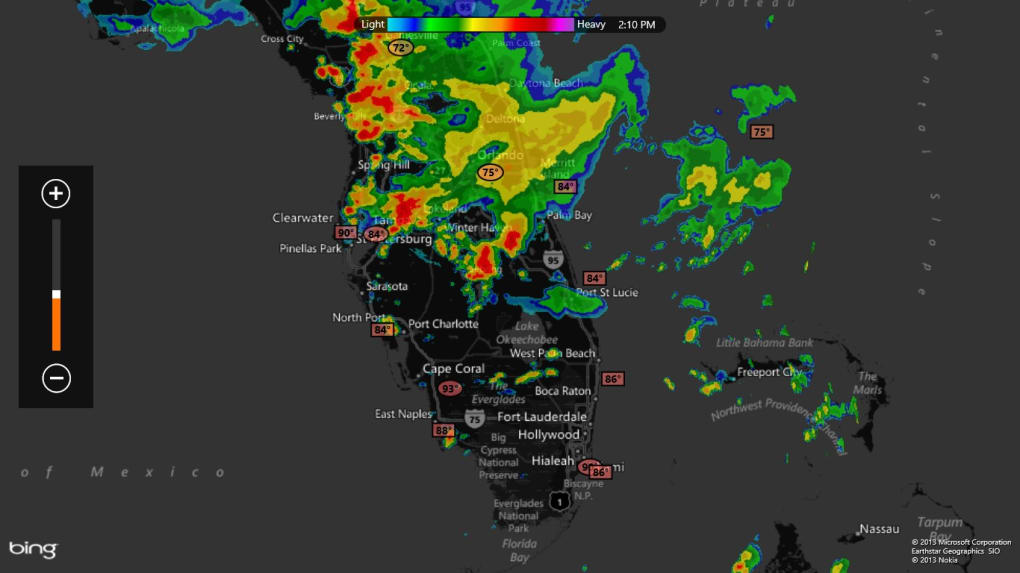
The animated weather radar provides a clear visual representation of precipitation, cloud cover, and other weather phenomena. This dynamic display is more engaging and informative than static weather maps, allowing users to quickly grasp the movement and intensity of weather systems. The application also provides numerical data, such as temperature readings, for various locations displayed on the map, supplementing the visual information with precise measurements.
Beyond its core mapping features, MyRadar Ad Free incorporates a crucial safety feature: weather warnings and alerts. This functionality ensures users receive timely notifications regarding severe weather conditions, such as thunderstorms, heavy snowfall, or hurricanes. These alerts are delivered via push notifications, ensuring users are promptly informed even when the app isn’t actively open. This feature is especially valuable for individuals living in areas prone to severe weather events. The inclusion of an optional hurricane tracker further enhances this safety-focused aspect, providing detailed tracking and monitoring of hurricanes and tropical storms, allowing for proactive preparation and safety planning.
Detailed Analysis of MyRadar Ad Free’s Strengths and Weaknesses
While MyRadar Ad Free offers a compelling suite of weather-tracking features, it’s essential to acknowledge both its advantages and disadvantages to provide a balanced perspective.
Pros: A Superior Weather Experience
- Animated Weather Radar: The app’s central feature, the animated weather radar, offers a superior level of weather visualization compared to static maps. The dynamic display allows for intuitive understanding of weather system movement and intensity, enhancing the user experience significantly.
- Ad-Free Experience: The key advantage of the paid version is the absence of intrusive advertisements. This provides an uninterrupted and focused experience, crucial for quick weather checks and monitoring.
- Comprehensive Weather Warnings and Alerts: The timely delivery of weather warnings and alerts through push notifications is a critical safety feature. This ensures users are proactively informed about potentially hazardous weather conditions, promoting safety and preparedness.
- Optional Hurricane Tracker: The inclusion of an optional hurricane tracker is a valuable addition for users in regions susceptible to hurricanes and tropical storms. This detailed tracking information allows for enhanced safety planning and preparedness during hurricane season.
- GPS-Based Location Tracking: Automatic location tracking via GPS simplifies the user experience, eliminating the need for manual location input. This ease of use is particularly beneficial for users who require quick and efficient weather information.
- Zoom and Pan Functionality: The ability to zoom and pan the weather map allows users to explore weather patterns in various locations, expanding the app’s utility beyond immediate surroundings.
Cons: Areas for Improvement
- Separate App from Free Version: The existence of a separate paid app (MyRadar Ad Free) alongside the free MyRadar app might create unnecessary confusion for users. A single app with a paid ad-free option within the existing structure could streamline the user experience.
- Lack of Weather Pattern Labels: The absence of labels clearly identifying the types of weather patterns displayed on the map (e.g., rain, snow, hail) can be confusing for some users. Incorporating clear labels would greatly enhance usability.
- Absence of User Guide: The lack of an in-app guide or tutorial could present a barrier for new users unfamiliar with the app’s interface and features. Providing a helpful tutorial would improve onboarding and overall user satisfaction.
- Bright Colors: While the animated weather patterns are visually engaging, the bright color scheme might be overwhelming or visually jarring for some users. The option to adjust color palettes or themes could enhance the user experience.
- Limited Customization Options: The app might benefit from increased customization options, such as the ability to personalize the display of information and adjust settings to individual preferences.
MyRadar Ad Free: A Detailed Feature Breakdown
MyRadar Ad Free’s functionalities extend beyond the core weather radar display. Let’s break down these features individually:
- Real-time Weather Radar: This is the heart of the application, providing a constantly updating visual representation of weather conditions in real-time.
- Temperature Readings: The app accurately displays temperature readings for various locations, enriching the visual data with precise numerical information.
- Animated Cloud Cover: The dynamic display of cloud cover patterns adds another layer of visual context to the weather information presented.
- Weather Alerts and Warnings: Push notifications deliver timely warnings about severe weather, acting as an essential safety feature.
- Optional Hurricane Tracker: This dedicated feature provides in-depth tracking and monitoring of hurricanes and tropical storms.
- Interactive Map Interface: The intuitive map interface allows for seamless zooming and panning, enabling exploration of weather conditions in various locations.
- GPS-Based Location Tracking: Automatic location detection simplifies the app’s usage, eliminating the need for manual location input.
MyRadar Ad Free Compared to Alternative Weather Applications
MyRadar Ad Free occupies a unique space within the landscape of weather applications. While many free weather apps exist, they often include intrusive advertisements that can disrupt the user experience. MyRadar Ad Free directly addresses this issue, providing a clean, ad-free environment for focused weather monitoring. Compared to other paid weather applications, MyRadar Ad Free stands out with its engaging animated radar display, which offers a more intuitive and informative presentation of weather data than many alternatives. However, the lack of certain features found in some competitor apps, such as hyperlocal weather forecasts or detailed climate data, could be perceived as a limitation by certain users.
Conclusion: Is MyRadar Ad Free Worth the Investment?
The decision of whether MyRadar Ad Free is worth the investment hinges on individual needs and preferences. For users who prioritize an ad-free, seamless weather monitoring experience with an emphasis on visually engaging animated radar, the app presents a compelling value proposition. The incorporation of crucial safety features, such as weather alerts and an optional hurricane tracker, further strengthens its appeal. However, potential users should weigh the absence of certain features (such as detailed weather labels and a user guide) against the benefits of an ad-free experience and the visually dynamic weather radar. Ultimately, the value of MyRadar Ad Free is subjective, but its strengths in terms of visual presentation and uninterrupted usage make it a noteworthy contender in the market of weather applications.
File Information
- License: “Full”
- Version: “varies-with-device”
- Latest update: “September 10, 2019”
- Platform: “Windows”
- OS: “Windows 10”
- Language: “English”
- Downloads: “3K”


