
Namebench, a free and open-source networking utility, empowers users to identify and utilize the fastest Domain Name System (DNS) servers available, resulting in a significantly improved browsing experience. Developed under Google’s renowned “20 percent time” initiative, this cross-platform tool boasts both command-line and graphical user interfaces, making it accessible to users of all technical skill levels. Crucially, Namebench operates without altering your system’s configurations, offering a safe and non-invasive method for DNS optimization. This comprehensive guide explores Namebench’s functionality, usage, safety, and alternatives, providing a clear understanding of its benefits and how it can revolutionize your online experience.
Understanding DNS Servers and Their Importance
Before delving into the specifics of Namebench, it’s crucial to grasp the fundamental role of DNS servers in internet navigation. The Domain Name System (DNS) acts as the internet’s sophisticated address book, translating human-readable domain names (like “www.example.com”) into machine-readable IP addresses (numerical identifiers like 192.168.1.1). This translation is essential for browsers to locate and load web pages. Without this conversion, navigating the web would require remembering and inputting complex IP addresses for every website visited.
Your internet service provider (ISP) typically assigns a default DNS server. However, this assigned server may not always be the most efficient or fastest option. Geographical location, network congestion, and server capacity all contribute to variations in DNS server performance. Slower DNS resolution directly translates into slower page loading times, frustrating delays, and an overall less enjoyable browsing experience.
Public DNS servers, often provided by organizations like Google or Cloudflare, frequently outperform ISP-assigned servers. Their superior performance stems from several key factors:
-
Extensive Caching: Public DNS servers maintain vast caches of frequently accessed domain name resolutions. When a request for a common website’s IP address is received, the server can often retrieve the information from its cache, bypassing the need for a time-consuming lookup, resulting in significantly faster response times.
-
Global Network Infrastructure: Public DNS providers typically operate expansive networks of servers located globally. This strategic distribution allows requests to be routed to the nearest server, minimizing latency and maximizing speed.
-
Enhanced Security Features: Many public DNS servers incorporate advanced security measures, such as DNSSEC (Domain Name System Security Extensions), to protect against DNS spoofing and other attacks. These security enhancements are often lacking in ISP-provided DNS servers.
-
Circumventing Censorship: Utilizing a public DNS server can potentially bypass censorship imposed by certain governments or networks. By routing requests through a server outside the censored region, users may gain access to websites and content otherwise restricted.
How Namebench Works: A Deep Dive into the Benchmarking Process
Namebench’s core function revolves around its comprehensive benchmarking process. It systematically evaluates the performance of numerous DNS servers, allowing users to identify the fastest and most reliable option for their specific network environment. The process leverages several datasets to ensure accuracy and relevance:
-
Browsing History: Namebench analyzes your browsing history to identify the websites you frequently access. This data provides a realistic benchmark, focusing on the DNS servers that are most crucial for your daily online activities.
-
Geographical Location: The software considers your geographical location to select appropriate DNS servers, minimizing latency and prioritizing servers located geographically closer to you.
-
TCP Dump Output (Optional): For advanced users, Namebench can integrate TCP dump data, which provides detailed network traffic information for a more granular and in-depth analysis.
-
Predefined DNS Server List: The software includes a pre-configured list of public and private DNS servers, ensuring a diverse range of options for comparison.
The benchmarking process itself involves numerous connection tests, meticulously measuring the time required for each DNS server to resolve a range of domain names. The results are presented in a clear and concise format, typically including:
-
Response Time Metrics: Precise measurements of the time taken to resolve each domain name for each tested DNS server.
-
Visual Representations: Graphs and charts illustrate the performance data, enabling users to quickly identify the top-performing servers.
-
Ranked Recommendations: Namebench provides a ranked list of recommended DNS servers, simplifying the selection process for users who prefer a streamlined approach.
The entire benchmarking process generally takes between 5 to 15 minutes, depending on your internet connection speed and the number of DNS servers included in the test. However, this relatively short wait is a small price to pay for the potential significant improvements in browsing speed and overall online performance.
Using Namebench: A Step-by-Step Guide
Utilizing Namebench is remarkably straightforward, even for users with limited technical expertise. The process involves these simple steps:
-
Download and Installation: Download the Namebench executable from the official project website. The software is available for various operating systems, including Windows, macOS, and Linux.
-
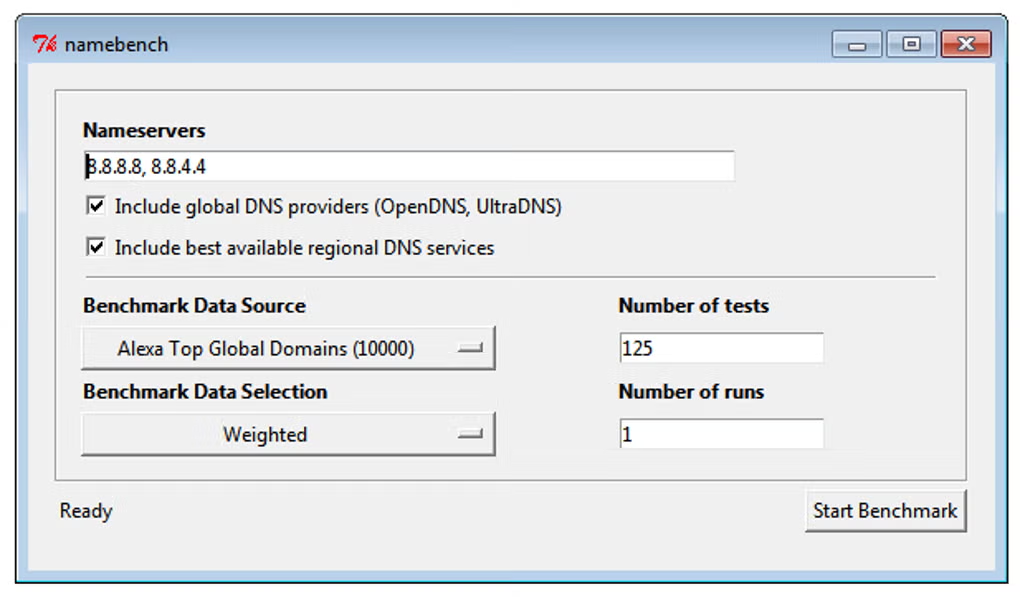
Run the Benchmark: Launch the Namebench application. The graphical interface presents a simple “Start Benchmark” button. Click it to initiate the benchmarking process.
-
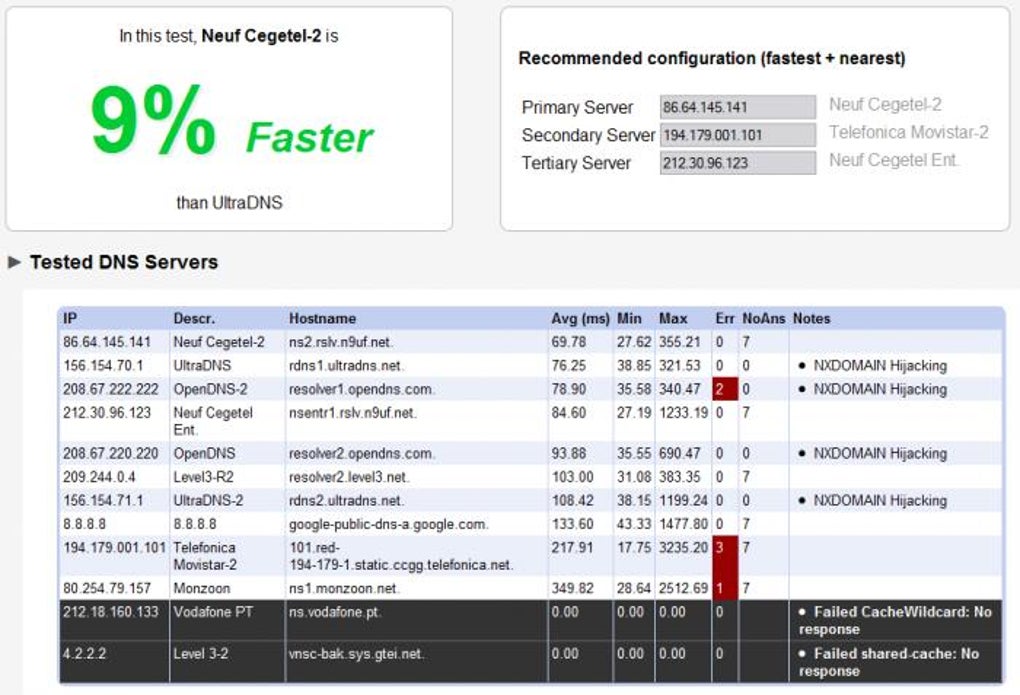
Review the Results: Once the benchmark completes, Namebench displays the results in a user-friendly format. The results page includes performance metrics, graphs, and a clear recommendation of the top three performing DNS servers.
-
Configure Your DNS Settings: Based on Namebench’s recommendations, modify your system’s DNS settings to utilize the suggested server. The exact procedure for configuring DNS settings varies depending on your operating system. Most operating systems provide clear instructions on how to modify the DNS server addresses within the network settings.
Safety and Security: Addressing Potential Concerns
A common concern for users considering new software is its safety and security. Namebench addresses these concerns effectively through several key aspects:
-
Open-Source Nature: The software’s source code is publicly available, allowing independent scrutiny and verification. This transparency allows security experts and interested users to review the code for potential vulnerabilities or malicious behavior.
-
Non-Invasive Operation: Namebench functions without modifying any core system files or settings. It solely performs a benchmark and provides recommendations; it does not install any background processes or alter your system’s functionality.
- Reputation and Provenance: Developed by a Google engineer under the company’s “20 percent time” program, Namebench benefits from a strong reputation and a known origin, reinforcing its trustworthiness.
Alternatives to Namebench
While Namebench is an excellent tool for DNS optimization, several alternative applications offer similar functionality:
-
DNS Benchmark: This utility provides a comparable benchmarking service, allowing users to test and compare the performance of various DNS servers.
-
DNS Jumper: DNS Jumper is a simpler tool primarily focused on easily switching between different DNS servers. It doesn’t offer the same in-depth benchmarking capabilities as Namebench.
-
QuickSetDNS: Another simple tool that allows quick switching between DNS servers.
Conclusion: Should You Use Namebench?
For users seeking a straightforward, safe, and effective method to enhance their browsing experience, Namebench is highly recommended. Its open-source nature, non-invasive operation, and comprehensive benchmarking capabilities make it a valuable tool for optimizing DNS performance. The potential improvements in browsing speed and overall online efficiency often justify the short time investment required to run the benchmark and configure the recommended DNS server. While alternatives exist, Namebench stands out due to its comprehensive analysis and user-friendly interface. If you’re experiencing slow loading times or seeking to improve your online security, downloading and utilizing Namebench is a worthwhile endeavor.
File Information
- License: “Free”
- Version: “1.3.1”
- Latest update: “June 16, 2020”
- Platform: “Windows”
- OS: “Windows XP”
- Language: “English”
- Downloads: “287.5K”
- Size: “5.23 MB”


