
NanaZip is a free, lightweight file manager for Windows operating systems, developed by Kenji Mouri. Categorized as a file manager under the Utilities & Tools section, it offers users a straightforward and efficient way to interact with their files and folders. This review delves into its features, usability, performance, and compares it to alternative options available on the market.
Core Functionality and Features
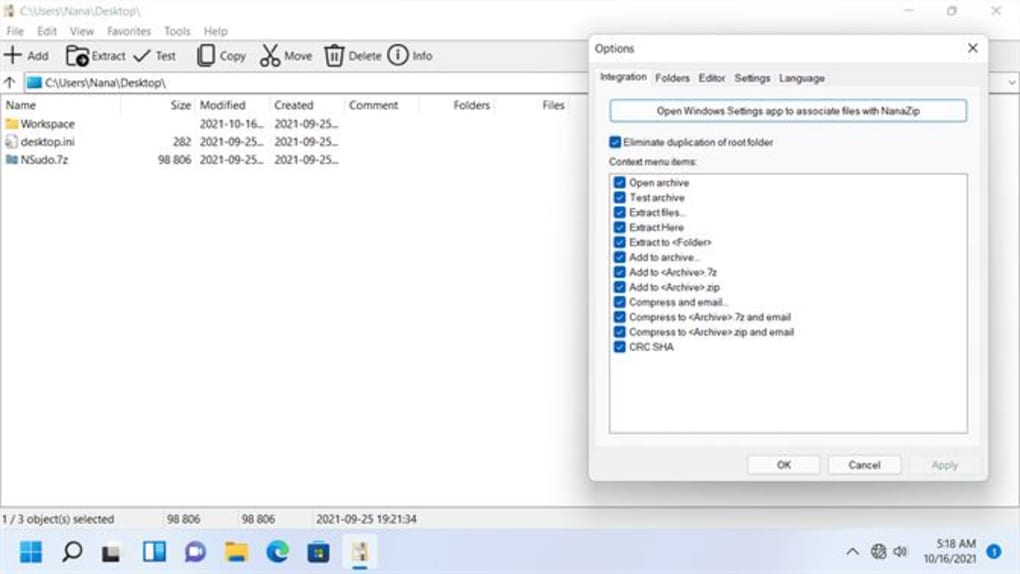
NanaZip provides a robust set of essential file management capabilities. At its core, it allows users to perform standard file operations such as copying, moving, renaming, and deleting files and folders. This functionality is presented through a clean and intuitive interface, making it accessible to users of all technical skill levels. The application’s simplicity is a key strength, avoiding unnecessary complexity and focusing on core tasks. Navigating through file structures is intuitive, resembling the familiar Windows Explorer interface but streamlined for efficiency.
Beyond basic file manipulation, NanaZip’s strength lies in its integrated compression and decompression capabilities. It supports a wide range of popular archive formats, including ZIP, RAR, and 7Z. This eliminates the need for users to rely on multiple applications for different archive types, streamlining their workflow. The compression and decompression processes are handled efficiently, with minimal impact on system performance, even on less powerful machines. This speed and efficiency are vital for users handling large numbers of files or large archive sizes.
The software’s lightweight nature is another notable advantage. Unlike some resource-intensive file management programs, NanaZip boasts minimal system footprint, ensuring smooth operation without slowing down the host computer. This is especially beneficial for users with older hardware or those running multiple applications concurrently. The application’s low resource consumption contributes to its overall stability and prevents unexpected crashes or freezes.
User Interface and Experience
NanaZip prioritizes a user-friendly interface, focusing on simplicity and ease of navigation. The design is clean and uncluttered, minimizing distractions and ensuring that the core functions remain easily accessible. The program’s intuitive layout makes it user-friendly for both beginners and experienced users. The familiar explorer-style interface reduces the learning curve, allowing users to quickly become proficient with the application’s functions.
One potential area for improvement could be the customization options. While the default interface is well-designed, providing more options for users to personalize their experience, such as theme customization or the ability to adjust the layout, would enhance its appeal. However, the current design is functional and effective, ensuring that users can quickly access the tools they need.
Performance and Resource Usage
NanaZip’s performance is consistently impressive. Its lightweight design ensures quick launch times and minimal impact on system resources. File operations, including copying, moving, and compression/decompression, are performed swiftly, reflecting the application’s efficient codebase. The program has been designed with speed and responsiveness in mind, ensuring a fluid and productive user experience.
Even when handling large files or multiple simultaneous operations, NanaZip maintains a high level of stability and responsiveness. This speaks to the program’s well-optimized code and efficient memory management. The stability of the application enhances user confidence, reducing the risk of data loss or application crashes.
Comparison with Alternative File Managers
Several alternative file managers exist for Windows, each with its own strengths and weaknesses. Some offer more advanced features, while others focus on specific functionalities, such as specialized archive handling or cloud integration. Popular alternatives include 7-Zip, WinRAR, and ZArchiver.
While 7-Zip excels in compression and decompression capabilities, particularly with its support for a wide array of archive formats, it lacks the integrated file management features that NanaZip provides. Similarly, WinRAR is known for its robust compression capabilities but focuses primarily on archive handling rather than overall file management. ZArchiver, while offering file management functionality, often falls short in terms of user interface clarity and ease of navigation compared to NanaZip’s clean and intuitive design.
NanaZip’s advantage lies in its streamlined combination of essential file management tools and integrated compression capabilities, presented within a clean and user-friendly interface. This all-in-one approach makes it a convenient option for users who need a simple yet effective file manager without the complexities of multiple specialized applications. The lightweight nature further distinguishes it from competitors, making it suitable for machines with limited resources.
Conclusion
NanaZip delivers a simple, effective, and lightweight solution for file management on Windows. Its intuitive interface, integrated compression capabilities, and minimal system resource usage make it an excellent choice for users seeking a straightforward and efficient tool to organize and manage their files. While it might lack the advanced features of some premium alternatives, its focus on core functionalities, combined with its ease of use and performance, makes it a strong contender in the crowded field of Windows file managers. For users prioritizing simplicity, speed, and efficiency without compromising functionality, NanaZip presents a compelling free option. Its streamlined approach and stability recommend it highly for everyday file management needs.
File Information
- License: “Free”
- Version: “1.0.95.0”
- Latest update: “February 14, 2024”
- Platform: “Windows”
- OS: “Windows 10”
- Language: “English”
- Downloads: “5.9K”


