
In the ever-evolving landscape of software utilities, certain applications leave an indelible mark, becoming go-to solutions for specific needs even as technology advances. One such classic is nCleaner, a robust and free system optimization program that has served Windows users for well over a decade. Originally released by Nkprods, nCleaner emerged as a powerful solution designed to enhance system performance, reclaim valuable disk space, and bolster user privacy on Windows operating systems. This in-depth article delves into the features, historical context, and enduring legacy of nCleaner, exploring why it remains a noteworthy tool for those seeking efficient system management.
nCleaner is more than just a simple file deleter; it’s a comprehensive suite crafted to address various aspects of PC health. Available exclusively for Windows, it falls under the broad category of Software Utilities, specifically within the subcategory of Analysis & Optimization. While its initial widespread availability dates back to 2007, with a critical update occurring on July 9th of that year, the program has continued to see periodic refinements, with its current version, 2.3.4, notably updated as recently as February 13, 2019. This longevity, coupled with its consistent user base, underscores its effectiveness and the continued demand for its capabilities.
For users running Windows XP and former versions, nCleaner provided a much-needed utility for maintaining system hygiene. Its compact size, weighing in at a mere 892.61 KB, made it an accessible download that didn’t burden system resources, a significant advantage in an era where internet speeds and storage capacities were often more constrained than today. Despite its lean footprint, nCleaner quickly garnered substantial attention, achieving over 171,784 installations since its inclusion in the PhanMemFree.org catalog in 2007, and maintaining a steady flow of new users, with 87 installations recorded in a single recent week. Its popularity has been particularly pronounced in regions like the United States, United Kingdom, and Indonesia, testifying to its global appeal.
Core Features and Comprehensive System Optimization
What truly set nCleaner apart was its multi-faceted approach to system optimization, integrating a diverse array of tools under a single, intuitive interface. The developers at Nkprods engineered nCleaner to provide users with unparalleled control over their system’s tidiness and efficiency. This comprehensive toolkit is the backbone of nCleaner’s reputation, allowing it to tackle everything from cluttered hard drives to registry inconsistencies and privacy concerns.
Advanced Cleaning Capabilities
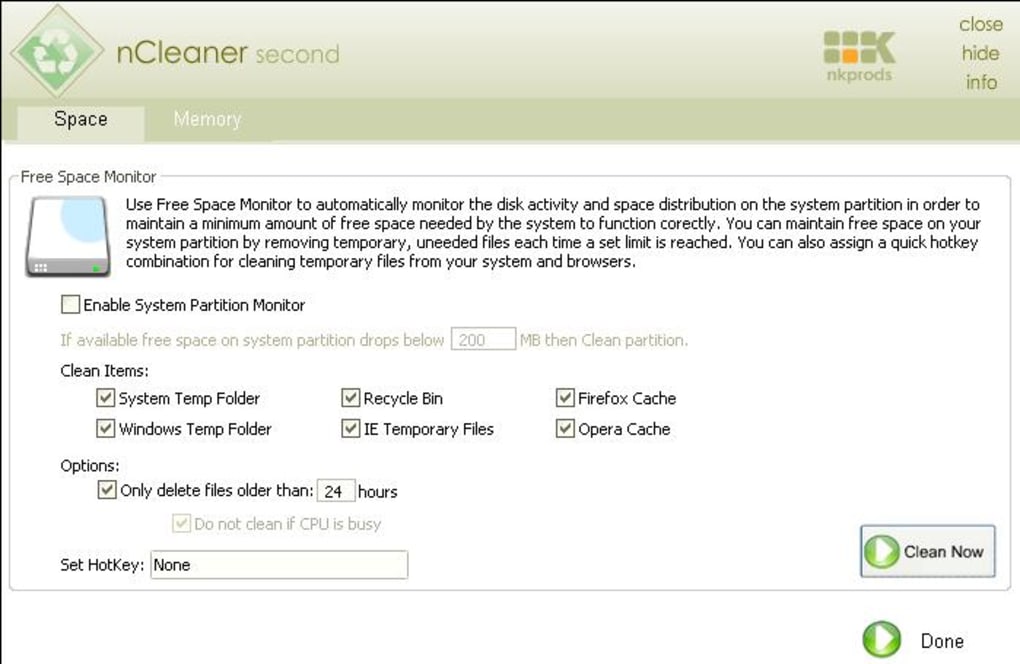
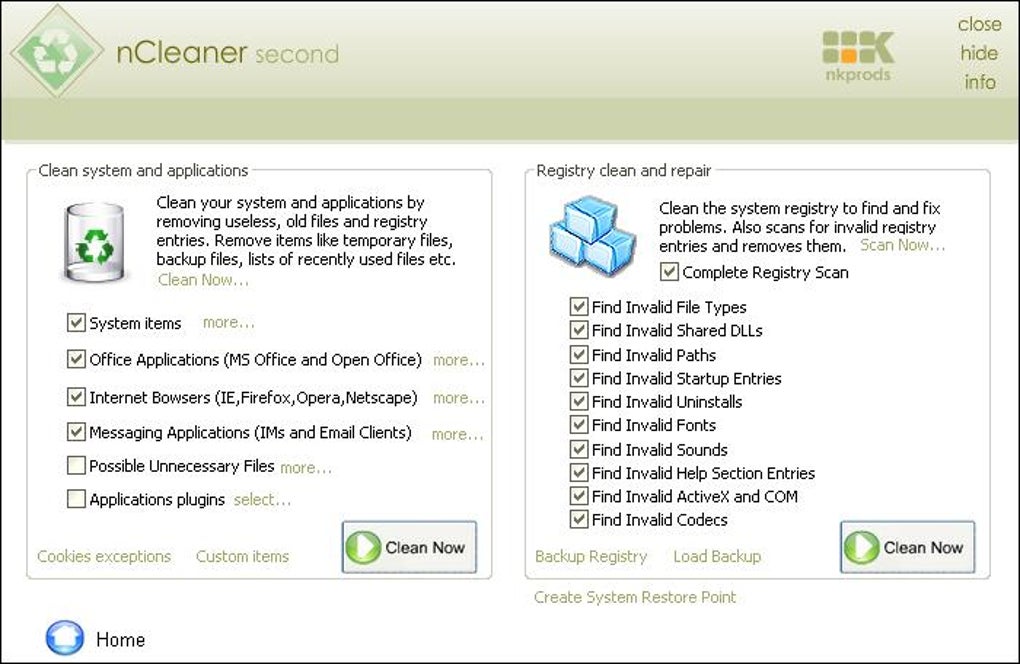
At the heart of nCleaner lies its advanced system and application cleaner. This powerful module boasts an impressive repertoire of over 90 cleaning items. Unlike simpler cleaners that might only target temporary internet files, nCleaner delves deeper, meticulously identifying and purging superfluous data generated by both the operating system and installed applications. This includes, but is not limited to, log files, temporary system files, cache data, and various leftover files that accrue over time, unnecessarily consuming disk space and potentially impacting performance. The sheer breadth of its cleaning scope ensures a thorough sweep, aiming to recover up to 2 GB of unnecessary disk space, a substantial amount, especially for systems with smaller drives.
Beyond system-wide junk, nCleaner exhibits smart awareness of common application usage. It provides robust support for all major Internet browsers prevalent at its time, including Microsoft Internet Explorer (and all derived browsers), Firefox, Netscape, and Opera. This means it efficiently clears browsing history, cookies, temporary internet files, and other privacy-sensitive data from these applications. Furthermore, nCleaner extends its cleaning prowess to popular instant messaging (IM) applications such as Yahoo Messenger, Windows MSN Messenger, ICQ, AOL, and Skype. For frequent users of these platforms, this feature was invaluable for managing chat logs, cache files, and other data that could compromise privacy or slow down the application over time.
Registry Maintenance for Stability and Speed
Another critical component of nCleaner’s utility belt is its dedicated Registry Cleaner. The Windows Registry, a hierarchical database that stores low-level settings for the operating system and applications, can often become a source of system instability and performance degradation. Over time, as software is installed, updated, and uninstalled, the registry can accumulate invalid, orphaned, or corrupted entries. These extraneous entries can lead to slower boot times, application errors, and general system sluggishness.
nCleaner’s Registry Cleaner is designed to meticulously scan the registry, pinpointing and removing these invalid entries. By streamlining the registry, nCleaner helps to increase overall system performance and enhance stability, mitigating common issues like application crashes or freezes that can be traced back to a cluttered or corrupted registry. This feature is paramount for maintaining a healthy and responsive Windows environment, ensuring that the operating system can access necessary information efficiently.
Performance Tweaks and Startup Control
nCleaner also integrates a Tweak Manager, a sophisticated tool that allows users to apply performance and privacy-related adjustments to their Windows system. These tweaks, often buried deep within system settings or requiring manual registry edits, are made accessible through nCleaner’s user-friendly interface. By optimizing various system parameters, the Tweak Manager empowers users to fine-tune their Windows experience, potentially boosting responsiveness and tightening security settings. This level of granular control is particularly beneficial for advanced users who wish to customize their system’s behavior beyond default settings.
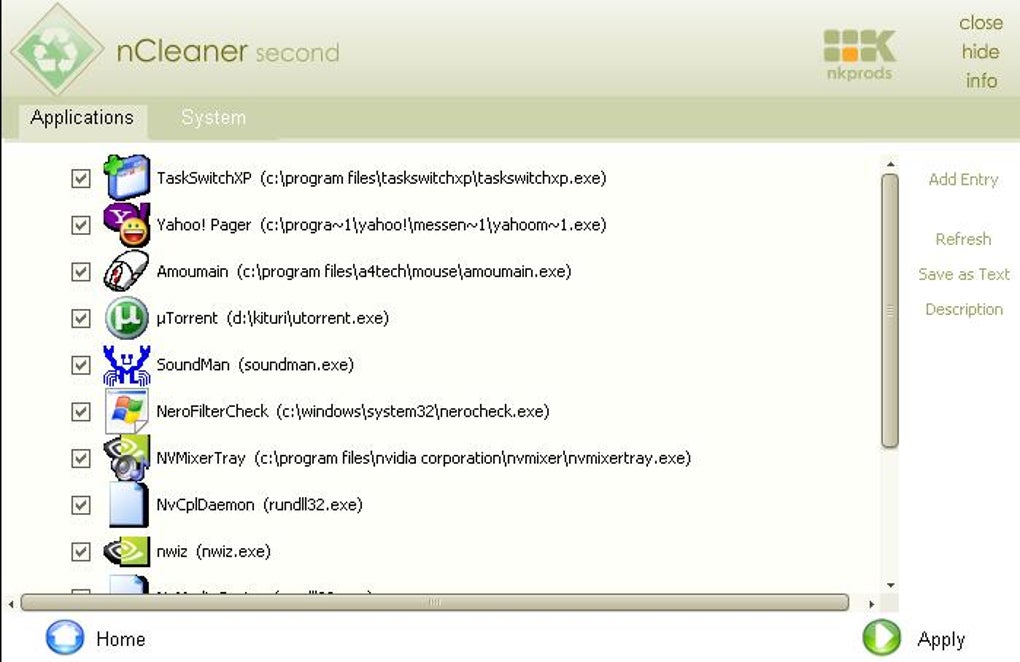
Complementing the Tweak Manager is an advanced Startup Manager. Applications configured to launch automatically at system startup can significantly prolong boot times and consume valuable system resources from the moment Windows loads. nCleaner’s Startup Manager provides a comprehensive overview of all programs scheduled to run at startup, allowing users to easily identify unnecessary entries and disable them. By selectively managing startup items, users can dramatically reduce their system’s boot time and free up memory and CPU cycles that would otherwise be monopolized by background processes, leading to a snappier and more efficient user experience.
Real-Time Monitoring and Advanced Scheduling
Beyond passive cleaning, nCleaner offers real-time system resource monitoring. The System Resource Monitor provides an immediate snapshot of crucial system metrics such as CPU usage, memory consumption, and disk activity. This continuous oversight allows users to identify resource-intensive applications or processes that might be hindering performance, enabling them to take corrective action. This real-time feedback loop is essential for proactive system management, helping users maintain optimal performance without constant manual checks.
Further enhancing its utility, nCleaner includes a System Adviser, which likely offers recommendations or alerts based on system analysis, guiding users towards further optimization. For those who prefer a “set it and forget it” approach, nCleaner supports advanced scheduling options. Users can configure the program to automatically perform cleaning tasks, registry scans, or other maintenance operations at predetermined intervals. This automation ensures that the system remains optimized without requiring constant manual intervention, making it an ideal solution for busy individuals or those less technically inclined. The platform also supports detailed logging and statistics, providing users with a historical record of cleaning activities and system changes, which can be useful for tracking improvements or troubleshooting issues.
Historical Context, Technical Specifications, and Availability
nCleaner’s journey began in an era when system optimization tools were becoming increasingly vital for maintaining Windows performance. Launched in 2007 by Nkprods, the software quickly found its niche among users seeking a free yet powerful alternative to commercial solutions. Its initial versions were specifically tailored for Windows XP and earlier operating systems, which were dominant at the time.
The development trajectory of nCleaner shows a commitment to refinement. While the initial catalog listing on PhanMemFree.org notes an update on July 9, 2007, the “App Specs” section provides a more recent “Latest update” date of February 13, 2019, for version 2.3.4. This suggests that even if major feature additions ceased, maintenance and compatibility updates continued for a significant period, ensuring its functionality for its user base.
Technical Overview:
- License: Free
- Version: 2.3.4
- Latest Update: February 13, 2019
- Platform: Windows
- Supported OS: Windows XP, Windows 2003, and likely earlier versions.
- Language: English (though also available in other languages via PhanMemFree.org’s localized versions)
- File Size: 892.61 KB
- Developer: Nkprods
- Total Installations (PhanMemFree.org): Over 171,784 (since 2007)
- Listed Downloads (PhanMemFree.org App Specs): 89.7K
- Last Month’s Downloads (PhanMemFree.org App Specs): 43
The discrepancy between “Total Installations” and “Listed Downloads” might reflect different metrics—perhaps total historical activations versus current active users or a different counting methodology for the app specs. Regardless, both figures point to a substantial user base for a utility of its age. The program’s minimal footprint (892.61 KB) remains a notable advantage, as it ensures quick downloads and minimal impact on system resources, a testament to efficient coding.
Advantages and Enduring Relevance in the Modern Computing Landscape
Despite the passage of time and the advent of newer operating systems, nCleaner continues to hold relevance for specific user groups and scenarios, primarily due to its core advantages.
Efficiency and Performance Boost
nCleaner’s primary allure is its ability to significantly boost system speed and stability. By meticulously clearing unnecessary files, optimizing the registry, and allowing users to manage startup programs, it directly tackles common bottlenecks that lead to sluggish performance. The developers proudly claimed that nCleaner offered the “best cleaning ratio on the market” due to its advanced detection algorithm. This wasn’t merely marketing rhetoric; the program’s ability to free up to 2 GB of disk space and its comprehensive approach to registry repair genuinely translated into tangible performance improvements for many users. For older machines or those running resource-intensive applications, these optimizations were, and still are, critical.
Enhanced Privacy Protection
In an increasingly privacy-conscious world, nCleaner’s emphasis on user privacy is another significant advantage. Its ability to thoroughly clean browsing data from multiple web browsers and clear sensitive information from popular instant messaging applications helps users maintain a higher degree of anonymity and control over their digital footprint. By removing digital traces, nCleaner contributes to a more secure and private computing experience, an often-overlooked aspect of system maintenance.
Cost-Effectiveness and Accessibility
Perhaps one of nCleaner’s most compelling features is its free license. In a market often dominated by premium system optimization suites, nCleaner offered robust functionality without any financial outlay. This made it an incredibly accessible tool for a wide range of users, from those on a tight budget to individuals simply looking for a no-cost solution to improve their PC’s performance. Its availability in English, and implicitly through PhanMemFree.org’s multi-language portals, further broadened its reach.
Niche Relevance for Legacy Systems
While modern Windows versions (Windows 10, Windows 11) have integrated some system maintenance features, and numerous contemporary alternatives exist, nCleaner retains a distinct niche. For users still operating older Windows XP or Windows 2003 machines—perhaps for specific legacy software, industrial control systems, or simply out of preference—nCleaner remains a highly effective and stable tool. Its design and resource requirements are perfectly aligned with these older operating systems, where newer, more resource-intensive cleaners might be overkill or even incompatible.
Addressing Security and Trustworthiness (PhanMemFree.org’s Perspective)
PhanMemFree.org, as a responsible software distribution platform, places a high emphasis on the security and integrity of the applications it hosts. The rigorous scanning process applied to all files, including nCleaner, is designed to assess and prevent any potential harm to users’ devices. This commitment to safety is crucial for maintaining trust and ensuring a malware-free catalog.
PhanMemFree.org’s Software Review Protocol:
- Comprehensive Scanning: Every new file uploaded to PhanMemFree.org undergoes a thorough scan. This process is repeated periodically to confirm or update the status of existing files. The scans are performed using more than 50 of the world’s leading antivirus services, ensuring a broad and robust detection capability.
- “Clean” Status: If, after extensive scanning, no possible threat has been detected in a software program and its associated URLs, PhanMemFree.org designates it as “Clean.” This status signifies a very high likelihood that the software is safe to download and use. nCleaner, for instance, typically falls under this category, reassuring users of its benign nature.
- “Warning” Status and False Positives: Occasionally, a software program may be flagged as “potentially malicious” or as containing “unwanted bundled software.” In such cases, PhanMemFree.org’s system evaluates these flags. If it determines that the flags are “possibly false positives,” the software may still be made available, but with a “Warning” designation. A false positive occurs when a benign program is mistakenly identified as malicious due to an overly broad detection signature or algorithm used by an antivirus program. PhanMemFree.org explicitly highlights this possibility to educate users.
- User Feedback and Continuous Improvement: Recognizing that no system is infallible, PhanMemFree.org has integrated a “Report Software” feature on every catalog page. This allows users to provide feedback on any particular issues they encounter, which is then looped back to the PhanMemFree.org team. This proactive approach ensures that any potentially malicious software that might have been missed by initial scans is quickly addressed, contributing to a continuously malware-free catalog.
Furthermore, PhanMemFree.org maintains a clear legal disclaimer regarding software usage: “Laws concerning the use of this software vary from country to country. We do not encourage or condone the use of this program if it is in violation of these laws.” This stance reinforces the platform’s commitment to ethical software distribution, placing the responsibility on users to adhere to local regulations.
Alternatives and the Evolving Landscape of Utilities
While nCleaner carved out its own space, the system utility market has always been competitive, populated by a host of programs offering similar or expanded functionalities. PhanMemFree.org lists several notable alternatives that users might consider, each with its own strengths and focus.
Prominent Alternatives to nCleaner:
- Puran Utilities (4.2 Free): A comprehensive suite offering more than 20 utilities, often providing a broader range of maintenance and optimization tools compared to nCleaner’s more focused approach.
- FCleaner (4.2 Free): Positioned as an efficient alternative to CCleaner, FCleaner offers robust cleaning capabilities, often with a more modern interface and features for contemporary Windows versions.
- FileCleaner (3 Free): Concentrates on effectively cleaning Windows and major web browsers, similar to nCleaner but perhaps with different algorithms or more up-to-date browser support.
- CleanAfterMe (3.8 Free): A utility designed to clean files and registry entries created during regular computer work, providing a focused approach to post-usage cleanup.
- Cloud System Booster (4.1 Free): A program by Anvisoft that typically offers a more integrated and often cloud-based approach to system optimization, sometimes including antivirus capabilities.
- Task Manager Extension (0.5 Free): As its name suggests, this extends the functionality of the standard Windows Task Manager, offering more granular control over processes and services.
- RegSeeker (4.1 Free): A specialized tool for well-managed Windows Registry, providing advanced features for registry cleaning, optimization, and backup, often favored by power users.
- Advanced System Cleaner (3.8 Trial version): A more general-purpose system utility, typically offering a trial period before requiring purchase, often includes a wider array of tools for system health.
- Toolwiz Care (4.2 Free): A comprehensive free suite designed to clean up and improve computer performance, often featuring a very user-friendly interface and a wide range of tools.
- PhoneClean (2.7 Trial version): A notable departure, this tool focuses on ensuring iPhones are clean and protected, highlighting the diversification of cleaning utilities across platforms.
- MV RegClean (4.3 Free): Another specialized registry cleaner, dedicated to analyzing the Windows Registry and deleting invalid keys to enhance system stability.
- Oblivion Remastered (2.3 Free): This appears to be an outlier in a list of utilities, as it’s an overhaul for the game Skyrim’s Oblivion game, suggesting a potential contextual mix-up in the original listing, or it may be listed as a utility for game performance.
The existence of such a varied ecosystem of cleaners demonstrates the ongoing need for tools that help manage and optimize digital environments. While newer tools often come with interfaces designed for Windows 10/11 and broader compatibility, nCleaner’s enduring presence highlights its specialized value for specific operating system versions and user preferences.
Conclusion
nCleaner, despite being a product of an earlier computing era, stands as a testament to effective and well-designed software. Its commitment to providing a free, comprehensive suite for system and application cleaning, registry maintenance, startup management, and privacy protection has solidified its place in the history of Windows utilities. From its humble beginnings catering to Windows XP users to its updated presence on platforms like PhanMemFree.org, nCleaner has consistently delivered on its promise of enhancing system speed, stability, and security.
For those still navigating older Windows environments, or simply appreciating the efficiency of a lightweight, focused tool, nCleaner remains a viable and highly recommended option. Its robust set of features, coupled with the rigorous vetting process of distribution platforms like PhanMemFree.org, assures users of its reliability and safety. In a world where digital clutter and performance bottlenecks are perennial challenges, nCleaner reminds us that sometimes, the classic solutions are indeed the most enduringly effective.
File Information
- License: “Free”
- Version: “2.3.4”
- Latest update: “February 13, 2019”
- Platform: “Windows”
- OS: “Windows 2003”
- Language: “English”
- Downloads: “89.7K”
- Size: “892.61 KB”


