
Nebo is a powerful application designed to seamlessly transform handwritten notes into neatly formatted digital text. Its intuitive interface and efficient resource management make it a versatile tool for students, professionals, and anyone who prefers the fluidity of handwriting to the constraints of typing. This in-depth review explores Nebo’s capabilities, advantages, disadvantages, and overall user experience.
Core Functionality: Handwriting Recognition and Text Formatting
At its heart, Nebo’s primary function is its exceptional handwritten text recognition. Using advanced algorithms, it accurately converts your scribbled notes into typed text, offering various formatting options to structure your content effectively. This feature eliminates the need for tedious retyping, saving considerable time and effort. You can easily switch between creating lists, paragraphs, and headings, allowing for the creation of well-organized documents directly from handwritten input. The application excels at recognizing different handwriting styles, accommodating individual variations in penmanship.
Beyond simple text conversion, Nebo allows for seamless integration of multimedia elements. You can effortlessly insert drawings, diagrams, and images directly into your notes, enriching the content and enhancing visual understanding. This versatility transforms Nebo from a mere note-taking app into a comprehensive digital notebook capable of capturing complex ideas and information. Imagine sketching a concept map while simultaneously recording accompanying explanations – Nebo allows for this seamless integration.
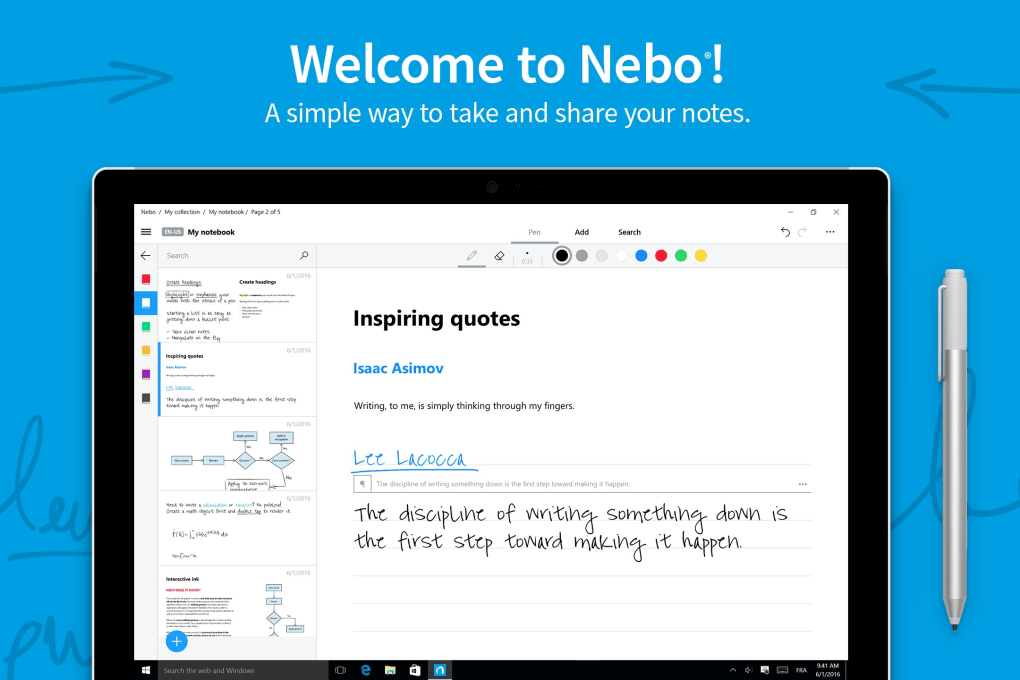
The application’s formatting features go beyond basic text styling. It automatically handles formatting such as bullet points and numbered lists, making the creation of organized outlines and to-do lists incredibly easy. This automated formatting saves time and contributes to a more professional and readable final product.
User Interface and Experience: Simplicity and Efficiency
Nebo boasts a clean and intuitive interface designed to minimize distractions and maximize productivity. The user experience is exceptionally smooth, with minimal lag or delays, even when processing large amounts of handwritten input. The application’s responsiveness is a notable strength, contributing significantly to its overall efficiency. Navigation is straightforward, and the various tools and functions are readily accessible, making the app suitable for both novice and experienced users.
The digital pen experience in Nebo is remarkably natural. It accurately captures the nuances of handwriting, including variations in pen pressure and stroke thickness. This level of accuracy is critical for ensuring the correct interpretation of handwritten characters and symbols. The application even adapts to different stylus inputs, maximizing compatibility across various devices.
Strengths and Weaknesses: A Balanced Perspective
While Nebo excels in many areas, it’s essential to acknowledge its limitations to provide a balanced assessment.
Strengths:
- Highly Accurate Handwriting Recognition: Nebo consistently demonstrates impressive accuracy in converting handwriting to text, even with variations in penmanship.
- Versatile Formatting Options: The application offers a range of formatting features, including lists, paragraphs, and headings, allowing for the creation of well-structured documents.
- Seamless Multimedia Integration: The ability to seamlessly integrate drawings, images, and diagrams enhances the note-taking experience and allows for richer content creation.
- Intuitive Interface: Nebo’s user interface is designed for simplicity and ease of use, making it accessible to users of all technical skill levels.
- Efficient Resource Management: The application is lightweight and doesn’t consume excessive system resources, ensuring smooth performance on a variety of devices.
- Microsoft Surface Compatibility: Nebo is fully optimized for Microsoft Surface devices, providing a superior user experience for Surface Pen users.
- Fast and Responsive: The application is known for its speed and responsiveness, minimizing delays and maximizing productivity.
Weaknesses:
- Occasional Misinterpretations: While generally accurate, Nebo occasionally misreads certain characters or words, requiring manual correction.
- Limited Drawing Tools: The application lacks advanced drawing tools such as rulers and shapes, which could be beneficial for more detailed diagrams and sketches.
- Absence of Copy/Paste Support: The lack of direct copy/paste functionality can be inconvenient when transferring content to other applications.
- Indentation Issues: The automatic formatting might not always correctly handle indentations, requiring manual adjustments.
- Export Limitations: While exporting is possible, the available formats might not encompass every desired option, limiting flexibility.
- Synchronization Challenges: Users have reported occasional difficulties synchronizing notes across different devices, impacting data accessibility.
Comparison with Alternative Applications
Nebo stands out amongst competing note-taking and handwriting recognition applications due to its combination of accuracy, versatility, and user-friendliness. While other apps may offer specific advantages in certain areas, Nebo’s comprehensive feature set makes it a strong contender. For example, some alternatives might focus solely on handwriting-to-text conversion without the multimedia integration capabilities of Nebo. Others may offer extensive drawing tools but lack the same level of handwriting recognition accuracy. Therefore, the choice depends on the user’s priorities and specific needs. A direct comparison with some competitors reveals the following:
- Penbook: Penbook emphasizes artistic expression and freehand drawing, making it more suitable for sketching and artistic creations rather than detailed note-taking.
- Inkodo: Inkodo offers a more playful approach to digital ink, prioritizing creative expression over the structured note-taking features of Nebo.
- Scrble Ink: Scrble Ink focuses on a digital canvas experience, emphasizing freehand writing and drawing without the advanced formatting options provided by Nebo.
Nebo occupies a unique space in the market by offering a balanced combination of handwriting recognition, text formatting, multimedia integration, and intuitive user experience. While competitors may excel in specific niches, Nebo’s versatility makes it an attractive option for a broad range of users.
Conclusion: A Powerful Tool for Modern Note-Taking
Nebo represents a significant advancement in digital note-taking technology. Its combination of highly accurate handwriting recognition, versatile formatting options, and seamless multimedia integration sets it apart from many competing applications. Despite some minor shortcomings, its strengths considerably outweigh its weaknesses, making it a valuable tool for anyone seeking to streamline their note-taking process and create rich, organized digital documents directly from handwritten input. While occasional manual corrections might be necessary, the overall efficiency and convenience offered by Nebo make it a worthwhile investment for students, professionals, and anyone who appreciates the natural flow of handwriting. The ongoing development and updates suggest a continued commitment to enhancing the application’s capabilities and addressing user feedback, further solidifying its position as a leading choice in the digital note-taking landscape.
File Information
- License: “Full”
- Version: “1.2.1867.0”
- Latest update: “October 15, 2018”
- Platform: “Windows”
- OS: “Windows 10”
- Language: “English”
- Downloads: “32.3K”


