
Nero BackItUp is a backup and recovery software solution developed by Nero AG. This software aims to provide users with a straightforward and reliable method for protecting their valuable data against various threats, including accidental deletion, hardware failure, malware attacks, and theft. This review delves into the features, performance, ease of use, and overall effectiveness of Nero BackItUp, considering both its strengths and weaknesses based on user feedback and available information.
Feature Set: Versatility and Automation in Data Protection
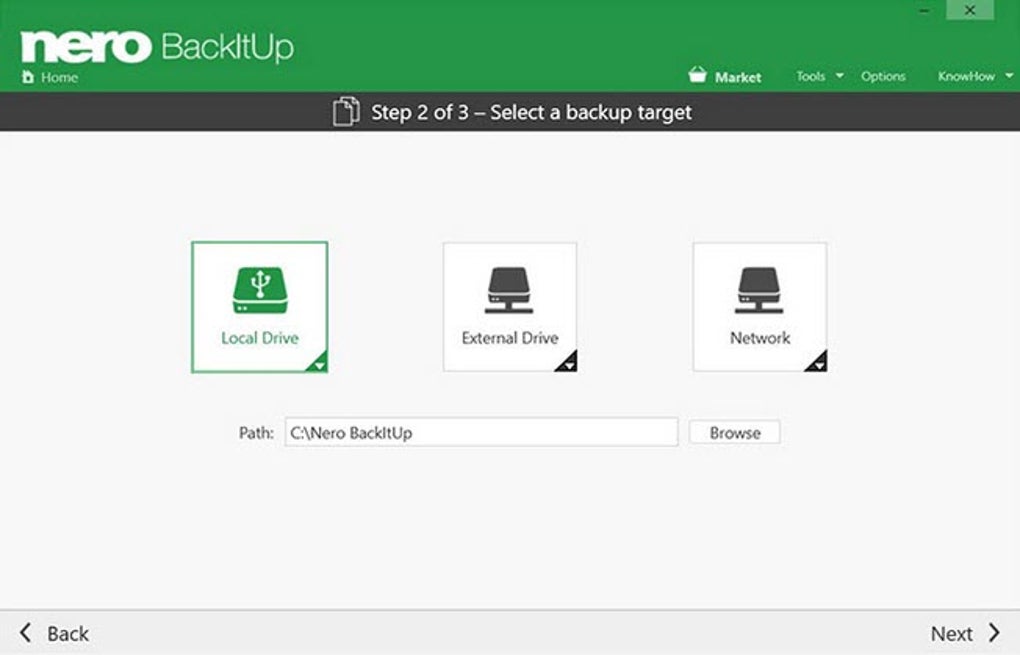
Nero BackItUp distinguishes itself through its versatile backup options and automated functionality. Users aren’t limited to a single backup location; the software supports a broad range of destinations, including:
-
Local Drives: The most fundamental and readily available option, allowing for backups directly to internal or external hard drives connected to the computer. This provides a fast and convenient method for creating backups.
-
External Hard Drives: This is a common and popular choice due to the portability and large storage capacities offered by external drives. Nero BackItUp seamlessly integrates with external drives, making the backup process as simple as connecting the drive.
-
Optical Media: While less prevalent in the age of large-capacity digital storage, Nero BackItUp retains the option to back up data to optical discs (CDs, DVDs, and Blu-ray discs). This provides a physical, offline backup for crucial data.
-
Network Attached Storage (NAS): For users with home or small business networks, NAS devices provide a centralized storage location accessible by multiple devices. Nero BackItUp’s compatibility with NAS drives allows for streamlined backups to this shared resource.
- Cloud Storage: Recognizing the growing importance of cloud-based storage, Nero BackItUp integrates with popular cloud services like OneDrive and Google Drive. This offers an offsite backup solution, providing an added layer of protection against local disasters such as fire or theft. However, it’s important to note that using cloud storage typically requires a paid subscription for sufficient storage space, which is an additional cost beyond the Nero BackItUp software license.
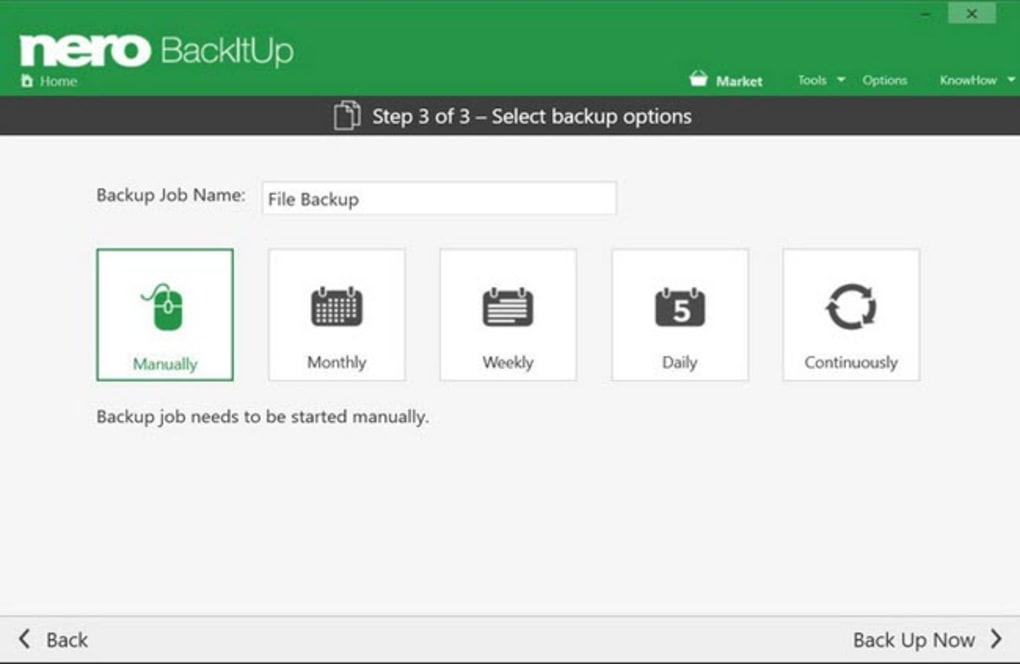
Beyond the choice of storage location, Nero BackItUp offers a range of scheduling options:
-
Scheduled Backups: Users can define a recurring backup schedule (daily, weekly, or monthly) to automate the process. This ensures regular backups are created without manual intervention, providing continuous data protection.
-
Continuous Backups: This option provides a more granular approach, backing up data in real-time or at frequent intervals. This method is particularly useful for critical data that is frequently modified.
-
Manual Backups: For situations where immediate backups are required, or for specific files and folders that need to be backed up outside the regular schedule, the software allows for manual initiation of backups.
The software also incorporates important data protection features:
- Versioning: Nero BackItUp preserves multiple versions of backed-up files, allowing users to revert to previous versions if the latest version becomes corrupted or damaged. This is a crucial feature for recovering from unintentional data loss or corruption.
- Encryption: To enhance security, the software employs AES 256-bit encryption, a robust encryption standard that protects data from unauthorized access. This encryption ensures that even if a backup is compromised, the data remains secure and unreadable without the correct decryption key.
Ease of Use and User Interface: Accessibility and Intuitiveness
While the specific user interface design may evolve with software updates, the overarching goal of Nero BackItUp is to simplify the backup process. The software aims for a user-friendly experience, even for those without extensive technical expertise. The streamlined interface and intuitive design should make setting up backups, scheduling routines, and restoring data relatively straightforward. However, user reviews suggest some inconsistencies in this regard, with some users finding the interface more challenging than others. A simple, clear interface is crucial for a backup solution, as complicated configurations could discourage users from regularly using the software, negating its protective benefits.
Performance and System Resources: Balancing Efficiency and Capacity
Nero BackItUp’s performance is a critical consideration. Efficient backups are essential to minimize disruption to ongoing computer usage. The speed of backups and restores will depend on several factors, including the size of the data being backed up, the speed of the storage devices, and the computer’s overall processing power. User reviews highlight varying experiences, with some reporting slow backup and restore speeds and high system resource consumption, particularly during large backups. In contrast, others have praised the software’s efficiency. Optimizing performance is crucial; a backup solution that significantly slows down a system or takes excessive time to complete its task diminishes its practical usability.
Security and Reliability: Data Protection and Recovery Capabilities

The security and reliability of a backup solution are paramount. Nero BackItUp’s AES 256-bit encryption contributes significantly to its security features. However, the reliability of the entire backup process hinges on several factors including the stability of the software itself, the integrity of the chosen storage locations, and the success of the restore process when needed. The software’s ability to create and maintain multiple versions of backed-up files enhances its reliability by offering a safety net against data loss or corruption. Users’ reported experiences with restore processes vary, with some expressing difficulties or inconsistencies. A robust backup solution should consistently and reliably back up and restore data without errors or data loss, and provide easy-to-use recovery mechanisms.
Pricing and Value: Cost-Effectiveness and Feature Comparison
Nero BackItUp operates on a licensing model. While the software itself is available for purchase, the use of cloud storage features might involve additional subscription costs. The pricing should be assessed against the features and capabilities offered, compared to other similar backup solutions available in the market. The overall value proposition is determined by how well the software meets users’ needs and expectations while considering the cost-benefit ratio.
Conclusion: A Balanced Assessment of Nero BackItUp
Nero BackItUp offers a comprehensive suite of features aimed at simplifying data protection. Its versatility in backup destinations, combined with automated scheduling options and robust security features (AES 256-bit encryption), makes it a potentially attractive option. However, user feedback reveals inconsistencies in performance, ease of use, and reliability. While the potential for slow backup speeds, high system resource usage, and occasional interface complexities should be acknowledged, the software’s strengths in flexibility and security remain noteworthy. Potential users should carefully weigh these factors, considering their specific needs and technical proficiency, when evaluating Nero BackItUp as a suitable backup solution. Thorough research into alternative backup solutions and comparative analysis of features and pricing is recommended before committing to any specific software. The value of a robust backup strategy cannot be overstated, and choosing the right software is a critical step in safeguarding valuable data.
File Information
- License: “Trial version”
- Latest update: “June 7, 2024”
- Platform: “Windows”
- OS: “Windows Vista”
- Language: “English”
- Downloads: “59.5K”
- Size: “159.75 MB”


